What you’ll take away
- An upload result, a retained earlier version and a successful recovery establish different facts.
- Synchronization can propagate unwanted changes; recovery depends on the relevant history and its service-specific limits.
- Retention needs a reference event: a clock starting at replacement differs from one starting at original upload.
- The recoverable data timestamp and job-completion timestamp are not interchangeable.
- Measure recovery through usable work, including access, dependencies and validation, and preserve the scope of the test.
What did “saved to the cloud” actually establish?
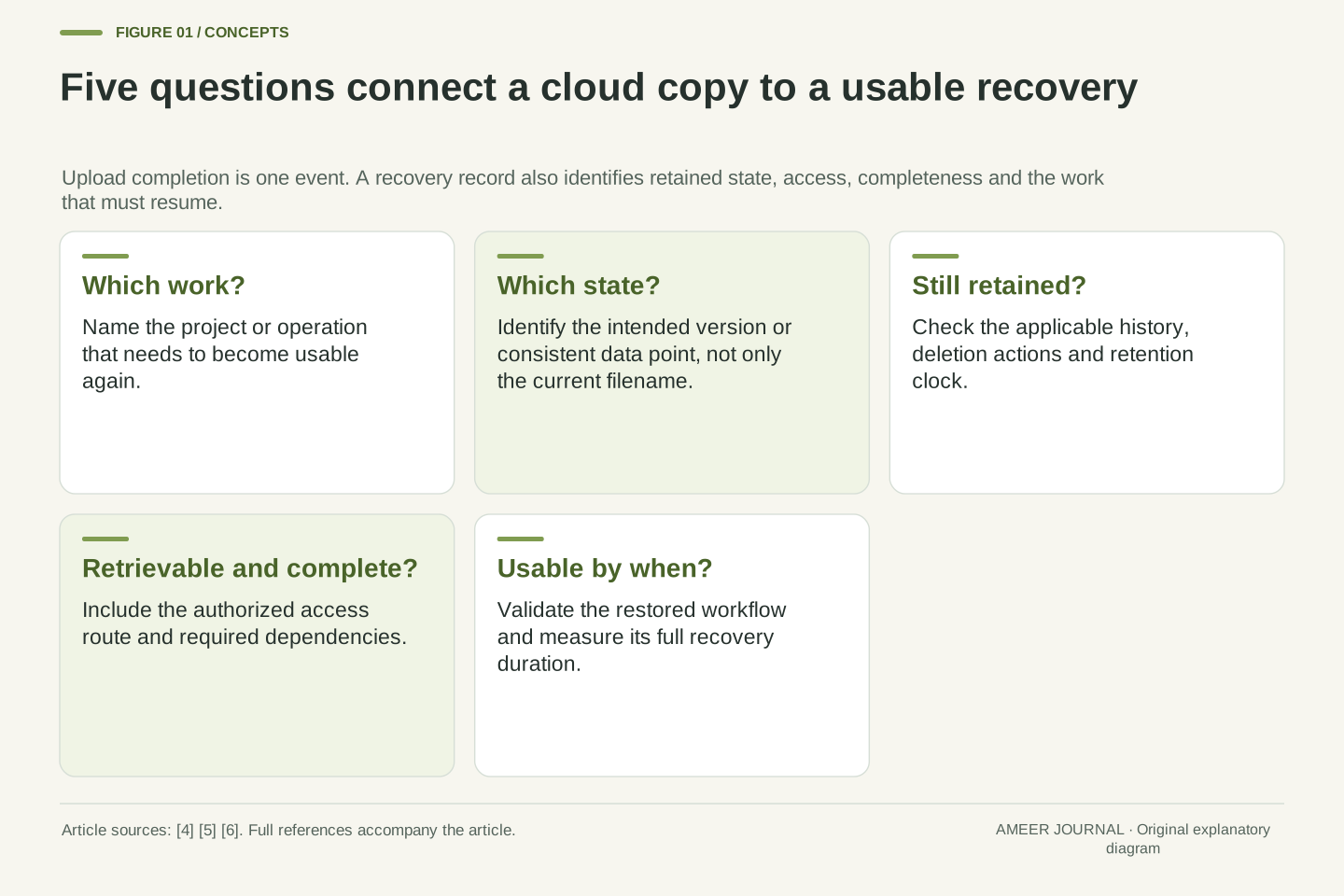
Imagine finishing a portfolio, seeing an upload indicator turn green, and closing your laptop. A week later, you discover that yesterday’s editing mistake replaced a useful chapter. The latest file still downloads perfectly. The cloud service has the file you sent, but the question has changed: can you recover the earlier chapter? A successful upload and a useful recovery are different pieces of evidence.
A backup exists to help recover data after loss or damage. That purpose involves more than a second location. You need the right material, a suitable earlier state, continued access to it, and a way to make it usable again. Microsoft’s recovery guidance treats backups, dependencies and recovery procedures together; its testing guidance also warns that a successful restore operation can leave out needed data. [4][5]
Three invented examples make this concrete: a version expires before a mistake is noticed, a daily backup has two timestamps, and a download estimate misses the full recovery time. Product documentation supplies the mechanisms; the numbers are original illustrations. Each feature remains specific to its documented service and plan.
Consider a fictional portfolio whose current cloud object faithfully contains an accidental overwrite. Transport and storage of that object may have completed correctly while the desired historical state is unavailable. The success condition for an upload concerns the submitted artifact. The success condition for recovery concerns an identified state, its completeness and the work that must resume. Those conditions should be specified separately before interpreting a status indicator.
Microsoft defines backup in terms of a separately stored copy used for recovery, and its disaster-recovery guidance extends the plan across data, infrastructure and dependent components. Its reliability-testing guidance explicitly distinguishes successful restoration from data integrity and completeness. A backup artifact therefore participates in a recovery process; the mere existence of an artifact does not establish the entire process. [4][5]
The following examples use documented iCloud Drive, OneDrive and Backblaze B2 behaviors alongside Azure architectural guidance. Each feature retains its service and plan scope. The timelines, data volumes and transfer rates are constructed cases, not observed incidents or benchmarks. Their common question is whether an independently identified recovery state remains retrievable and can support the intended operation within the chosen data-loss and time limits.
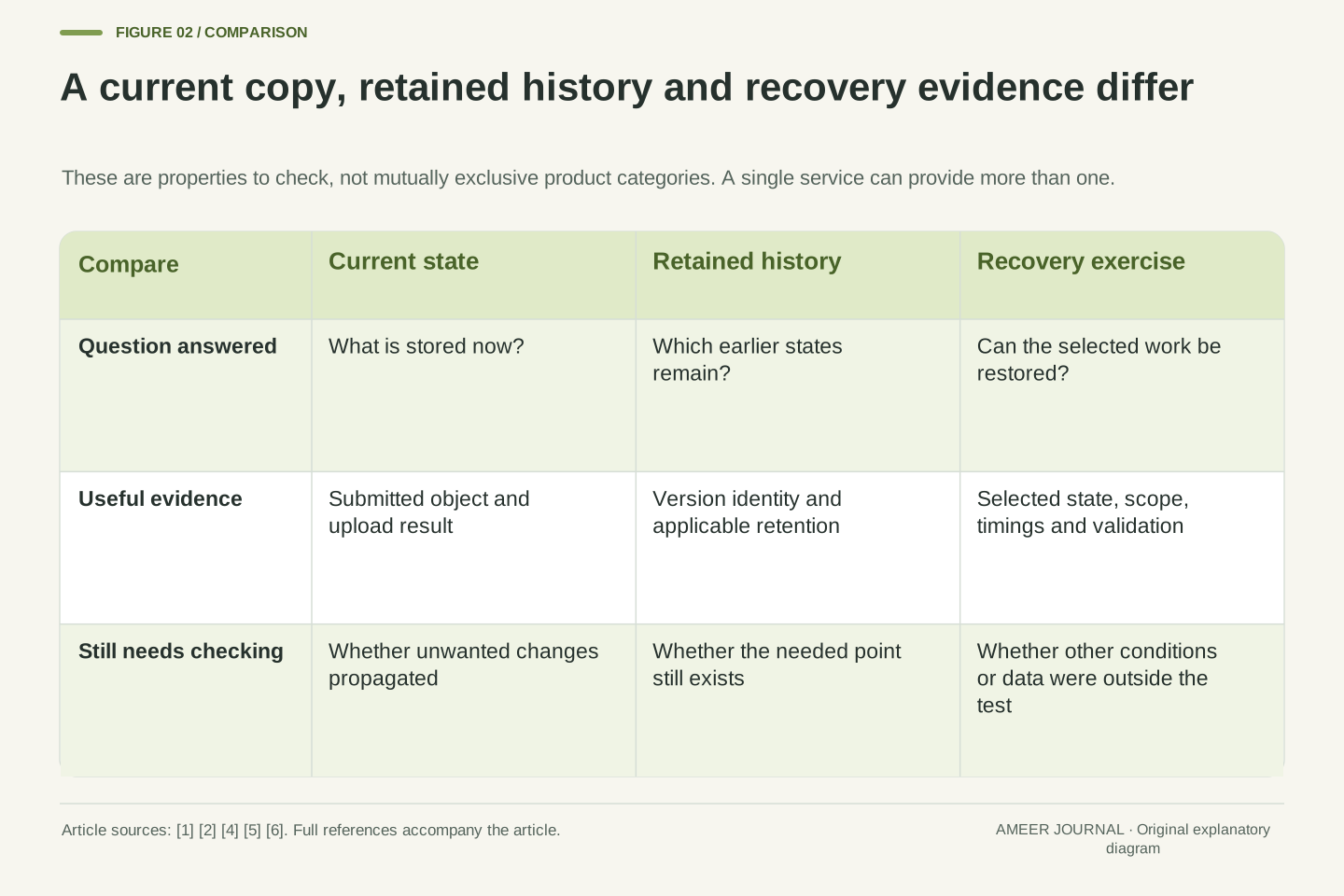
A synchronized deletion can travel with the file
Synchronization keeps locations in step, including some changes you later regret. Apple says that deleting a file from iCloud Drive on iCloud.com also deletes it from devices with iCloud Drive enabled. Its deleted-file recovery window is 30 days, and a file can be removed earlier. That is a specific iCloud Drive rule, not a promise covering every Apple service or every kind of backup. [1]
Microsoft documents a different feature: Microsoft 365 subscribers can restore their OneDrive by undoing activities within the last 30 days. It also says files permanently removed from the recycle bin cannot be recovered through this route. Files created after the selected restore point go to the recycle bin during the rollback. Reviewing which activities will be undone therefore matters, especially when useful new work happened after the original mistake. [2]
For the portfolio, first identify the missing thing: one chapter, one file, or a whole folder state. A broad rollback may affect later good work. Single-file history or deleted-item recovery may address a narrower problem where supported. [2] Check whether the feature follows today’s changes, retains selectable earlier states, or does both; these capabilities answer different recovery needs.
Replication of current user intent can propagate an unintended deletion. Apple’s documented iCloud Drive behavior deletes the corresponding file across enabled devices when it is deleted through iCloud.com. Recoverability is bounded by a 30-day deleted-file period and the possibility of earlier removal. This example establishes propagation and a particular recovery mechanism; it does not characterize every Apple backup product or storage class. [1]
OneDrive’s whole-drive restoration is a Microsoft 365 subscriber feature covering activities within the preceding 30 days. Its rollback changes the drive’s state by undoing selected activities, including later-created files moving to the recycle bin. Permanently deleted recycle-bin content cannot be recovered. These are operation semantics and eligibility conditions, rather than a universal 30-day guarantee for every possible loss. [2]
A recovery specification should name the desired granularity before choosing an operation. Restoring one earlier file version and reverting a broader activity sequence can have different consequences for later valid edits. In the fictional portfolio, the target might be one chapter’s pre-overwrite contents, while the surrounding folder should retain newer photographs. Recording that desired state makes the scope review concrete and prevents a successful broad rollback from being mistaken for the intended result.
A familiar filename may hide several different states
A filename is convenient because you can ask for the latest item without remembering its history. Backblaze B2 documents a useful distinction: uploading again with the same name creates another version. A download by name returns the current version, while an older retained version can be addressed by its file identifier. A list of current names and a list of versions answer different questions. [6]
B2 also distinguishes hiding from deleting a version. Hiding a name adds a marker; a request for that hidden name returns a not-found response, although older versions can remain available through their identifiers. Permanently deleting a particular version removes that recovery option. The visible absence of a name, and the permanent loss of the underlying version, are therefore separate events in this documented system. [6]
For our portfolio, imagine that the name always stays “final-project.” That label tells you little about whether the chapter is the useful Monday edition or the damaged Tuesday edition. A practical recovery note needs enough information to identify the chosen edition and explain why it is the right one. Keeping a version identifier without a meaningful date or description can leave you with several retrievable files and no clear basis for choosing among them.
Backblaze B2 separates the current filename namespace from its version history. Repeated same-name uploads create versions; a name-based download resolves the current one, whereas an exact file identifier can address a retained older version. Current-name listing and version listing consequently expose different views. These API semantics are specific to the documented B2 interface and should not be silently transferred to every cloud store. [6]
A B2 hide marker changes name-based resolution without necessarily deleting prior stored versions. A hidden name can return HTTP 404 while a retained version remains addressable by identifier. Conversely, permanent deletion of the selected version removes the version itself. The distinction matters when interpreting a restore failure: an unsuccessful current-name lookup is insufficient evidence that every historical object is absent. [6]
In an application recovery record, identify both the logical item and the required version. The logical name explains where the artifact belongs; the version identity identifies the retained bytes; the capture or validity information explains its relationship to the recovery target. The portfolio case illustrates why “use the latest final-project file” is underspecified after an overwrite. Resolving a name correctly can still retrieve the wrong historical state for the incident.
Retention can expire before the mistake is discovered
History only helps while the needed edition is still kept. B2 lifecycle rules can use different clocks, including time since a version was hidden by a replacement or time since upload. Its documentation describes daily lifecycle processing. Reaching the rule’s age limit and actually being removed by a cleanup run are distinct events. Read which clock a particular rule uses before translating “30 days” into a recovery deadline. [3]
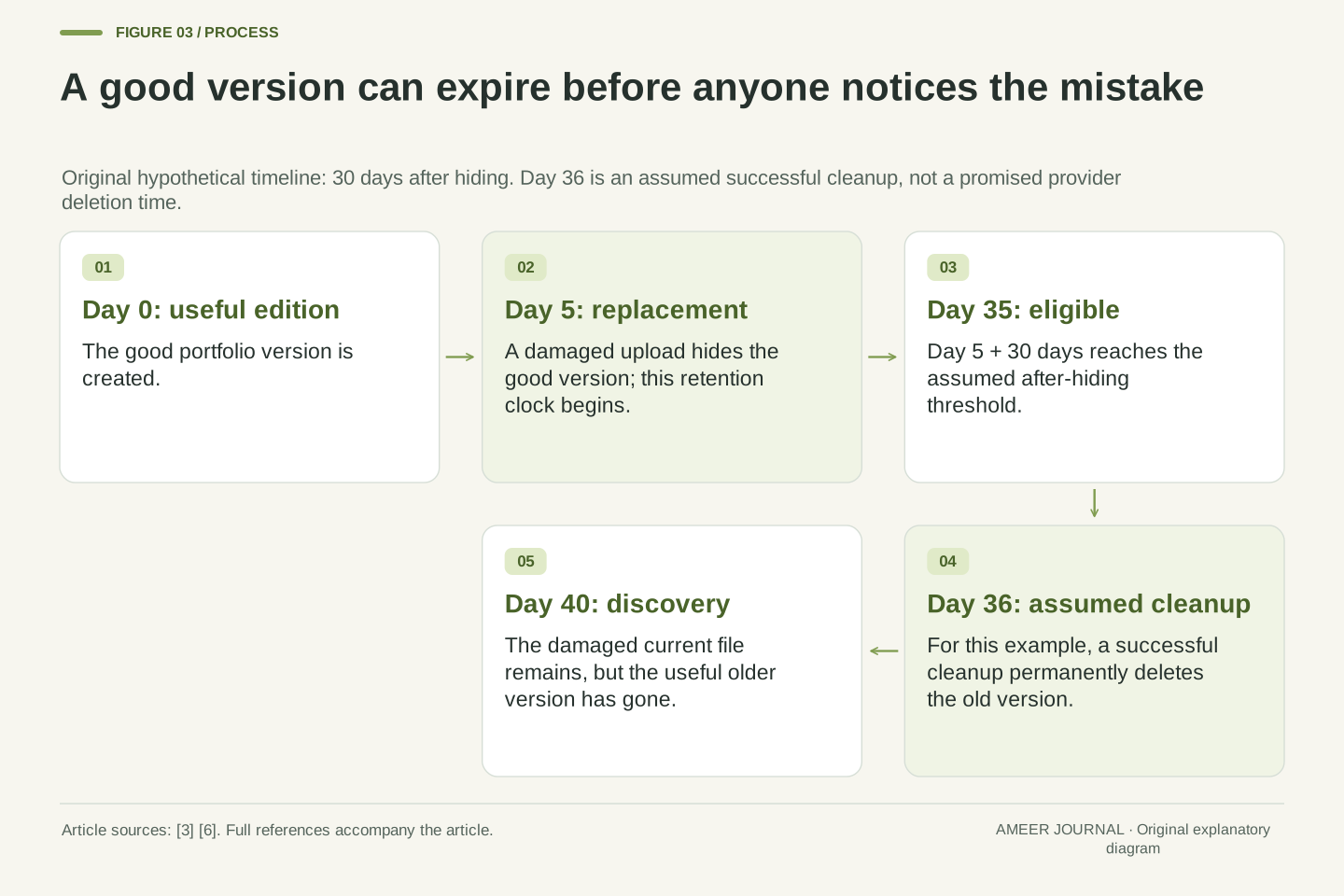
Here is an invented timeline. A good portfolio version is created on day 0. A damaged replacement arrives on day 5, hiding the good version. Assume a rule makes hidden versions eligible for deletion after 30 days. The good version becomes eligible on day 35, not day 30. For this example, assume a successful cleanup removes it on day 36. The mistake is discovered on day 40.
On day 40, the newest damaged file can still be present even though the useful older one has gone. Nothing about a successful current download reveals that lost option. The example deliberately separates the rule’s eligibility date from an assumed cleanup date; it does not predict a provider’s exact removal time. The practical question is how long a damaging change could remain unnoticed compared with the history you actually retain. [3][6]
Retention policy requires a reference event as well as a duration. B2 documents lifecycle fields based on time since hiding and time since upload; replacement can hide an older version. Lifecycle evaluation occurs daily, so threshold eligibility and eventual execution must not be represented as the same timestamp. An age of 30 days is incomplete unless the relevant event and rule scope are known. [3]
Define a hypothetical good version at day 0 and its replacement at day 5. Let an after-hiding retention interval be 30 days. Eligibility is then day 5 + 30 = day 35. Assume, separately, that an applicable cleanup successfully deletes that version on day 36. If corruption is recognized on day 40, this version is no longer a recovery candidate, although the current replacement remains downloadable.
This construction exposes a detection-delay constraint without claiming a universal retention recommendation. The useful history must still cover a valid point preceding the unwanted change when the problem is recognized. A long-running job that repeatedly uploads the damaged current file does not recreate a deleted good version. Exact availability also depends on the applicable policy and actions already taken; permanent version deletion is distinct from a temporary change in name visibility. [3][6]
Date the recoverable data, not just the completed job
A backup record may show when work started, when data was captured and when the transfer finished. Those times can differ. Recovery planning needs the time represented by the usable data. Microsoft’s guidance links recovery objectives to data consistency and dependencies between stores, while its testing guidance calls for checking the contents that were actually captured. A recent “completed” timestamp alone does not describe that state. [4][5]
Imagine a complete, consistent backup representing Wednesday at 02:00. Its upload finishes at 02:20. A disruption occurs at 17:30 that afternoon. Assume there are no later logs or other recovery sources. Restoring that point leaves 15 hours 30 minutes of subsequent changes outside it. Measuring from upload completion would produce 15 hours 10 minutes, making the protected data appear 20 minutes newer than it is.
Now suppose Wednesday’s backup failed and Tuesday’s 02:00 point is the latest valid one. At the same Wednesday disruption, that point is 39 hours 30 minutes old. A daily schedule has not changed, but the available recovery state has. Record the latest verified data point alongside job outcomes, rather than replacing one with the other. Also distinguish the age of missing changes from their importance: a few critical edits can matter more than a large batch of replaceable files.
Distinguish the data’s represented point in time from orchestration and transfer timestamps. A recovery point must have the required consistency and scope; a job completion event does not independently establish either. Microsoft’s disaster-recovery guidance addresses consistency across stores, and its testing guidance requires validating completeness rather than assuming the backup operation captured everything. [4][5] The following case explicitly assumes a valid, complete, consistent point.
Let the represented point be Wednesday 02:00, transfer completion 02:20, and disruption 17:30. With no subsequent log replay or other recovery source, the interval after the available point is 930 minutes, or 15.5 hours. Substituting the completion timestamp gives 910 minutes and understates that interval by 20 minutes. The relevant subtraction uses the state timestamp, not the most convenient recent event in the job log.
If Wednesday’s point is unavailable and Tuesday 02:00 is the latest valid point, its age at disruption becomes 2,370 minutes, or 39.5 hours. This is a constructed available-state interval, not a count of irrecoverable records or bytes. It shows why scheduled frequency cannot substitute for observed recovery-point availability. A report should expose missed runs, invalid artifacts and the newest usable point rather than collapsing all three into “daily backup enabled.”
There are two recovery clocks to agree on
Recovery point objective, usually shortened to RPO, describes how much time-based data loss is acceptable. Recovery time objective, or RTO, describes how long it is acceptable to take to restore business operation. Microsoft uses these as planning targets. One asks how far back you may have to go; the other asks how long the interruption may last. Neither is automatically established by buying storage or setting a schedule. [4]
Suppose our fictional project accepts up to 24 hours of missing changes and needs usable work restored within four hours. The Wednesday 02:00 point in the previous example is 15 hours 30 minutes old at the disruption, within that chosen data-age limit. The Tuesday point is 39 hours 30 minutes old, outside it. That comparison says nothing yet about how long either point will take to download, check and open.
The four-hour target also needs a clear finish line. Does work resume when the files arrive, when the editing project opens, or when a restored website can serve its pages? Choose the result that the project actually needs. Microsoft’s testing guidance includes issue detection and response when considering the complete recovery flow. A fast file transfer can be only one stage of the interruption you are trying to limit. [5]
RPO expresses the maximum acceptable data-loss interval; RTO expresses the maximum acceptable duration to restore business operation. They are objectives, not timestamps or measurements. The documented Azure framework treats both as requirements shaping the recovery design. Reporting a configured backup interval as an achieved RPO, or a download estimate as an achieved RTO, removes the validation step that connects design to behavior. [4][5]
For a constructed RPO of 24 hours, the available Wednesday point at age 15.5 hours satisfies the example’s time-based threshold, assuming the stated consistency and completeness. The Tuesday point at age 39.5 hours does not. This comparison evaluates the recoverable data age at one incident time; it does not infer a guaranteed worst case from a single observation or imply that all changes have equal business value.
Set a separate RTO of four hours and define its start and finish events. Here, the clock begins at disruption and ends when the specified work can resume after restoration and validation. Microsoft’s end-to-end testing guidance includes detection and response as well as dependent recovery. [5] The next calculation uses deliberately serial stages so that the complete duration is auditable. Parallel execution could change a different plan’s timing, but it is not silently assumed here.
A 60 GB download can fit while the recovery does not
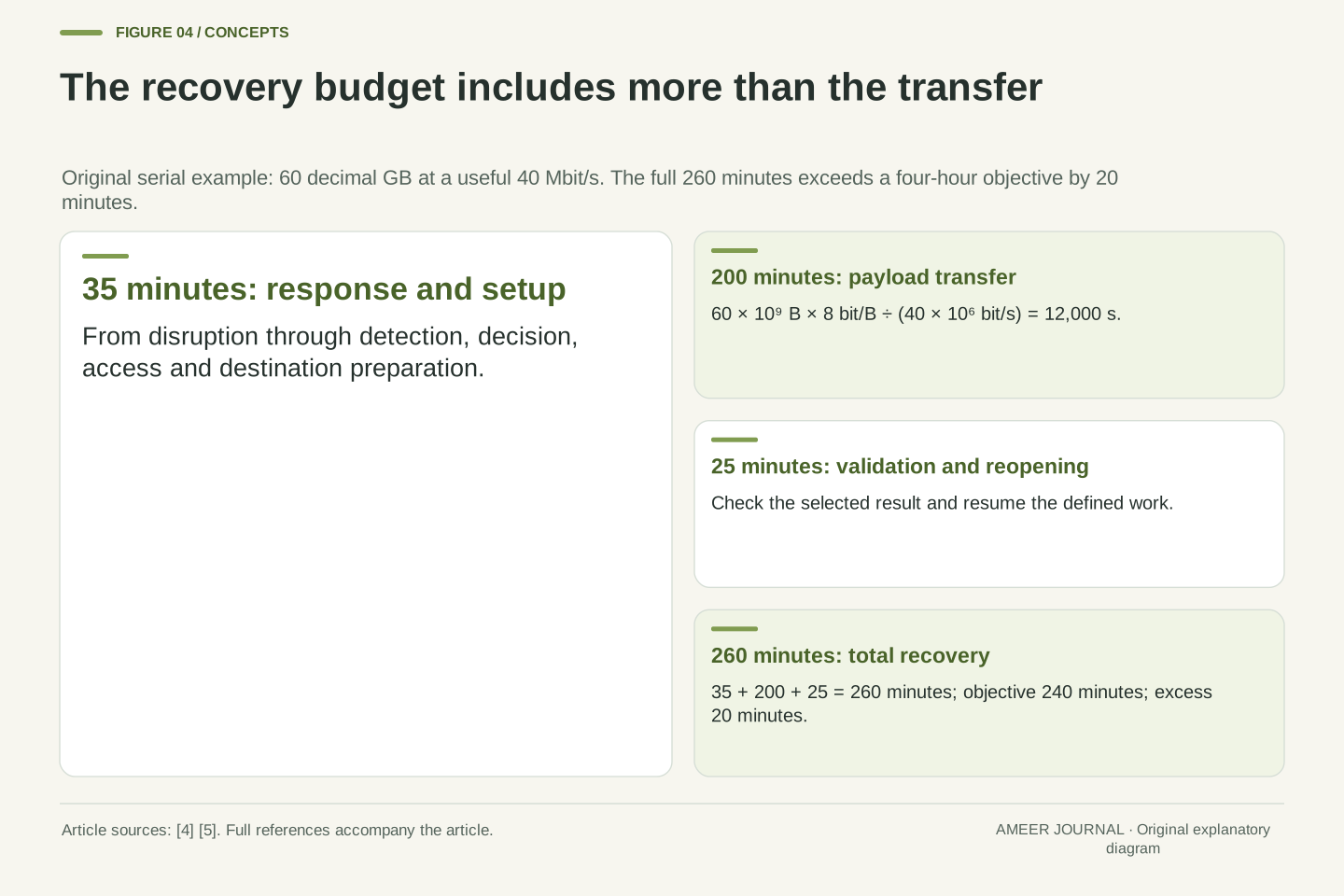
Assume the needed backup contains 60 decimal gigabytes: 60 billion bytes. Also assume the connection delivers useful backup data at a steady 40 million bits per second. There are eight bits in a byte, so transferring the payload takes 60 billion × 8 ÷ 40 million = 12,000 seconds. That is 200 minutes, or three hours 20 minutes. These are invented inputs for a calculation, not an internet-speed claim.
Now add the rest of this fictional recovery. From the disruption, 35 minutes pass while the problem is recognized, a recovery point is selected, access is obtained and the destination is prepared. After transfer, another 25 minutes are needed to check the result and reopen the work. If these stages happen one after another, the total is 35 + 200 + 25 = 260 minutes: four hours 20 minutes.
The transfer alone appears to fit a four-hour target, but the defined recovery misses it by 20 minutes. The assumed rate already measures useful payload, so we do not subtract network overhead a second time. A real record would replace these assumptions with observed stages and explain overlap or extra work. The broader principle follows Microsoft’s recovery guidance: measure the complete flow, including response, dependencies and validation. [4][5]
Use decimal units and an explicitly useful payload rate. Let S = 60 × 10^9 bytes and r = 40 × 10^6 bits/s. The idealized transfer duration is 8S/r = 12,000 seconds = 200 minutes. This rate is already net payload throughput, so applying a further generic protocol-overhead discount would change the assumption rather than refine the same calculation. No measured link performance is implied.
Construct three serial intervals: 35 minutes from disruption through detection, decision, access and destination setup; 200 minutes transferring the selected payload; and 25 minutes validating and reopening the work. Total recovery duration is 260 minutes. Against an RTO objective of 240 minutes, the constructed plan exceeds the allowance by 20 minutes. The transfer-only estimate of 200 minutes answers a narrower question and cannot be reported as the full duration.
Other recovery designs may include parallel retrieval, dependency waits, additional artifacts or variable throughput. Their elapsed time should follow the actual critical sequence rather than an indiscriminate sum of all task durations. Microsoft recommends explicit recovery sequencing and end-to-end validation, including issue detection and response. [4][5] The simple serial case is valuable because every boundary is visible: changing the rate affects one stage, while improving access or validation changes different stages.
Include what makes the restored files useful
A folder can be complete as a folder and incomplete as a working project. Imagine a small website whose photos are stored separately from its article database. Recovering every photo does not recover the article text. Restoring the database without the matching photos may leave broken pages. The intended result needs to name the pieces that belong together, not merely the storage location with the most reassuring status indicator.
Microsoft’s guidance calls for handling dependencies between data stores and planning recovery at component, data and workload levels. It also includes configuration, networks and permissions in the wider recovery setup. Its testing guidance warns that a backup may contain only a subset of the expected data. [4][5] For our fictional site, a useful inventory would connect article records, media references and the configuration required to run the restored version.
The times of those pieces also matter. A database captured before a photo was renamed may refer to a name missing from a later media copy. Simply choosing the newest item from each location does not explain whether they fit together. Define what a consistent project state means, then test that relationship. This is a reason to inspect the restored work itself, rather than judging completeness only by the number of files that downloaded.
Define the restore set around a workload outcome. In a fictional publishing application, the required state may include database records, referenced media and configuration identifying the corresponding application behavior. A successful restore of one storage container validates that container operation, not the union of dependencies. The completeness criterion must therefore identify expected relationships as well as individual artifacts.
Microsoft’s architectural guidance requires attention to data-store consistency and recovery sequencing across component, data-estate and workload levels. Network configuration, identity and access, and post-failover connection changes may also participate. Its testing guidance explicitly notes that a misconfigured backup can capture a subset of the data. [4][5] These points support a dependency inventory; they do not provide a universal snapshot procedure for every application or database engine.
Suppose a restored record references image name A while a separately captured media set contains only its later renamed form B. Both copies could be individually intact yet fail the application’s relationship check. The case demonstrates why selecting each store’s latest available artifact is insufficient as a consistency rule. Record the coordinated state or supported reconstruction procedure, then validate representative references and the intended flow in the restored environment. Artifact integrity and cross-artifact coherence answer different questions.
The access route is part of the recovery plan
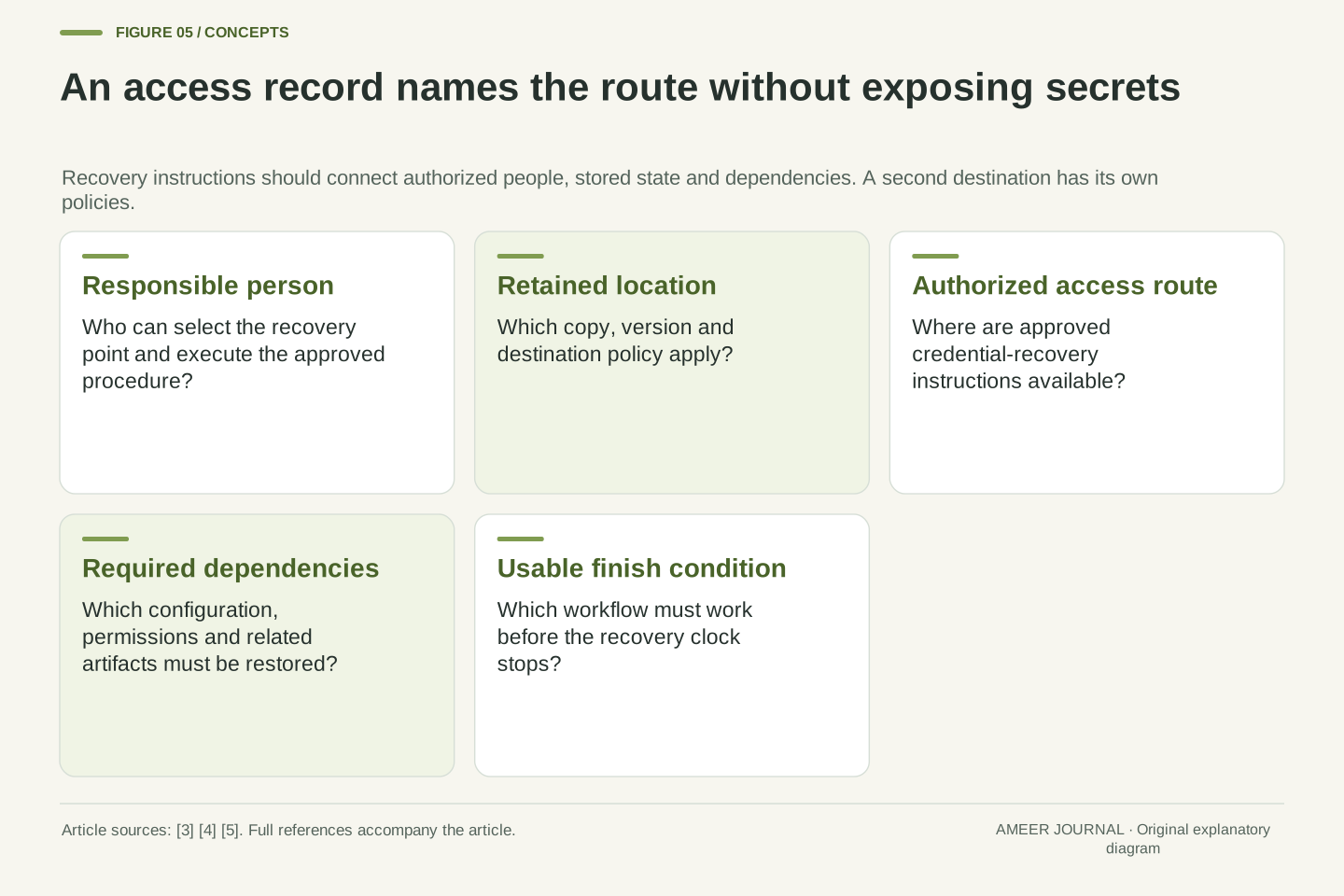
Knowing that a copy exists is useful only if the right person can retrieve it when needed. Microsoft’s recovery guidance includes prerequisites such as credentials and configuration, and its testing guidance checks that operators have the necessary access and can find the recovery instructions. [4][5] In a small project, the same person may fill every role, but the access route still needs to work from the recovery situation.
Imagine instructions stored only on the failed laptop, or a backup account whose recovery steps depend on files inside that same account. Those are original planning questions, not claims that a particular provider is vulnerable. Record where authorized access instructions are kept and who can use them. The ordinary recovery log should identify the secure route to credentials, rather than becoming another document filled with passwords or private keys.
Location and retention need separate attention too. B2 documents that replicas follow the destination bucket’s lifecycle rules. [3] A second location therefore does not by itself tell you how long that destination keeps the needed history. For the project inventory, name the copy, its owner, its access route and its applicable retention policy. Those fields make it possible to investigate an unavailable version without assuming that every copy behaves like the original.
Recovery prerequisites include authorization, configuration and operational knowledge. Microsoft explicitly includes credentials and configuration in recovery instructions, and its reliability-testing guidance asks whether operators have the required permissions and can locate the runbook. [4][5] A design that counts an artifact as available should state which recovery identity can retrieve it and which dependencies that identity requires.
A useful dependency analysis asks whether instructions or access-recovery material exist only inside the failure domain being recovered. The question is structural: an inaccessible laptop should not be the sole place that explains the recovery path from that laptop. Record the location and owner of the approved secret-access mechanism rather than copying secret values into routine test results. This keeps the runbook informative while preserving the intended authorization boundary.
A second storage destination is another policy boundary, not evidence of identical behavior. Backblaze states that replicated files are subject to the destination bucket’s lifecycle rules. [3] The inventory should therefore identify destination retention separately from source retention. Likewise, a separate location alone does not establish independent credentials, a protected version history or unlimited availability. Those properties require their own configuration evidence and a recovery exercise appropriate to the intended failure scenario.
A useful test opens the work in a separate place
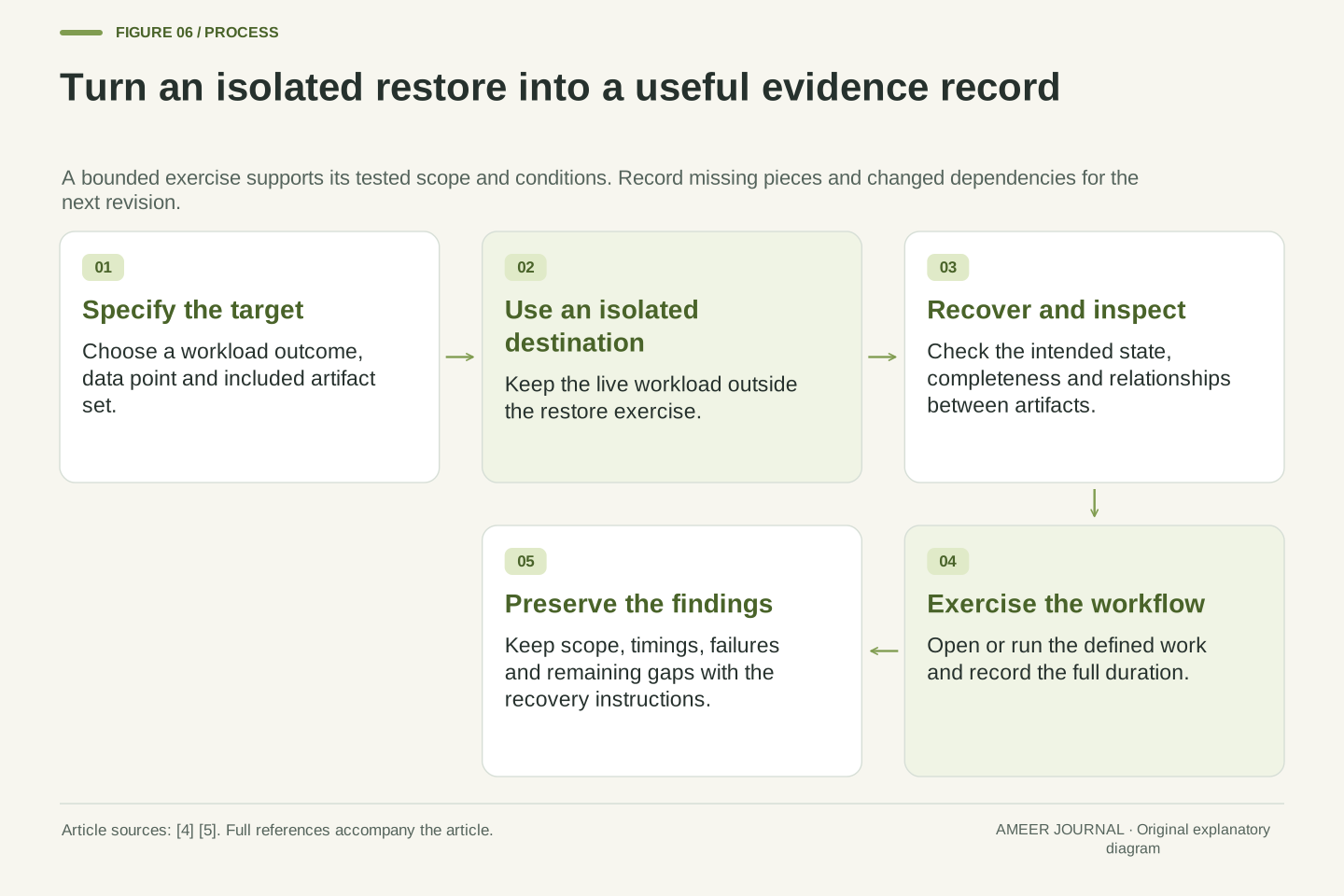
A small restore exercise can answer questions that status screens cannot. Choose a defined project state, retrieve it into a separate test destination, and keep the existing live work outside the exercise. Microsoft recommends isolated restore testing and checking integrity and completeness, not only whether the restore operation reports success. Its guidance also ties test frequency to changes in backup configuration, data structure and infrastructure. [5]
For the fictional portfolio, check that the selected chapter is the intended earlier edition, that referenced images appear, and that the project opens with the required settings. For the fictional website, inspect representative article pages and their media relationships in the separate environment. Write down what the exercise covered. Successfully restoring one photograph is useful evidence about that photograph; it does not show that every article and setting can be recovered together.
Record the exercise’s start, selected state, transfer finish and return to usable work. Keep surprises too: missing access, an excluded folder, a forgotten dependency, or a slow step. These findings improve the next recovery attempt. Preserve them alongside successful results, because an unexplained failure reveals a gap that a green backup schedule can otherwise conceal. [4][5]
Design a bounded restore exercise in an isolated destination, preserving the live workload. Microsoft’s reliability guidance calls for validating data integrity and completeness rather than merely observing operation success. It also bases the restore-testing cadence on changes in configuration, schema and infrastructure. [5] A test specification should identify the selected artifact set, the expected state and the workflow that must function after restoration.
For the constructed publishing workload, validation could include opening selected article records, resolving their referenced media and exercising the corresponding page-rendering path in the test environment. The coverage statement must distinguish a representative sample from an exhaustive verification. Record omissions explicitly. An intact sample provides evidence about the tested sample and procedure; it does not establish universal recoverability across unexamined artifacts or future configurations.
Capture operational timings with defined event boundaries and compare them with the stated objectives. Keep failures and unexpected prerequisites in the same record as the successful stages. Microsoft recommends feeding test findings back into the recovery plan and maintaining it as the environment changes. [4][5] A result such as “access recovery added 18 minutes” is actionable because it identifies a concrete dependency; an unqualified “backup tested” conceals the observation that would guide improvement.
Keep a record that someone can actually use
A useful backup summary explains a recovery path. Name the work and included items, the version or consistent point, its data timestamp, location and retention policy. Add the access route, dependencies and finish condition. Another authorized person can then understand what “recover this project” means without guessing from filenames or a job-completion email.
Add the last exercise’s date, scope and result. Keep the data-age check separate from the time needed to restore usable work. If a test used 60 GB and a steady useful transfer rate, retain those conditions with the timing; a later, larger restore needs a new estimate or observation. Microsoft’s guidance treats recovery plans as documents that change when the environment changes or testing reveals a new failure case. [4][5]
The green upload indicator can be one useful event in this record. Answering the portfolio problem also requires a named earlier edition that still exists, an authorized retrieval route, and a demonstrated way to reopen the intended work. Those details reveal what the current arrangement can recover and which missing piece needs attention next.
A compact recovery record should connect intent, artifact and procedure. Identify the workload outcome, included data set, version or consistent point, represented timestamp, retention rule, authorized access mechanism and dependency order. Distinguish claims established by configuration from claims observed in an exercise. This makes the record useful during an incident without turning every successful job event into an assertion of end-to-end recoverability.
Attach the latest exercise’s scope, environment, start and finish events, actual outcomes and unresolved gaps. Preserve both the recovery-point assessment and operational duration, because they answer different objectives. Microsoft recommends updating plans after environmental changes and feeding test results back into procedures. [4][5] A historical successful exercise remains evidence about its tested conditions; it should not silently acquire the scope of a larger, modified workload.
In the portfolio case, a complete explanation names the desired earlier version, shows that it remains within the available history, identifies how an authorized operator can retrieve it, and states how usability was checked. Current-file availability, retention and recovery timing can then be assessed individually. The next improvement follows from the actual missing link—an expired version, an incomplete restore set, inaccessible instructions or a slow stage—rather than from the appearance of the latest upload status.
Sources & further reading
Explore the references behind this guide. External pages may change after our review.
- Delete files in iCloud Drive on iCloud.com – Apple Support (UK)Apple · Accessed 6 Nov 2026
- Restore your OneDrive | Microsoft SupportMicrosoft · Accessed 6 Nov 2026
- Automate File Deletion with Backblaze B2 Lifecycle RulesBackblaze · Accessed 6 Nov 2026
- Architecture strategies for disaster recovery - Microsoft Azure Well-Architected Framework | Microsoft LearnMicrosoft · Accessed 6 Nov 2026
- Architecture strategies for designing a reliability testing strategy - Microsoft Azure Well-Architected Framework | Microsoft LearnMicrosoft · Accessed 6 Nov 2026
- Cloud Storage File VersionsBackblaze · Accessed 6 Nov 2026
Article updated 6 Nov 2026.
Found something we should revisit?
Good explanations get better with thoughtful feedback.