What you’ll take away
- Current charge, daily runtime, and long-term battery capacity are different measures.
- A charge cycle represents cumulative use, not each time you plug in.
- Heat, workload, environment, and charging conditions belong in the same investigation.
- Optimized timing and an upper charge limit are different features with practical tradeoffs.
- Use manufacturer diagnostics and service for persistent problems or suspected damage; avoid electrical DIY.
Three battery questions that sound like one
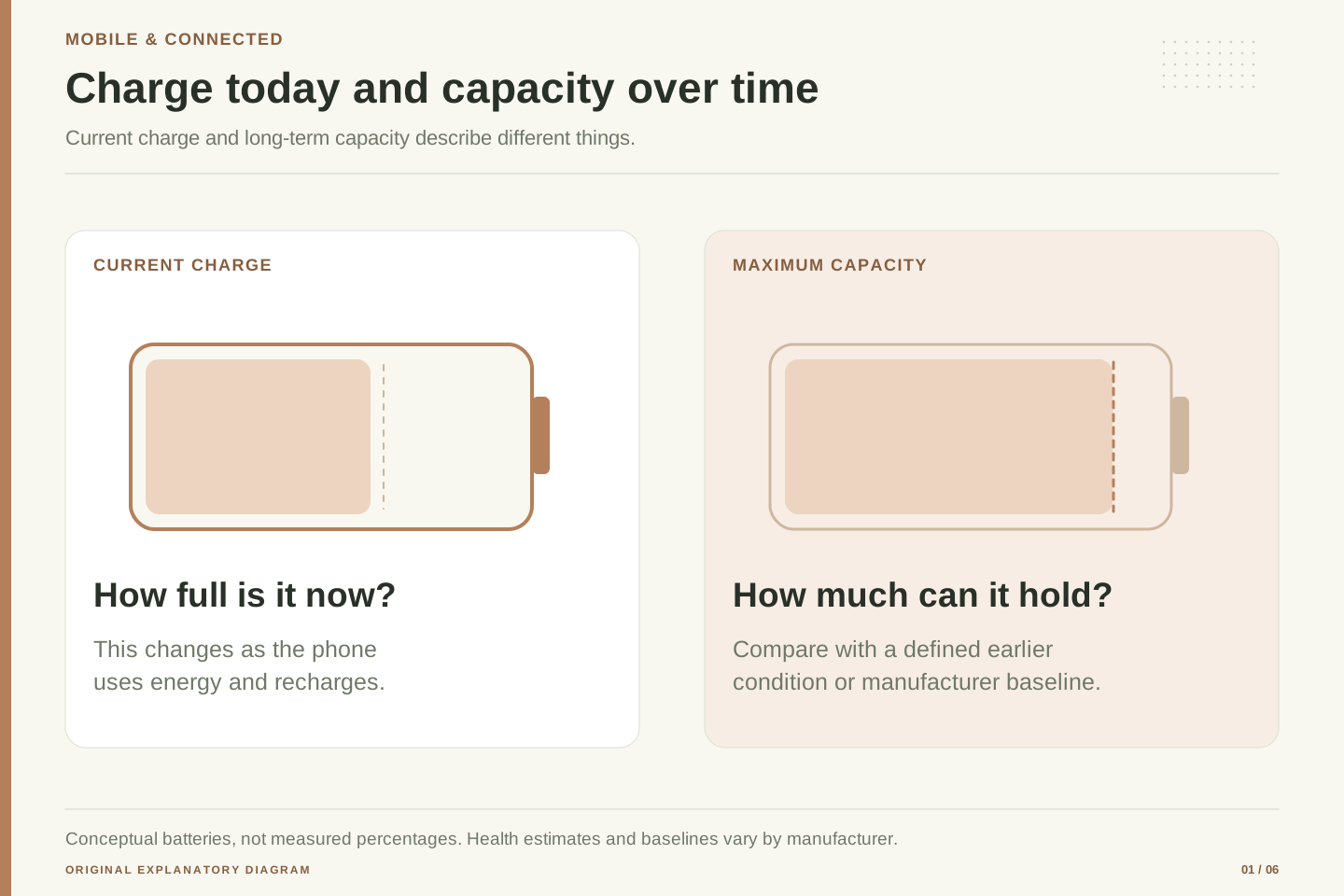
Current charge, daily runtime, and retained battery capacity are different measures. Apple distinguishes battery life from battery lifespan. A shorter runtime on a busy day does not, by itself, establish sudden battery wear. [3]
Google describes batteries as consumable components with changing capacity and calls the displayed capacity an estimate. That health estimate differs from the charge percentage beside the battery icon: one concerns retained capacity, the other current charge. [1]
Consider a fictional reader whose phone starts the morning full. On one day it mostly stays in a pocket. On another day it records videos and runs navigation for hours. Comparing the remaining percentage at dinner cannot isolate battery aging because the work was different. The useful first question is what changed: the workload, the environment, a setting, the charging arrangement, or the battery’s longer-term condition? Separating those questions prevents a single disappointing afternoon from turning into an unnecessary charger or phone purchase.
Separate state of charge, workload-dependent runtime, and retained capacity over the battery’s service life. Apple distinguishes per-charge life from overall lifespan. Runtime reflects both usable energy and demand, so these measures are not interchangeable diagnostic signals. [3]
Google describes capacity decline in consumable batteries and identifies reported capacity as an estimate. Interpret a health estimate alongside operating history and symptoms rather than as a perfectly precise laboratory measurement. [1]
A useful conceptual model is available usable energy divided by average demand over a specified interval. This is a reasoning aid, not a prediction formula for a particular phone. If demand changes substantially, runtime can change without a sudden equivalent change in maximum capacity. For a consumer investigation, record the interval, the activities, the environmental conditions, and any warnings. That creates enough context to ask a meaningful support question and avoids treating every percentage display as if it measured the same underlying property.
Plugging in is not the same as using a charge cycle
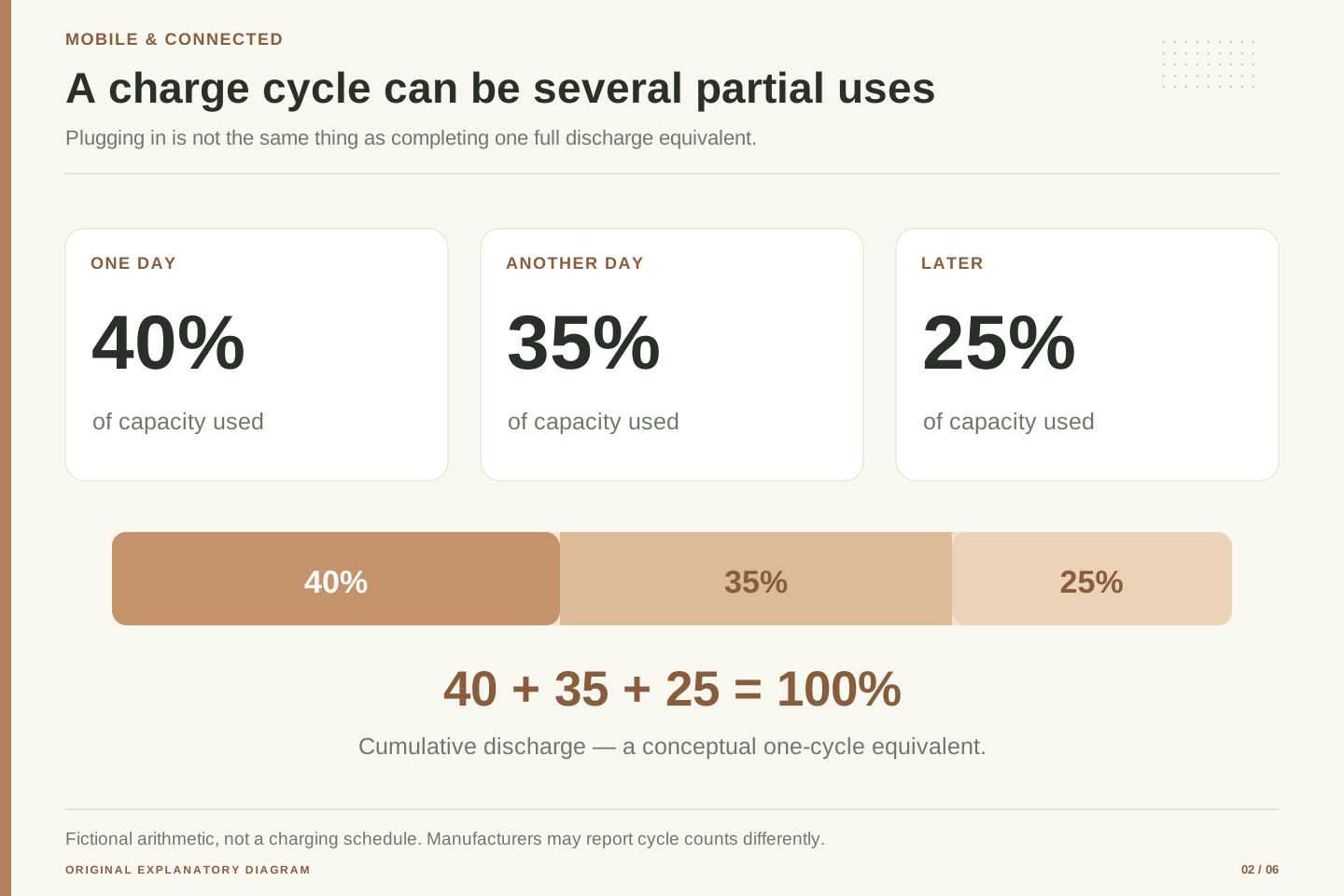
A charge cycle is not one cable connection. Apple describes cumulative battery use equivalent to a full discharge, potentially across several partial uses. It also says you need not wait for full depletion before charging a lithium-ion battery. [2]
Here is a deliberately simplified example. Imagine using forty percent of a battery’s charge, later using thirty-five percent, and later using another twenty-five percent. Those amounts add to one hundred percent of cumulative use. The example illustrates counting; it is not a suggested charging schedule, a prediction of a phone’s health, or a promise about the exact number shown in a device’s cycle counter.
This matters because trying to avoid every extra plug-in can create needless inconvenience. A short useful top-up is not automatically an entire cycle. Equally, unplugging and reconnecting repeatedly does not erase the energy the phone has already used. Let the phone serve your day, and use its supported charging features. If the manufacturer gives a special troubleshooting procedure for your model, keep that separate from an everyday habit. Routine full depletion is not a general requirement established by this cycle explanation.
Equivalent cycle accounting concerns cumulative discharge, not connector insertions. Apple describes partial use accumulating into a cycle and does not require depletion before ordinary charging. Energy-use accounting and the number of charging sessions are different measures. [2]
For an original arithmetic illustration, fractional discharge amounts of 0.40, 0.35, and 0.25 sum to 1.00. This normalized example omits the details of a real battery-management system and should not be interpreted as a prescription or a calibrated model of aging. Manufacturers may expose cycle and health information differently; the reader should use the documentation for the actual device when interpreting its reported value.
Cycle count alone is therefore a limited comparison metric. Two observations with the same cumulative-use illustration do not establish identical temperature history, time in service, charging behavior, or usable runtime. For consumer reporting, state what the number is and what it cannot explain. Do not promote a diagnostic procedure intended for a specific fault into a universal daily routine. A useful maintenance habit should solve a real problem without making ordinary charging more difficult merely to optimize an oversimplified counter.
Look at the whole heat situation
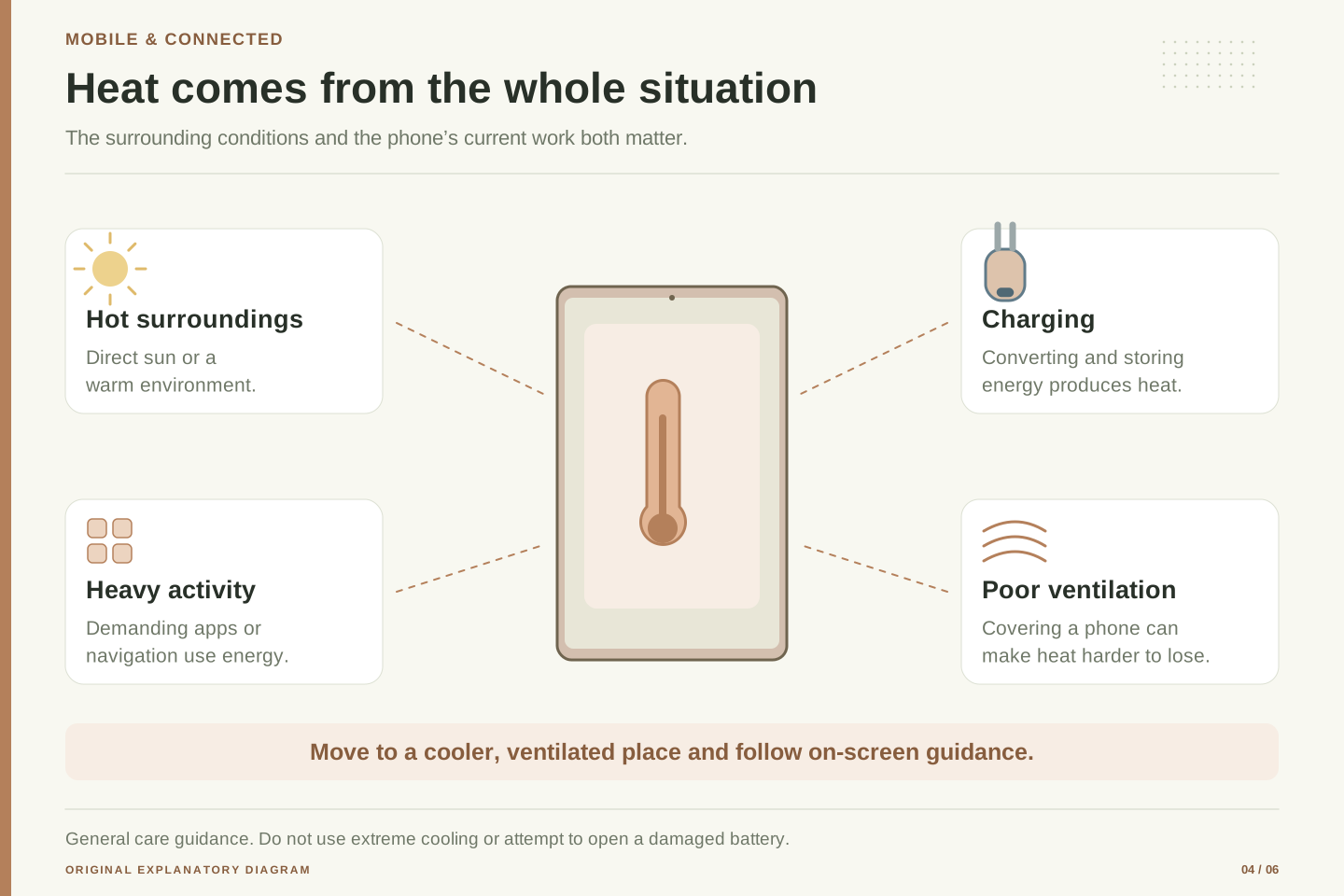
A phone can feel warmer while doing demanding work. Google lists activities such as gaming, recording video, setup, and data transfer, with charging sometimes adding to the situation. Its guidance also explains that a phone may reduce performance or charging speed when hot. Warmth needs context; it is not a diagnosis by touch alone. [6]
Apple warns that high ambient heat can shorten battery lifespan and that charging in hot conditions can contribute. Consider where you charge: a convenient spot is unsuitable if it exposes the phone to strong sunlight or traps heat. [3]
Imagine a fictional journey with navigation, a bright screen, mobile data, and direct sun reaching the phone. Several conditions have changed at once. Instead of blaming only the charging cable, follow any on-screen temperature guidance and move the phone to an appropriate cooler, ventilated environment when you can do so safely. Do not use a refrigerator, ice, or other improvised cooling method. If unusual heat continues during ordinary use, contact the manufacturer with the circumstances and any messages you observed.
Google’s heat guidance connects device temperature with workload and environment and describes thermal responses such as reduced charging speed or performance. These responses mean that charging observations cannot be interpreted independently of what the phone is doing and where it is being used. A temporary limit is an observation to understand, not automatically a charger defect. [6]
Apple identifies high ambient heat as a contributor to permanent capacity loss, including during charging. Ambient and internal temperatures differ; a casual impression of surface warmth cannot precisely establish cell temperature or lifetime damage. [3]
For a practical investigation, record concurrent workloads and exposure to sun or poor ventilation. Change the environment in a normal manufacturer-supported way and follow the device’s temperature warnings. Do not perform forced cooling, open the phone, or attempt to override protective behavior. A consistent description of the conditions is more useful to support than a claim that the phone always runs hot. If the behavior is persistent or accompanied by faults, manufacturer diagnostics and service guidance take precedence over a generic online explanation.
Charging speed changes during the session
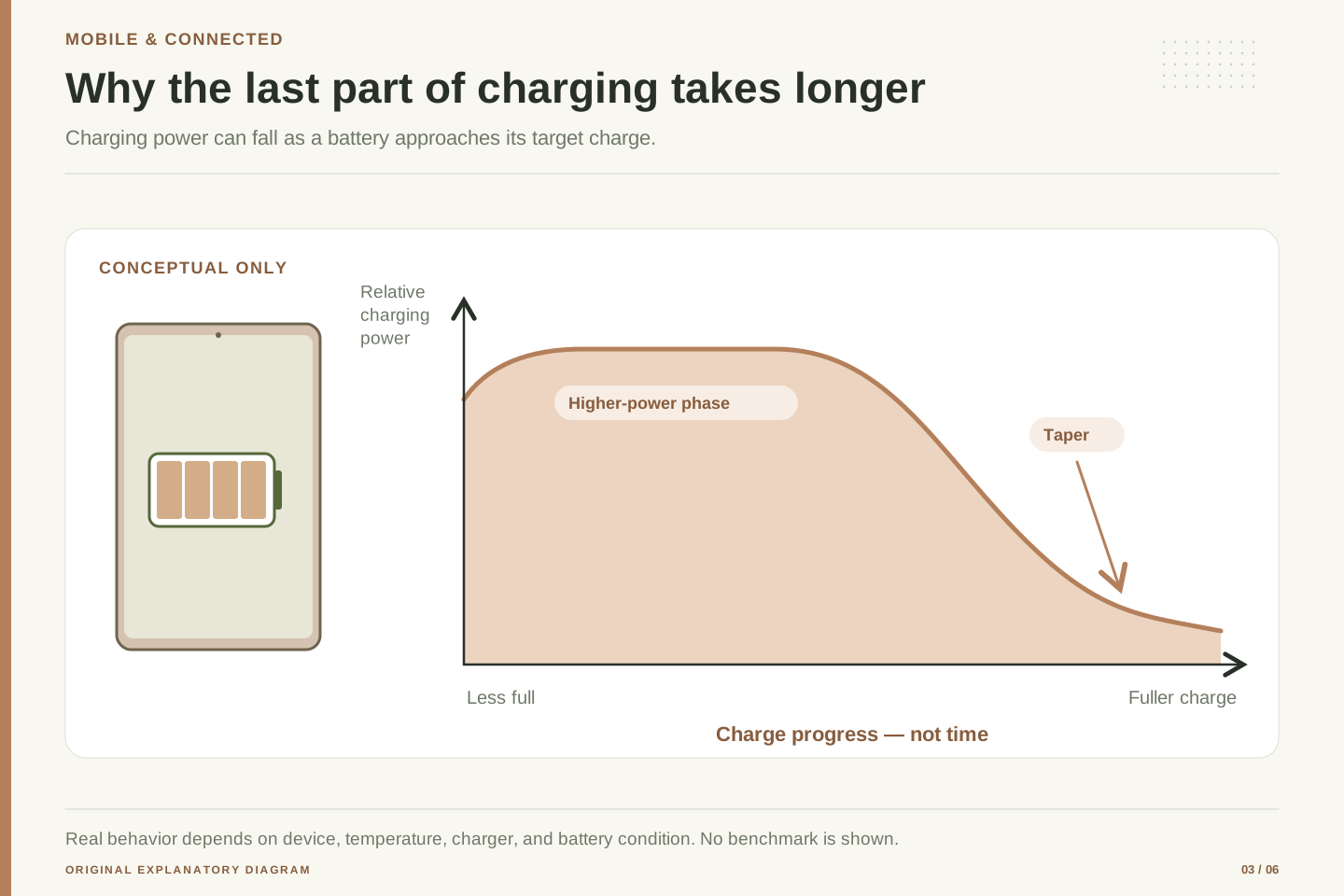
Charging can slow near full. Apple explains this behavior and notes temperature-dependent limits. An early rise in the displayed percentage therefore does not establish that every later percentage point will arrive at the same pace. [2]
Picture a conceptual graph with charge progress along the bottom and charging power up the side. A line that becomes lower near the end illustrates tapering. It is not a test result and does not assign a universal cutoff to every phone. Actual charging behavior depends on the model and its current conditions. The illustration helps explain why a simple straight-line guess can disappoint.
If you need to leave home soon, use the phone’s own estimate and the charging guidance for the exact device. Do not calculate a guaranteed finishing time from the largest wattage printed on a charger. That label is not a promise that the same amount of power reaches the battery throughout the entire session. Compare charging setups under similar conditions before drawing conclusions, and keep any claimed improvement specific to what you actually observed.
Apple describes charging-rate reduction near full and temperature-dependent limits. A consumer charge curve should therefore show variable behavior rather than constant power from empty to full. Exact thresholds and control behavior remain device-specific. [2]
A conceptual taper diagram can communicate this without inventing measured data: label the horizontal axis charge progress rather than elapsed time, label the vertical axis relative charging power, and omit numerical performance claims. Such a diagram explains a qualitative relationship. It cannot establish the duration of a charging session or compare two phones, because it contains no measured time series.
Likewise, a charger’s maximum output rating is not a measurement of battery input throughout a session. When evaluating an observed charging time, record the starting state, target state, concurrent use, environment, and equipment. Those conditions determine what the observation can support. A result from one interval should not be extrapolated linearly to every interval. This is a basic measurement principle that keeps a useful consumer explanation from becoming an unsupported fast-charging benchmark.
Optimized charging changes the timing
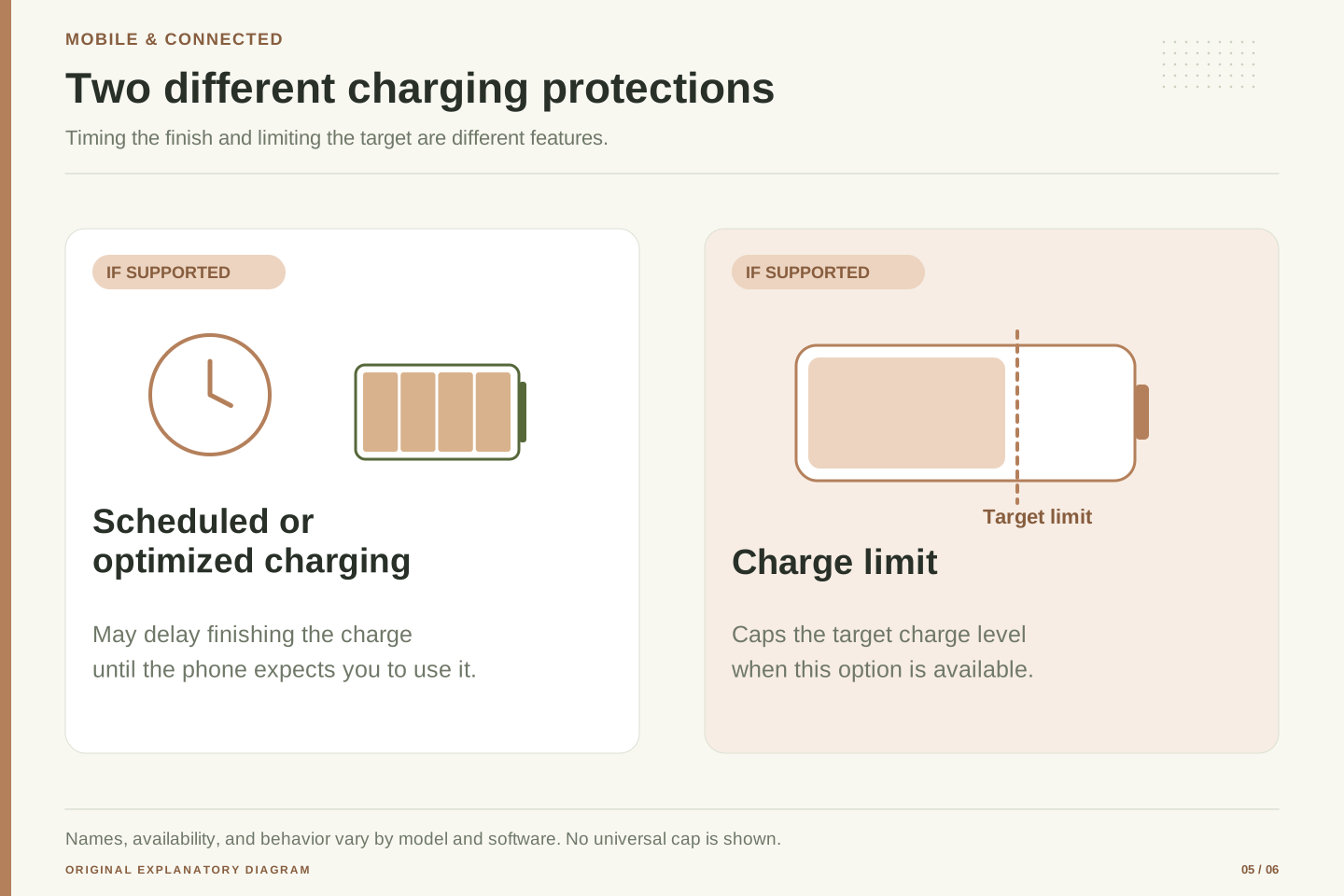
Optimized charging features can delay the final part of a charge so that it finishes closer to when you normally unplug. Apple describes learning daily charging habits as part of Optimized Battery Charging. The purpose is different from simply making every charging session finish as quickly as possible. Availability and behavior depend on the device and settings. [7]
Google’s Adaptive Charging uses charging habits to prepare for an expected unplug time. An unusual schedule can change its usefulness. On a travel day or early start, check the displayed charging information rather than assume it knows your plan. [4]
For a fictional office worker, predictable overnight charging may fit the feature well. For a fictional photographer leaving before dawn on an irregular assignment, tomorrow’s needs may be different. The sensible choice is to understand the supported controls and the indicated finish time. You do not have to turn battery care into a rigid daily ritual. A charging feature is useful when it supports your routine and you understand what it is trying to do.
Optimized Battery Charging is a scheduling behavior rather than a guarantee of the shortest charge duration. Apple describes using learned daily habits and connects battery chemical age with factors including temperature history and charging patterns. Product-specific availability and implementation should be checked in the current device documentation. [7]
Google’s Adaptive Charging uses an expected unplug pattern, introducing a prediction dependency when routines change. Distinguish an intentional delay from an unexplained failure to charge and consult the device’s displayed status. [4]
For an original evaluation scenario, compare the user’s requirement with the feature’s objective. A consistent overnight routine may need readiness at a predictable time; an irregular early departure may need readiness sooner. The acceptance condition is not always highest immediate percentage. It is appropriate readiness while using the supported optimization. Record whether the behavior was scheduled, thermally limited, or unexplained before judging the charger. Combining those categories into one report of slow charging makes both consumer advice and technical support less precise.
A charge limit is a different control
A charge limit changes the usual upper target; scheduling changes the finish time. Google documents a limit for eligible Pixels and occasional full charging for capacity estimation. Check your model’s guidance before assuming an occasional full charge means failure. [4]
Samsung’s battery-protection documentation shows why names and options should not be generalized across phones. Protection modes and available limits depend on the device and software. A screenshot from another model may show controls your phone does not have, or use a different name for a related idea. [5]
The tradeoff is practical: a lower starting charge leaves less charge available for that day. If you finish most days comfortably, a supported limit may suit you. If you are traveling without predictable charging access, you may reasonably want the full supported charge. Use the manufacturer’s controls and your actual needs. There is no universal percentage in this article that every person must obey, and no promise that selecting one limit guarantees a particular number of extra years.
Google documents an upper cap on eligible devices and occasional full charging for capacity estimation. A cap and predictive scheduling are distinct policies. Interpret the visible behavior according to the implementation, not an assumed absolute invariant. [4]
Samsung’s protection documentation describes mode and limit choices that vary with model and software. For a technical article or support workflow, use feature detection and exact documentation rather than hard-coding one brand’s settings names into advice for every device. The same general objective can be exposed through different user controls. [5]
The user-facing tradeoff is available energy for the next unplugged interval versus the selected charging strategy. A lower cap reduces the starting reserve relative to a fuller charge under otherwise comparable conditions. Whether that tradeoff is worthwhile depends on the workload and access to charging. Do not convert a manufacturer feature into an unsupported quantitative lifespan forecast. A useful recommendation states the conditions under which the feature fits the routine and makes the option to prioritize a longer day of use easy to understand.
Investigate unexpected drain before buying a replacement
If the phone starts draining unexpectedly, begin with its own battery information and official diagnostic guidance. Google provides a battery-issue workflow for supported Pixel devices, including investigation of performance and charging symptoms. That is more useful than assuming every problem has the same cause or applying a reset procedure meant for another model. [8]
Write a short before-and-after note. What changed around the time the problem began? Was there a new app, a longer video session, a different journey, or a new charging location? Compare reasonably similar days where possible. A day of navigation and photography is not a fair match for a day when the phone mostly rested on a desk. Keep the note focused on observations, not guesses about invisible battery damage.
Use the phone’s supported settings to inspect activity and follow the manufacturer’s next steps. Change one ordinary setting at a time if the guidance calls for it, so you can tell whether it helped. Preserve useful error messages. Avoid installing a random battery-repair app because it promises to reverse aging. If the device reports a service need or the problem persists, bring your observations to the manufacturer or an appropriate service provider.
Google’s battery troubleshooting documentation provides a device-specific diagnostic route for battery-performance symptoms. Use the relevant manufacturer workflow as the authority for corrective actions. A general explanation can organize observations, but it should not prescribe a reset, calibration sequence, or software change without the conditions that make that procedure appropriate. [8]
Create a simple observation record: time interval, starting and ending state of charge, major activities, environment, and any system message. This is not laboratory instrumentation, but it is enough to distinguish several plausible categories. A demand increase, a charging interruption, and a long-term capacity concern require different questions. Observations across dissimilar workloads cannot isolate capacity change by themselves.
When following supported troubleshooting, make changes deliberately and retain the original observation. Multiple simultaneous changes can make a successful outcome hard to explain and a failed outcome hard to undo. If the issue persists, provide the record to support rather than escalating to unverified battery-optimization tools. The objective is a useful causal investigation within normal phone controls. It is not to expose private system interfaces, override protection, or claim that consumer software can restore lost chemical capacity.
Treat health numbers as information, not a countdown
Health information is not a future failure date. Google describes estimated remaining capacity and explains that use and conditions affect battery life. A model’s design target does not guarantee an identical path for every battery. [1]
A fictional phone owner may notice a small change in a displayed health estimate and become concerned even though the phone still comfortably handles the day. Another owner may have a practical problem because the phone shuts down unexpectedly or cannot support a necessary routine. These situations deserve different attention. A percentage should be read alongside what the device is doing and what the manufacturer reports about its condition.
Keep any service recommendation and warranty question separate from a general online comparison. The relevant model, region, purchase details, and inspection result may matter. Use the official support route to learn the options for your device. Do not assume that another person’s replacement experience establishes your eligibility. A sensible decision considers reliable daily use, the device’s condition, and the available service options instead of treating every small movement in an estimate as an emergency.
Google distinguishes estimated capacity from eventual individual behavior and gives model-specific expectations under defined conditions. A design target is not a deterministic aging curve for every unit. Interpret reported health with symptoms and operating history. [1]
From a measurement perspective, a displayed estimate is one observation produced by a device’s reporting system. A change in that estimate does not independently establish the cause or timing of every runtime change. Avoid fitting a straight-line remaining-life prediction to a few consumer screenshots. Without a controlled model and relevant data, that apparent precision would be invented.
For a replacement decision, separate technical symptoms from service eligibility. Runtime no longer meeting the user’s needs, reported service conditions, physical damage, warranty coverage, and local repair options are distinct inputs. The manufacturer or service provider determines the applicable inspection and service process. An article can explain how to prepare a clear report and compare options; it cannot infer a specific reader’s entitlement or guarantee an outcome from another user’s anecdote. This keeps battery-health information useful without turning an estimate into a countdown.
Damage and swelling belong in the service process
Damage is different from ordinary aging. Google’s Pixel safety guidance prohibits using a physically damaged phone and directs suspected damage to service. It also warns against modifying or puncturing batteries. Follow handling instructions instead of experimenting with charging. [9]
If you notice swelling, separation of the case, or another sign that the device may be damaged, stop treating it as a question about getting more hours from a charge. Contact the manufacturer or an authorized service provider for the next step. Do not press the case back together, open the device, or attempt to repair the battery. Follow the provider’s instructions about handling and arranging service.
Before transporting or posting a damaged device, ask the service provider what is appropriate for that condition and your location. Do not assume that ordinary return packaging is suitable. For a phone that is simply aging without physical damage, backup and service planning can be routine. Keep those two situations distinct so that a general longevity article does not encourage unsafe handling when the real issue is a damaged component.
Google’s safety guidance advises against using damaged devices or modifying batteries and provides service and transport instructions. This establishes a boundary: consumer troubleshooting ends where suspected physical battery damage requires the appropriate service process. [9]
Visible swelling or enclosure separation should not be interpreted through a cycle-count optimization model. The appropriate action is to seek the manufacturer’s handling and service instructions, without compressing the enclosure, opening the device, or conducting charging tests. This is a routing decision rather than a remote diagnosis of the cell’s internal condition. An article cannot establish that condition from a description alone.
Also distinguish service preparation from ordinary disposal or shipping. A provider may have condition-specific instructions, so obtain those instructions before transport rather than extrapolating from a normal trade-in process. For an undamaged aging phone, data backup and scheduled replacement may be ordinary maintenance tasks. For suspected damage, handling guidance takes priority. Keeping that boundary explicit lets the rest of the article remain practical without drifting into electrical repair, unsafe experimentation, or promises about the suitability of a damaged battery for continued use.
Choose a routine that works on ordinary days
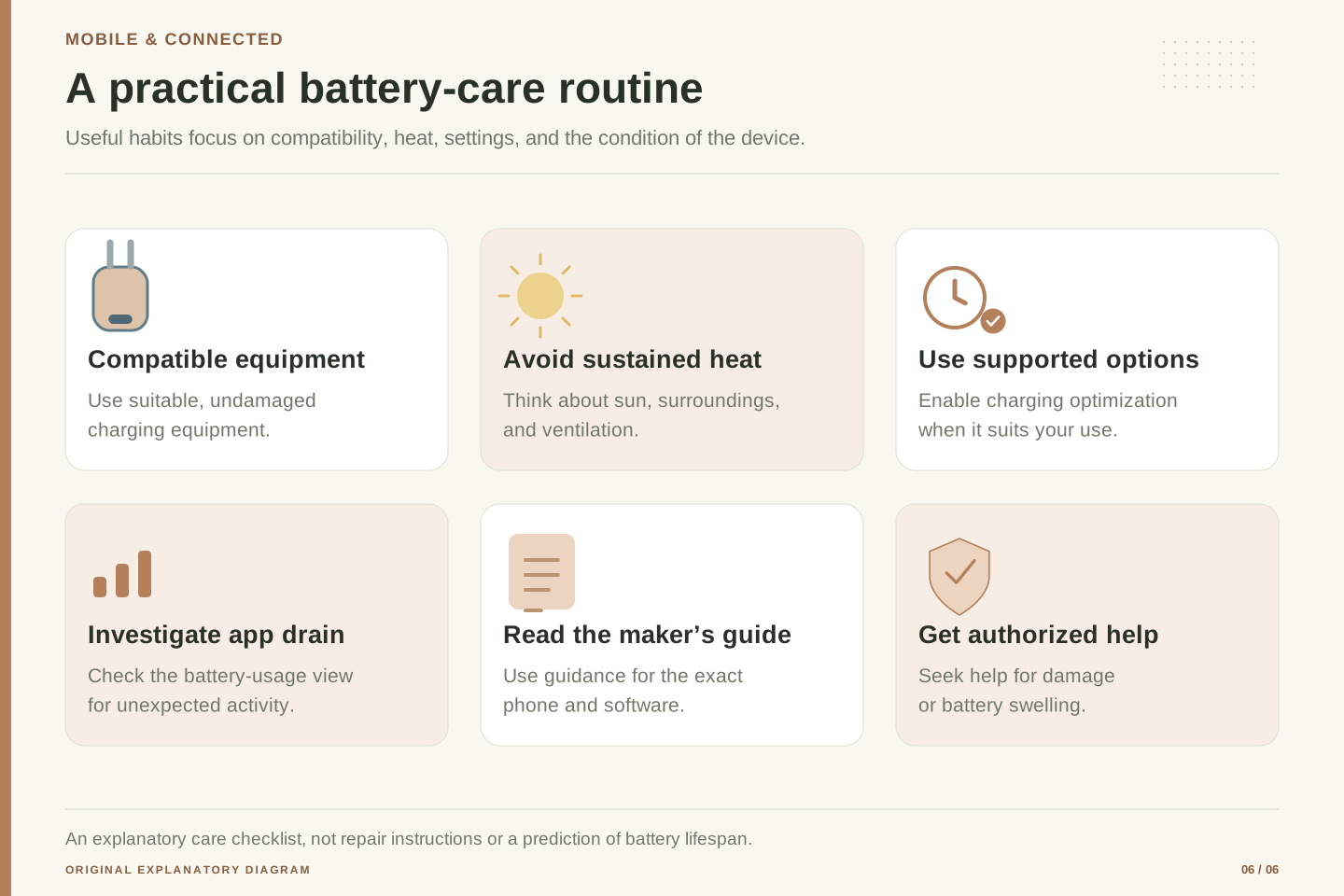
Use compatible, undamaged charging equipment in a suitable ventilated place, as the manufacturer’s safety guidance explains. Understand your phone’s supported optimization and charge-limit features, then choose settings that leave enough charge for the day. [9]
For a fictional reader who works near a charger, a supported charge limit may be easy to live with. For someone spending a long day away from power, readiness may take priority. On a hot travel day, the environment and workload deserve attention. These are examples of adapting a routine, not a ranking of people who care for batteries correctly or incorrectly. The phone is a tool, and occasional changes of plan are normal.
Revisit the setup when the routine changes or the phone shows a persistent problem. Keep the model’s official charging and service pages handy, because settings can change with software. Do not expect a perfect percentage, a particular plug-in schedule, or a single accessory to stop all aging. The practical aim is dependable use, sensible heat management, supported charging behavior, and timely help when the phone’s condition calls for it.
Manufacturer safety guidance establishes compatible, undamaged equipment and suitable ventilation as the baseline. Choose supported charging controls around readiness needs. Optimization is not a reason to modify hardware or override protection. [9]
An original planning matrix can remain small: predictable desk day, long unplugged day, and unusually hot or demanding day. For each, identify readiness needs, available charging opportunities, and relevant on-screen guidance. This is a decision aid rather than a battery-aging simulation. It helps the reader understand why one fixed percentage rule may not fit every situation and why a supported temporary change is not a failure of the overall routine.
Review the matrix when the device, software, or daily pattern changes. Use manufacturer documentation for exact controls, interpret measurements in context, and seek service for persistent faults or suspected damage. The outcome is a defensible consumer workflow: adequate runtime, transparent tradeoffs, and clear limits to self-troubleshooting. It does not promise indefinite battery life or a quantified improvement without evidence. That restraint makes the advice more useful, because the reader can apply it to an actual phone without mistaking an illustration for a product-specific guarantee.
Sources & further reading
Explore the references behind this guide. External pages may change after our review.
- Understand your Pixel batteryGoogle Pixel Phone Help · Accessed 6 Nov 2026
- Why lithium-ion?Apple · Accessed 6 Nov 2026
- Maximizing battery life and lifespanApple · Accessed 6 Nov 2026
- Get the most life from your Pixel phone batteryGoogle Pixel Phone Help · Accessed 6 Nov 2026
- Galaxy battery protection tipsSamsung · Accessed 6 Nov 2026
- Help keep your Pixel phone from feeling too warm or hotGoogle Pixel Phone Help · Accessed 6 Nov 2026
- About Charge Limit and Optimized Battery Charging on iPhoneApple Support · Accessed 6 Nov 2026
- Fix battery issues on your Pixel phoneGoogle Pixel Phone Help · Accessed 6 Nov 2026
- Safety and regulatory guide for Pixel 6 and Pixel 6 ProGoogle Pixel Phone Help · Accessed 6 Nov 2026
Article updated 6 Nov 2026.
Found something we should revisit?
Good explanations get better with thoughtful feedback.