What you’ll take away
- Passkeys use a public-key authentication process rather than sending a reusable site password.
- Biometric or device-PIN approval is local; it is not a fingerprint handed to the website.
- Provider recovery and website account recovery are separate questions.
- Verify fresh sign-in and supported backup access before retiring an old device.
- Review fallback methods, active sessions, and account permissions as part of the complete account.
A better sign-in starts with a different kind of credential
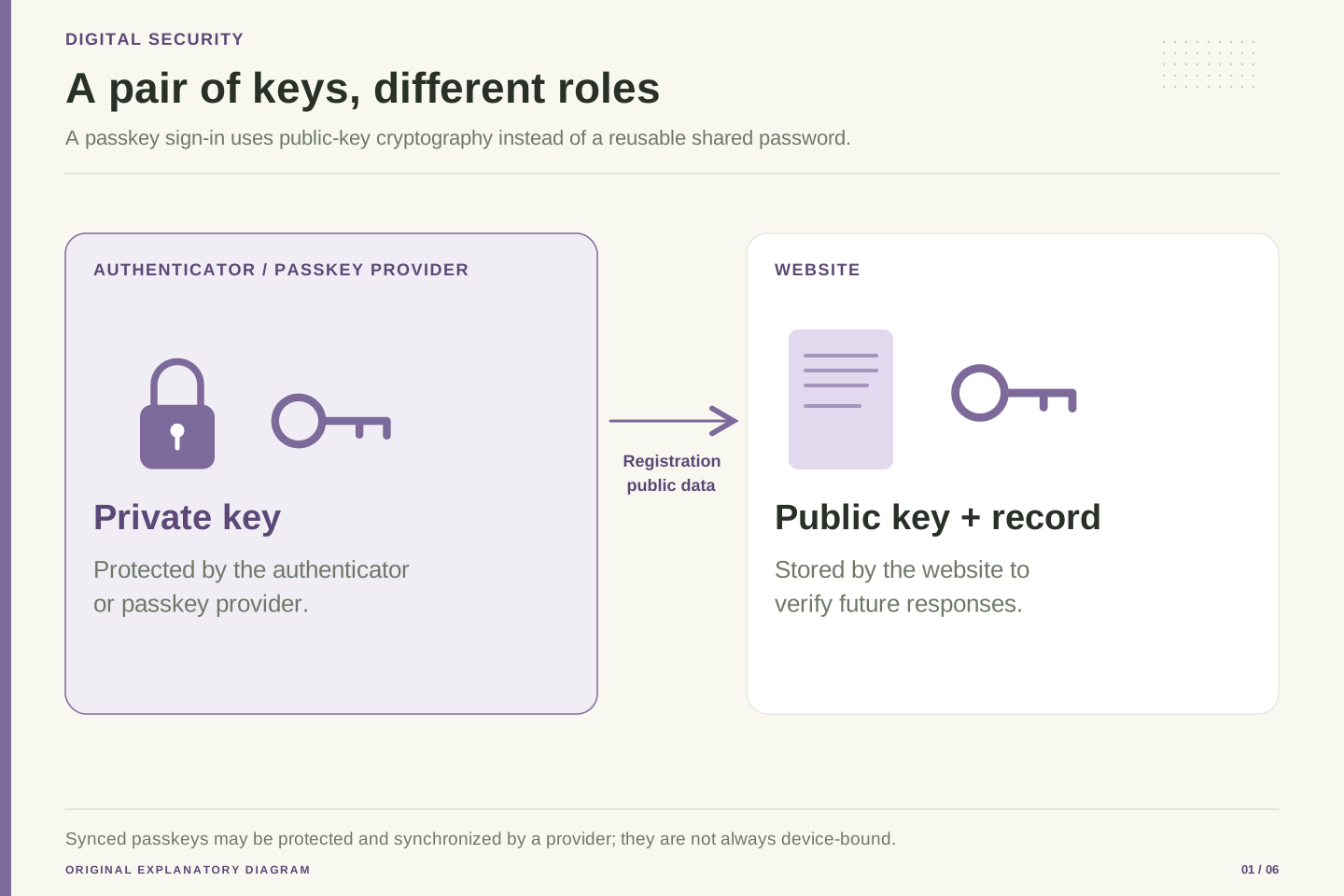
A password is something you usually type. A passkey instead uses a public and private key pair. The website keeps the public part; an authenticator or provider manages the private part. FIDO describes this approach as resistant to sign-in phishing. [1]
In an ordinary sign-in, you may select your account and approve the request using a familiar device-unlock method. Google’s developer introduction describes this kind of flow. You do not need to invent and remember a separate password for that passkey sign-in. The exact screens depend on your device, browser, credential provider, and the website. [5]
The important buying decision is not really about buying anything. It is deciding where your passkeys will be kept and how you will recover access if a device disappears. A smooth login today is useful, but a trustworthy account setup should also make sense after a lost phone, a replacement laptop, or a change of platform. This guide explains both the sign-in and the recovery questions without assuming that every service behaves the same way.
Passkeys authenticate using public-key credentials. The relying party stores a public verification key; an authenticator or provider manages the private signing material. FIDO distinguishes synced and device-bound credentials. Authentication proves possession through a protocol instead of disclosing a site password. [1]
Google’s developer overview presents passkeys as a user-facing sign-in mechanism built around account selection and local approval. The observable interaction can be short while the underlying system contains several trust boundaries: relying party, browser or platform client, authenticator, credential provider, and account-recovery process. Treating those boundaries separately is essential to evaluating the full account lifecycle. [5]
For an adoption decision, define success beyond successful authentication on the first device. Include adding another legitimate device, losing the original one, revoking unwanted access, and recovering the website account. A credential system can provide strong phishing resistance while still depending on a poorly protected recovery route. The useful engineering question is therefore how the complete account behaves under normal use and failure, with the authentication protocol as one important component of that account.
The website asks a fresh question each time
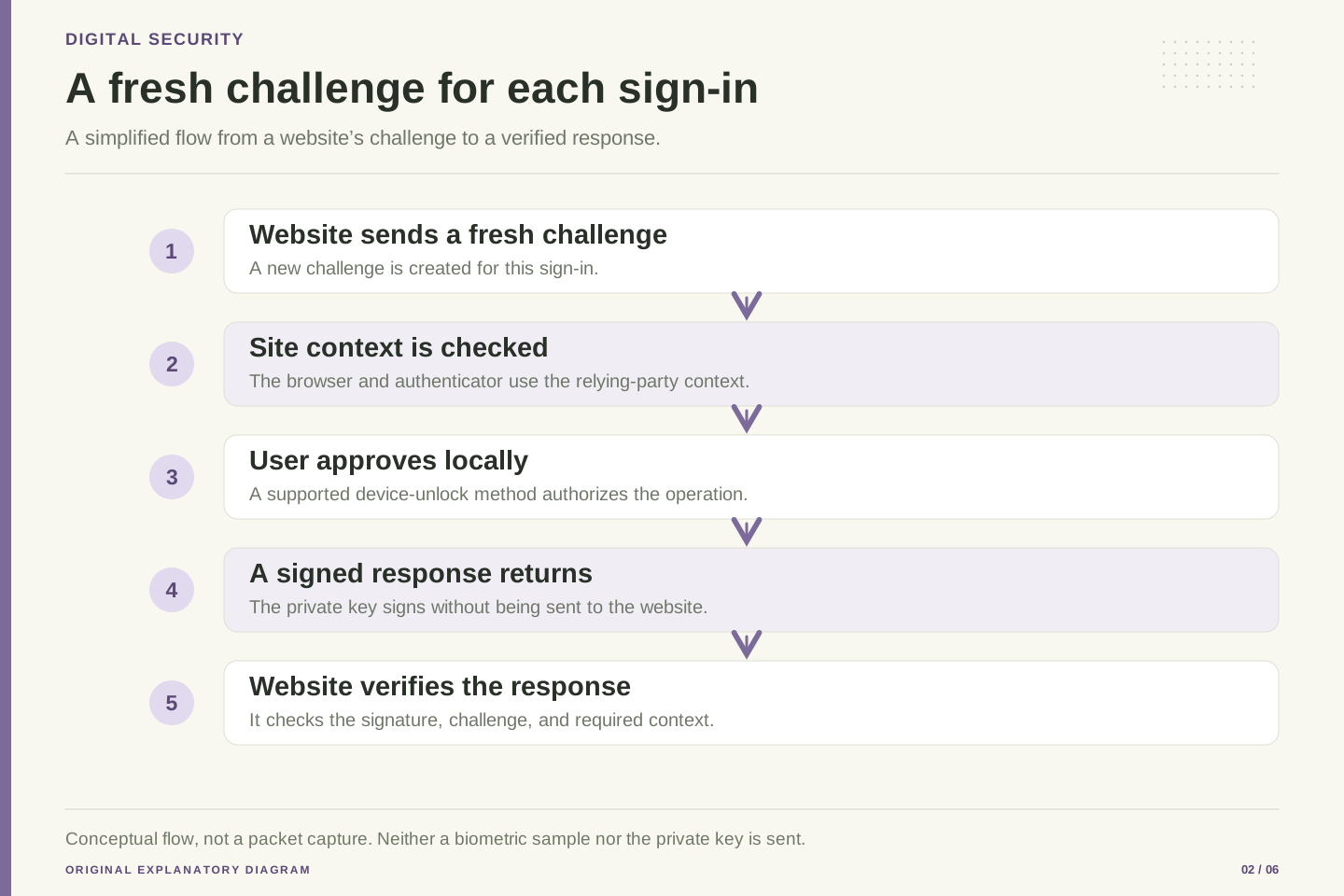
At registration, the website associates your account with a public credential. At sign-in, it sends a fresh challenge that the authenticator helps answer with a digital signature. WebAuthn also includes the website’s identity in the checks. The website verifies the response instead of asking you to send the private key to it. [2]
An everyday comparison is a challenge that only the right key can answer, with the intended destination included. This is only a comparison, not a description of a physical lock. The useful point is that copying the visible response from one sign-in does not turn it into a general password. The system is designed around a particular request and the correct website context.
For readers, this means the address and the browser’s own sign-in interface still deserve attention. Do not treat a message saying use your passkey as proof that everything around the message is trustworthy. Start important account changes from the service’s known address or application. A strong sign-in method can protect the authentication step while a misleading message still tries to persuade you to make an unwanted purchase, approve access, or change recovery information.
WebAuthn registration creates a credential association; authentication produces an assertion for a relying-party challenge. Verification checks include the challenge, expected origin and relying-party context, and the signature using the stored public key. Fresh, unpredictable challenges help prevent replay of an old response as a new authentication event. [2]
Keep the protocol guarantee scoped to the authentication ceremony. A valid assertion answers whether the relevant credential participated under the verified conditions. It does not establish that every business action surrounding the ceremony matches the user’s informed intention. This distinction matters when describing account security to people who may reasonably interpret a successful biometric prompt as approval of everything shown on a page.
An original design-review exercise is to write two acceptance statements: the correct account can authenticate to the correct relying party, and the user can understand the sensitive action that follows. The first statement belongs to credential verification; the second belongs to product design and authorization. Reviewing both exposes a common gap: strong login can coexist with confusing consent screens, unexpected sharing settings, or a poorly explained account-recovery change. Those problems require their own controls and clearer interfaces.
Your fingerprint is a local approval method
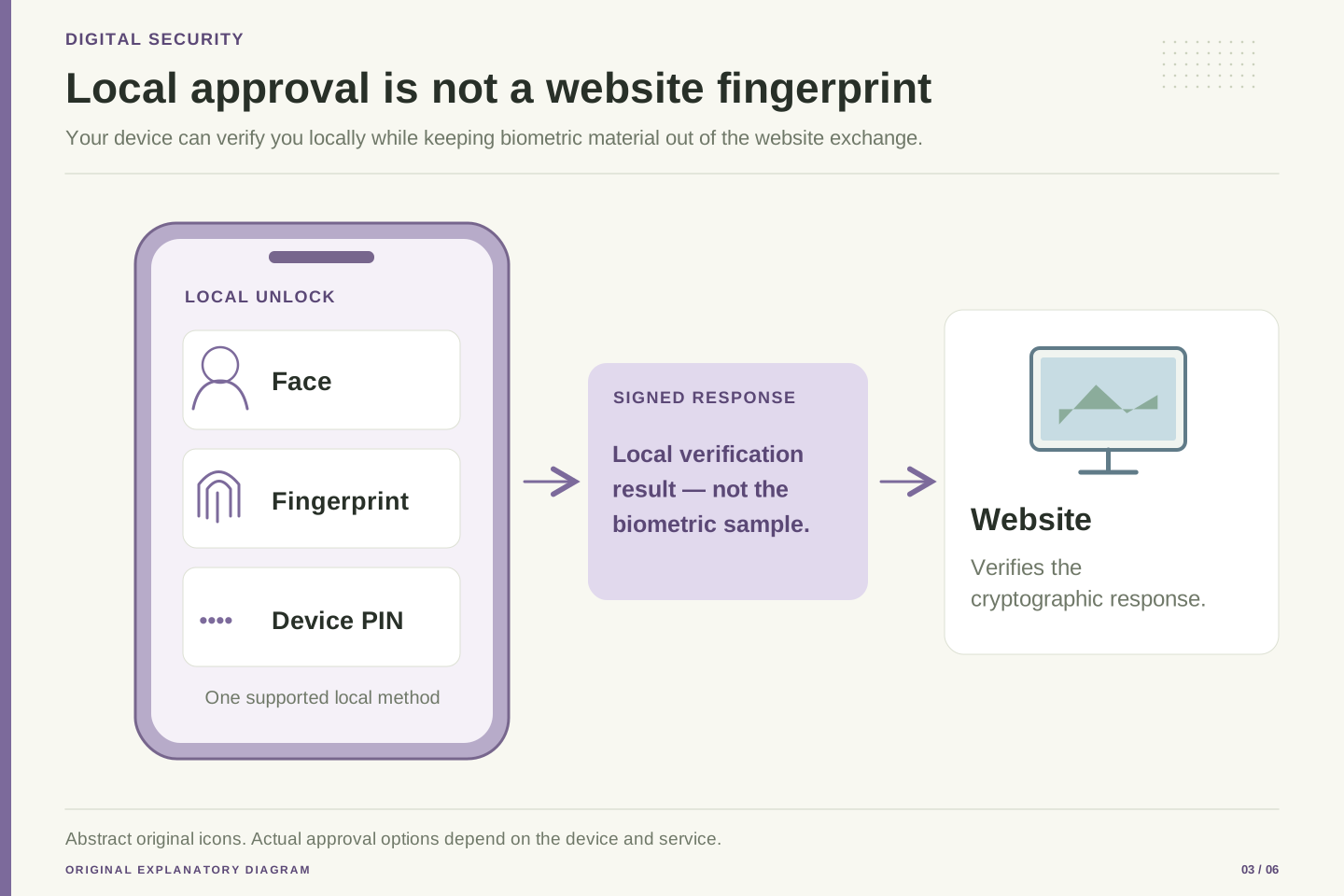
Passkeys do not require a website to receive a copy of your fingerprint or face. FIDO’s specifications explain that biometric information is processed locally; the website receives the authentication result. Depending on the authenticator and service, a device PIN, passcode, or another supported local method may be available instead of a biometric. [3]
This helps separate two things that can look similar on screen. Your device-unlock code protects access to the device or credential system. A website password is a credential for that website. Entering a device PIN in a genuine system prompt is not the same operation as typing that PIN into an ordinary web form. Be cautious about messages that ask you to reveal your unlock code as part of supposed account support.
Choose a local unlock method that suits your needs and protect it carefully. A passkey is not a reason to share your device-unlock code casually. If a shared household device has several users, understand how its user accounts and credential storage are separated before adding important accounts. The practical question is who can authorize use of this credential from this device, not merely whether the device has a fingerprint reader.
FIDO’s specification overview describes local biometric processing and authentication protocols that avoid sending biometric samples to the relying party. Local user verification can use supported methods other than biometrics. The website’s authentication decision should be understood in terms of the protocol result and its configured policy, not as remote possession of a fingerprint template. [3]
Keep local verification separate from the relying party’s account secret model. A device PIN may authorize the authenticator or provider locally; it is not a replacement string to be entered into arbitrary website forms. This distinction should appear in support instructions and onboarding language. Otherwise, users may develop the mistaken habit of sharing a local unlock secret whenever a page describes a request as passkey-related.
For a shared workstation, review the actual user boundary. Separate operating-system profiles, who can unlock each profile, and where credentials are available are more meaningful questions than whether a biometric sensor exists. A fictional office could use identical hardware with very different exposure depending on those choices. Document the supported verification and recovery methods, including accessible alternatives, so a person is not forced into a biometric method they cannot reliably use or do not wish to use.
Decide where the passkey will live
Some passkeys sync through a provider to supported devices. Others stay tied to an authenticator, such as a device or security key. FIDO describes both approaches. Recovery and transfer features still depend on the particular provider. [1]
GitHub’s documentation provides a concrete example: it describes passkeys backed by cloud providers and passkeys on hardware security keys. This is an example of one service’s supported options, not a promise that every website offers the same choices. Check the service and provider you intend to use. [6]
Think of two fictional readers. One uses a phone and laptop with a familiar credential provider and wants easy access on both. Another wants a separate security key for a sensitive account. Each should ask how a second authenticator is added, what happens if the primary one is lost, and whether the service allows more than one passkey. The right arrangement depends on the documented options and the reader’s willingness to maintain a backup route.
Synced credentials depend on a provider’s protected synchronization and recovery mechanisms. Device-bound credentials require the relevant authenticator unless another access method is enrolled. These availability differences make provider documentation important; the word passkey does not establish universal portability. [1]
GitHub documents both cloud-backed passkeys and hardware security keys as examples of supported authenticators. Its documentation is useful for understanding a real deployment, but its account-management behavior should not be generalized to every relying party. Authentication standards and account-product policies operate at different layers. [6]
Build an authenticator inventory with provider, supported devices, enrollment date, and a human-readable name where the service permits it. Do not put private keys, device PINs, or recovery secrets into that inventory. The inventory’s purpose is to support lifecycle decisions: identify which credential should remain, which should be removed, and which recovery dependency would be lost if a provider account became unavailable. A small, accurate inventory is preferable to an elaborate plan that nobody can understand during a device-loss incident.
There are two recovery questions, not one
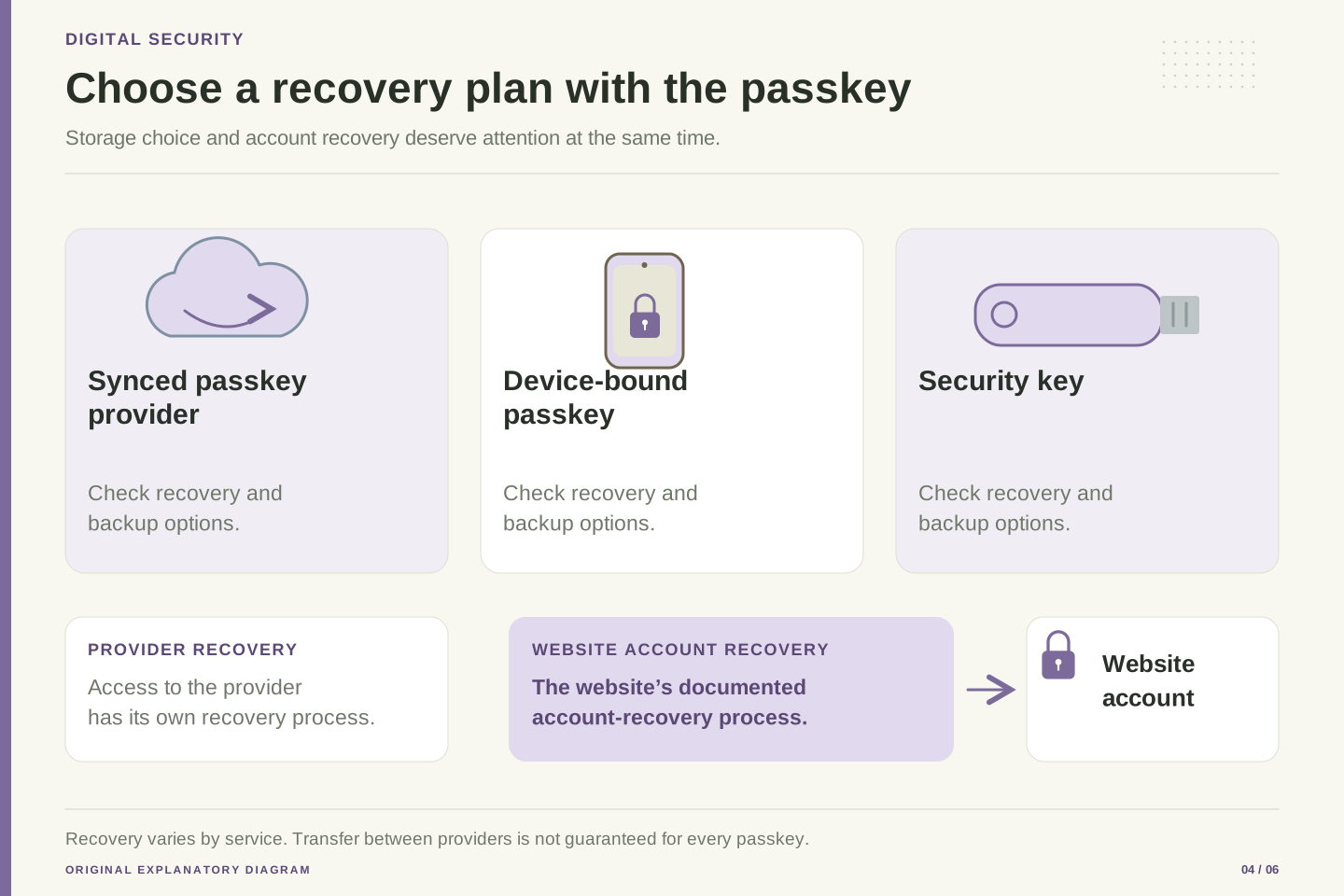
First ask how you would regain access to your passkey provider. Then ask how you would regain access to the website account itself. These may be different organizations with different recovery steps. Google’s Chrome documentation, for example, describes provider-managed passkeys associated with a Google Account and protected through supported device or Password Manager mechanisms. [7]
Google also documents a Password Manager PIN and specific ways to manage it. That PIN is part of its credential-provider experience. Do not assume that changing a website password, changing a provider password, or replacing a phone will always restore every encrypted credential automatically. Read the recovery instructions for the provider you actually use before you need them. [8]
A useful exercise is to draw two boxes on paper: credential provider and important website. Under each, write the official recovery page and the access you would need to follow it. Look for a circle: the only way into the provider requires the lost phone, while the only way into the website requires the provider. Resolve that dependency using the supported backup options before making the original device your only route.
Separate credential-provider recovery from relying-party account recovery. Chrome’s provider documentation describes passkey availability through a Google Account and supported protections for the stored credentials. This is one provider’s architecture and user workflow, not a universal rule that any account password reset decrypts every passkey collection. [7]
Google’s Password Manager PIN documentation establishes an additional provider-specific recovery and access surface. Its procedures depend on the user’s device and existing access. For a deployment review, link to the current provider procedure instead of inventing a generic reset sequence that could strand a user or remove needed credentials. [8]
Construct a dependency graph in ordinary notes: website access depends on an authenticator; authenticator availability may depend on a provider account; provider recovery depends on supported trusted devices or other recovery factors. Look for single points of loss and circular dependencies. A backup is useful only if its prerequisites remain available in the scenario it is meant to cover. This analysis is an original planning method, not a claim that a particular provider’s recovery has been tested or that every provider exposes equivalent controls.
Adding a passkey may leave other sign-in routes in place
Adding a passkey does not necessarily remove other access methods. Google explicitly preserves existing authentication and recovery methods when a passkey is added. Other websites make their own choices, so inspect the account’s actual security settings. [4]
This is helpful during a careful transition, but it also means the account needs a broader review. If an old recovery address is no longer yours, a strong new sign-in method does not make that old address a sensible recovery destination. If you no longer recognize a listed device or credential, use the service’s documented review process. Do not delete everything simply to make the settings page look tidy.
For a fictional reader moving a shopping account to passkeys, a sensible sequence is to confirm that the passkey works, verify the supported backup route, review recovery details, and then decide which optional old methods to retain. That order keeps convenience and recoverability visible. It also avoids a common mistake: making several account changes at once and later being unable to tell which change caused an access problem.
Passkey enrollment and password removal are distinct account operations. Google’s account documentation explicitly preserves existing authentication and recovery methods when a passkey is added. The security assessment therefore needs the complete set of permitted access paths, including fallbacks and recovery, rather than the strongest enrolled credential alone. [4]
An account-state review should identify active authenticators, recovery destinations, legacy methods, and the policy governing sensitive changes. Do not infer that the account has become passwordless merely because the preferred login screen offers a passkey. Likewise, do not remove a fallback without first understanding the recovery effect and the provider’s supported alternatives. Stronger authentication and durable account access must be planned together.
For a hypothetical migration, define a staged process: enroll, verify a new login, establish an independent supported recovery route, inspect existing access methods, and then make deliberate removals. Record the outcome of each stage without storing secrets in the record. Staging makes failures easier to diagnose and reduces the chance that a user simultaneously loses the old and new routes. It also produces clearer support documentation than a single instruction to turn on passkeys and assume the rest of the lifecycle is solved.
Plan the move before wiping the old phone
When replacing a device, keep the old one available until the new setup has been checked. This is a practical migration principle, not a guarantee about any provider’s transfer feature. Open the relevant official instructions, confirm which provider holds the passkeys, and establish which accounts matter most before beginning the move.
On the new device, check a real sign-in for each important service using the intended credential. Seeing an account already open in an app is not the same as confirming that you can sign in again. An existing session might still be working from an earlier login. Choose a normal supported sign-in flow, and avoid signing out of your only working session before you know the recovery route.
Once the replacement works, review the old device through the service and provider settings. Understand what removing a device, removing a passkey, and signing out a session each does. The labels can refer to different things. Follow the manufacturer’s normal preparation steps before selling or giving away the old device. Keep recovery information in an appropriate secure place that does not depend entirely on the single device being replaced.
Device migration should have an explicit acceptance condition: the replacement authenticator or provider environment can complete the intended fresh authentication flow for each critical relying party. A surviving application session is not equivalent evidence. It can hide an unavailable credential until the session expires or a sensitive operation requires reauthentication.
Preserve at least one known-working supported access path during migration. Verify provider restoration or transfer according to its current documentation, then verify the relying-party login. Keep these as separate checks because a restored provider application does not prove that every required credential is present or accepted. Equally, a successful website recovery may establish a new access route without restoring the original credential collection.
After validation, review device inventory, enrolled credentials, and sessions using the relevant services’ documented controls. Deletion semantics matter: a synchronized credential can be available on more than one device, and removing a relying-party credential is not necessarily the same operation as removing one device from a provider. Do not promise remote erasure from an ambiguous remove button. Read the explanation, preserve the intended remaining access, and use the device manufacturer’s supported transfer or disposal procedure.
A lost device needs a deliberate account review
Google warns against creating passkeys on devices you do not control: someone who can unlock the device may access your accounts. Its loss guidance covers removing affected access. Protect both the account and the local unlock boundary. [4]
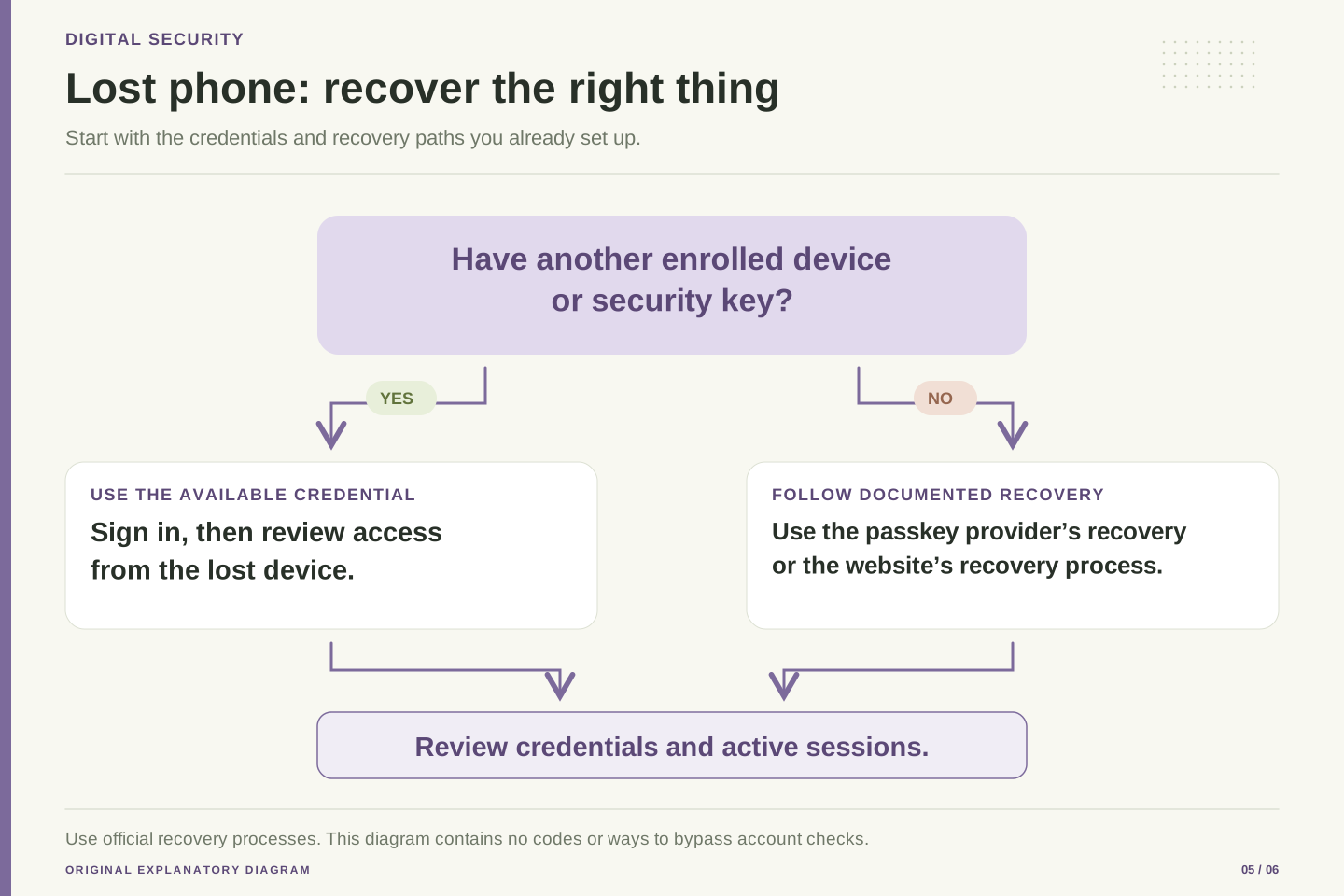
If a device disappears, start from a trusted device and the service’s known account-security page. Use an already enrolled backup credential if you have one. Otherwise, follow the provider’s or website’s official recovery process. Avoid people or messages offering to bypass recovery in exchange for a code, remote access, or a payment. An urgent situation is a poor time to invent a new trust relationship.
Once you regain access, review which devices, passkeys, recovery details, and sessions should remain. Keep a short record of the changes you made and the official pages you used. Do not assume that changing one password signs out every session or removes every passkey. The controls are service-specific. If access remains uncertain, use that service’s support route and describe the specific lost device and the working access you still have.
The local unlock boundary is part of credential protection. Google’s account guidance warns against enrolling passkeys on devices outside the user’s control and describes the risk from someone able to unlock the device. Its loss guidance supports reviewing the affected account access rather than treating credential enrollment as a substitute for device security. [4]
An incident workflow should begin with a trusted access path and an inventory of what was lost. Distinguish physical device loss, provider-account compromise, and relying-party account compromise; they can overlap but are not identical incidents. Use existing enrolled authenticators or the official recovery process. Avoid adding new actors or remote-control tools merely because they promise faster recovery.
After access is restored, review the relevant credential records, trusted devices, recovery destinations, and active sessions. Record actions and timestamps without collecting authentication secrets. Confirm the documented effect of each revocation action. A credential revocation can prevent future authentications while a session may require separate termination; a provider-device removal can have another scope. The practical goal is an account state you can explain and verify, not a broad claim that one reset operation has necessarily removed every possible route.
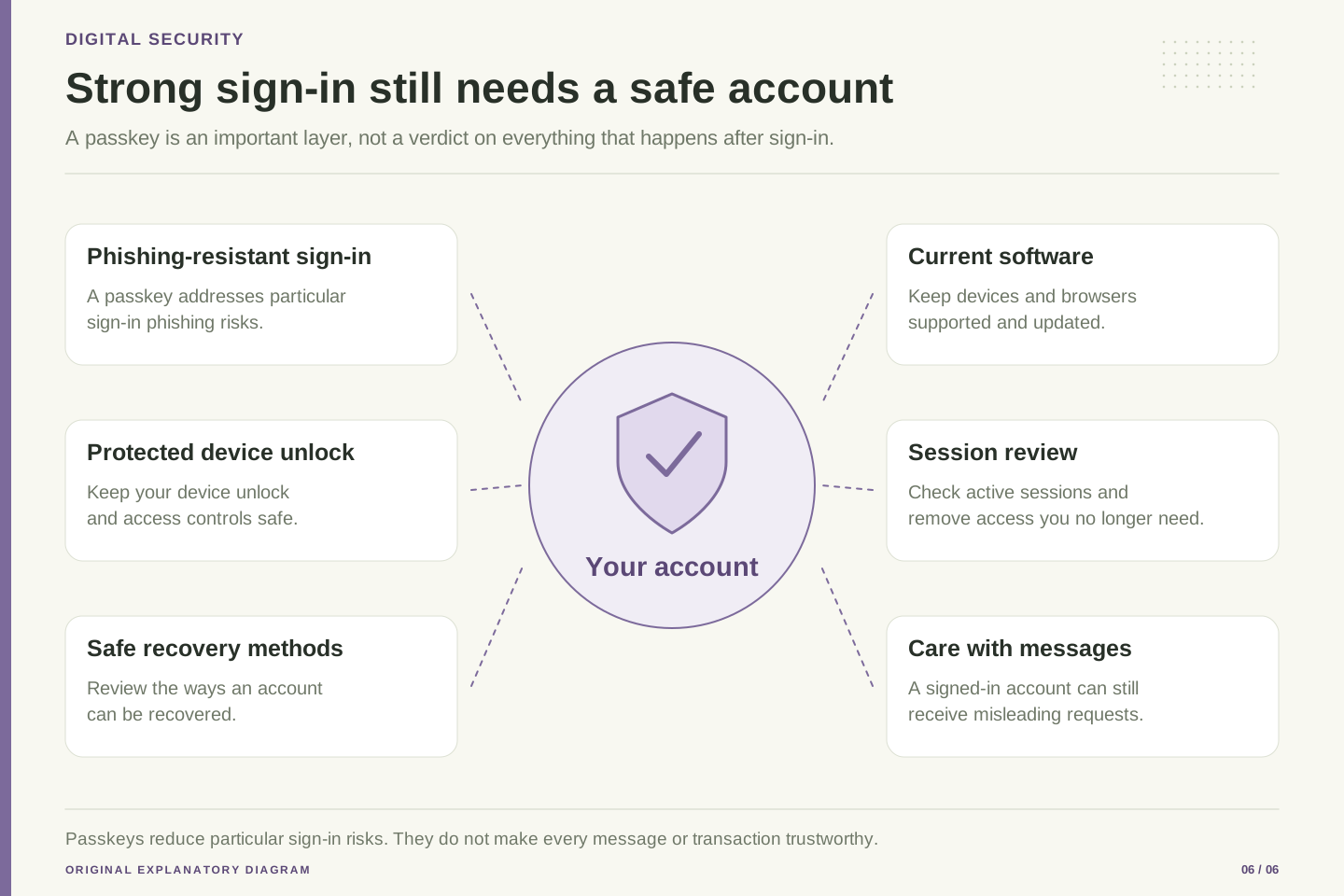
Strong sign-in does not remove every account risk
After you sign in, a website usually keeps a session so you do not have to authenticate on every page. NIST’s authentication guidance treats session management as a separate security area. Protecting the initial login and protecting the session that follows are connected jobs, but they are not the same job. [9]
This explains why updates, trusted software, careful device access, and sensible account permissions still matter. A passkey does not make a suspicious download useful or make an unexpected request for money legitimate. It also does not decide whether you meant to grant a connected application access to your information. Read those requests on their own terms, even when you signed in securely.
For a shared or borrowed computer, use the service’s supported temporary sign-in options and avoid leaving your account available for the next person. Be especially careful about saving a new credential on a device you do not control. When finishing, follow the service’s sign-out process and review account access if you are unsure what was saved. The goal is to use the convenience of passkeys while keeping clear boundaries around devices, sessions, and permissions.
NIST distinguishes authentication from the session established after authentication and discusses session-secret handling and session attacks. A phishing-resistant authentication ceremony does not by itself eliminate session theft, compromised endpoints, or authorization mistakes after login. Scope security claims to the boundary that the mechanism actually protects. [9]
For an account review, separate credential compromise, session compromise, and abusive authorized actions. Each has a different failure mechanism and may need different recovery controls. For example, terminating a session addresses an existing access context, while removing an authenticator affects future use of that credential. Reviewing connected applications addresses another set of permissions. These are conceptual distinctions; the exact controls depend on the service.
For product teams, explain those distinctions in plain language instead of presenting passkeys as a complete account-security package. Keep sensitive changes understandable, provide a clear account-access inventory, and offer documented revocation and recovery. For individual users, the corresponding habits are straightforward: maintain device updates, install software carefully, understand access requests, and periodically review important accounts. None of this negates the value of passkeys. It keeps a strong authentication improvement within an honest description of the wider system.
Make a small plan you can actually maintain
Begin with one account you understand. Read its official passkey and recovery instructions, choose where the credential will be stored, and add it from a trusted device. Give it a recognizable name if the service allows that. Then verify a fresh sign-in without destroying your existing working access. This is a proposed rollout method, not a report of a test on your account.
Next, decide how you would recover from two different problems: losing the device and losing access to the credential provider. Record the official support links and the backup options you have actually enabled. Keep secret recovery material separate from ordinary notes and follow the service’s storage guidance. A note saying backup exists is not enough if you have never established what the backup requires.
Finally, extend the method to your most important accounts at a pace you can manage. Review the plan when changing phones, computers, email addresses, or providers. Passkeys can make everyday sign-in easier and reduce exposure to password phishing, but the most dependable arrangement is one whose recovery steps you understand. A small verified plan will serve you better than a large collection of new credentials with no clear route back into the accounts.
A manageable rollout has four outputs: an authenticator inventory, verified fresh-login behavior, a documented recovery route, and an understood revocation process. These outputs are proposed acceptance criteria for personal or small-team adoption. They are not evidence that any particular provider has passed an independent audit or that an individual account is already secure.
Pilot the process on a service whose recovery documentation is clear. Record provider and relying-party dependencies, enroll the intended credential, verify a fresh authentication, and establish supported backup access. Review legacy methods deliberately. Keep identifiers and procedural notes distinct from secrets; ordinary project notes should never become a collection of device PINs or recovery codes. If a recovery assumption cannot be verified safely, mark it as unresolved rather than presenting it as protection.
After the pilot, repeat the process for higher-value accounts and revisit it after material changes. Device replacement, provider migration, and recovery-address changes are natural review points. The outcome should be explainable in a few sentences: where the credential is available, how it is locally protected, how legitimate access is recovered, and how unwanted access is removed. That level of clarity makes the security improvement durable and prevents a convenient first login from being mistaken for a finished account-lifecycle plan.
Sources & further reading
Explore the references behind this guide. External pages may change after our review.
- Passkeys: overview, types, and common questionsFIDO Alliance · Accessed 6 Nov 2026
- Web Authentication: An API for accessing Public Key Credentials — Level 3World Wide Web Consortium · Accessed 6 Nov 2026
- FIDO specifications overviewFIDO Alliance · Accessed 6 Nov 2026
- Sign in with a passkey instead of a passwordGoogle Account Help · Accessed 6 Nov 2026
- Passkeys for a simpler and more secure sign-inGoogle for Developers · Accessed 6 Nov 2026
- About passkeys on GitHubGitHub Docs · Accessed 6 Nov 2026
- Manage passkeys in ChromeGoogle Chrome Help · Accessed 6 Nov 2026
- Manage your Google Password Manager PINGoogle Chrome Help · Accessed 6 Nov 2026
- Digital Identity Guidelines: Authentication and Authenticator ManagementNational Institute of Standards and Technology · Accessed 6 Nov 2026
Article updated 6 Nov 2026.
Found something we should revisit?
Good explanations get better with thoughtful feedback.