What you’ll take away
- Choose accuracy and timing separately; background access does not automatically upgrade approximate location.
- Precise access permits more detailed estimates but does not guarantee a perfect location fix.
- An ongoing, authorized location task may continue after the app leaves the screen under documented platform conditions.
- Read the options offered by the actual app and OS version; Android and iPhone flows are not identical.
- Review provider data practices separately from the phone permission, and revisit access when the feature or your needs change.
Begin with the feature that is asking
A weather app, a navigation feature and an arrival reminder may all ask for location, but they do not need it for the same job. Imagine choosing a city for a forecast, following a route as you walk and asking for a reminder when you reach a place later. Those are three hypothetical tasks, not descriptions of a particular app. Before choosing an option in the permission prompt, identify which task you actually want. Both Android and Apple tell developers to request location when a person engages with the feature that needs it [2][6].
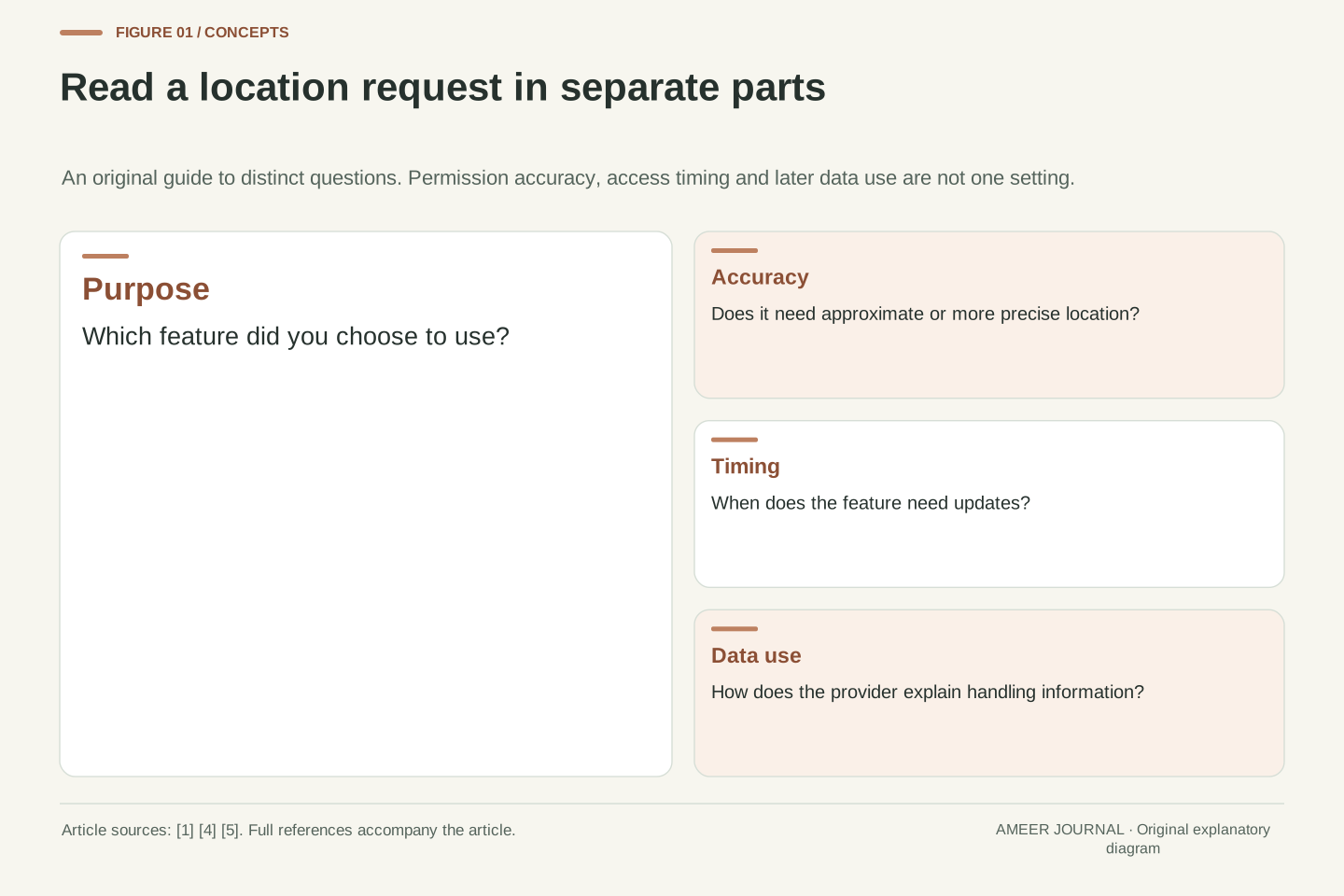
Then separate two questions: how detailed does the location need to be, and when should the app be allowed to receive it? Android explicitly distinguishes accuracy from foreground or background access [1]. Apple's controls also separate Precise Location from the app's access options [4]. A third question comes afterward: how will the provider use information once it receives it? A permission prompt cannot answer all three questions with one reassuring word. Reading them separately gives you a clearer decision than choosing the broadest permission simply to make the prompt disappear.
Location authorization is a feature-design decision before it is a permission identifier. Google's Android documentation separates the category of access, foreground or background, from its accuracy, precise or approximate [1]. Apple exposes related choices through app authorization and Precise Location controls [4]. These dimensions constrain different aspects of access. They should not be collapsed into a single location-enabled flag in either a user's explanation or an application's design model.
Start with a concrete feature contract. An original audit might record the purpose, spatial detail needed, execution context and fallback for each feature. A manually selected forecast city, active navigation and an unattended arrival reminder produce different contracts even if they belong to one hypothetical app. Android and Apple both recommend placing the authorization request in the context of the relevant feature [2][6]. That timing gives the person a reason to connect the request with an intended result. It also helps the developer identify whether a broad application-wide request is standing in for several narrower decisions that deserve separate explanations.
An app permission is one part of the control
Per-app permissions say which apps may use the protected location information. They sit alongside device-level services and other settings. On an iPhone, Apple lets you review app and system-service access through Location Services. Turning Location Services off prevents apps from obtaining location through that service in either the foreground or background [5]. Turning one app's permission off is a more specific choice. It is useful to identify which control you changed when explaining why a feature stopped working.
Keep the information source in mind as well. Apple explains that Location Services can use available GPS, Bluetooth, Wi-Fi and cellular information to estimate position [4]. It is not simply a switch for a single sensor. Now consider an unrelated, hypothetical action: you type a city into an app's search box. That app has the city you supplied, regardless of whether you gave it access to the phone's location service. This example is a logical distinction, not a claim about hidden collection. It shows why a review of location-service access and a review of information you choose to provide are separate jobs.
The per-app grant and availability of the underlying service are separate inputs to a location feature. Apple's privacy guidance distinguishes individual app and system-service controls from the overall Location Services setting, and states that apps cannot use Location Services location in the foreground or background when that service is off [5]. This is a statement about that access path. It should not be expanded into a claim that every possible source of place information disappears from the application or its provider.
The service itself can derive estimates from several available technologies, including GPS, Bluetooth, crowd-sourced Wi-Fi hotspots and cellular towers [4]. A useful design description therefore identifies the protected service and the data it supplies rather than referring vaguely to GPS permission. Separately, consider the hypothetical case of an app accepting a manually entered city. That input has its own data flow; disabling location-service access does not undo the act of entering it. Keeping these paths distinct improves both troubleshooting and privacy explanations. It also prevents an interface from presenting one permission toggle as a complete description of everything an organization knows about a user's location-related choices.
Precise describes access, not a perfect position
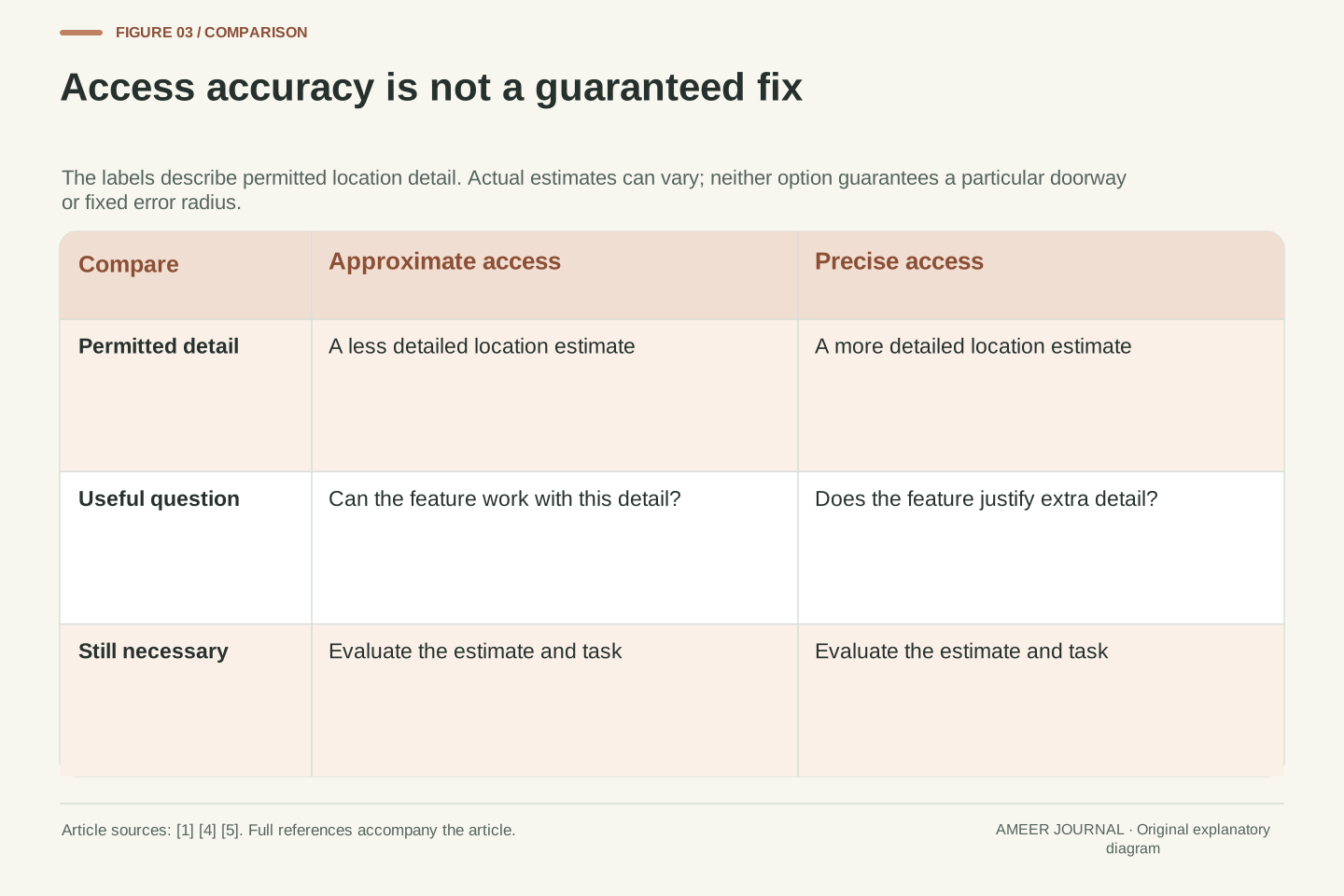
Approximate access gives an app a less detailed estimate. Precise access permits a more detailed estimate, but the result remains an estimate. Android describes precise location as being as accurate as possible, with actual accuracy varying [1]. Apple's Maps explanation similarly describes an uncertainty circle around the location marker when the position cannot be determined precisely [5]. A precise permission is therefore not a promise that the marker will identify the correct doorway or remain equally accurate in every setting.
On Android 12 and later, a person can choose approximate access even when an app requests precise access [2]. On iOS 14 and later, the Precise Location setting lets a person share an approximate location with an app instead [4]. The right question is what the chosen feature can do with that level of detail. A hypothetical city forecast may work well with a selected city; a feature that must distinguish two nearby streets has a different need. These examples describe requirements to examine, not a guarantee that every app implements a suitable fallback. Check its explanation and the actual result.
Permission accuracy sets the detail the app is authorized to receive; it does not eliminate measurement uncertainty. Android distinguishes coarse and fine location access and describes the precise result as an estimate whose accuracy varies [1]. Apple's explanation of the Maps uncertainty circle illustrates the same distinction between permission and a particular location fix [5]. Avoid turning either a permission name or a documentation example into a universal radius, a guaranteed error bound or proof that the current estimate is suitable for a specific action.
Android 12 and later allow the user to grant approximate location even when the app requests ACCESS_FINE_LOCATION. The runtime guidance explains requesting ACCESS_COARSE_LOCATION together with ACCESS_FINE_LOCATION when fine access is needed, and handling the approximate result [2]. Apple's user-facing Precise Location control has been available since iOS 14 [4]. A feature should evaluate whether its actual purpose tolerates the permitted detail. In the hypothetical forecast-versus-nearby-streets comparison, the decision concerns required spatial distinction, not the label of the app category. A well-defined requirement is more useful than assuming that every feature becomes better merely because its grant is more precise.
While using can include an ongoing task
While using sounds simple, but it does not always mean that updates stop as soon as you leave the app's main screen. Android counts an app using a foreground service as foreground location use; that service shows a persistent notification and can retain access after the user goes Home or turns off the display [1]. Apple documents that an iOS app with When In Use authorization can continue active location updates in the background when it is configured to do so [6]. The permission label needs to be understood alongside the activity you started.
For example, imagine starting a location-based task and then putting the phone in your pocket. Continued updates may be part of that task rather than evidence that the permission has been ignored. Look for the app's activity controls and the operating system's location indication, then review whether you still want the task running [1][5]. Apple's Always authorization can permit some additional background behavior, including automatic launching for certain location updates, but it is not a promise of continuous observation in every circumstance [6]. Accuracy and timing remain separate: a task continuing later does not automatically gain more detailed location.
Foreground authorization is not synonymous with a visible activity at every instant. Android's location guidance includes a foreground service in the foreground-access category. Such a service raises user awareness through a persistent notification and can retain location access while the app is otherwise in the background [1]. This classification explains an important user-facing observation without granting a general exemption from the operating system's other requirements.
On iOS, Apple documents that When In Use authorization can support continued background operation while configured location services are active. If the app is terminated or is not running, that authorization does not cause the system to launch it for new location updates. Always authorization permits automatic launch for some services, including significant location changes, visits and region monitoring, rather than for every conceivable update [6]. These are authorization and delivery distinctions, not a guarantee of continuous execution. Explain the intended active task and its visible indications to users, and avoid the inaccurate equation that background execution always requires an Always grant. The platform, service and activity state all matter to the interpretation.
Android separates accuracy from the background request
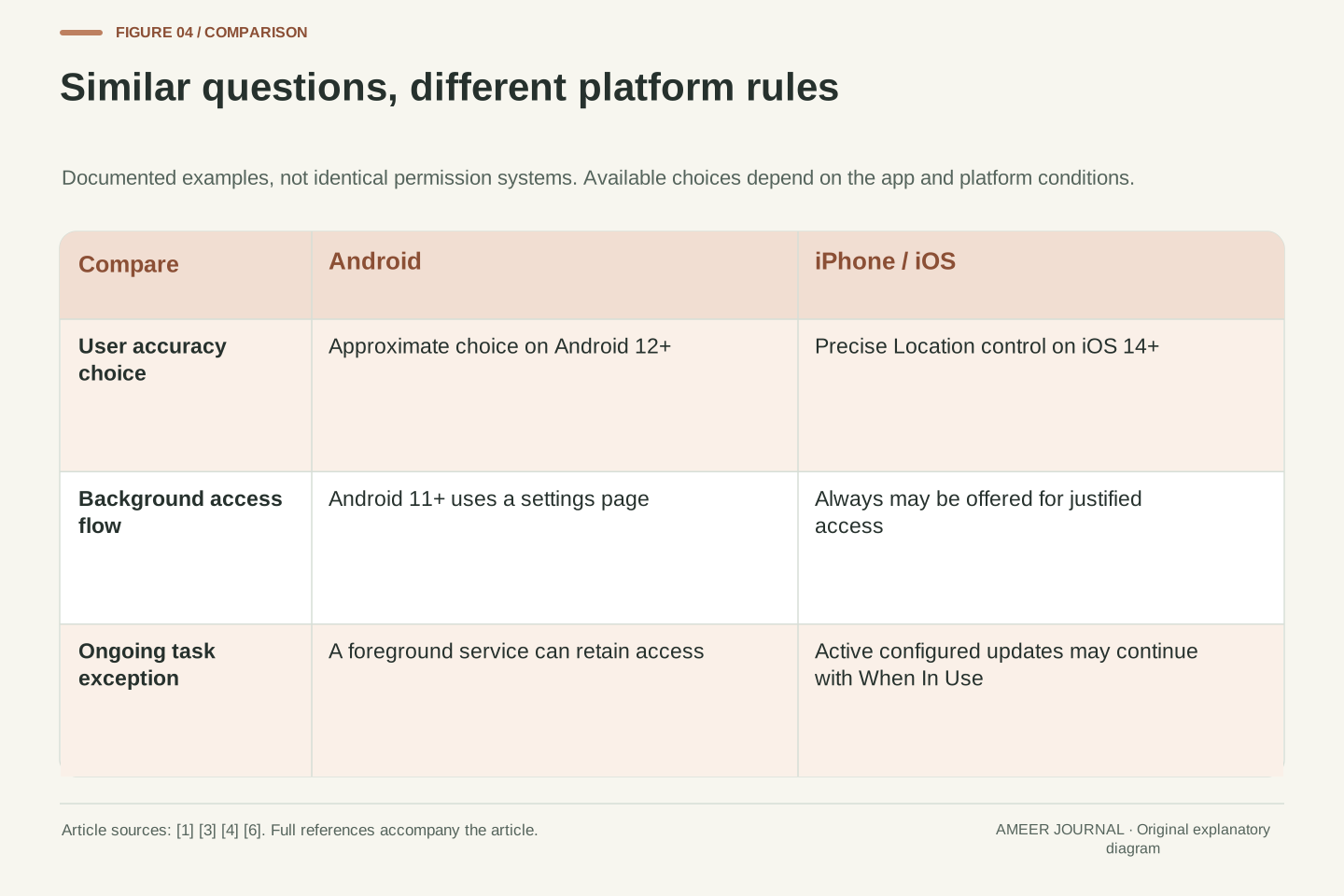
Android's background-access flow has changed across versions. The official documentation describes an Allow all the time option in the location request on Android 10. On Android 11 and later, background access is enabled through a settings page instead; the precise request flow also depends on the app's target software version [3]. A tutorial showing an older prompt may therefore differ from the one on your phone. Use the explanation attached to the actual feature and review the current setting, rather than searching for a button that your version no longer shows in that place.
An approximate choice still matters if background access is granted. Google states that an app given only approximate location in the foreground also receives only approximate location in the background [3]. The two controls do different work. A hypothetical reminder that needs to check a place later should explain that timing requirement without treating it as permission to upgrade accuracy as well. Android's guidance recommends asking for foreground access first and requesting background access when a relevant feature is explored [2]. That gives you a chance to decide whether you want the additional behavior at all.
On Android 10 and later, an application requesting background location declares ACCESS_BACKGROUND_LOCATION in addition to the applicable location permissions [1]. The documented user flow differs by OS version: Android 10 can offer Allow all the time in the system dialog, while Android 11 and later use a settings page. The target SDK also affects how the application guides the user through that flow [3]. A description that omits these qualifiers can be correct for one test configuration and misleading for another.
Accuracy remains a separate constraint. Granting background access does not promote an approximate grant to precise access; Google's background-permission documentation explicitly preserves the user's chosen accuracy [3]. The runtime guidance recommends incremental requests, starting with foreground access and requesting background access when the user engages with a feature that requires it [2]. For a feature audit, record both the required execution category and the minimum useful accuracy. If only one feature requires background behavior, its requirement should not be presented as a reason that every part of the app needs that grant. Google also says a user who declines background access should be able to continue using the app [3].
On iPhone, inspect the options the app actually offers
Apple's current support instructions direct you to Settings, then Privacy & Security, then Location Services, where you can select an app. Depending on the app, available choices can include Never, Ask Next Time Or When I Share, While Using the App and Always. Apple notes that some apps offer only two options [4]. Read the explanation shown for that app instead of assuming every app must display the same menu. If you choose an option for occasional use, check what happens when you next use the relevant feature rather than assuming it grants access forever.
Precise Location is a separate setting on supported iOS versions [4]. You can therefore review the detail an app receives separately from its authorization to receive updates during use or permitted background behavior. Apple also describes Allow Once as access for a session, with another request when a later session needs location again [5]. These choices are related to Android's accuracy and timing questions, but their labels and operating rules are not identical. A cross-platform guide should help you recognize the questions while keeping the actual platform's behavior attached to each answer.
The iPhone settings path documented by Apple exposes app-specific authorization choices under Privacy & Security, Location Services. Its support page lists Never, Ask Next Time Or When I Share, While Using the App and Always, while noting that an individual app may offer fewer options [4]. Do not treat the complete list as an invariant interface contract for every app. Apple's privacy guidance additionally describes Allow Once as a session-limited choice on the supported system versions it names [5].
The Precise Location control, introduced with iOS 14, is distinct from When In Use and Always authorization [4][6]. A cross-platform implementation can use a common conceptual audit of accuracy and execution context, but should map those concepts to the actual platform APIs and current grant state. Android's ACCESS_BACKGROUND_LOCATION request and Apple's Always authorization are not interchangeable names for one identical mechanism. For example, Apple's When In Use behavior includes the active-background-update case discussed earlier [6]. A helpful interface states the intended feature behavior in ordinary language and follows the platform's authorization flow, rather than promising users a simplified model that omits those differences.
A hypothetical three-feature audit
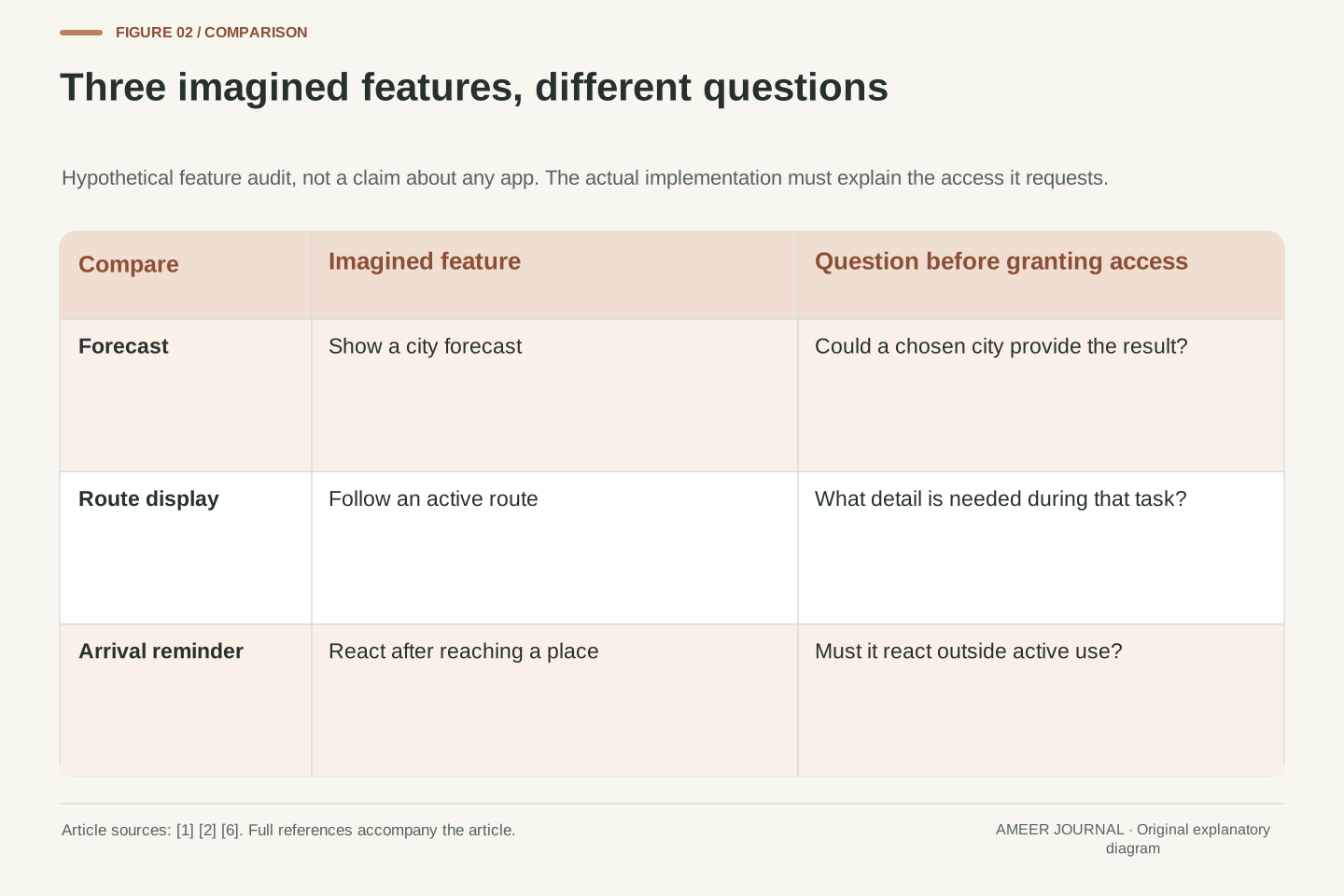
Imagine an app with three optional features: a city forecast, a route display and an arrival reminder. For the forecast, ask whether choosing the city yourself provides the result you want. For the route display, ask whether the feature needs your current position while the route is active. For the reminder, ask whether it must notice arrival when you are no longer actively using that feature. These are original planning questions, not claims about an existing app. They apply the source documents' distinction between accuracy, access category and a request made in context [1][2][6].
Write one sentence for each feature explaining the access it needs and a second explaining what remains possible if you decline. The forecast might offer a saved city; the route display might offer a manually chosen starting point; the reminder might remain off until you enable the behavior it needs. Those are possible design choices, not guaranteed features of every product. The exercise makes a broad request easier to challenge constructively. Instead of asking whether the entire app should have everything, you can ask which result depends on which specific access and whether you actually want that result.
Consider a hypothetical product with forecast, navigation and arrival-reminder features. Define four fields for each: purpose, required spatial detail, required execution context and behavior after denial. This is an original design exercise derived from the platforms' separation of access category and accuracy, together with their guidance to request permission in context [1][2][6]. It is not a compatibility matrix for a particular SDK or a claim that one implementation strategy suits every platform.
A forecast could accept a selected city without requesting current device location. A route feature could request access when the user starts the route, while an arrival-reminder implementation may need a separately explained ability to react later. For each row, state the fallback explicitly: manual selection, reduced functionality or leaving that optional feature disabled. Then compare the implemented behavior with the explanation. If several features share one broad request, identify which requirement justifies each part of it. This audit exposes unnecessary coupling, such as making an unrelated forecast unusable because the person declined background behavior for an optional reminder. Google's guidance specifically supports continued app use after background access is declined [3].
Treat changed permission as a normal state
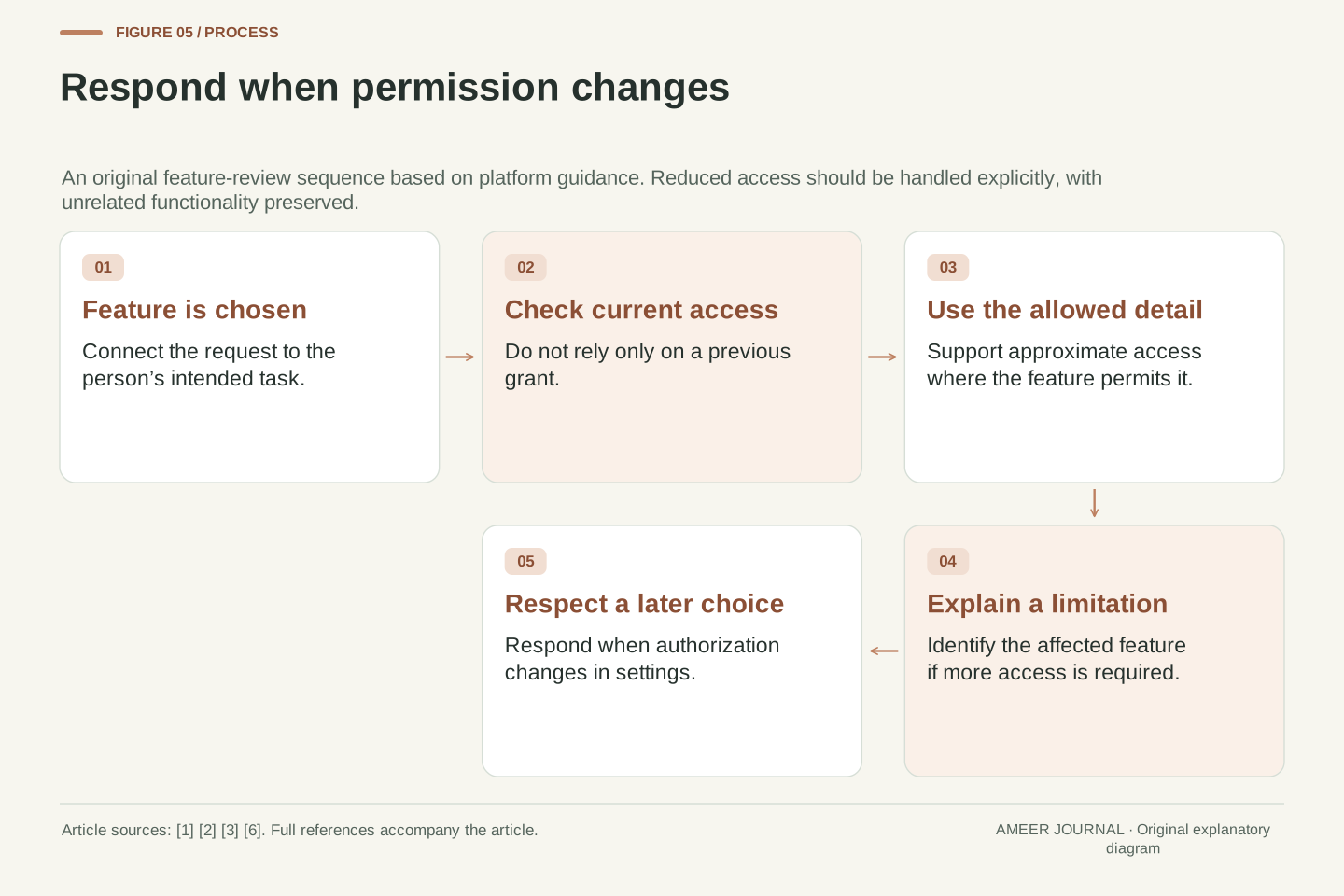
You can revisit a choice after granting it. Android 12 and later let you change an app's preferred location accuracy in system settings, even when the app targets an older Android version [2]. Apple also allows you to update location preferences in Settings [5]. A permission should therefore be something an app checks and responds to, rather than a decision it assumes will stay unchanged for the lifetime of your phone. Review it when your use of an app changes or when a new feature asks for broader access.
A reasonable explanation tells you what a changed setting affects. If a feature needs a level of access that you have declined, it should identify that feature and explain the limitation. Android tells developers to support approximate access and to let people continue using the app after declining background access [1][3]. Those are design expectations, not a guarantee about every app you install. If an app responds by asking repeatedly for more than its explanation justifies, you can leave the optional feature off and reconsider whether it is useful to you. You do not need to broaden a grant merely to silence a prompt.
Authorization is mutable application state. Android 12 and later expose the preferred accuracy setting even for apps targeting earlier SDK versions [2]. Apple's Core Location documentation instructs applications to inspect authorization and respond when the person changes it in system settings; a location-manager delegate receives status changes and receives current status at other relevant lifecycle points [6]. A remembered success from first launch is therefore insufficient evidence that a later feature invocation has the same authorization.
Design the reduced-access paths deliberately. Google's permission overview says the app should still work with approximate location, and its background guidance says users who decline background access should be able to continue using the app [1][3]. If an individual feature cannot provide a valid result under the current grant, explain that limitation and preserve unrelated functionality. Request additional access when the user chooses the relevant feature, using the platform's flow, rather than converting every launch into a repeated request [2][6]. This is a concrete quality criterion for the hypothetical audit: evaluate denial, approximate access and changed authorization as intended states, not as exceptional cases to be hidden from the user.
Permission does not describe the provider’s data practices
Granting access answers a question about what the app may obtain through the protected service. It does not, by itself, explain how the provider uses the information afterward. Apple's privacy guidance tells people to review third-party terms, privacy policies and practices when sharing location or other data [5]. Look for a clear explanation of the purpose, sharing and retention that apply to the feature you want. An operating-system label such as precise or while using is not a substitute for that explanation.
Consider a hypothetical app that previously received a location, and another to which you manually supplied a city. Changing a phone permission is not evidence that either provider has deleted information already received or supplied. That is a limit on what the permission screen tells you, not a claim that a particular company keeps such records. If removing existing information matters to you, inspect the provider's account and data controls separately. Approximate access is also still location-related information. Choosing it can limit detail, but it should not be described as making the interaction anonymous or proving that the app knows nothing about where you are.
Separate device authorization from subsequent data handling. Apple's guidance states that third-party apps and websites have their own terms, privacy policies and practices for information people share, and directs users to review those practices [5]. The OS permission state constrains an access path; it does not encode a provider's retention schedule, sharing arrangements or every other input to the service. An accurate product explanation should identify those as separate questions rather than presenting a narrower grant as a complete privacy guarantee.
In an original hypothetical example, one service has previously received a location and another has received a city typed by the user. A later permission change is not, on its own, evidence of deletion of those earlier inputs. That conclusion concerns the information available from the control, not an allegation about any named provider. Check the relevant account or deletion mechanism separately when that is the intended action. Likewise, approximate location remains an estimate of place [1]; reducing detail is not equivalent to removing all place information. These distinctions keep a useful permission feature from being oversold as anonymity, retrospective erasure or a complete data-governance system.
Make your next permission decision easier
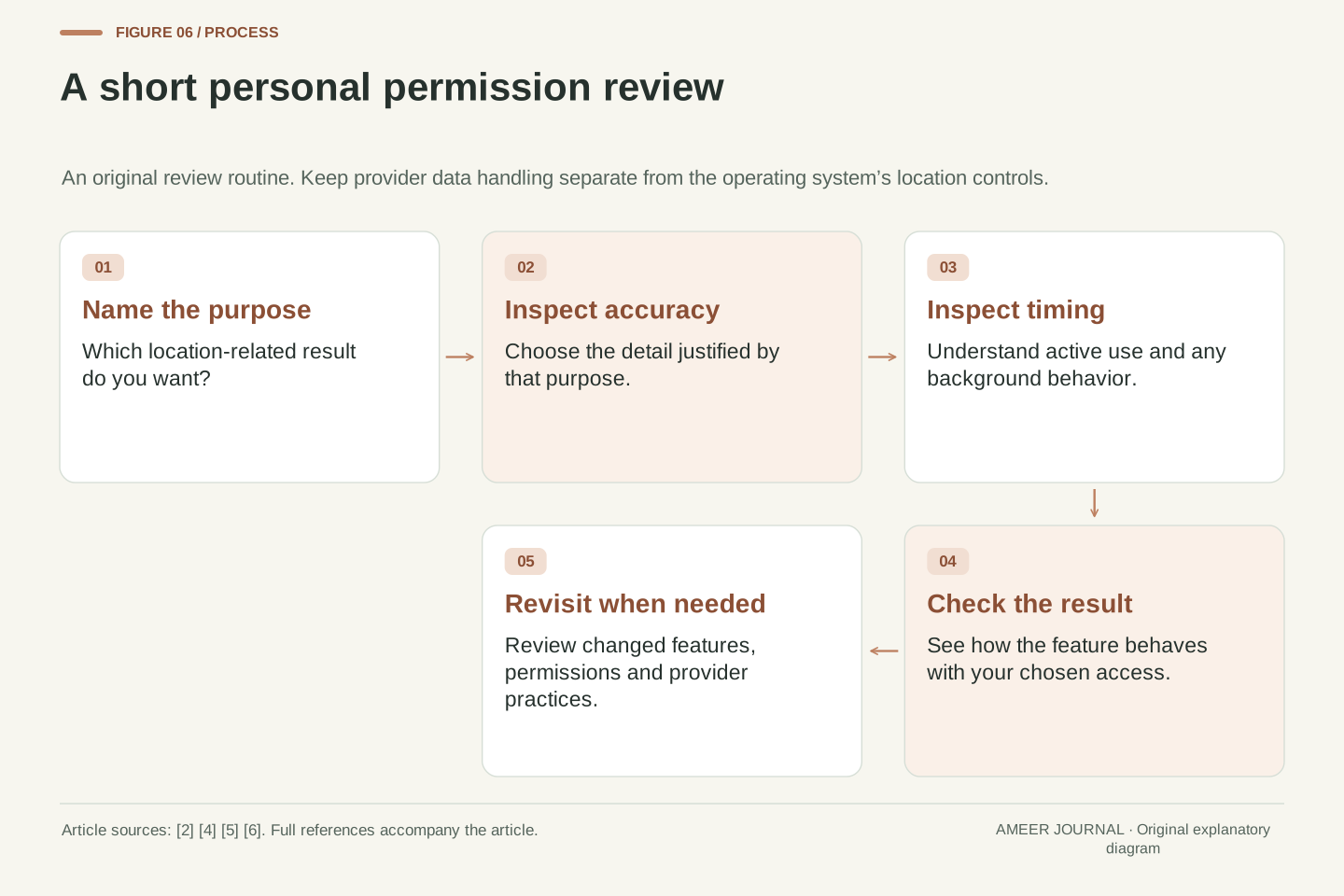
Choose an app you use and identify one location-related feature inside it. Read the reason for the request, then check the current options in your phone's settings. Decide what detail the feature needs and whether you want an active task, occasional access or a separately justified background behavior. Try the narrower choice when it can meet your purpose, and observe the actual feature. If something is missing, read its explanation before broadening access. This routine follows the platforms' emphasis on purpose, context and the ability to revisit a choice [2][4][6].
Keep a short personal note if the app's behavior is difficult to remember: the feature, the chosen setting and the result you expected. Do not include private coordinates or account details in a public support post. If you are building the app, the same note becomes a small acceptance check: does the request match the feature, does reduced access have a sensible outcome, and does a changed grant receive a clear response? A well-explained permission should leave the person with a usable choice and a clear expectation. That is more valuable than making a broad prompt easy to accept without understanding it.
Use a compact feature review before requesting or changing authorization: identify the purpose, determine the necessary detail and execution context, inspect the current grant, and evaluate the outcome when access is reduced. Android's contextual-request guidance and Apple's authorization guidance both make the feature's immediate purpose central to the request [2][6]. Preserve the platform-specific conditions rather than translating all choices into one generic background-on state.
For a developer, turn that review into observable acceptance cases: a first request at the relevant feature, approximate access where supported, a declined background request, and a grant changed later in settings. Record the OS version and app configuration that produced each result, since the documented request flows depend on those conditions [2][3]. For a reader choosing settings, retain only the simpler record of feature, choice and expected behavior. Neither record proves how a remote provider handles data after receipt; that remains a separate policy and account-control question [5]. The purpose is to make access understandable, limited to a justified task and responsive when the person's choice changes.
Sources & further reading
Explore the references behind this guide. External pages may change after our review.
- Request location permissions | Sensors and location | Android DevelopersGoogle Android · Accessed 6 Nov 2026
- Request location access at runtime | Sensors and location | Android DevelopersGoogle Android · Accessed 6 Nov 2026
- Request background location | Sensors and location | Android DevelopersGoogle Android · Accessed 6 Nov 2026
- Turn Location Services and GPS on or off on your iPhone, iPad, or iPod touch - Apple SupportApple · Accessed 6 Nov 2026
- About privacy and Location Services in iOS, iPadOS, and watchOS - Apple SupportApple · Accessed 6 Nov 2026
- Requesting authorization to use location servicesApple · Accessed 6 Nov 2026
Article updated 6 Nov 2026.
Found something we should revisit?
Good explanations get better with thoughtful feedback.