What you’ll take away
- An eSIM profile is installed on a secure eUICC, not copied as a portable file, so a move requires carrier provisioning for the new device [2].
- The LPA bridges the SM-DP+ and the eUICC, manages profiles, enforces privilege checks and presents the user interface [2].
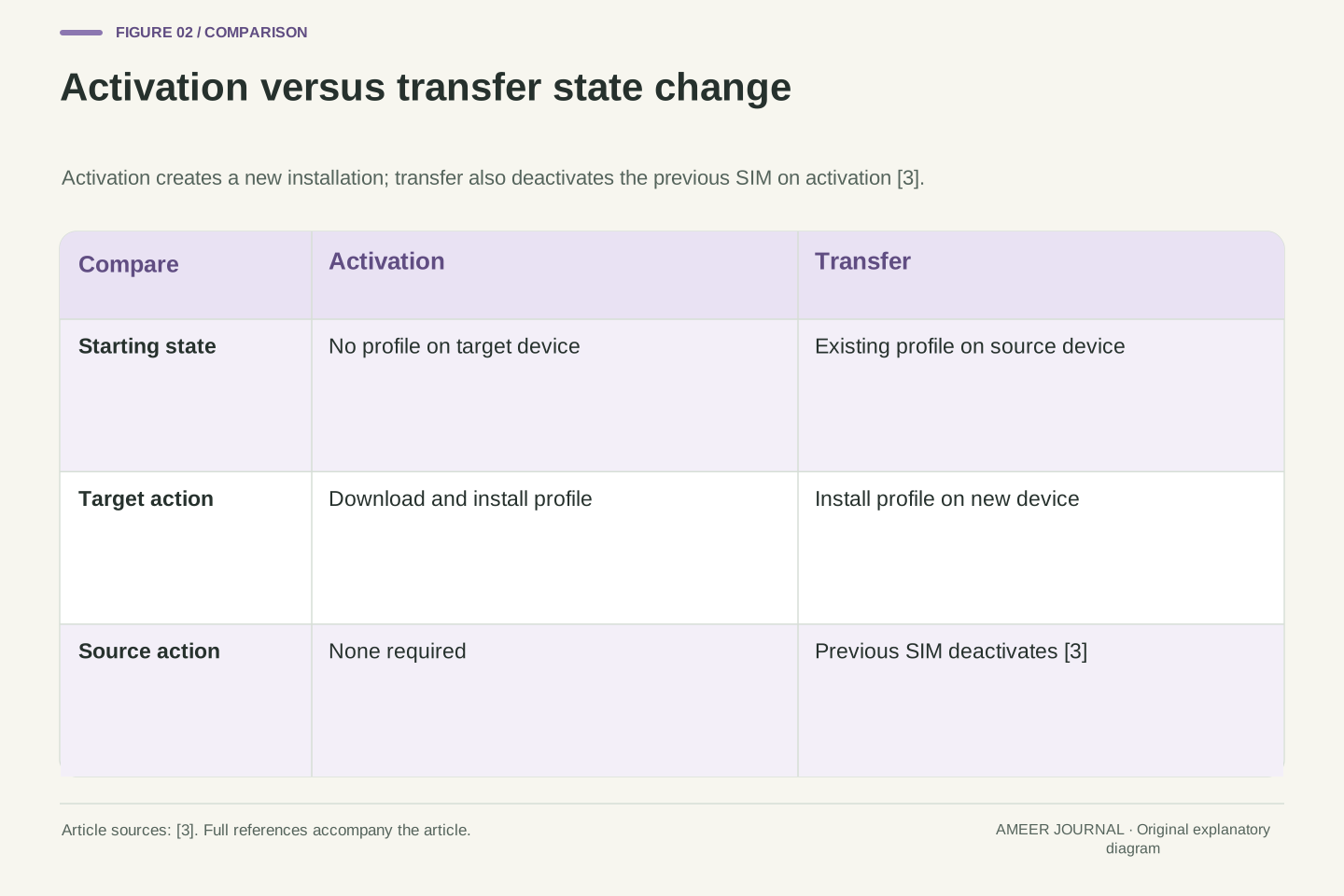
- Activation and transfer differ: transfer deactivates the previous SIM when the new plan activates [3].
- Support depends on exact model, region, operating system version, carrier method and remote SIM provisioning version alignment [1][2][3].
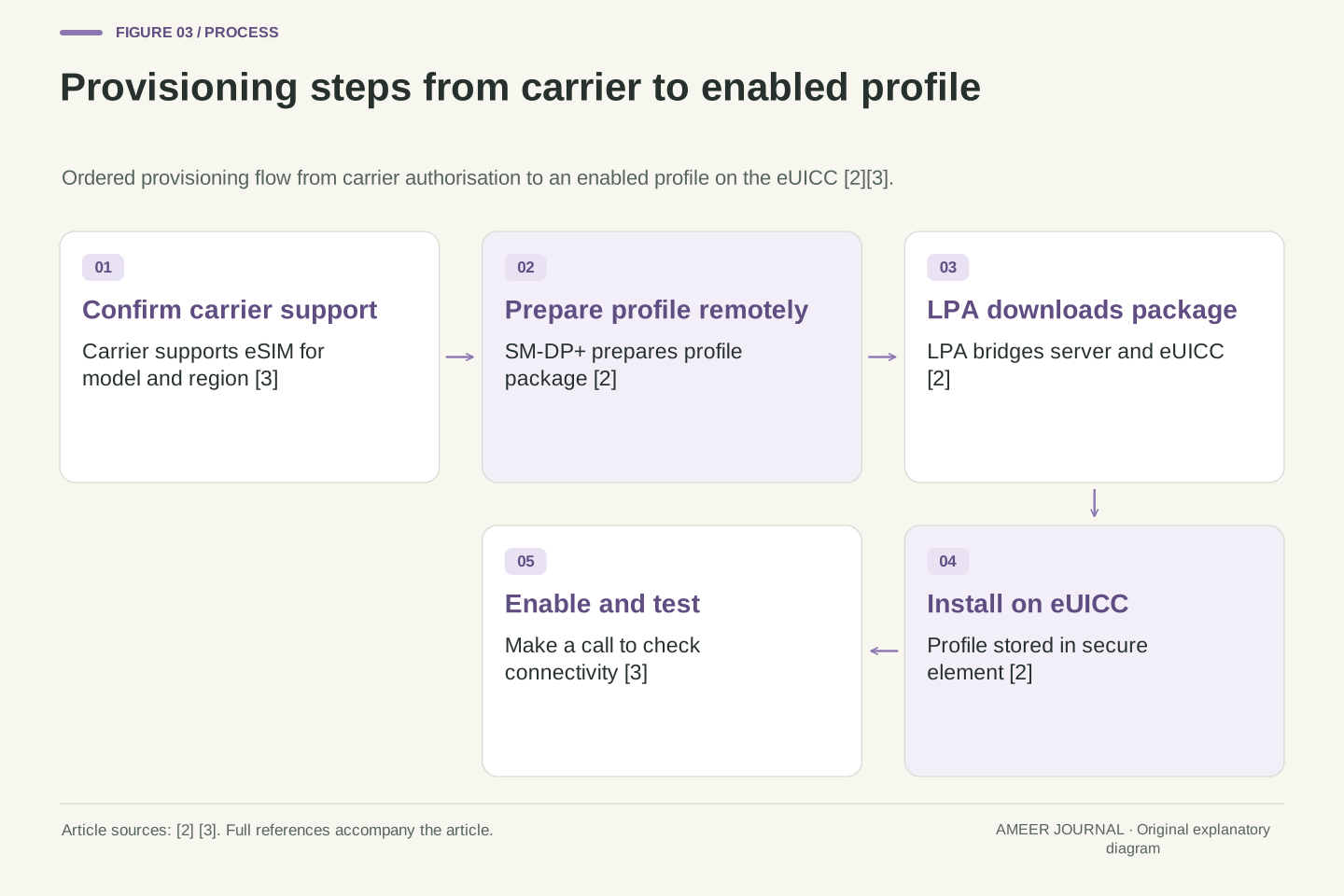
- Confirm carrier support and method, prepare the old device and connectivity, then test a call before retiring the old phone [3].
The file-copy idea misses the secure hardware
A physical SIM is a small card you can move from one phone to another, so it is natural to expect an eSIM to behave the same way. An eSIM is different because it is a digital SIM built into the device, and it lets a user download a carrier profile and activate service without a physical card [2][3]. That means the important object is not a loose file on storage, but a profile that must be delivered to and installed inside special hardware.
The hardware is called an eUICC, or embedded universal integrated circuit card, and it is the secure element inside the phone that holds subscription profiles [2]. Because the profile is bound to that secure hardware, moving service means creating or delivering a profile for the new device, not dragging the old profile across like a photo. The phone also needs software that can talk to the eUICC and manage profiles, which is where the local profile assistant, or LPA, comes in [2].
This distinction explains why a move can fail even when both phones work perfectly for other tasks. The new phone must have an eUICC, the software must be able to use it, and the carrier must be willing and able to provision a profile for it. Apple, for example, lists an iPhone XS, XS Max, XR or later, plus a carrier that supports eSIM, as basic requirements for setting up an eSIM on iPhone [3]. If any one of those pieces is missing, there is no file to copy that will fix it.
The file-copy mental model fails because an eSIM profile is not a portable data file but a subscription package installed on an embedded UICC, the eUICC, which is a secure element soldered into the device [2]. Android documentation describes eSIM technology as allowing a mobile device user to download a carrier profile and activate carrier service without a physical SIM card, under a global GSMA-driven specification for remote SIM provisioning [2]. The profile therefore has a lifecycle: it is prepared by carrier-side systems, downloaded, installed on the eUICC, enabled, and later disabled or deleted under controlled operations.
On Android, the eUICC is not accessed directly by ordinary apps. The framework provides standard APIs from Android 9 onward for accessing eSIM and managing subscription profiles, and third parties can build carrier apps and LPAs for compatible devices [2]. The LPA is a standalone system application included in the Android image build, and profile management is generally performed by the LPA because it bridges the SM-DP+, the remote service that prepares, stores and sends profile packages to the device, and the eUICC chip [2]. This separation of remote preparation, local assistance and secure storage is the core reason a transfer is a provisioning transaction.
Consequently, compatibility is a conjunction of conditions rather than a single property. The device must expose eSIM support, the LPA and operating system must implement a compatible remote SIM provisioning version, the modem must recognise an enabled profile as a valid SIM, and the carrier must authorise provisioning for that device [2][3]. GSMA maintains separate architecture and technical specification families for consumer and IoT eSIM, with versioned and dated releases, which reinforces that interoperability depends on aligned specification versions rather than on a generic eSIM label [1].
Four roles that must agree before service moves
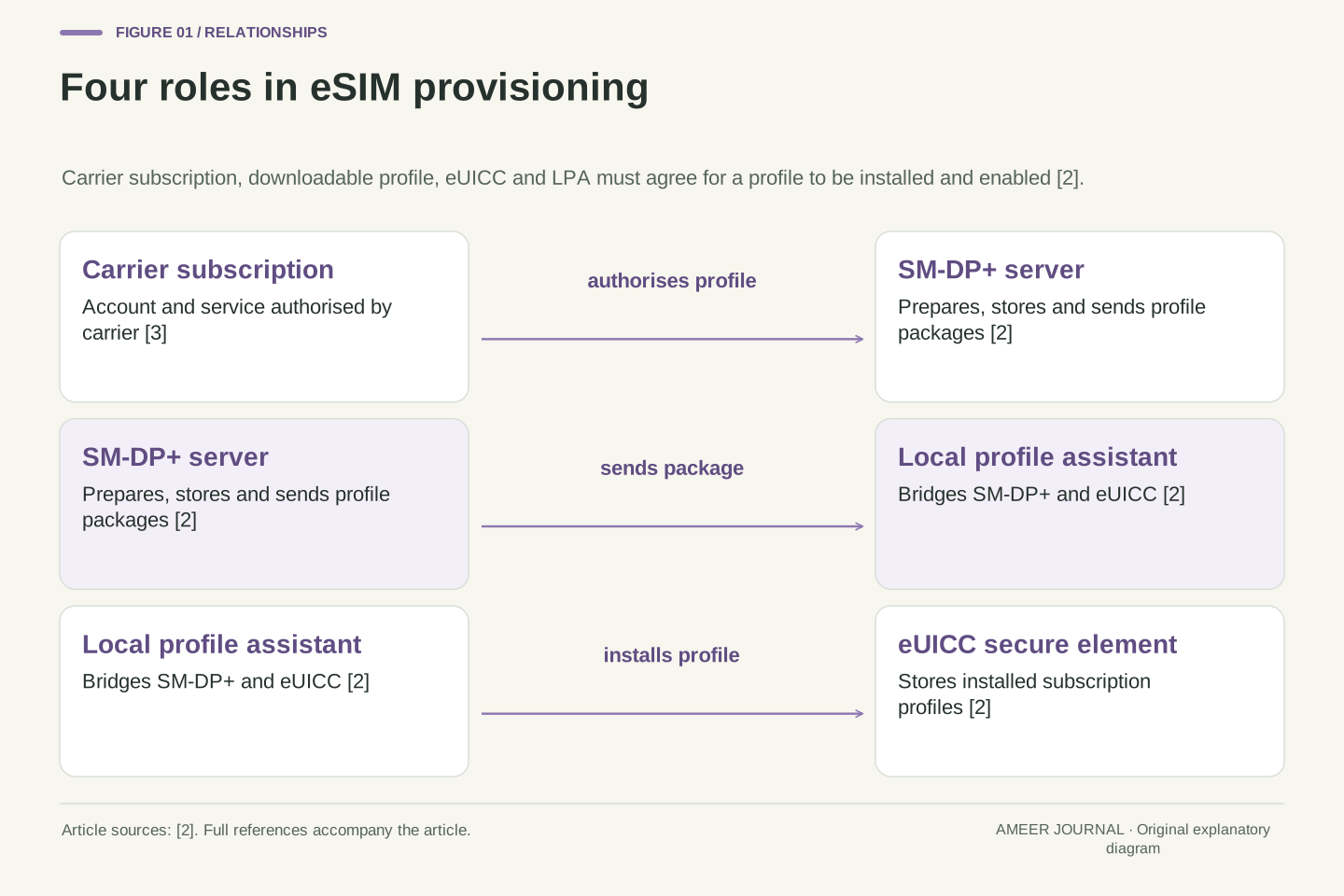
Think of four roles that must agree. First is the carrier subscription itself, which is the account and service the profile represents. Second is the downloadable profile package, which carries the information needed to create that subscription on a device. Third is the eUICC, the secure hardware that will store the profile. Fourth is the LPA, the local assistant on the phone that coordinates download, installation and management [2].
The LPA is the bridge between the phone and the carrier side. Android describes it as a bridge between the SM-DP+, which prepares, stores and sends profile packages, and the eUICC chip [2]. In plain terms, the SM-DP+ is the remote service that gets the profile ready, the LPA on the phone asks for it and hands it to the secure chip, and the chip stores it. A user may see only a prompt or a settings screen, but those four roles are working behind it.
If one role is absent, the move stops. A phone without eSIM support has no eUICC to receive a profile. A phone with an eUICC but no working LPA cannot manage profiles properly. A carrier that does not support eSIM cannot prepare a profile. Apple states the need for both a supported iPhone model and a wireless carrier or worldwide service provider that supports eSIM [3]. That simple checklist already shows why support varies from person to person.
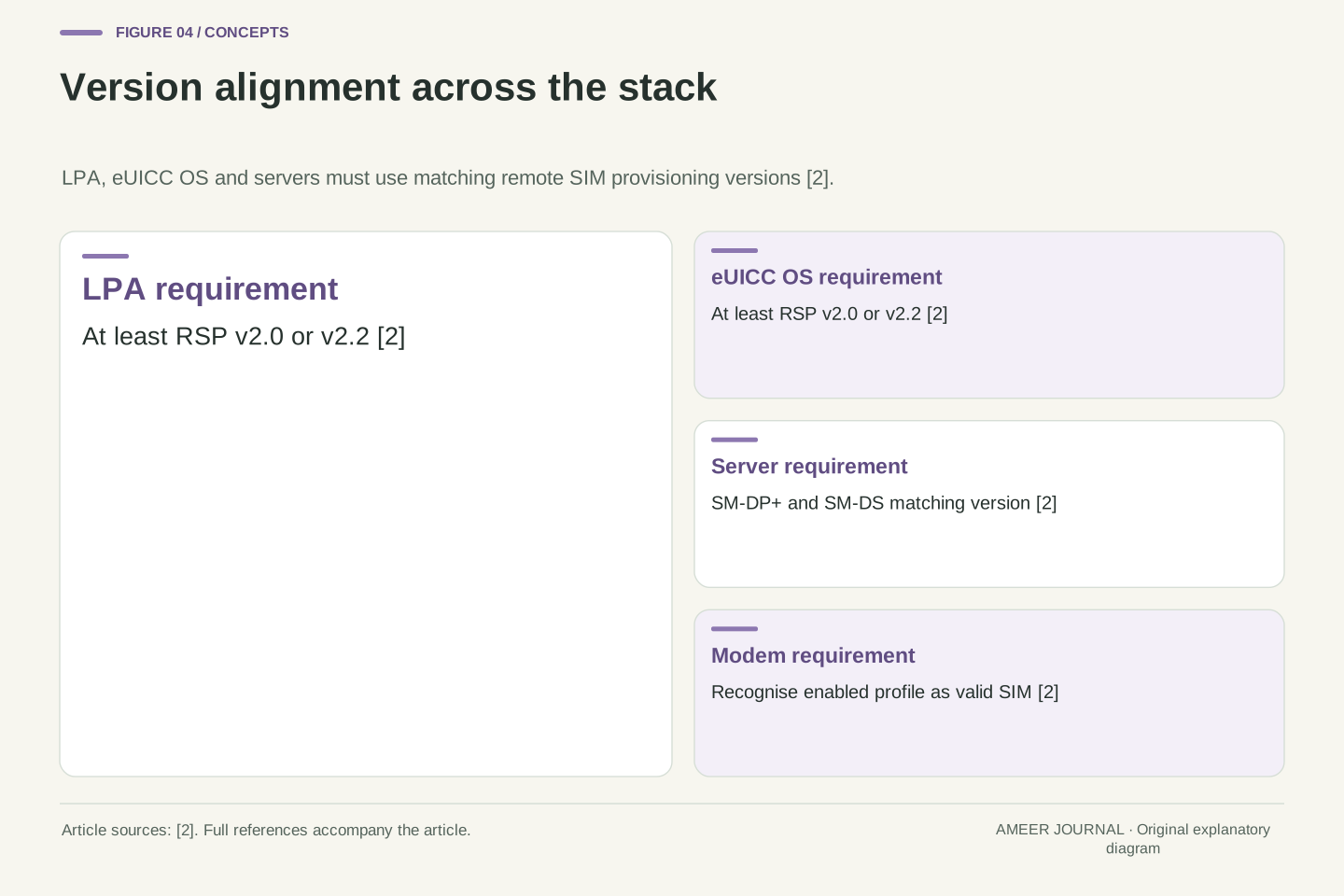
The provisioning chain can be decomposed into the carrier subscription, the downloadable profile, the eUICC and the LPA, with the SM-DP+ and SM-DS as remote provisioning servers [2]. The SM-DP+ prepares, stores and sends profile packages to the device, while the LPA acts as the local bridge between that server and the eUICC [2]. Android requires the LPA and the eSIM operating system on the eUICC to support at least GSMA remote SIM provisioning version 2.0 or 2.2, and the SM-DP+ and SM-DS servers should use a matching version [2]. Version alignment is therefore a precondition, not an implementation detail.
The LPA is a standalone system application that must be included in the Android image build, and it may optionally include a user interface component, called the LPA UI or LUI, that gives the end user a central place to manage embedded subscription profiles [2]. The Android framework automatically discovers and connects to the best available LPA and routes all eUICC operations through that LPA instance [2]. Carrier applications use higher-level operations such as downloadSubscription, switchToSubscription and deleteSubscription, whereas an OEM building an LPA extends EuiccService and uses EuiccCardManager functions based on GSMA remote SIM provisioning [2].
This architecture also explains privilege boundaries. EuiccCardManager is a system API that can only be called by an application with system privileges, and profile operations through it require the caller to be the LPA, enforced by the Android framework [2]. Carrier privilege is similarly controlled: Android loads certificates stored in a profile access rules file and grants permission to applications signed by those certificates to call EuiccManager APIs [2]. A move is thus an authorised transaction among mutually identified parties, not an unauthorised copy of bytes.
Activation and transfer are different operations
Activation means putting a profile onto a device for the first time, or at least for a new subscription. Transfer means moving an existing phone number or service from an old device to a new one. They can look similar on screen, but they involve different checks. Activation may need a QR code, a carrier link, a carrier app, manual details, or carrier activation sent digitally [3]. Transfer may need the old device nearby, both devices signed in, and confirmation on the old phone [3].
Apple lists several activation routes that depend on carrier support, including eSIM Quick Transfer, a QR code, and transfer from an Android or other non-Apple device [3]. It also describes eSIM Carrier Activation, where a carrier that assigned an eSIM when the phone was bought, or sent one digitally after setup, prompts the user to install it [3]. Other methods include a carrier link, a carrier app, or entering eSIM information manually [3]. The variety of routes is itself evidence that there is no single universal procedure.
A transfer adds a deactivation step on the old side. When a cellular plan activates on a new iPhone through Quick Transfer, it deactivates the previous SIM [3]. That is a deliberate handover, not a copy that leaves two active copies. If the old profile stayed active, the network would have to decide which device represents the subscription. Provisioning avoids that ambiguity by making the new installation the authorised one and retiring the old one.
Activation and transfer differ in their state transitions. Activation creates a new profile installation on a target eUICC, whereas transfer coordinates installation on the target with deactivation of the source profile. Apple states that when the cellular plan on a new iPhone activates, it deactivates the previous SIM [3]. Android exposes the same distinction at API level through separate operations for downloading, switching to and deleting subscriptions [2]. A switch operation changes which installed profile is enabled, while a download creates a new installation, and neither is equivalent to copying profile data between eUICCs.
The activation surface is intentionally plural. Apple enumerates Quick Transfer, QR code, transfer from a non-Apple device, carrier activation, carrier link, carrier app and manual entry as alternative methods, each conditional on carrier support [3]. Android similarly allows a carrier app to download a profile directly by calling downloadSubscription or to supply an activation code to the LPA, with the LPA then downloading the profile and controlling the user interface flow [2]. These are different trust and user-experience paths to the same underlying provisioning outcome.
Error handling also differs. Android notes that downloadSubscription can fail in a user-resolvable way if profile metadata indicates a carrier confirmation code is required, and switchToSubscription can fail if the carrier app has privilege over the target profile but not over the currently enabled profile, so user permission is needed [2]. A transfer that appears to be a simple move may therefore require confirmation, privilege checks and a successful enablement step on the new device before the old profile is retired.
Why the LPA matters more than the settings screen
Most users meet the LPA only as a settings screen or a prompt, but the LPA does the real coordination. It is the local assistant that talks to the secure chip and to the carrier's remote provisioning service [2]. Without it, the phone may have eSIM hardware but no reliable way to download, enable, switch or delete profiles. That is why Android treats the LPA as a system application that must be included in the device image [2].
The LPA also protects the user from having to understand low-level details. It can present a single place to manage embedded profiles, and the Android framework routes eUICC operations through the best available LPA [2]. When a carrier app starts activation, the LPA may take over the whole flow, including the interface, so the user sees one coherent process rather than several disconnected steps [2]. If the carrier app cancels or errors, the LPA can cancel the activation flow [2].
For a person changing phones, the practical lesson is to check the whole chain, not just the brand of the new phone. Does the new phone support eSIM? Does it have a working LPA and current software? Does the carrier support the chosen method? Apple frames the requirements in exactly those terms: a supported iPhone model, a carrier that supports eSIM, and a Wi-Fi or hotspot connection in most cases [3]. A missing LPA or outdated software can be as blocking as a missing carrier feature.
The LPA is the local policy and protocol endpoint for remote SIM provisioning. It bridges the SM-DP+ and the eUICC, and Android requires it to be a standalone system application in the image build [2]. The framework discovers the best available LPA and routes all eUICC operations through that instance, which means the LPA is a mandatory intermediary rather than an optional convenience [2]. An OEM implementing an LPA must extend EuiccService, declare it with the system permission BIND_EUICC_SERVICE, and use EuiccCardManager for ES10x functions such as prepareDownload, loadBoundProfilePackage, retrieveNotificationList and resetMemory [2].
The LPA also mediates carrier privilege and user consent. Android uses profile access rules and certificates to grant EuiccManager access only to the profile owner's application [2]. When a carrier app downloads directly, the framework checks a metadata tag that encodes carrier privilege rules, and the download is rejected if the tag is absent or does not match the calling app's signature [2]. When activation uses a code supplied to the LPA, that tag check is bypassed and the LPA controls the flow, which is a different security posture for the same provisioning goal [2].
From a systems perspective, the LPA is where version compatibility, privilege enforcement, error recovery and user interface converge. The LPA and eUICC operating system must support at least remote SIM provisioning version 2.0 or 2.2, with matching server versions [2]. The modem must also recognise an enabled default profile as a valid SIM and keep SIM power active [2]. A settings screen is only the visible surface of that stack, so troubleshooting that ignores the LPA, modem and server versions will miss the actual failure point.
A concrete hypothetical example of changing phones
Consider a purely hypothetical example. Maya has an older phone with a physical SIM and buys a new eSIM-capable phone. Her carrier supports eSIM, and the new phone meets the model requirement [3]. During setup, she is offered a transfer option. In this hypothetical case, the new phone connects to Wi-Fi, the old phone is nearby and unlocked, and both devices are signed in to the same account, which are the conditions Apple lists for Quick Transfer [3]. She confirms on the old phone, waits for activation on the new phone, and the old SIM deactivates [3].
Now change one assumption. Suppose Maya's carrier does not support Quick Transfer but does support a QR code. The process changes completely: she contacts the carrier for a QR code, scans it with the camera, taps the cellular plan notification, and enters a confirmation code if asked [3]. The underlying provisioning is similar, but the user steps, the timing and the failure points are different. A person who assumes the first method will work may be stuck even though a second method would succeed.
A third hypothetical variation shows the cross-platform case. If Maya were moving from an Android phone to an iPhone, Apple says she should contact the carrier, which will transfer the number by carrier activation or by providing a QR code [3]. It also notes that, with iOS 26 or later, some carriers and select smartphone manufacturers support direct Android to iPhone and iPhone to Android eSIM transfer [3]. The word some matters: cross-platform transfer is conditional, not guaranteed, and the carrier remains the authority that makes it happen.
The following worked example is entirely hypothetical and is used only to illustrate the provisioning logic. Assume a user, Maya, moves from a physical SIM to a new eSIM-capable iPhone, the carrier supports eSIM, the model is iPhone XS or later, and the device is connected to Wi-Fi or a hotspot, satisfying Apple's stated prerequisites [3]. Assume further that Quick Transfer is supported, both devices are signed in to the same Apple Account, the previous iPhone is unlocked with its passcode, both are nearby with Bluetooth on, and both run iOS 18.4 or later [3]. Under those assumptions, the onscreen prompts transfer the SIM, the user confirms on the previous iPhone, and activation on the new iPhone deactivates the previous SIM [3].
Now vary the assumptions. If Quick Transfer is unsupported but QR activation is supported, the flow becomes carrier-issued QR code, camera scan, cellular plan notification and optional confirmation code [3]. If the source is Android, Apple directs the user to the carrier for carrier activation or a QR code, while noting that direct cross-platform transfer with iOS 26 or later is supported only by some carriers and select manufacturers [3]. Each variation changes which party initiates provisioning, which credentials or codes are needed, and which device must be present, even though the end state, a profile installed and enabled on the target eUICC, is the same.
The example also shows why deactivation must be part of the plan. In the Quick Transfer case, activation on the new device deactivates the previous SIM [3], so the user should not expect both devices to remain active. In the carrier activation case, Apple advises making a call to check connectivity and, if the new plan replaces a physical SIM plan, removing the physical SIM and restarting the iPhone [3]. Those post-activation checks are part of provisioning completion, not optional extras.
Carrier and device support vary for structural reasons
Support varies because eSIM is a system, not a single feature. The phone needs eSIM hardware, the operating system needs eSIM APIs and an LPA, the modem needs to recognise the profile, and the carrier needs to support provisioning for that device [2][3]. Android explicitly says the LPA and eSIM operating system must support at least remote SIM provisioning version 2.0 or 2.2, with matching SM-DP+ and SM-DS server versions [2]. A phone that is too old, or software that is too old, may fail that alignment.
Carrier policy adds another layer. A carrier may support eSIM for new activations but not for transfers, or support one method but not another. Apple repeatedly qualifies its instructions with carrier support: Quick Transfer depends on the carrier, QR codes are provided by the carrier, and carrier activation happens when the carrier assigned or sent the eSIM [3]. Android similarly notes that the Google LPA needs to know carrier lock status so downloads or transfers are allowed only for permitted carriers, otherwise a user might transfer a SIM and only later discover the device is locked by another carrier [2].
Region and model rules can also differ. Apple notes that in mainland China only certain iPhone models support eSIM, and in Hong Kong and Macao certain models have dual nano-SIM instead [3]. Those examples are not a complete compatibility list, and they should not be treated as one. The safe conclusion is narrower: always confirm the exact model, region, operating system version and carrier method before assuming a transfer will work [3].
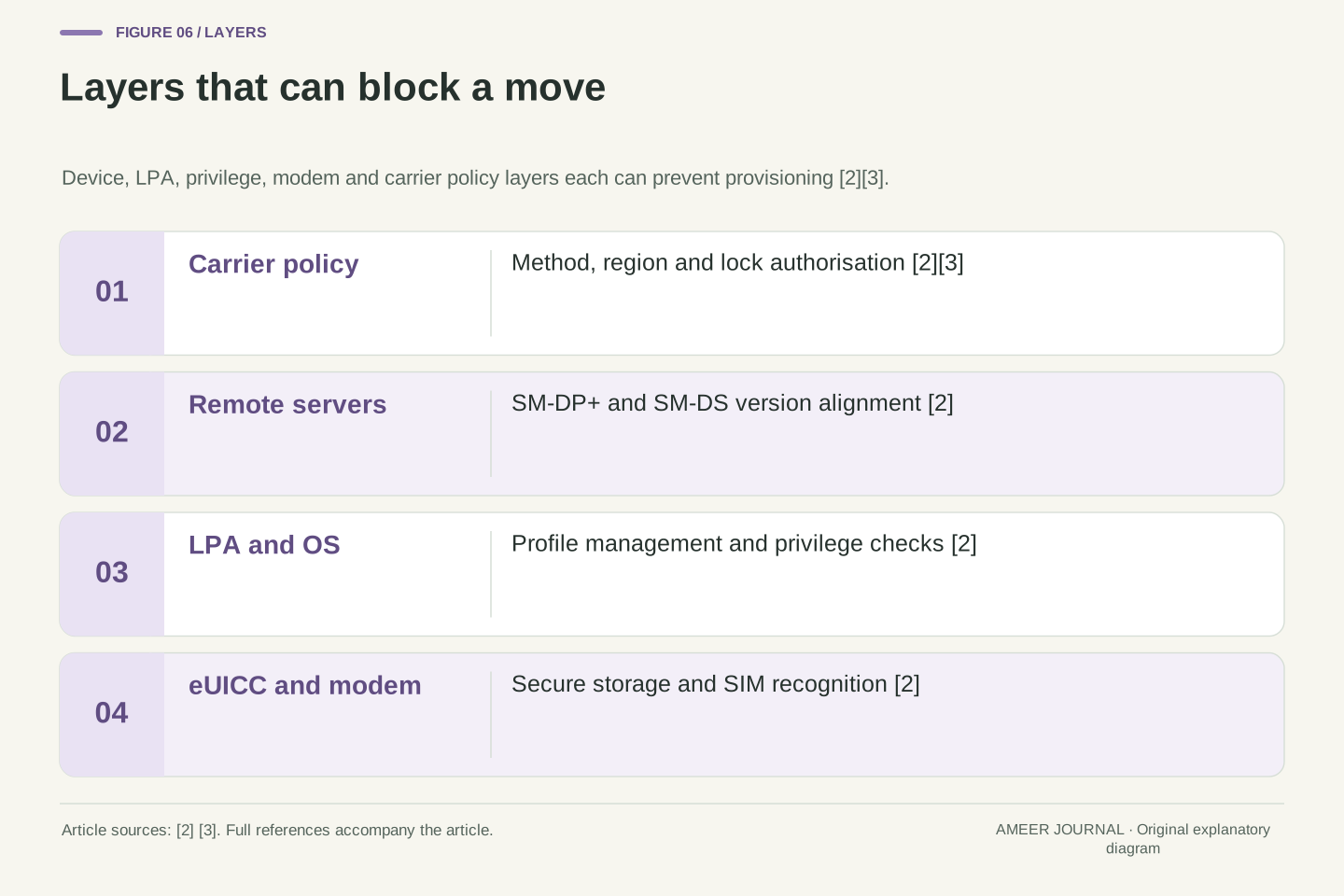
Support is a conjunction of independently checkable preconditions rather than a single device property. At the device layer, EuiccManager must report eSIM support, which generally requires the eUICC feature to be present and an LPA package to exist [2]. At the software layer, the framework must discover an LPA and route eUICC operations through it, and the LPA and the eSIM operating system on the eUICC must support at least GSMA remote SIM provisioning version 2.0 or 2.2, with SM-DP+ and SM-DS servers using a matching version [2]. At the modem layer, the modem must recognise an eSIM with an enabled default profile as a valid SIM and keep SIM power active [2]. Failure at any one of these layers produces the same user-visible result as a carrier refusal, which is why a generic eSIM label is not a sufficient compatibility test.
Carrier and policy layers add further independent constraints. The LPA needs carrier lock status so that downloads or transfers are allowed only for permitted carriers, otherwise a user may complete a transfer and only later discover that the device is locked by another carrier [2]. Apple qualifies each activation method by carrier support, including Quick Transfer, QR code, carrier activation, carrier link, carrier app and manual entry, and it also notes regional model differences, such as specific eSIM-capable models in mainland China and dual nano-SIM models in Hong Kong and Macao [3]. Those regional examples illustrate variation without providing a complete compatibility list, and they should not be generalised to other regions or models.
Specification status does not remove these constraints. GSMA lists eSIM specifications with versions, publication dates, expiry dates and active or expired status, and its own limitation is that a specification does not prove a carrier's commercial support or transfer policy [1]. A device can therefore satisfy a specification version while a particular carrier still does not offer a given method for that model, region or plan, and a carrier can support eSIM broadly while a specific device lacks the required LPA, modem behaviour or operating system version [2][3]. The correct pre-move check is consequently specific: exact model, region, operating system version, provisioning version alignment, carrier lock status and the carrier-supported method for that combination.
Specifications, versions and why they create variation
Behind the scenes, eSIM is governed by GSMA specifications that are versioned and dated. The GSMA page lists architecture specifications such as SGP.21, technical specifications such as SGP.22, test specifications, compliance processes and identity schemes, each with versions, publication dates and active or expired status [1]. That long list is a clue: interoperability depends on which version a device, an LPA and a server implement, not just on the word eSIM.
Android makes the version point concrete. It requires the LPA and eSIM operating system to support at least remote SIM provisioning version 2.0 or 2.2, and it advises using SM-DP+ and SM-DS servers with a matching version [2]. If a phone implements an older version and a carrier server expects a newer one, the download may fail even though both sides claim eSIM support. Version mismatch is a structural cause of variation, not a sign that one party is broken.
The GSMA list also shows that specifications expire and are replaced. Many SGP.21 and SGP.22 versions are marked expired, while later versions are marked active [1]. A device built around an older version may still work with a carrier that supports that version, but it may not work with a newer service. That is why a user should ask which provisioning version and which activation method a carrier supports for a specific model, rather than asking only whether eSIM is supported in general.
GSMA publishes eSIM specifications as a linked family of architecture, technical, test, compliance and identity documents, each with explicit versions, publication dates, expiry dates and active or expired status [1]. For consumer eSIM, SGP.21 is the architecture specification and SGP.22 is the technical specification, with test specifications such as SGP.23 and compliance processes under SGP.24 [1]. The presence of many expired versions alongside active ones means that compliance is version-specific: a product may be valid evidence of compliance for one version and not for another [1].
Android translates that versioning into deployment requirements. The LPA and eUICC operating system must support at least GSMA remote SIM provisioning version 2.0 or 2.2, and the SM-DP+ and SM-DS servers should use a matching version [2]. The modem must recognise an eSIM with an enabled default profile as a valid SIM and maintain SIM power [2]. These are testable preconditions, and failure at any layer, device, LPA, modem or server, produces the same user-visible symptom of a failed download or transfer.
The GSMA specification list also warns against treating specification status as commercial support. Its own limitations note that a specification does not prove a carrier's commercial support or transfer policy [1]. That distinction is essential: a device can be specification-compliant while a particular carrier still does not offer eSIM transfer for that model, region or plan. Conversely, a carrier may support eSIM broadly while a specific device lacks the required LPA, modem behaviour or operating system version [2][3].
Comparing activation methods without recommending one
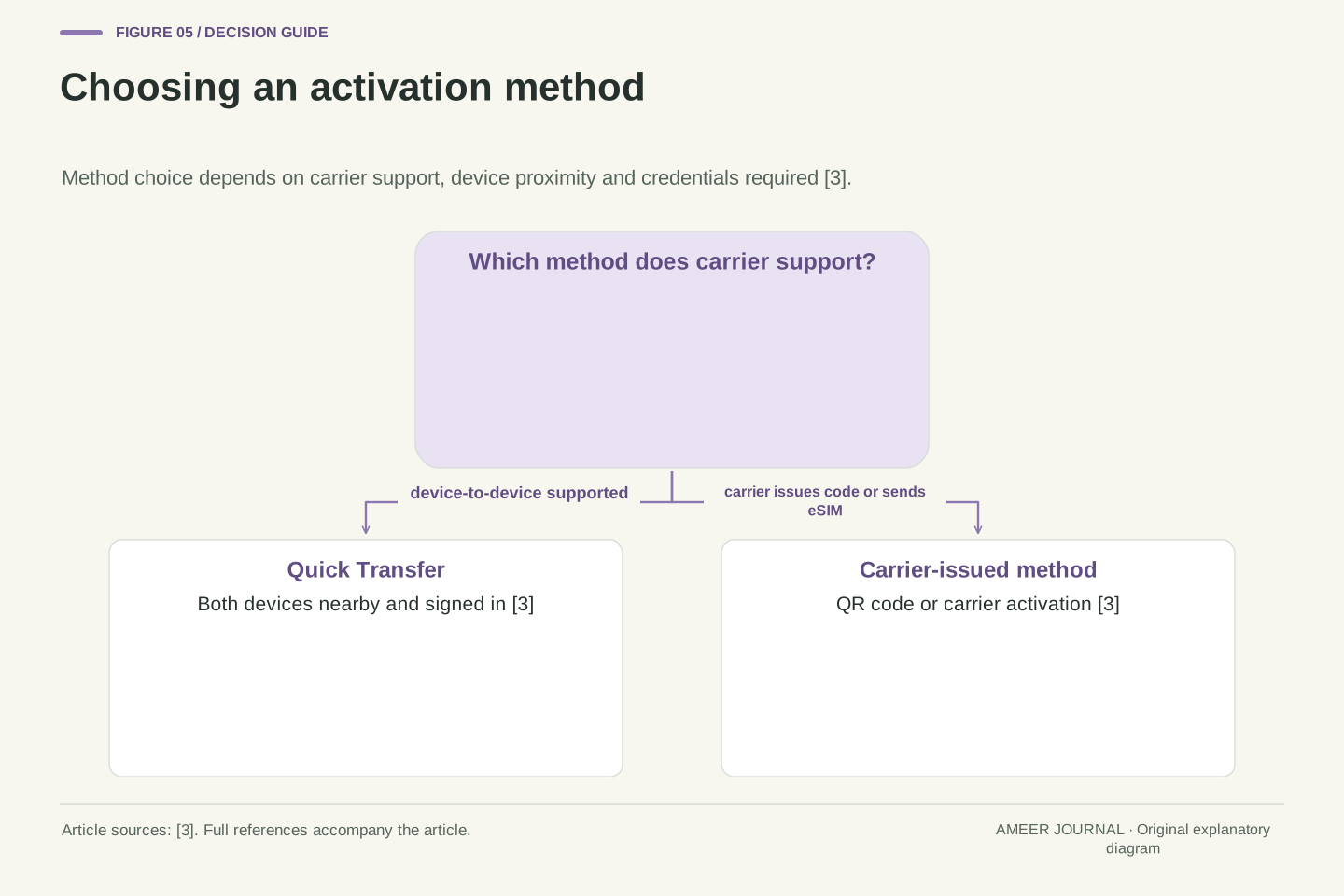
It helps to compare activation methods by what they require from the user and the carrier. Quick Transfer requires both devices, proximity, Bluetooth, sign-in and confirmation on the old phone, and it deactivates the old SIM when the new one activates [3]. A QR code requires the carrier to provide the code and the user to scan it, with a possible confirmation code [3]. Carrier activation requires the carrier to assign or send the eSIM digitally, after which the user installs it from a notification [3].
A carrier link, a carrier app and manual entry are further alternatives, each with its own steps [3]. A carrier app may also allow the user to transfer a number from a previous phone to a new iPhone [3]. Manual entry requires the carrier to send the details and the user to enter them [3]. None of these methods is universally available, and the right one is simply the one the user's carrier supports for that device and situation.
The comparison also shows why instructions from one person may not help another. A friend who used Quick Transfer may have a carrier that supports it, while your carrier may only offer a QR code or a carrier app [3]. The underlying provisioning is the same, but the entry point differs. Before changing phones, the useful question is not which method is best in general, but which method your carrier supports for your exact model and region [3].
The activation methods differ in initiator, credential and proximity requirements. Quick Transfer is a device-to-device flow that requires both devices signed in to the same Apple Account, the previous iPhone unlocked, both nearby with Bluetooth enabled, and iOS 18.4 or later, with confirmation on the previous device and deactivation of the previous SIM on activation [3]. QR activation is carrier-issued and camera-mediated, with an optional confirmation code [3]. Carrier activation is carrier-initiated, either at purchase or by digital delivery after setup, and is installed from a notification [3]. Carrier link, carrier app and manual entry are additional carrier-dependent paths [3].
Android presents an analogous choice between direct download by a carrier app and code-mediated activation through the LPA. Direct download is subject to the carrier privilege metadata check, while code-mediated activation bypasses that check and lets the LPA control the entire user interface flow [2]. The two paths therefore differ in who controls the interface, which privilege checks apply, and how errors are handled. If the carrier app errors or returns a cancelled result, the LPA cancels the activation flow [2].
No method dominates on all dimensions. Quick Transfer minimises carrier contact but maximises device proximity and account requirements [3]. QR activation minimises device proximity requirements but requires the carrier to issue a code and the user to scan it [3]. Carrier activation minimises user data entry but depends on carrier assignment and notification delivery [3]. The correct comparison is therefore conditional: which initiator, credential and proximity constraints does the user's carrier and device combination satisfy?
Failure and edge cases to expect
Several failures are predictable. The new phone may not support eSIM, the carrier may not support eSIM, or the phone may not be connected to Wi-Fi or a hotspot when needed [3]. The old phone may not be unlocked, nearby or signed in for a transfer [3]. The carrier may require a confirmation code that the user does not have [2][3]. Or the profile may download but not activate, in which case Apple suggests making a call to check connectivity and contacting the carrier if the call fails [3].
Other edge cases involve privilege and locking. Android notes that a download can fail if a carrier confirmation code is required, and a switch can fail if the carrier app lacks privilege over the currently enabled profile [2]. It also warns that without carrier lock awareness, a user might download or transfer a SIM and only later discover the device is locked by another carrier [2]. Multiple eSIMs add complexity too: Android 10 and later can support devices with multiple eSIMs, and operations must be directed to the correct eUICC [2].
The most important edge case is the gap between download and service. A profile can be installed but not enabled, enabled but not connected, or connected on the new phone while the old phone still appears to work for a short time. Apple treats activation as complete only when the plan activates and, in the carrier activation case, when a test call succeeds [3]. Users should therefore verify service on the new phone before discarding or resetting the old one.
Failure modes map to layers in the provisioning stack. At the device layer, EuiccManager must report eSIM support, which generally requires the eUICC feature and an LPA package to be present [2]. At the LPA layer, the framework must discover a suitable LPA and route operations through it [2]. At the privilege layer, carrier app downloads are rejected if the profile privilege metadata tag is missing or mismatched [2]. At the user-consent layer, downloads requiring a confirmation code and switches requiring permission over the current profile fail until the user supplies the code or grants permission [2]. At the modem layer, an enabled default profile must be recognised as a valid SIM with SIM power maintained [2].
Multi-eUICC devices introduce addressing failures. Android 10 and later support multiple eSIMs, and EuiccManager objects can be bound to a specific card ID so that all operations are directed to that eUICC [2]. If the target eUICC is unreachable, for example because it is disabled or removed, EuiccManager stops functioning for that card [2]. A transfer that targets the wrong card ID, or that assumes a single eUICC on a multi-eUICC device, will therefore fail even if the carrier and profile are valid.
Carrier lock and regional model restrictions are policy-layer failures. Android notes that the LPA needs carrier lock status to allow downloads or transfers only for permitted carriers, otherwise the user may discover the lock only after transferring [2]. Apple notes regional model differences, such as specific eSIM-capable models in mainland China and dual nano-SIM models in Hong Kong and Macao [3]. These are not technical defects but deployment constraints, and they must be checked before provisioning is attempted.
What to confirm before changing phones
Before changing phones, confirm five things. First, confirm the exact new model supports eSIM, not just the brand or product line [3]. Second, confirm the carrier supports eSIM for that model and region, and which method it supports: Quick Transfer, QR code, carrier activation, carrier link, carrier app or manual entry [3]. Third, confirm the operating system version meets the method's requirements, such as iOS 18.4 or later for Quick Transfer [3]. Fourth, confirm the old device is available, unlocked and nearby if the method requires it [3]. Fifth, confirm you have a Wi-Fi or hotspot connection for setup in most cases [3].
Also confirm what happens to the old SIM. In a transfer, activation on the new phone deactivates the previous SIM [3]. In a carrier activation that replaces a physical SIM plan, Apple advises removing the physical SIM and restarting the iPhone [3]. Ask the carrier whether the old profile will be deactivated immediately, whether a confirmation code is needed, and whether the number will move or a new number will be issued. Those answers determine whether the move is a transfer or a fresh activation.
Finally, do not share sensitive identifiers or codes with strangers or unofficial helpers. The process should be done through the carrier's official channel, the phone's settings, or the carrier's app [3]. If a banner says to finish setting up the carrier's cellular plan, Apple directs the user to the carrier's webpage and, if help is needed, to contact the carrier [3]. Keep the old phone until the new phone has activated and a test call succeeds [3].
A pre-move checklist should verify each provisioning precondition in order. Verify device capability: the model must support eSIM, the eUICC feature and LPA must be present, and the operating system must expose eSIM APIs [2][3]. Verify version alignment: the LPA and eUICC operating system must support at least remote SIM provisioning version 2.0 or 2.2, with matching SM-DP+ and SM-DS versions [2]. Verify carrier authorisation: the carrier must support eSIM for the exact model, region and plan, and must support the chosen method [3]. Verify user-consent prerequisites: account sign-in, device unlock, proximity, Bluetooth and any confirmation code [2][3]. Verify connectivity: Wi-Fi or hotspot for setup in most cases [3].
Verify the state transition as well. A transfer must deactivate the source profile when the target activates [3], and a carrier activation that replaces a physical SIM plan requires removal of the physical SIM and a restart [3]. Verify privilege and lock status: carrier app downloads depend on profile privilege metadata, and the LPA should know carrier lock status before allowing a download or transfer [2]. Verify multi-eUICC addressing if the device has more than one eUICC, so operations target the correct card ID [2]. Each check corresponds to a distinct failure mode, so skipping one creates a predictable risk.
Verification after provisioning is part of the checklist. Apple advises making a call to check cellular connectivity after carrier activation and contacting the carrier if the call fails [3]. The user should also confirm that the intended profile is enabled, that the old SIM is deactivated if a transfer was intended, and that the number and plan match expectations before resetting or discarding the old device [3]. If a finish-setup banner appears, the user should follow the carrier's webpage and contact the carrier for help rather than improvising [3].
The bottom line for a safe move
Moving an eSIM is a provisioning process because the profile must be prepared remotely, delivered to a specific secure chip, installed by the LPA, enabled, and authorised by the carrier [2]. It is not a file copy because the profile is bound to the eUICC hardware and to the carrier subscription, and because activation on the new device deactivates the old SIM in a transfer [3]. That is why the same steps do not work for everyone: model, region, operating system, carrier method and provisioning version all matter [1][2][3].
The safest approach is to treat the move as a short project. Confirm the exact model and carrier support, choose the method the carrier actually offers, prepare the old device and connectivity, complete the provisioning, and test service before retiring the old phone [3]. If anything fails, contact the carrier, because the carrier is the party that prepares and authorises the profile [3]. A calm, checked move is faster than a rushed copy that leaves the new phone without service.
In summary, eSIM mobility is governed by a provisioning chain comprising the carrier subscription, the downloadable profile, the SM-DP+ and SM-DS servers, the LPA and the eUICC, with version alignment and privilege enforcement at each interface [1][2]. Activation creates a new installation, transfer coordinates installation with source deactivation, and both depend on carrier authorisation for the specific device [2][3]. GSMA specification versioning, Android LPA and modem requirements, and Apple carrier-dependent methods together explain why support varies by model, region, operating system and carrier [1][2][3].
The operational conclusion is to verify preconditions, execute the carrier-supported method, and confirm the resulting state. That means checking eSIM capability and LPA presence, remote SIM provisioning version alignment, carrier method support, user-consent prerequisites, connectivity, privilege and lock status, and multi-eUICC addressing where relevant [2][3]. It also means testing connectivity after activation and retaining the old device until the new profile is confirmed active [3]. Understood this way, an eSIM move is not a copy operation but a controlled provisioning transaction whose success depends on agreement among all parties in the chain.
Sources & further reading
Explore the references behind this guide. External pages may change after our review.
- eSIM Consumer and IoT Specifications - eSIMGSMA · Accessed 6 Nov 2026
- Mengimplementasikan eSIM | Android OS core topics | Android Open Source ProjectAndroid Open Source Project · Accessed 6 Nov 2026
- Set up eSIM on iPhone - Apple SupportApple · Accessed 6 Nov 2026
Article updated 6 Nov 2026.
Found something we should revisit?
Good explanations get better with thoughtful feedback.