What you’ll take away
- Stored profiles, enabled profiles and the selected cellular-data line are different counts.
- A profile can remain installed after another profile replaces it in an enabled position.
- Changing a data choice is separate from enabling a profile, moving a number or cancelling an account.
- Conditional data switching can attribute traffic to different lines over time without combining two cellular data networks.
- Describe the device, starting state, action and observed service result before deciding which layer needs attention.
A list of profiles is not a count of working data connections
A phone shows three saved eSIM profiles: Home, Work and Travel. Does that mean it has three mobile connections ready to carry an app’s traffic? The list tells you which profiles are present. It does not, on its own, tell you how many can be enabled together or which line is carrying cellular data. Android documents separate profile, port and logical-slot concepts; Apple’s Dual SIM guide separately describes choosing one cellular data network at a time. These are different questions, even when the settings screen places their answers close together. [1][2][3]
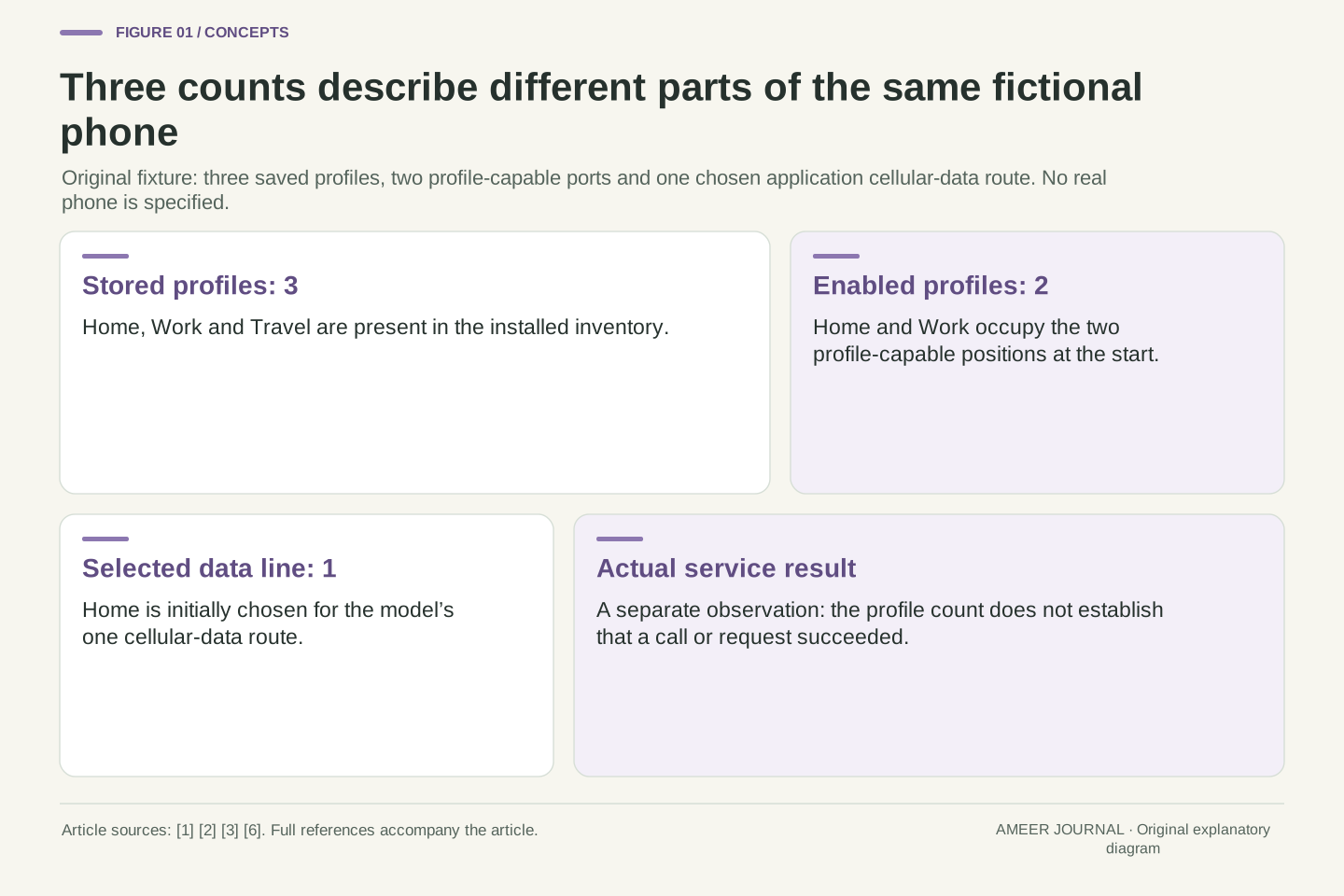
We will follow an invented phone with room for all three profiles, two places for enabled profiles and one chosen cellular data route. Home and Work start enabled; Home is chosen for data. Travel is saved but disabled. The counts are therefore three stored, two enabled and one selected data line. Those are declared teaching assumptions, not specifications for a named phone or a universal eSIM limit. Following this one example makes it easier to understand what changes when a line is enabled, selected, temporarily used or removed.
Profile inventory, enabled-profile capacity and cellular-data selection are separate state variables. The Android MEP architecture permits multiple enabled profiles on supporting eUICCs through ports mapped to logical slots. Apple documents a separate user-facing constraint for its described iPhone Dual SIM configurations: one cellular data network is used at a time. Neither statement allows the number of stored profiles to be substituted for the number of simultaneous application data routes. [1][2][3] A storage list is an inventory observation, not a complete connectivity measurement.
Define an original abstract fixture with installed set P={H,W,T}, two profile-capable ports and a single selected application cellular-data line D. Initially the enabled set E={H,W}, and D=H. The symbols stand for Home, Work and Travel. We deliberately choose a one-route data policy; we are not claiming every Android device follows Apple’s implementation or assigning this combined fixture to a real product. The model separates local configuration from actual network service and account status. Unless explicitly varied later, those additional states are held unchanged rather than inferred from P, E or D.
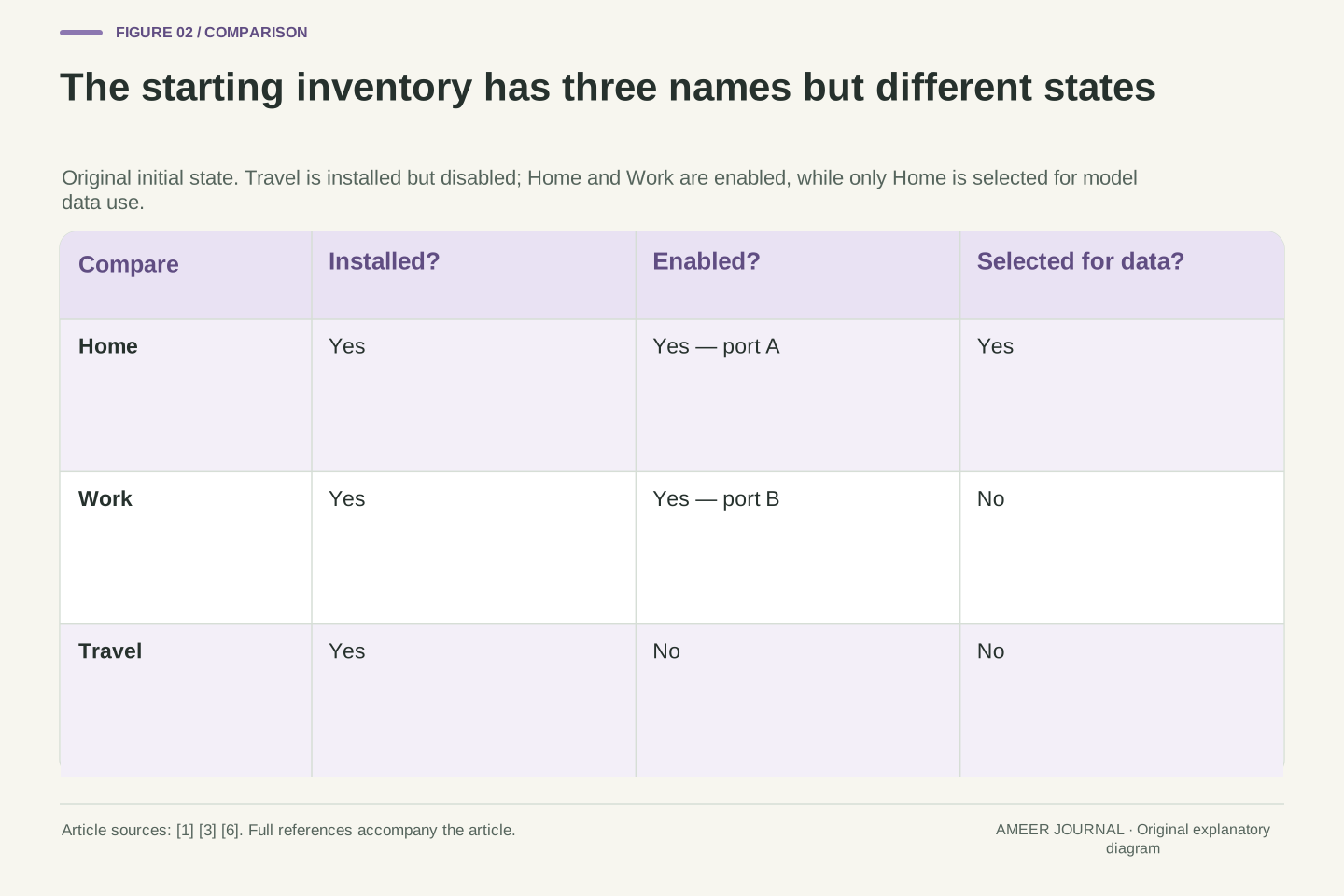
Installed, enabled and usable answer different questions
An installed profile is present on the device. Enabling it makes it the profile used through a supported connection position. Working service is a further question: can the intended call or data action actually succeed? Android’s documentation lists downloading, switching and deleting as separate operations, and its testing guidance separately names installing a profile and activating service on it. [6] A single friendly setup flow can arrange several of those operations, so the word activation on a button is not a precise report of every internal state.
This explains why success messages deserve context. In one documented Android activation flow, the result returned to the carrier app reports a successful profile download. It does not describe a completed test of every later call and internet connection. [6] Apple likewise includes a cellular-connectivity check in its carrier-activation guidance. [4] For our saved Travel profile, the useful first question is whether it is merely present or also enabled. If it is enabled, repeating the download would still not answer which line an app uses. Keep the questions separate before deciding that something has failed.
Use installed to describe profile presence, enabled to describe its active local profile assignment, and service availability to describe the relevant network or application outcome. The AOSP overview exposes downloadSubscription, switchToSubscription and deleteSubscription as distinct operations. Its example download call can request switching after download, illustrating that a flow can combine actions without making them the same action. Its validation guidance also separates download/install from activating service on the profile. [6] These are conceptual boundaries, not a mandatory sequence of four visible screens.
The documented LPA flow returns RESULT_OK when downloading the new profile succeeds. That scoped result cannot be promoted into evidence that a particular data session or voice call subsequently completed. [6] Conversely, a failed application request alone does not identify installation as the faulty layer. Apple’s carrier-activation instructions include checking cellular connectivity, reinforcing the difference between setup progress and a service observation. [4] In the fixture, membership in P says nothing about an end-to-end transaction; membership in E adds a local assignment but still does not establish the observed outcome of a network action.
One eSIM chip can provide more than one enabled position
The word slot can be confusing because it sounds like a hole for a removable card. In Android’s description, a physical slot identifies a hardware position, while a logical slot identifies an active position supported by the device. With multiple enabled profiles, or MEP, one eUICC can expose several ports so that separate profiles can be enabled through that one chip. [1][2] A port in this explanation is an internal connection point, not another opening in the phone’s case.
Android provides MEP support from Android 13 on devices that implement the feature. The manufacturer must integrate the necessary hardware and software; installing a sufficiently new operating-system version does not establish that integration. [1] This is also different from the older Android support for devices containing more than one eUICC. [6] Our fixture has one eUICC with two usable profile positions. Calling them A and B will help us follow assignments without pretending that these letters are actual Android port numbers. Two positions tell us something about enabled profiles, but still do not choose the line used for data.
AOSP’s MEP model maps one UiccSlot and UiccCard through multiple UiccPort objects, with each port linked to at most one UiccProfile. A port can map to a logical slot, allowing a single physical eUICC slot to support multiple logical slots. [1] Android’s identifier guide separately defines physical and logical slot indices; their counts need not match. [2] Counting chip packages therefore does not directly establish the number of enabled profiles, just as counting profiles does not establish the radio-resource arrangement.
The relevant platform support begins with Android 13 for devices supporting MEP, with OEM, modem and eSIM integration required. [1] Android 10’s multi-eSIM section instead concerns devices with multiple eUICCs. [6] Those are different capabilities. The fixture uses two abstract profile-capable ports A and B and avoids assigning command-port roles or real numeric indices from Android 14’s MEP variants. Its useful invariant is simply one assigned profile per port. This suffices for the inventory exercise without claiming a particular baseband architecture, simultaneous-call capability or universal Android data policy.
Enabling Travel can replace Work without deleting it
At the start, Home occupies position A and Work occupies position B. Travel is installed but has no enabled position. Both positions are already occupied. In our model, enabling Travel therefore requires choosing an existing enabled profile to disable. Android’s MEP guidance describes a user choice of this kind when an enabled subscription must make room for another. [1] The existence of a saved Travel entry does not create a third position.
Choose Work for this invented transition. First, Work becomes disabled; then Travel takes position B. Home remains at A. The stored list is still Home, Work and Travel, while the enabled list is now Home and Travel. Home remains the selected data line throughout this sequence. We have changed which profiles are enabled without removing Work, choosing Travel for data or cancelling a carrier account. The intermediate one-enabled-profile state is an accounting step, not a measured pause or a promise of uninterrupted service. It shows exactly which part of the record changed, leaving the other questions available to check separately.
Initially, map A→H and B→W, with P={H,W,T}, E={H,W} and D=H. Because the fixture’s enabled capacity is two, assigning T requires releasing an occupied profile-capable port. AOSP documents port selection and a user flow for disabling an active subscription to enable another when necessary. [1] Actual operations also have privilege and consent boundaries; the overview describes a switch that requires user resolution when the caller lacks the relevant privilege over the currently enabled profile. [6] Our paper transition assumes those authorizations are satisfied.
Specify the sequence E={H,W}→{H}→{H,T}, with port B reassigned from W to T. Throughout it, P remains {H,W,T} and D remains H. The disabled W is still installed, so the inventory cardinality stays three while enabled cardinality goes two, one, two. This is a logical state trace, not an implementation timing diagram. No account cancellation, profile deletion or guaranteed continuity follows from the set operations. Their value is precision: a before/after comparison can identify an enablement change without accidentally calling it a data-selection change or a loss of the stored profile.
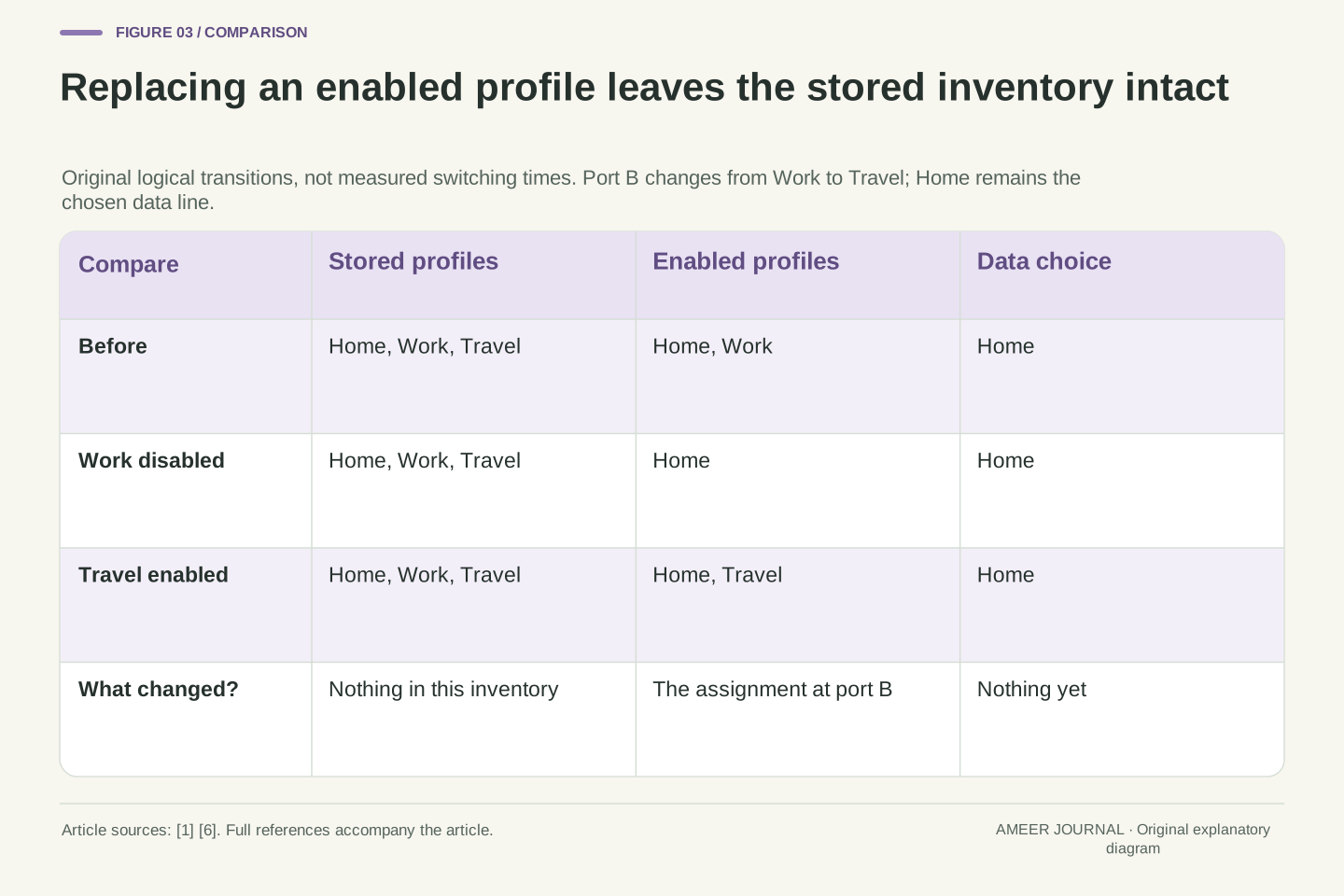
Choosing a data line changes a different field
Home and Travel are now enabled. To use Travel for cellular data in the fixture, change the data choice from Home to Travel. Neither enabled position needs to disappear, and the stored list remains unchanged. Apple’s Dual SIM guide illustrates this separate choice: a line can be designated for cellular data while other choices govern calls and contacts. [3] Choosing data is therefore not the same question as choosing which profiles are available for use.
Imagine opening the settings again and seeing the same three names as before. That does not show that nothing changed. The important field is now the data choice, which moved from Home to Travel. A call can still be associated with Home in the example. On the documented iPhone behavior, a remembered line for a contact can also differ from the general default. [3] This gives a practical reading habit: name the service beside the word default. A default for a new voice call, a contact’s remembered choice and the cellular-data choice should not be silently treated as one master setting.
Continue with P={H,W,T} and E={H,T}. The next operation changes D from H to T while preserving both sets and both port assignments. This is deliberately independent of the prior W→T enablement change. Apple documents choosing the cellular-data number separately from default voice use and a contact’s remembered calling line. [3] Those separate controls are direct evidence that a generic active-line description is insufficient to determine every service selection.
In the fixture, D belongs to E, but E need not equal {D}. That distinction allows Home to remain enabled while Travel is selected for application cellular data. It does not assert that all calls remain reachable under every radio condition; those conditions appear later. Likewise, the Apple documentation’s one-cellular-data-network statement must not become a claim about every modem design. [3] The model needs only its declared single-route policy. An unchanged profile list is compatible with a changed routing choice, so a support record should preserve the relevant default or remembered selection instead of merely counting visible entries.
A card identity, a port and a subscription are not interchangeable
Several numbers can appear in technical support information because they identify different things. Android distinguishes a card ID, a physical slot, a logical slot and a subscription ID. [2] Two profiles can share the same eUICC while remaining different subscriptions. Seeing one chip identity therefore does not mean the phone has only one profile; seeing two logical positions does not mean there are two separate eSIM chips.
Draw our fixture as two short mappings. The hardware position called physical slot 1 contains the eUICC. Its labelled port A maps to logical slot 0 and Home; port B maps to logical slot 1 and Travel. The A and B labels are invented, while the separation of these objects follows Android’s documented structure. [1][2] A change to the profile at B need not change the card itself. For an ordinary reader, the benefit is knowing why two different support questions may ask about different identifiers. Do not replace a requested subscription detail with a slot number simply because both happen to be numbers on the same screen.
Android’s telephony APIs distinguish subscription ID, card ID, physical slot index and logical slot index. MEP adds the port dimension to the mapping between physical and logical slots. [1][2] For the schematic fixture, physical slot 1 contains one eUICC, with (1,A)→logical0→H and (1,B)→logical1→T. A and B are abstract labels rather than executable port indices. This is an original mapping example; it is not a reproduction of the documentation’s hardware diagram or a claim that every product uses these indices.
The API changes show why the distinction matters. AOSP’s MEP guide directs ICCID retrieval toward UiccPortInfo rather than the deprecated card-level getIccId approach, because an MEP-capable UICC can be associated with more than one ICCID. It separately documents a port index for an enabled subscription and an invalid-port result for a disabled one. [1] The conceptual lesson is object identity, not an invitation to call privileged APIs. A shared card identity, a local subscription identifier and an enabled-port assignment describe different relations; equality of one field cannot establish equality of the others.
A temporary data switch is not two networks added together
The data choice can also change during a call. In Apple’s documented Dual SIM behavior, enabling Allow Cellular Data Switching can let the voice line carry data during a call when that line was not the designated data line. The documentation limits this behavior: carrier availability matters, and the described switching does not work while using Data Roaming. [3] This is a conditional change of route, not permission to assume two cellular data networks are simultaneously combined.
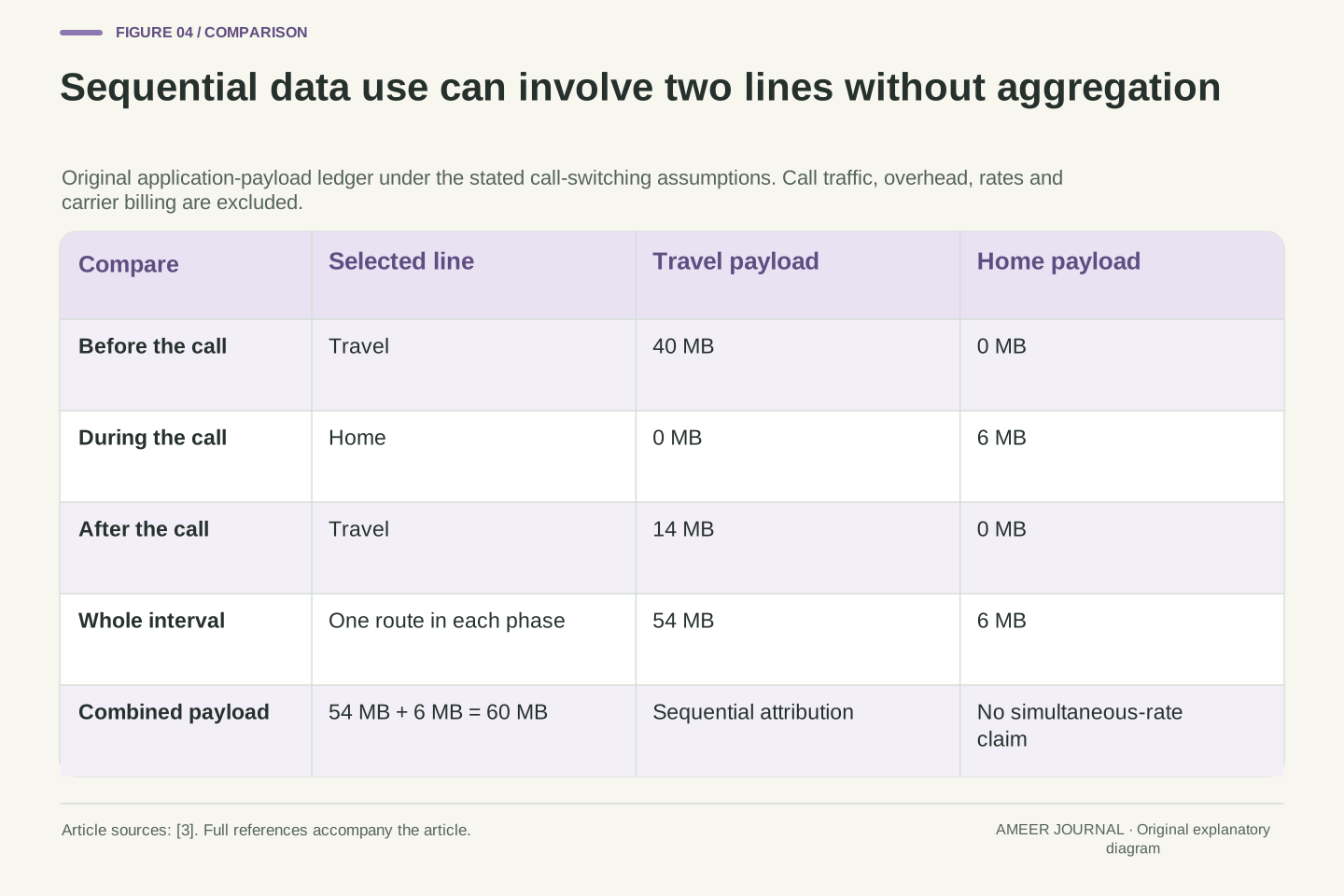
Use an original payload ledger to make that difference visible. Before a Home-line call, an app receives 40 MB over Travel. During the call, suppose the documented conditions are met and the app receives another 6 MB over Home. Afterward, it receives 14 MB over Travel again. Travel carried 54 MB and Home carried 6 MB, for 60 MB altogether. These are invented application-payload amounts across three successive intervals; they exclude the call’s own traffic and network overhead. They are not carrier-billing measurements or speed results. Both accounts appear in the history even though the example used only one chosen cellular route in each interval.
Apple’s specified behavior distinguishes a designated cellular-data line from the line temporarily used while a call is active. With Allow Cellular Data Switching enabled, a call on the non-data voice line can switch that line to voice-and-data use for the call’s duration. The documented conditions include carrier availability and the exclusion when currently using Data Roaming. [3] The one-cellular-network-at-a-time statement remains intact: sequential selection changes do not establish simultaneous aggregation of two data bearers.
For an original three-interval ledger, assign application payloads (40,6,14) MB to lines (T,H,T). The per-line totals are T=40+14=54 MB and H=6 MB; their sum is 60 MB. Each interval has exactly one selected line, and no throughput calculation is possible because no durations or link rates were specified. Voice traffic, protocol overhead, metering rules and tariffs are outside this payload boundary. The record demonstrates why two subscriptions can have data attributed to them over an interval without proving concurrent dual-network transport. Conversely, a constant selected line would not by itself establish that every attempted request succeeded.
Two enabled lines do not settle every incoming-call question
Two enabled lines can be useful, but availability during a call needs its own explanation. Apple describes Dual SIM Dual Standby and gives conditions involving Wi-Fi Calling, the carrier and cellular-data switching when one line is already in use. [3] The fact that two profiles are enabled should not be expanded into a promise that both numbers are always independently reachable in every situation.
One of Apple’s illustrated states is especially helpful: one carrier supplies cellular data while the other line uses Wi-Fi Calling over that data connection. [3] The two service identities have not become two simultaneous cellular data routes. Equally, a No Service indication during a call is not proof that a saved profile was deleted. It describes a service condition in that context. Our inventory can still contain Home and Travel while their immediate reachability differs. A useful account of the situation therefore states whether a call was in progress, which line was used and which supporting features were available, rather than treating the profile list as a complete call-availability report.
The Apple guide identifies its described arrangement as Dual SIM Dual Standby and qualifies incoming-call behavior through Wi-Fi Calling and data-selection conditions. [3] Enabled-profile cardinality is therefore not a sufficient statistic for concurrent voice reachability. The relevant outcome depends on the active service context, not solely on whether the eUICC has an assigned profile for each line. This article does not infer the number of RF chains or prescribe a universal interpretation for every Android implementation.
Apple’s example of Carrier2 using Wi-Fi Calling through Carrier1’s cellular data is a useful distinction between service identity and underlying data connectivity. [3] The second subscription’s service can appear in the interface without adding a second simultaneously selected cellular-data path. Conversely, a contextual No Service display does not imply a transition T∉P or T∉E. It supplies an observation that must be interpreted with the call and feature state. In the fixture, inventory, enablement and service observations are separate fields, so a failed or unavailable service action can be recorded without inventing deletion or reinstalling a profile to repair an unproven fault.
Replace the word active with the observation you actually have
Someone says, “The eSIM is active.” Ask what they observed. A profile name in settings supports a presence observation. An enabled assignment supports a different statement. Signal indicators, a chosen data line and a completed cellular action provide other kinds of information. Android’s profile and port APIs, and Apple’s separate line labels and data controls, reflect these distinctions. [1][3][6] A single word can otherwise hide several unanswered questions.
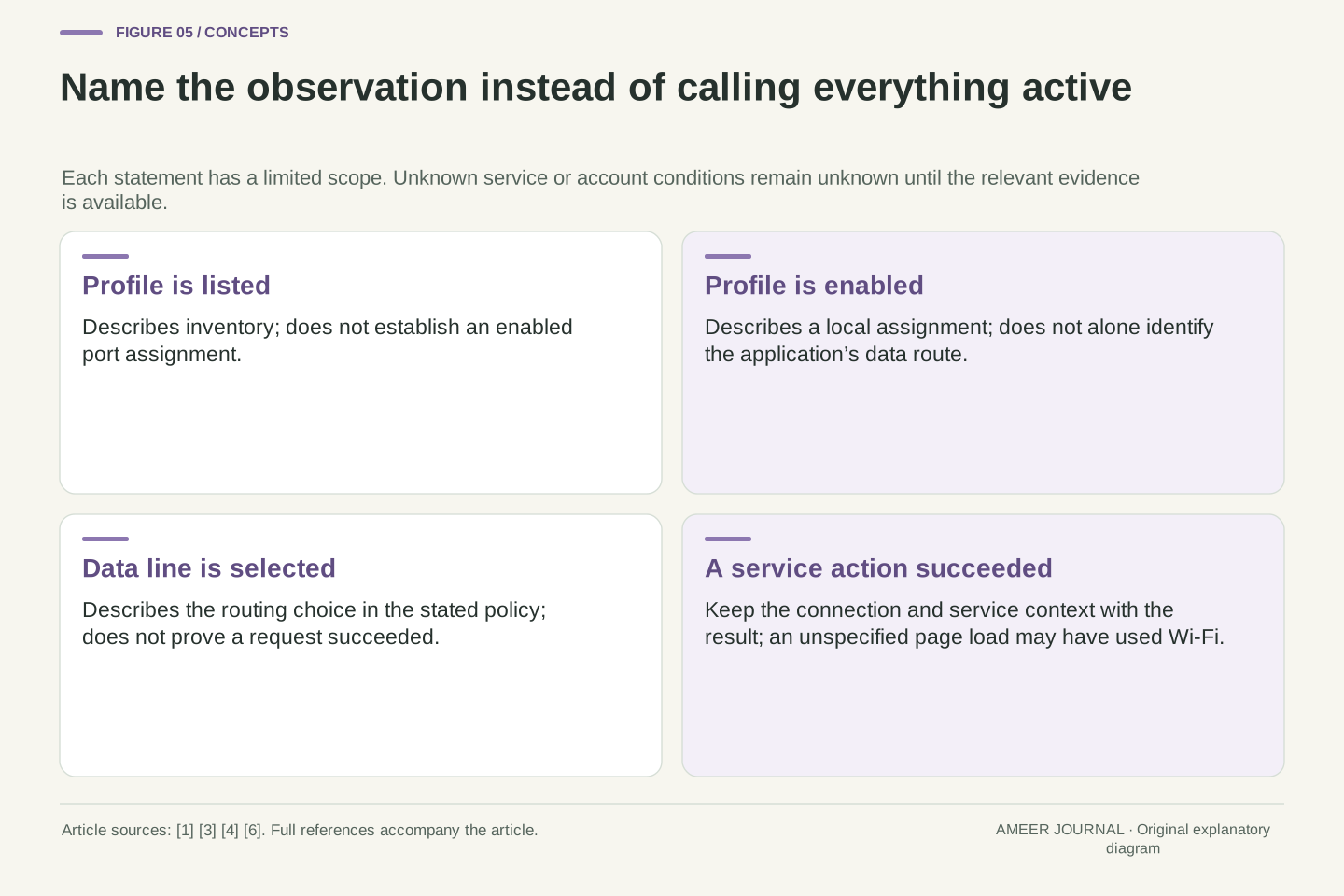
Consider three reports about Travel. “It is listed” does not establish that it is enabled. “It is enabled” does not establish that an app used it. “The page loaded” does not establish that cellular data was used if Wi-Fi carried the request instead. The last point is a reasoning boundary, not a claim about a particular phone test. A better report names the relevant connection and result together. Apple’s setup guidance includes checking cellular connectivity rather than relying only on the completed setup screen. [4] Unknown conditions should remain unknown in the record, instead of being filled in because a status label sounded reassuring.
Treat active as an ambiguous label until its namespace is identified. Profile enablement, a logical-slot association, network attachment, a designated data subscription and an observed transaction occupy different levels. AOSP separately represents an enabled port and validates attachment to networks; Apple separately presents line labels, signal indicators and a cellular-data choice. [1][3] These fields should be recorded with their actual semantics rather than collapsed into one undocumented Boolean.
An observation matrix prevents invalid implications. Listed profile does not imply enabled profile; enabled profile does not imply selected data line; selected data line does not establish that an attempted request completed on that path. A successful page load over an unspecified connection does not identify the cellular subscription that carried it. Those are limits of the evidence, not measured failures. The documented download-success callback is similarly scoped to its operation. [6] Keeping unknowns explicit avoids a circular diagnosis in which a presumed activation failure is used to explain every symptom and then every symptom is treated as proof of that same failure.
Removing a local profile is not evidence of cancelling the plan
There is one more state outside the phone’s profile list: the carrier account. Apple directs users to the carrier to cancel a cellular plan, and advises against deleting an eSIM merely as a troubleshooting step unless the carrier directs it. Its guidance also says a replacement may require contacting the carrier. [5] The local list is therefore the wrong place to look for proof that a provider-side cancellation has completed.
Imagine a record that previously showed Home, Work and Travel and now shows only Home and Travel. That establishes a change in the displayed inventory if the observations are reliable. It does not record who requested cancellation, whether a provider accepted it or what the account’s terms say. Keep those questions in a separate account record. The same discipline works in the other direction: a stored entry is not proof that every service associated with it remains available. Our model does not perform either removal or cancellation. It simply refuses to substitute a device-side observation for a carrier-side decision.
The profile lifecycle and the commercial account lifecycle require separate ledgers. A local delete operation concerns the installed object; provider-side cancellation concerns the service relationship. Apple’s support page directs cancellation to the carrier and discourages deletion as generic troubleshooting without carrier direction. [5] Those instructions support separating the operations, not predicting the billing or replacement policy of an arbitrary provider.
In set notation, a local inventory transition P={H,W,T}→{H,T} says W is no longer in that inventory. It does not define a transition in an independent account-state variable A_W. An audit would need a separate record of the provider-side result before making that claim. Likewise, a profile that remains installed can outlast a particular usable service state; presence alone is not an entitlement check. This is an inference rule about different records, not a cancellation procedure. It explains why deleting and downloading again is a poor default response to an ambiguous active label: the operation changes one layer while the suspected problem may belong to another.
Read a capability claim at the layer it describes
A phone description may mention eSIM, Dual SIM or support for several profiles. Ask which capability is being described: storage, simultaneous enablement, the available SIM combination, a data choice or a calling feature. Android’s MEP documentation requires implementation support as well as the relevant platform version. Apple describes two-eSIM Dual SIM support for supported iPhone 13 and later configurations, with carrier and device restrictions still applying. [1][3][4] Neither statement turns a saved-profile count into a complete connectivity specification.
For an exact device, useful details include its model variant, software version and the carrier-supported arrangement. A requirement for a second enabled position cannot be answered merely by finding enough storage for another profile. A requirement to keep a second number reachable during a call needs the relevant calling conditions, not just an MEP label. The documentation discussed here was checked on 7 November 2026; it is not a complete worldwide compatibility list. The questions remain useful when products change because each asks for evidence about a specific capability instead of asking one broad eSIM badge to answer all of them.
Interpret support as a conjunction of the required capabilities, not a scalar profile count. MEP needs supporting eUICC, platform and integration work; Android’s feature availability from version 13 does not guarantee it on every build. AOSP explicitly notes that not every Android phone supports eSIM or includes an LPA. [1][6] Apple’s two-eSIM support statement is likewise bounded by compatible configurations and carrier conditions. [3][4] The reviewed documents were retrieved on 7 November 2026, not treated as timeless inventories of every region and model.
A capability comparison should state the required relation. Does the requirement concern |P|, the maximum |E|, a permitted physical-SIM/eSIM combination, the mapping to logical slots, the data-selection policy or a call-reachability condition? Each needs evidence at that level. The fixture’s inequalities |E|≤2 and D∈E do not describe account authorization or a radio-performance limit. Nor does the existence of a free port prove a particular carrier profile may be enabled without the appropriate consent and policy checks. [1][6] This structured reading avoids deriving a universal operating promise from a narrowly correct platform feature description.
Describe the change before choosing a remedy
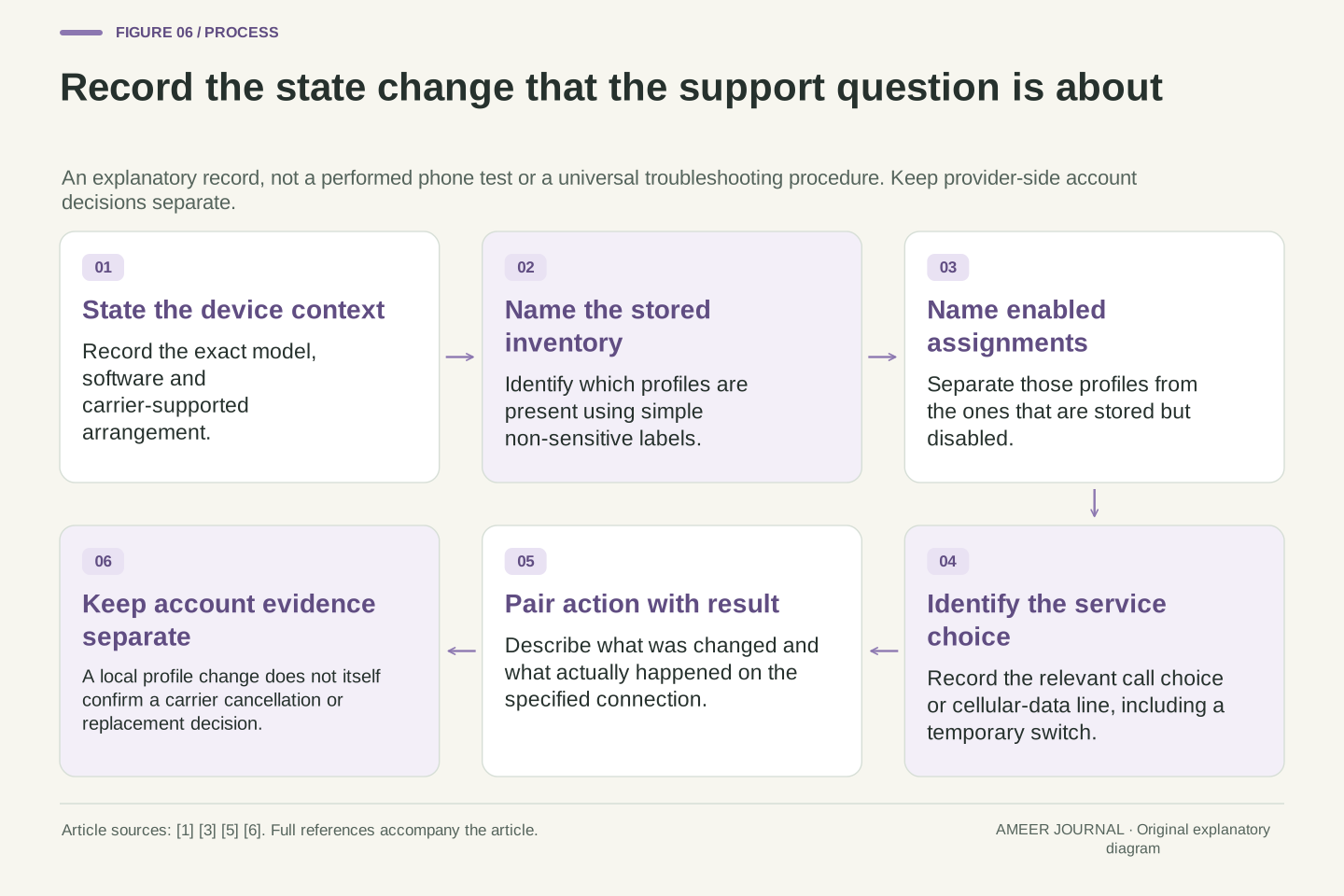
A clear support description can be short: three profiles were stored; Home and Work were enabled; Work was disabled so Travel could be enabled; Travel was then selected for data. That sentence identifies two distinct changes and leaves account status separate. If a later call temporarily changed the data route, record that as a third event. The profile names alone would not preserve this history.
For a real support conversation, pair the starting configuration with the action and observed result. Include the exact device and software context, the carrier-supported method and whether the problem concerns calls or cellular data. Use ordinary labels in a public explanation; an activation code or private QR image is not needed to describe this state model. When an account or replacement decision is required, the carrier’s own process supplies that missing information. [4][5] The result is a more answerable question: which specific state or service failed to change as expected? That is much clearer than treating every saved eSIM as a working connection or every unexplained outcome as a download failure.
Preserve a before/action/after record with explicit fields for P, E, the relevant port mapping, D and the observed service outcome. In our complete trace, installed cardinality remains three while E changes from {H,W} to {H,T}; a later independent action changes D from H to T. The conditional call example then changes the data route over time without changing the inventory. These are different transitions and should remain distinguishable in logs or an explanation.
The minimum useful context includes the actual model and software version, the carrier-supported arrangement and the service being examined. Account status or cancellation confirmation belongs in a separate provider record; sensitive activation material is unnecessary in the public schematic. The documentation supplies the distinction between operations and supported conditions, while the examples demonstrate the resulting inference limits. [1][3][5][6] A profile inventory answers what is present. An enabled mapping answers which profiles are locally assigned. A data choice answers which route is selected for the stated policy. None can substitute for all the others, and each leaves a precise next question when the observed result differs from the intended one.
Sources & further reading
Explore the references behind this guide. External pages may change after our review.
- Multiple enabled profiles | Android OS core topics | Android Open Source ProjectAndroid Open Source Project · Accessed 7 Nov 2026
- Detect eSIMs and SIM cards | Connectivity | Android DevelopersAndroid Developers · Accessed 7 Nov 2026
- Using Dual SIM with an eSIM - Apple SupportApple Support · Accessed 7 Nov 2026
- Set up eSIM on iPhone - Apple SupportApple Support · Accessed 7 Nov 2026
- How to erase an eSIM on your iPhone or iPad - Apple SupportApple Support · Accessed 7 Nov 2026
- Implement eSIM | Android OS core topics | Android Open Source ProjectAndroid Open Source Project · Accessed 7 Nov 2026
Article updated 7 Nov 2026.
Found something we should revisit?
Good explanations get better with thoughtful feedback.