What you’ll take away
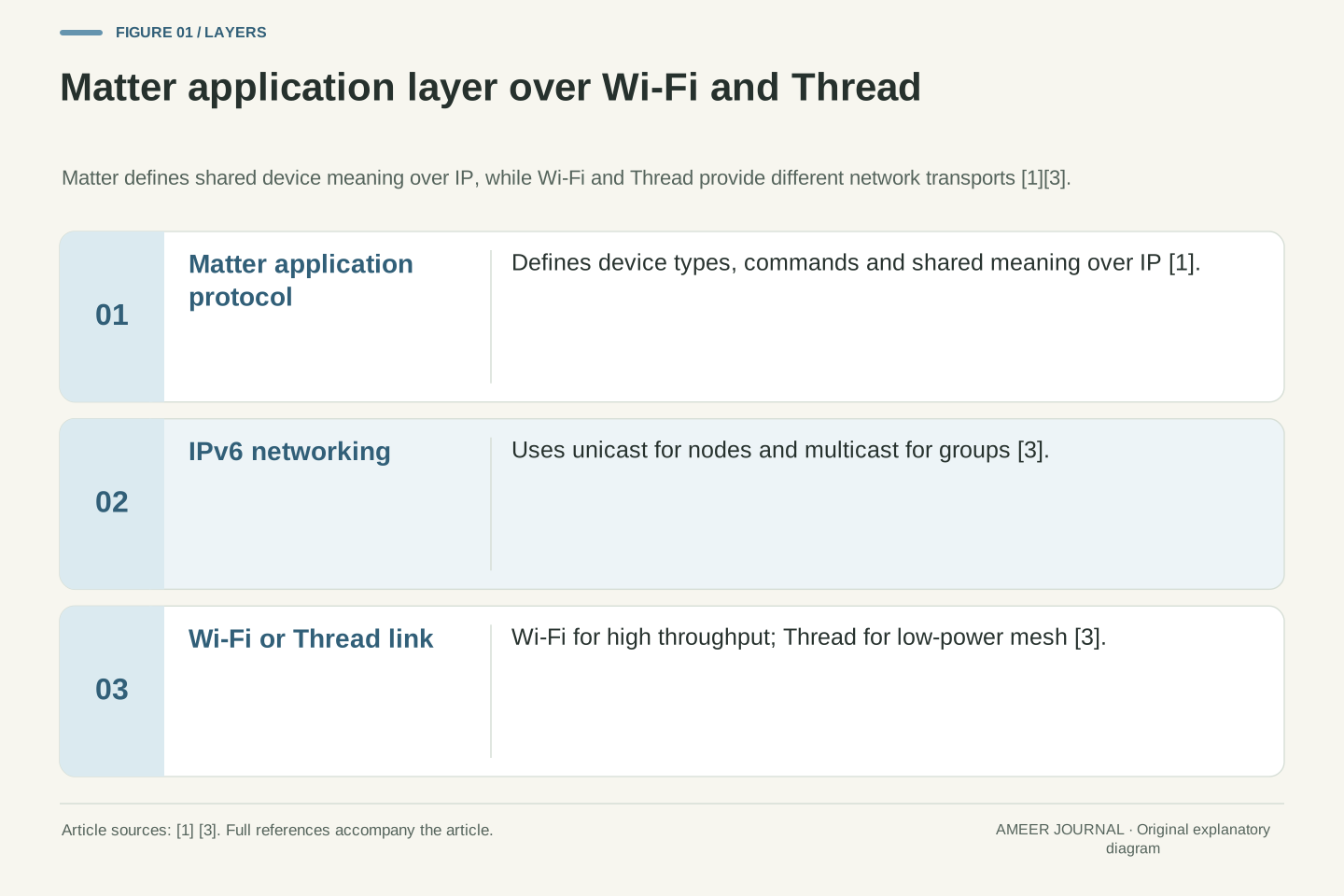
- Matter is an IP-based application protocol that defines shared meaning; Wi-Fi and Thread are the network layers that carry it [1][3].
- Bluetooth Low Energy is used for commissioning, while Wi-Fi or Thread carries operational traffic [1][2].
- A Matter label does not guarantee every device type or every function in every platform [1][2].
- Thread devices need a Thread network and, for Wi-Fi communication, a Thread Border Router [3].
- Diagnose failures by layer: power, commissioning, network reachability, device-type support, then exposed functions [1][2][3].
The problem a shared standard was meant to solve
Imagine buying a light, a lock and a sensor from three different brands and discovering that each one only talks happily to its own app. That frustration is the problem Matter was created to reduce. The Connectivity Standards Alliance describes Matter as one protocol intended to connect compatible devices and systems with one another, with an emphasis on secure, reliable and seamless use [1]. The promise is not that every gadget ever made will work together, but that compatible products can share a common way of communicating.
The Alliance presents Matter as an industry-unifying standard and a seal of approval for devices that are meant to work together [1]. Google Home Developers similarly describes Matter as an open standard that lets a device work with any Matter-certified ecosystem using a single protocol [2]. That wording matters. The key qualifier is certified or compatible. A label is a claim about a defined set of behaviours, not a guarantee that every feature on a box will appear in every app.
For a buyer, the practical question is therefore narrower than the marketing slogan. Instead of asking whether a product is simply smart, ask what standard it supports, whether it is certified, which device type it claims, and which platform you intend to use. Those questions follow directly from the sources, which repeatedly tie Matter to compatible and certified products rather than to universal interoperability [1][2].
Interoperability in this context is not a single property. It depends on a shared application protocol, a shared network substrate, compatible device models, certification, and a controller or ecosystem that implements the same rules. Matter addresses the application and IP-based networking layers, while leaving the physical and link technologies to be supplied by networks such as Wi-Fi or Thread [1]. Separating those layers is essential, because agreement at one layer does not automatically create agreement at another.
The Connectivity Standards Alliance states that Matter is built on Internet Protocol and is intended to enable communication across smart home devices, mobile apps and cloud services [1]. Google describes the same idea from the developer side: Matter is an IP-based local connectivity protocol, and a certified device is intended to work with Matter-enabled apps, ecosystems or controllers [2]. The technical claim is therefore about a common protocol stack, not about identical product features.
A further limit is explicit in the developer material. Matter is not yet supported for all device types, and the supported list is growing [2]. That statement prevents a common over-reading. Even if two products both mention Matter, they may implement different device types, different clusters or attributes within a type, and different optional functions. Certification and the device-type definition define the scope of the promise.
The Alliance overview describes broad compatibility goals; it does not document every product's functions across platforms [1]. That limitation should be treated as part of the technical model. A protocol can standardise how a light reports on/off state or brightness without requiring every manufacturer to expose every advanced behaviour in every ecosystem. Interoperability is therefore bounded by the implemented profile, not by the protocol name alone.
Matter as the application layer: shared meaning, not just shared wires
A useful way to think about Matter is as a shared language for meaning. It defines what a device is, what properties it can report, and what commands it can accept. That is different from the radio or cable that physically carries the message. The Alliance calls Matter a unifying, IP-based connectivity protocol built on proven technologies [1]. In plain terms, the protocol gives devices a common grammar, while IP gives them a common way to address and reach one another.
Google makes a similar distinction when it says Matter adds a local fulfilment path and that a Matter-certified device should work with any Matter-enabled app or ecosystem [2]. Local fulfilment means the command can be handled on the home network rather than depending entirely on a cloud service. The benefit Google cites is lower latency and higher reliability than a cloud-to-cloud connection, because Matter is IP-based and local [2].
This layer explains why two devices can both be IP-connected yet still fail to understand each other. If one speaks a proprietary language and the other speaks Matter, sharing Wi-Fi does not create shared meaning. Conversely, if both implement the same Matter device type, the controller can interpret a sensor report or send a light command without needing a brand-specific translator for that basic function [1][2].
Matter operates as an application-layer standard over IP. It defines device types, clusters, attributes, commands and interactions so that a controller can discover a node, read its state, and invoke defined operations [1][2]. The transport substrate is deliberately separated. The first Matter specification release was described as running on Wi-Fi and Thread network layers, with Bluetooth Low Energy used for commissioning [1]. That separation allows the same application semantics to be carried over different link technologies.
The IP foundation is not incidental. Because Matter is IP-based, it can use IPv6 unicast addressing to reach individual nodes and IPv6 multicast addressing for groups [3]. Google also emphasises that this IP-based local path can provide lower latency and higher reliability than cloud-to-cloud integration [2]. The mechanism is locality: the controller and device can exchange messages on the home network without routing every interaction through a remote service.
Application-layer agreement still has boundaries. A controller can only use functions that the device implements within its certified device type and clusters. Google notes that not all device types are supported yet [2]. The Alliance overview does not provide a feature-by-feature matrix for every product and platform [1]. Standardised meaning therefore creates a common baseline, not feature identity.
This is why protocol labels must be read as scoped claims. Matter certification signals conformance to a defined specification and test process, while the actual user experience depends on the implemented device type, the controller's support, and the functions the manufacturer chose to expose [1][2]. The application layer reduces translation work, but it does not eliminate product differences.
Wi-Fi and Thread: two network jobs under the same protocol
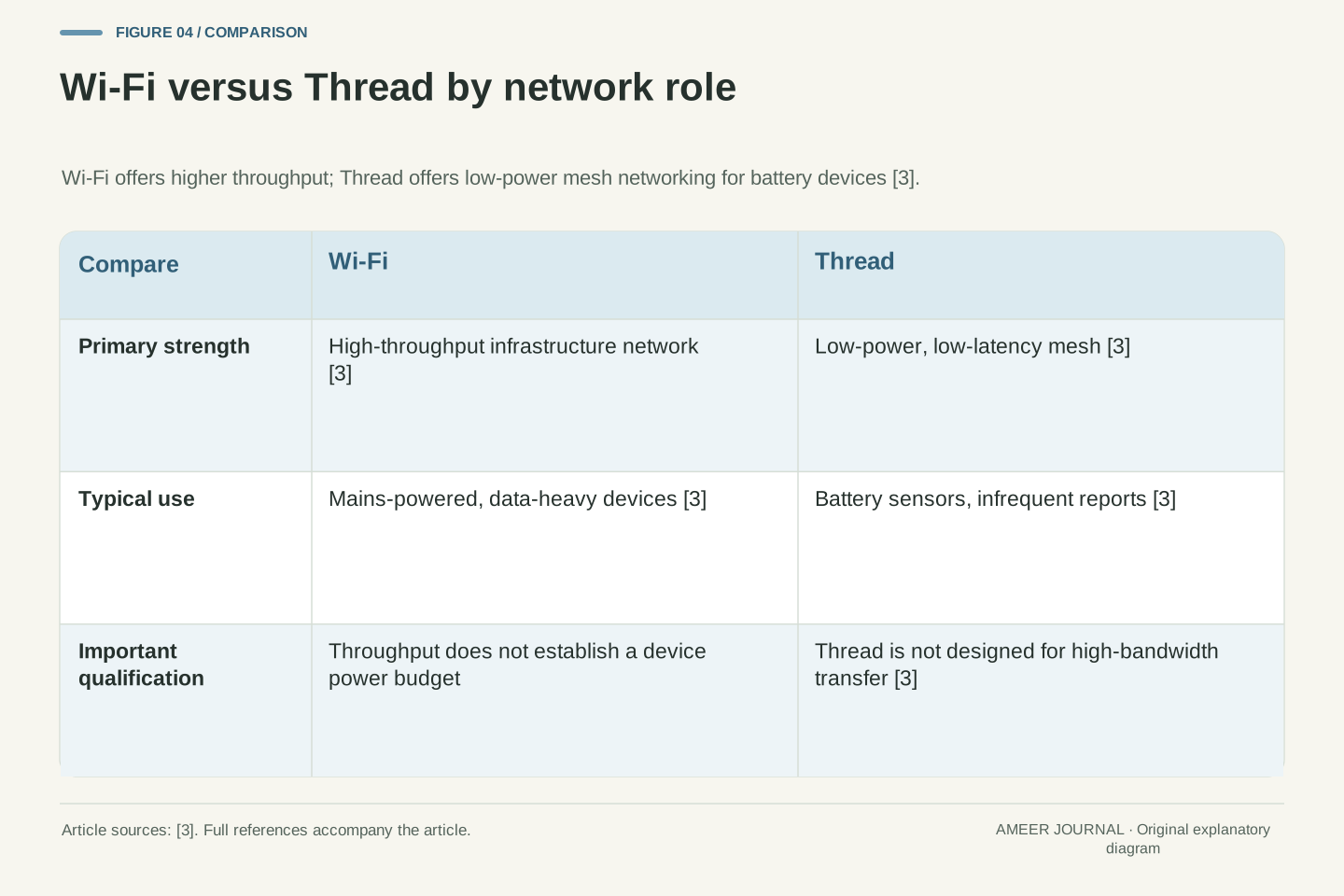
Wi-Fi and Thread are often mentioned in the same breath, but they do different jobs. Both can carry Matter traffic because Matter is built on IP [1]. The difference lies in the kind of network each creates. Wi-Fi is the familiar high-throughput network used by phones, laptops and many mains-powered devices. Thread is designed for low-power, low-latency mesh networking for devices that may run on batteries for years [3].
Google's Thread primer explains that Matter works on high-throughput mediums such as Wi-Fi and Ethernet, but also on low-latency, low-bandwidth Thread [3]. That contrast is central. A mains-powered hub or light may keep its radio on continuously, while a battery sensor needs to sleep and wake efficiently. Thread's proxy architecture and sleepy end devices help full-powered nodes support child nodes without forcing the battery device to handle energy-intensive transactions [3].
For a household, the lesson is that Matter does not replace the network. It rides on it. If a device uses Wi-Fi, it depends on your Wi-Fi coverage and infrastructure. If it uses Thread, it depends on a Thread network and, for communication with Wi-Fi or Ethernet devices, a Thread Border Router [3]. The shared protocol helps the devices understand one another, but the network still determines reach, power use and performance.
A simple comparison is a road and a language. Wi-Fi and Thread are different roads, with different speeds and energy costs. Matter is the shared language spoken by drivers using either road. Confusing the road with the language leads to the mistaken belief that buying any Matter device automatically solves coverage, battery life or router placement [1][3].
Wi-Fi, Ethernet and Thread are distinct network layers that can all carry IP traffic for Matter [1][3]. The retrieved Google primer describes Thread as a low-power, low-latency mesh technology intended to enable IPv6 in constrained environments rather than high-bandwidth transfer [3]. It cites an IEEE 802.15.4 physical-layer rate of 250 kbps, with typical maximum bandwidth around 125 kbps after retransmissions and overhead, and notes that this is orders of magnitude less than Wi-Fi [3]. Those figures are indicative and version-qualified, not guarantees for any particular product.
The same primer explains that IPv6 packets in Thread often need fragmentation because IEEE 802.15.4 frames are 127 bytes while the typical IPv6 MTU is 1280 bytes, a process defined by RFC 4944 [3]. That detail illustrates the engineering trade-off. Thread optimises for low power and mesh reach, accepting fragmentation and limited throughput. Wi-Fi optimises for higher throughput and simpler integration with existing infrastructure, accepting higher power consumption.
Power architecture follows from those trade-offs. Some Matter nodes are wired and can keep radios continuously on, while battery sensors require low-power operation [3]. Thread Sleepy End Devices and proxy functions allow full-powered nodes to provide network-level and application-level support for child nodes, insulating them from energy-intensive transactions [3]. The network design therefore shapes device design, not merely connectivity.
Coexistence requires explicit bridging. A Thread Border Router acts as a stub IPv6 router between a Thread stub network and the adjacent Wi-Fi or Ethernet infrastructure network, forwarding only relevant packets and using different IPv6 prefixes for each side [3]. Matter credentials may be shared at the application level, but the link technologies remain different [3]. Shared meaning does not merge the underlying networks into one physical system.
Commissioning: the setup step that is not normal operation
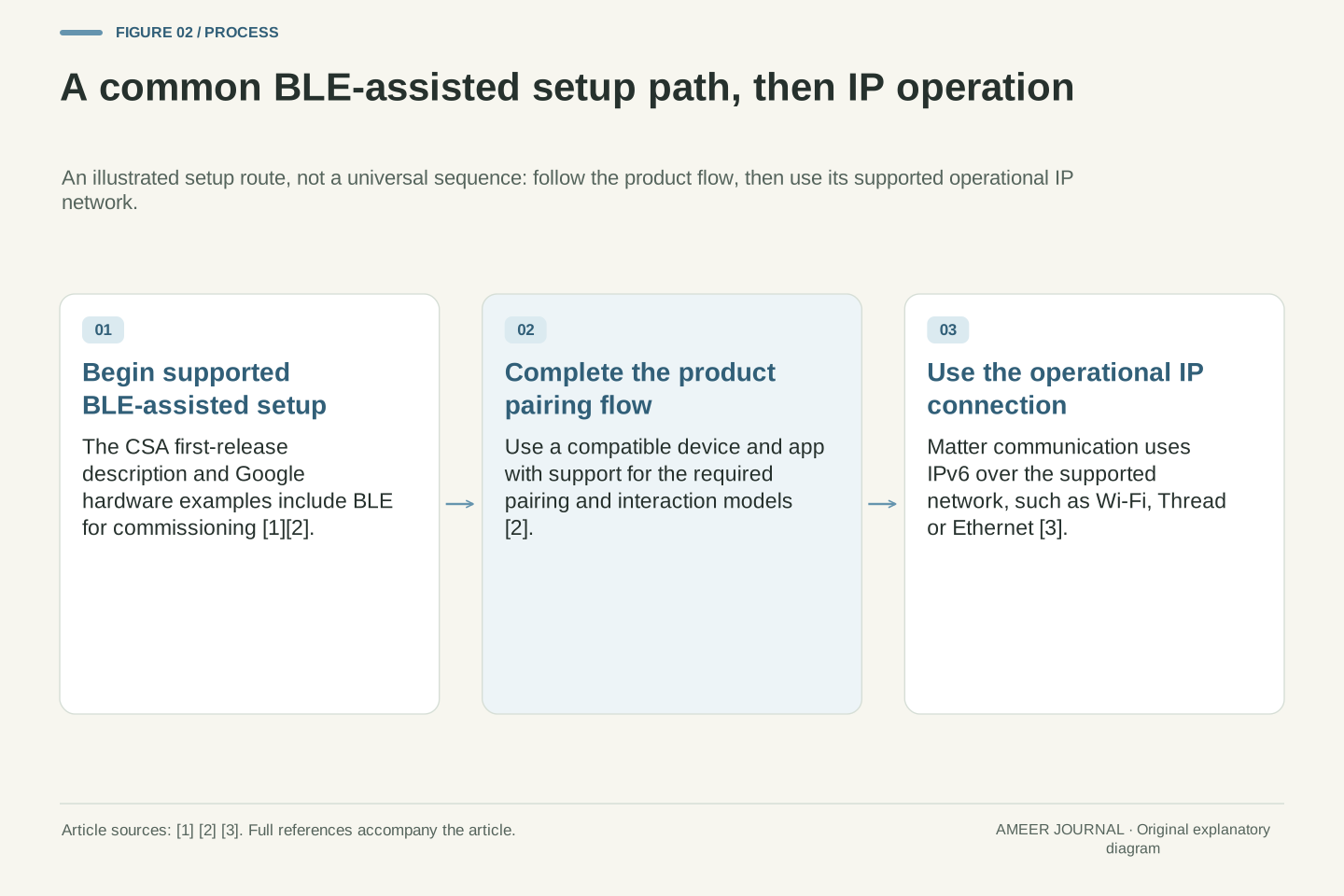
Commissioning is the moment a new device is introduced to a home network and given the credentials it needs to join a Matter fabric. It is not the same as everyday control. The Alliance states that the first Matter specification release would use Bluetooth Low Energy for commissioning [1]. Google adds that a Matter device needs a compatible radio, such as a BLE/Wi-Fi or BLE/Thread combination, and that the mobile app must support the pairing and interaction models of the protocol [2].
That explains a common source of confusion. A phone may use Bluetooth to help set up a device, even if the device will later communicate over Wi-Fi or Thread. Bluetooth is doing a temporary setup job, not necessarily carrying the long-term control traffic. Once commissioning is complete, the device should communicate using its operational network, such as Wi-Fi or Thread, under the Matter fabric it joined [1][2].
Commissioning also explains why setup can feel different across brands even when the protocol is shared. Google says Matter is intended to provide a consistent setup experience across Matter-enabled devices [2]. Consistent does not mean identical in every detail. The app still needs to support pairing, the device still needs compatible hardware, and the user still needs the right network in place. A Thread device, for example, needs a Thread network to join [2][3].
Commissioning is a distinct phase in which a new node is authenticated, provisioned with fabric credentials, and configured to join an operational Matter network. The Alliance identifies Bluetooth Low Energy as the commissioning transport for the first specification release [1]. Google specifies that a device requires a compatible radio combination, for example BLE/Wi-Fi or BLE/Thread, and that the mobile app must implement the protocol's pairing and interaction models [2]. Commissioning therefore depends on both radio hardware and application software.
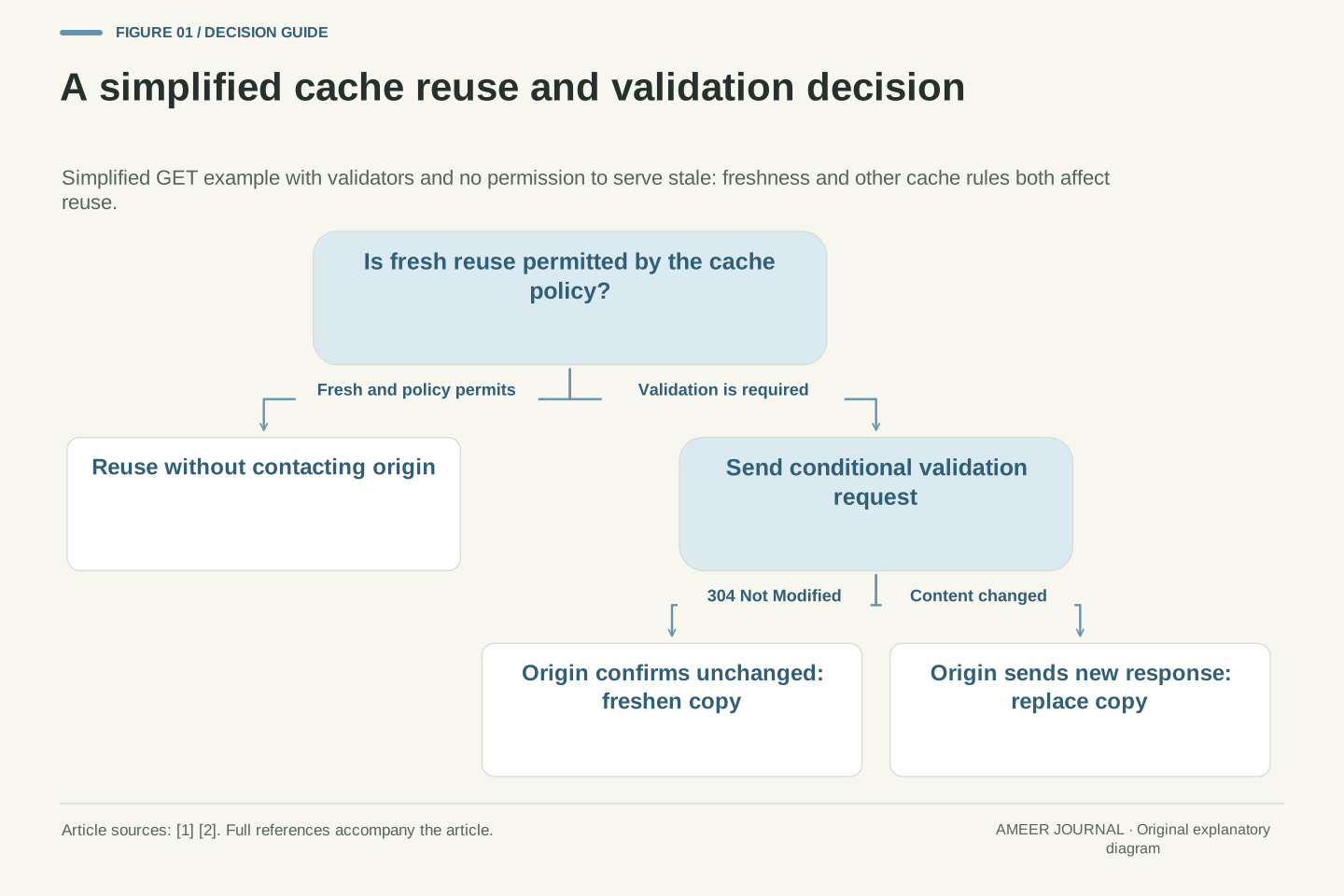
The distinction between commissioning and operation matters for diagnosis. A failure during pairing may reflect missing BLE support, an incompatible app, insufficient hardware resources, or the absence of a required operational network, rather than a defect in the device's Matter application logic [2]. Google notes that a device must handle memory and processing requirements and use a supported network layer such as Wi-Fi or Thread [2]. Setup is a system integration task, not a single radio handshake.
After commissioning, operational communication uses IPv6 over the selected network layer [3]. The device is then addressed as a Matter node within a fabric, and group communication can use multicast scoped to that fabric [3]. The commissioning channel should not be confused with the operational path. BLE may assist with introducing the device; its supported IP network, such as Wi-Fi or Thread, carries ongoing Matter traffic [1][2].
This separation also clarifies why a phone's presence during setup does not imply that the phone remains in the control loop. In a local Matter system, a controller on the home network can communicate directly with the node over IP [2][3]. The phone's role may be limited to commissioning, user interface, or remote access through an ecosystem, depending on the product and platform. The protocol defines the roles; the product determines how prominently each role is used.
A fictional sensor-to-controller interaction, step by step
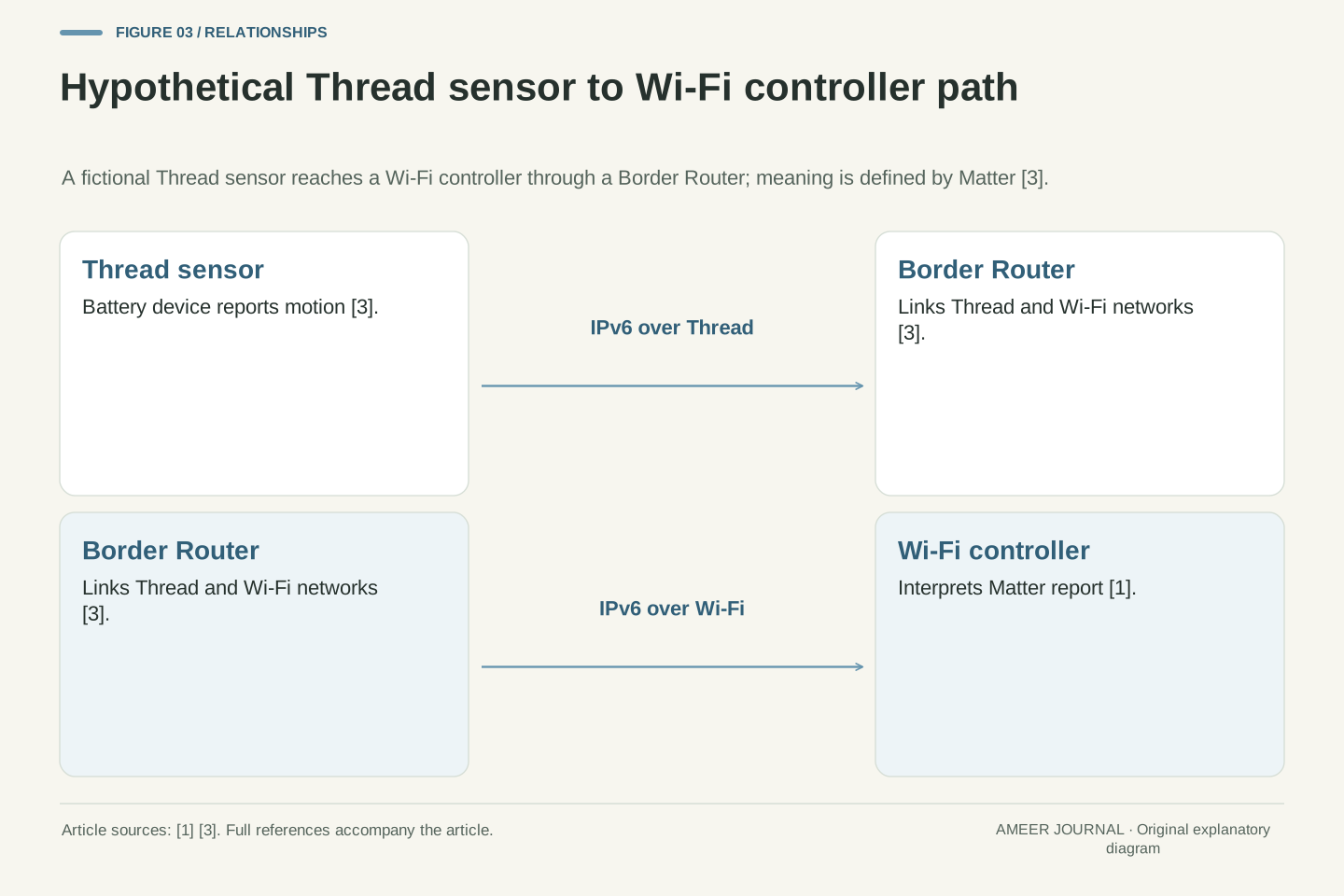
Consider a fictional hallway sensor called the North Sensor. It is battery-powered, uses Thread, and reports motion to a controller in the same home. This example is hypothetical and is used only to show the layers. The sensor does not send a raw radio pulse that the controller magically understands. It sends a Matter message over IPv6, carried by Thread, expressing a defined meaning such as motion detected [1][3].
First, the sensor wakes from sleep because Thread supports low-power operation for battery devices [3]. It then sends an IPv6 packet to the controller. The packet's journey across the Thread mesh is a transport matter. The controller's interpretation of the packet as a motion report is an application matter. If the controller is on Wi-Fi, a Thread Border Router forwards relevant traffic between the Thread network and the adjacent infrastructure network [3].
Next, the controller decides what to do. It might turn on a light, start a recording, or simply log the event. Those decisions are not dictated by Thread or Wi-Fi. They depend on the controller's rules and the functions exposed by the light or camera. Matter helps because the controller and the light can share the same application language if both implement compatible Matter device types [1][2]. The network carried the message; the protocol gave it meaning; the controller supplied the policy.
If the same sensor were replaced by a fictional Wi-Fi sensor, the meaning could remain the same while the transport changed. That is the value of separating layers. The controller still receives a Matter motion report, but the packet travels over Wi-Fi instead of Thread, with different power and throughput characteristics [3]. The example also shows the limit. If the light does not implement the relevant Matter function, or the controller does not support that device type, the chain breaks even though the sensor worked perfectly [2].
The following worked example is entirely hypothetical. A battery-powered Thread sensor, Node S, detects motion and reports it to a controller, Node C, on Wi-Fi. The example assumes both nodes are commissioned into the same Matter fabric, both implement the relevant device types, and a Thread Border Router is present. Those assumptions are stated explicitly because the sources do not guarantee that any particular commercial product will satisfy them [1][2].
At the network layer, Node S originates an IPv6 unicast packet addressed to Node C. Thread carries the packet across the mesh, potentially fragmenting it because the IPv6 MTU exceeds the IEEE 802.15.4 frame size [3]. The Border Router forwards the packet between the Thread prefix and the adjacent infrastructure prefix, and publishes discovery information so Thread nodes can be found from the Wi-Fi side [3]. None of those steps defines what motion means. They define how bits reach the destination.
At the application layer, the packet carries a Matter interaction whose semantics are defined by the protocol. Node C interprets the interaction as a state report from a sensor device type, not as an undifferentiated network event [1][2]. That interpretation is possible only because both endpoints implement compatible Matter profiles. The transport layer delivered the packet; the application layer supplied the meaning. Conflating those functions obscures where a failure occurs.
Node C may then issue a command to a light. If the light implements the relevant Matter device type and clusters, the command can be expressed in shared terms [1][2]. If it does not, the controller may need a different integration path or may be unable to control that function. The sensor-to-controller path can therefore succeed while the controller-to-light path fails. Each hop must be evaluated at both the transport and application layers.
A failure analysis follows naturally. If Node S never wakes, check its power and documented operating behaviour first. If the packet does not cross the Border Router, investigate the network path and configuration. If the packet arrives but is not recognised, check application compatibility and controller support. If the light does not respond, the problem may be device-type support or controller policy. Matter reduces ambiguity by standardising the application layer, but it does not collapse all failure modes into one.
Border routers and the bridge between Thread and Wi-Fi
A Thread Border Router is the bridge that lets Thread devices communicate with devices on Wi-Fi or Ethernet. Google describes it as a stub IPv6 router that links a Thread stub network to the adjacent infrastructure network [3]. It forwards only packets relevant to the Thread network and uses different IPv6 prefixes on each side [3]. Without that bridge, a Thread sensor and a Wi-Fi controller may share Matter credentials yet still lack a network path between them [3].
The Border Router also helps with discovery. It publishes mDNS DNS-SD discovery packets on behalf of Thread nodes so they can be discovered on the adjacent infrastructure network [3]. Discovery is the process of finding devices before communicating with them. If discovery fails, a controller may not see a device even though the device is powered and commissioned. That is a network problem, not necessarily a Matter meaning problem [3].
For buyers, the practical implication is simple. A Thread device needs a Thread network, and communication with Wi-Fi devices needs a Border Router somewhere in the system. The sources do not say that every Wi-Fi router is also a Thread Border Router, nor that every Matter hub provides one. Check the specific product's role. The label Matter tells you about the application protocol; it does not automatically tell you which network bridges are present [1][3].
The Thread Border Router occupies a precise architectural position. It is a stub IPv6 router connecting a Thread stub network, which provides outer connectivity to its members but does not serve as transit between other networks, to the adjacent infrastructure network [3]. It forwards unicasts to or from the Thread IPv6 prefix and configures prefixes and routes so hosts on either side can communicate [3]. The design limits forwarding to relevant traffic, which is important because bridging all Wi-Fi multicast into Thread could overburden the low-bandwidth mesh [3].
Discovery is handled through mDNS DNS-SD publication on behalf of Thread nodes [3]. That mechanism allows infrastructure-side hosts to discover Thread nodes without requiring the Thread network to carry unnecessary traffic. The Border Router therefore performs three functions: routing, prefix management, and discovery publication [3]. Each function can fail independently, producing different symptoms.
Multicast routing into Thread uses a unicast prefix-based IPv6 multicast addressing scheme defined by RFC 3306 [3]. Multicast addresses also include the upper 56 bits of the Fabric ID, so multicast scope is within a fabric while unicast addresses are shared between fabrics [3]. Nodes in many fabrics can therefore have several multicast addresses for overlapping groups. That design ties group communication to fabric membership, not merely to network proximity.
The Border Router does not unify the link technologies. Thread and Wi-Fi remain separate networks with different physical layers, frame sizes and bandwidth characteristics [3]. Shared Matter credentials at the application level allow nodes on both sides to participate in the same fabric, but only if the Border Router provides the necessary network connectivity [3]. Architectural separation persists beneath application unity.
What a protocol label cannot promise
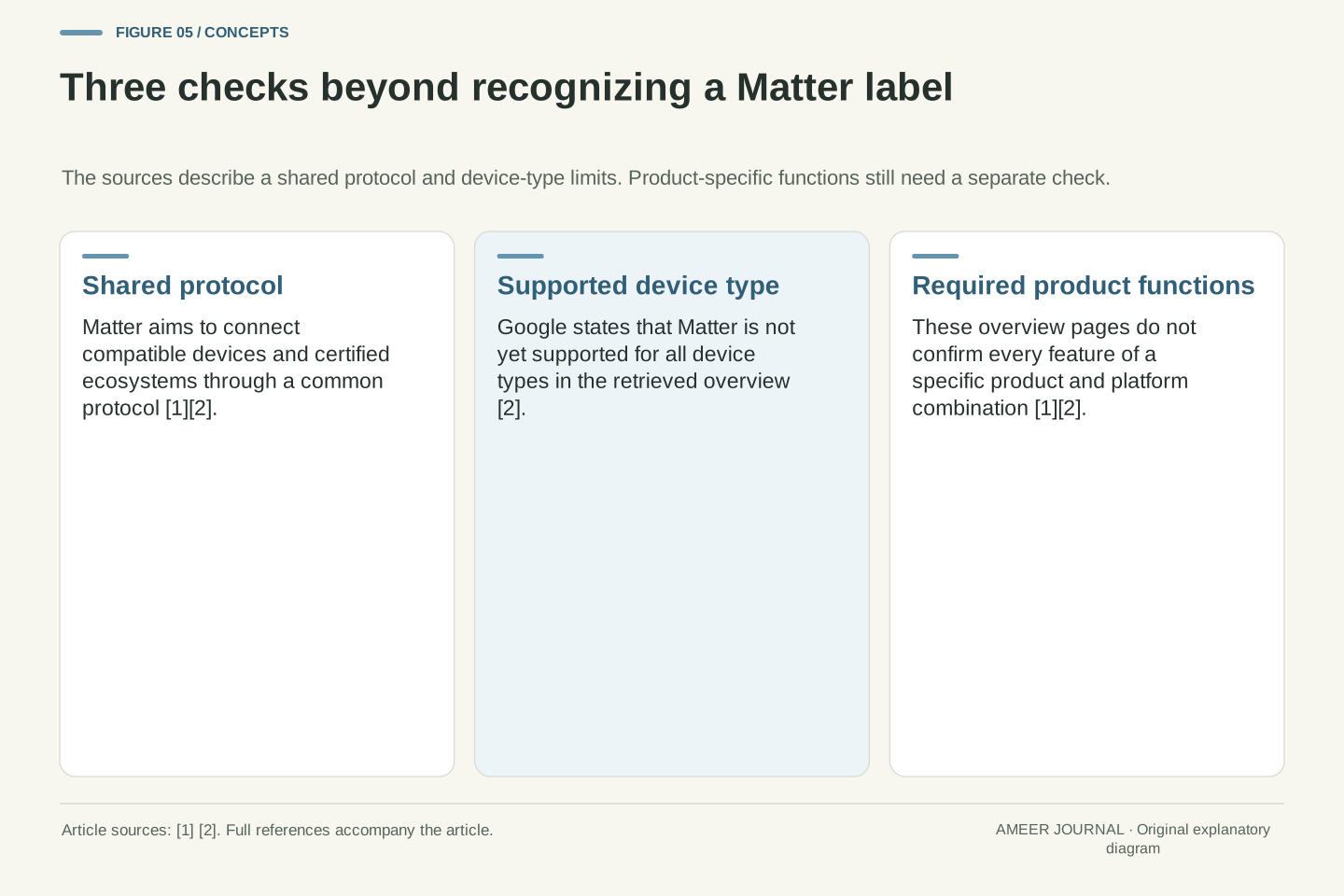
A Matter label is useful, but it is not a complete specification of a product. It does not tell you which device types are supported, which functions are exposed, or whether a particular platform implements the same features. Google states plainly that Matter is not yet supported for all device types [2]. The Alliance overview does not list which functions every product exposes on every platform [1]. Those limits should be read as part of the label's meaning.
The same caution applies to network claims. Matter can run on Wi-Fi or Thread [1]. That does not mean a given device supports both, or that it will work well in every room. A Wi-Fi device depends on Wi-Fi coverage. A Thread device depends on a Thread mesh and, for cross-network communication, a Border Router [3]. The protocol label does not replace a site survey, a power budget, or a check of the controller's capabilities.
Price, performance and longevity are also outside the label. The sources describe Thread's limited bandwidth and low-power design [3], but they do not guarantee battery life for any specific sensor. Battery life depends on the device's hardware, firmware, reporting frequency and environment. Similarly, Matter's local path can reduce latency compared with cloud-to-cloud integration [2], but actual responsiveness depends on the whole system. Treat the label as a starting point for questions, not as the answer.
A careful buyer will ask four questions. Is the device Matter-certified? Which device type does it implement? Which network does it use, and what bridge or hub does that network require? Does my chosen platform support that device type and the functions I care about? Those questions are more informative than the presence of a logo alone [1][2].
Protocol labels compress a large conformance space into a small symbol. Matter certification indicates that a device conforms to a defined specification, but the specification is partitioned into device types, clusters, attributes and commands [1][2]. A device may be certified for one type and not another, or may implement a subset of optional behaviours within a type. The label therefore denotes membership in a defined set, not equivalence across all products bearing it.
Google's developer guidance makes the incompleteness explicit. Not all device types are supported, hardware must meet memory and processing requirements, and a supported network layer such as Wi-Fi or Thread must be used [2]. The Alliance overview describes the protocol's goals rather than a product-by-product feature matrix [1]. Those statements define the boundary of the claim. Interoperability is profile-specific.
Network performance is similarly underdetermined by the label. Thread's physical-layer rate, fragmentation behaviour and typical bandwidth are constrained by IEEE 802.15.4 and IPv6 overhead [3]. Wi-Fi offers higher throughput but different power characteristics [3]. Neither technology's performance in a particular home can be inferred from the Matter name alone. Coverage, interference, node placement, Border Router availability and controller implementation all affect outcomes.
The correct inference from a Matter label is therefore conditional. If a device is certified, implements a device type supported by the controller, uses a network that is present and correctly bridged, and exposes the required functions, then Matter provides a shared application protocol for local IP communication [1][2][3]. If any condition fails, the label does not rescue the integration. Precision about conditions is the difference between engineering and marketing.
Comparing Wi-Fi, Thread and Bluetooth Low Energy by role
Bluetooth Low Energy, Wi-Fi and Thread are sometimes listed together as if they had interchangeable jobs. The CSA page describes BLE commissioning for the first specification release [1], and Google gives BLE/Wi-Fi and BLE/Thread as compatible hardware examples [2]. These illustrate a common setup route, not a universal sequence for every device. Ongoing Matter communication uses IPv6 over the device's supported network, with Wi-Fi, Thread and Ethernet among the media described by the primer [3].
Wi-Fi is suited to devices that need higher throughput or are mains-powered. Thread is suited to low-power, low-latency mesh networking for battery devices [3]. Google notes that Thread's total bandwidth is limited and that its goal is not high-bandwidth transfer [3]. A sensor reporting occasional events fits Thread well. A device streaming large amounts of data would not. The sources do not provide a complete catalogue of device types, but they do establish the trade-off between power, bandwidth and mesh networking [3].
Bluetooth Low Energy also has a role in device hardware. Google says a Matter device needs a compatible radio, such as BLE/Wi-Fi or BLE/Thread [2]. That means the same physical product may contain two radios with different jobs. One handles setup; the other handles operation. Confusing those radios leads to mistaken expectations, such as assuming that a device that pairs over Bluetooth will continue to use Bluetooth for all control traffic [1][2].
The three technologies occupy different positions in the Matter architecture. Bluetooth Low Energy is the commissioning transport in the first specification release [1]. Wi-Fi and Thread are operational network layers [1]. Google requires a compatible radio combination, for example BLE/Wi-Fi or BLE/Thread, and notes that the mobile app must support the protocol's pairing models [2]. The radio architecture therefore encodes the phase separation between setup and operation.
Wi-Fi and Thread differ in throughput, power and topology. Wi-Fi is a high-throughput infrastructure network. Thread is a low-power, low-latency mesh with a 250 kbps physical-layer rate and typical maximum bandwidth around 125 kbps after overhead, as described in the retrieved Google primer [3]. Thread frames are small, so larger IPv6 packets can require fragmentation under RFC 4944 [3]. Those characteristics make Thread appropriate for infrequent sensor reports and inappropriate for high-bandwidth transfer [3].
Bluetooth Low Energy should not be evaluated as an operational alternative to Wi-Fi or Thread within this model. Its role is commissioning [1]. A device may therefore be BLE-capable without being BLE-operational for Matter traffic. Conversely, a device's operational network choice determines its power budget, coverage requirements and bridging needs [2][3]. Role-based comparison prevents category errors.
The comparison also clarifies hardware selection. Google warns that choosing a new chipset may be necessary because of radio compatibility and software requirements [2]. A manufacturer cannot simply add Matter to any existing radio design. The device must support its chosen pairing flow and operational network, and meet the processing and memory requirements of a compliant Matter library [2]. Architecture constrains product design at every level.
Failure modes: when the chain breaks
When a Matter system fails, the first task is to locate the break. A device may be powered but not commissioned. It may be commissioned but not reachable over the network. It may be reachable but not understood because the controller does not support its device type. Or it may be understood but not acted upon because the target device does not expose the required function. Each failure looks similar to the user, but the causes are different [1][2][3].
Network failures are common. A Wi-Fi device outside coverage will not communicate, no matter how well it implements Matter. A Thread device without a mesh path or without a Border Router will not reach a Wi-Fi controller [3]. A battery sensor that has exhausted its battery will not report. Those are transport and power problems. They are not solved by reinstalling an app or by assuming the protocol label guarantees coverage.
Application failures are subtler. A controller may see a device but lack support for its type. Google notes that not all device types are supported yet [2]. A light may support basic on/off but not a particular advanced function in a given ecosystem. A general protocol overview does not verify that specific product-and-platform feature combination [1]. In those cases, the network worked and the protocol worked, but the implemented profile did not cover the desired behaviour.
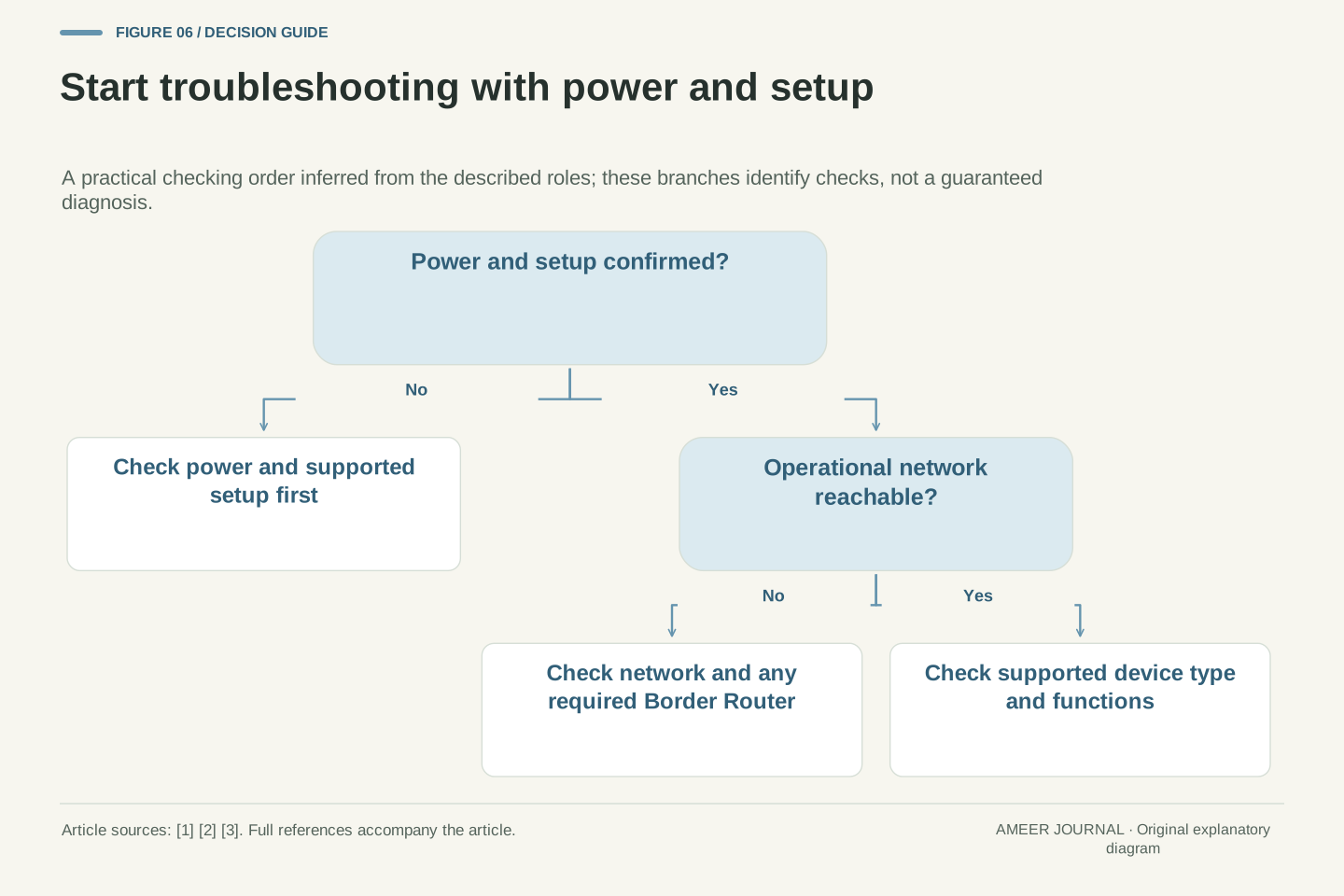
A useful checklist is to test each layer in order. Confirm power. Confirm commissioning. Confirm network reachability. Confirm that the controller recognises the device type. Confirm that the target function is exposed. That sequence follows the architecture: power and radio first, then network, then application meaning, then policy [1][2][3]. Skipping to the last step wastes time when the break is earlier.
The checklist is non-hazardous and requires no tools beyond the products themselves. Work with the manufacturer's instructions, keep devices on their intended power sources, and do not open sealed units or modify wiring. If a device is mains-powered, follow its safety instructions and seek qualified help for any electrical work. The goal is diagnosis, not repair of hardware you are not qualified to service.
Failure diagnosis should follow the layer separation described in the sources. A device that is not powered cannot commission or communicate, and battery-powered nodes depend on low-power operation to remain available over time [3]. Checking power first therefore separates an energy or hardware problem from a protocol problem before any Matter interaction is evaluated.
Commissioning is the next distinct phase. The first Matter specification release used Bluetooth Low Energy for commissioning, and a device needs a compatible radio combination such as BLE/Wi-Fi or BLE/Thread, with a mobile app that supports the protocol pairing and interaction models [1][2]. A failure at this stage may reflect missing commissioning support rather than a failure of operational Matter communication over Wi-Fi or Thread [1][2].
Network reachability is a separate check. Matter uses IPv6 for operational communications, with unicast addressing for nodes and multicast addressing for groups [3]. A Thread node also needs a Thread network, and communication with Wi-Fi or Ethernet networks needs a Thread Border Router, which forwards only relevant packets between the Thread and adjacent infrastructure networks and publishes discovery information for Thread nodes [3]. A commissioned device that cannot be reached or discovered therefore points to network configuration, coverage, or bridging, not necessarily to application meaning [3].
Application-layer failures occur after reachability is established. Matter is an IP-based application protocol, but not all device types are supported yet, and an overview does not establish that every product exposes every function across platforms [1][2]. A controller may therefore reach a node yet be unable to use a desired function if the implemented device type, clusters, or exposed functions do not cover it [1][2]. Testing power, commissioning, network reachability, device-type support, and exposed functions in that order keeps each failure mode distinct [1][2][3].
How to judge a product before you buy it
Start with the device type. Ask what kind of device the product claims to be under Matter and whether that type is supported by the platform you use. Google's guidance that not all device types are supported yet makes this question essential [2]. A product may be an excellent example of one type and absent from another. The type determines the baseline functions a controller can expect [1][2].
Next, ask about the network. Does the device use Wi-Fi or Thread? If it uses Thread, is there a Thread network in your home, and is there a Border Router for communication with Wi-Fi devices? If it uses Wi-Fi, is the location within reliable coverage? Those questions follow from the network layer's role in carrying Matter traffic [1][3]. The answer also affects power. Battery devices benefit from Thread's low-power design, while mains-powered devices can sustain Wi-Fi radios more easily [3].
Then ask about commissioning and the app. Does the product include the radio combination needed for setup, such as BLE/Wi-Fi or BLE/Thread? Does your phone app support Matter pairing? Google notes that the app must support the protocol's pairing and interaction models [2]. A device that cannot be commissioned into your fabric will not participate, regardless of its other merits.
Finally, ask about functions, not just compatibility. Which specific behaviours do you need, and does the product expose them in your chosen ecosystem? The Alliance overview presents the protocol's goals rather than a product-specific feature inventory [1]. A short list of required functions, checked against the product's documentation and the platform's support, is more reliable than a general claim of interoperability.
That approach respects what Matter provides. It offers a shared protocol over IP, with Wi-Fi and Thread among the supported network choices [1]. The BLE-assisted commissioning route described in the sources is distinct from ongoing operational communication [1][3]. The overview pages do not establish universal device-type coverage, identical product features, or freedom from network planning [2][3]. Assess a product against those documented roles and your required functions, then check its own setup instructions and the platform's support.
From a technical perspective, a purchase decision is a conformance check across layers. First, confirm Matter certification and the implemented device type, because certification is scoped to a defined specification and not all device types are supported yet [1][2]. Second, confirm the operational network layer, Wi-Fi or Thread, and, for Thread, the presence of a Thread network and a Thread Border Router for communication with Wi-Fi or Ethernet networks [2][3]. Third, confirm commissioning hardware and software, including a compatible radio combination such as BLE/Wi-Fi or BLE/Thread and an app that supports pairing and interaction models [1][2].
Finally, confirm exposed functions in the chosen ecosystem, because an overview does not establish that every product exposes every function across platforms [1]. Also check memory and processing requirements for running a compliant Matter library [2]. If those layer-by-layer checks pass, Matter provides a shared IP-based application protocol for local communication; if any check fails, the label alone does not ensure interoperability [1][2][3].
Sources & further reading
Explore the references behind this guide. External pages may change after our review.
- Build With Matter | Smart Home Device SolutionConnectivity Standards Alliance · Accessed 6 Nov 2026
- What is Matter? | Google Home DevelopersGoogle Home Developers · Accessed 6 Nov 2026
- Thread and IPv6 | Matter | Google Home DevelopersGoogle Home Developers · Accessed 6 Nov 2026
Article updated 6 Nov 2026.
Found something we should revisit?
Good explanations get better with thoughtful feedback.