What you’ll take away
- A stored response can be reused without validation only when freshness and the other cache reuse conditions permit it. A stale response normally needs validation or replacement unless serving stale is allowed [1].
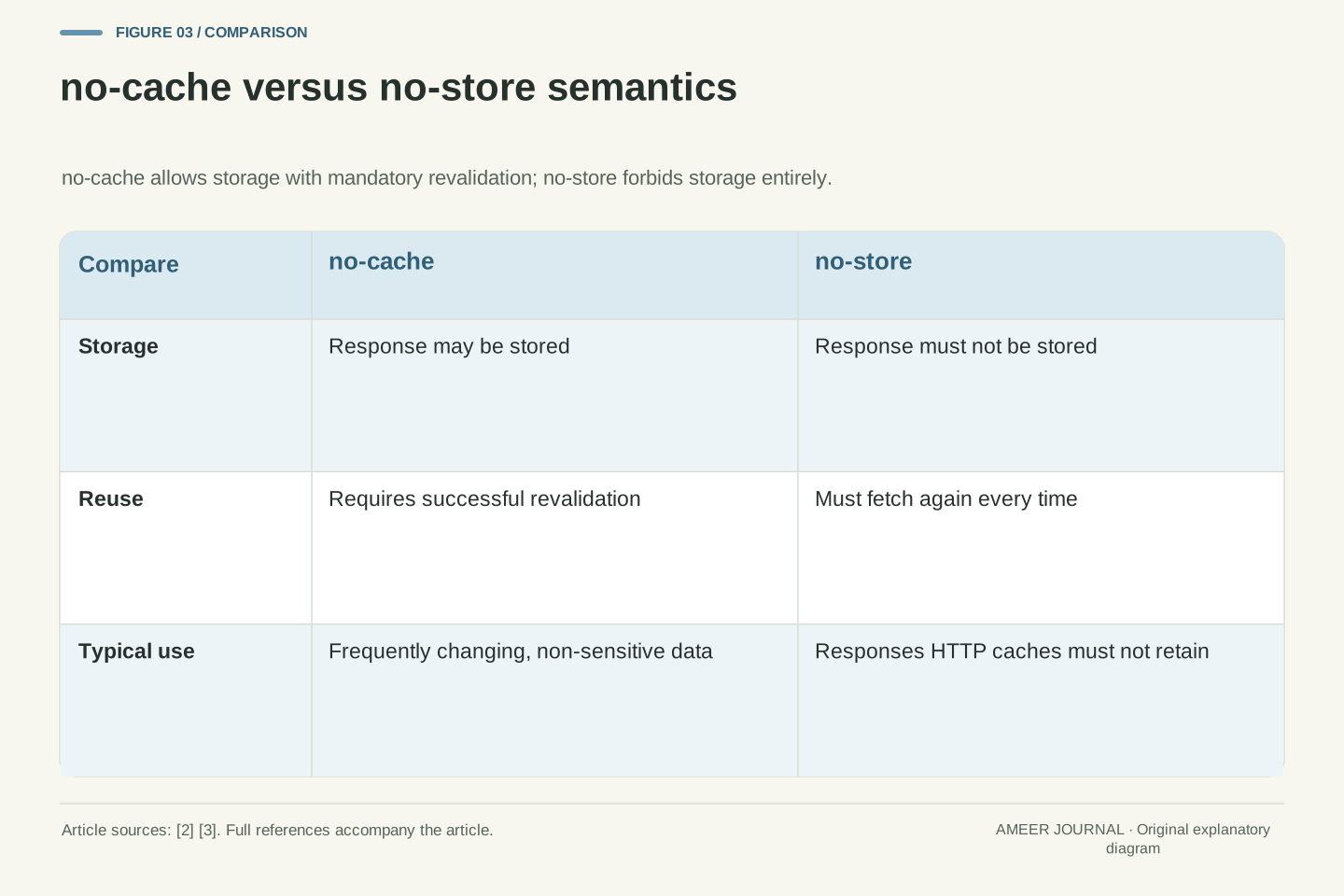
- no-cache permits HTTP cache storage but requires successful validation before reuse. no-store instructs HTTP caches not to store the response; it is not a universal privacy or browser-history guarantee [1][2][3].
- The private directive restricts storage to a private cache. The public directive permits shared caching in circumstances where it might otherwise be disallowed, subject to the remaining protocol rules [1][3].
- Versioned asset URLs can support long freshness lifetimes; an HTML document that must reflect changes can instead use validation. The appropriate policy depends on the resource and its requirements [2].
- Cloudflare settings and product behavior can affect Origin Cache Control and Vary handling. Check the documented behavior for the configuration in use [3].
Why a cache exists and what it stores
An HTTP cache stores a response associated with a request and reuses that stored response for later requests [2]. The main benefit is speed: if the cache is close to the person asking, the answer can arrive without travelling all the way to the origin server [2]. It also reduces work for the origin, because the server does not need to parse the request, restore a session, query a database, or render a template for a reusable response [2].
A cache does not simply keep every response forever. It chooses a stored response using a cache key, which at minimum includes the request method and the target URI [1]. Many common caches focus on GET responses and use the URI as the key [1]. A typical stored result is a 200 response to a GET, although redirects, 404 responses, and partial 206 responses can also be stored when the method definition allows it [1].
Caching is optional in HTTP, but reuse is the expected default when no rule or local configuration prevents it [1]. The standard therefore concentrates on stopping a cache from storing something that should not be stored, or reusing something inappropriately, rather than forcing every cache to store every response [1]. For a site owner, that means headers are instructions to be respected, not guarantees that every intermediary will behave identically [1][2].
The examples below assume ordinary GET requests and responses that are otherwise eligible for caching. A freshness lifetime is only one part of the decision: the response policy, the request, and any required validation still matter. These are explanatory scenarios, not results from a test of your browser or CDN.
RFC 9111 defines HTTP caches and the header fields that control cache behaviour or indicate whether a response message is cacheable [1]. The stated goal is to improve performance by reusing a prior response to satisfy a current request while preserving HTTP transfer semantics [1]. A response is fresh when it can be reused without validation, meaning without checking with the origin server whether it remains valid for this request [1]. Fresh reuse reduces both latency and network overhead [1].
Selection is governed by the cache key, composed at minimum from the request method and target URI, with the method determining the circumstances under which a stored response may satisfy a subsequent request [1]. In practice many caches only cache GET responses and therefore use only the URI as the key [1]. The most common stored object is a 200 response to GET containing a representation of the target resource [1]. Redirects, negative results such as 404, incomplete results such as 206, and responses to other methods may also be stored if the method definition permits caching and supplies a suitable key [1].
Because caching is optional, the normative requirements focus on preventing inappropriate storage or reuse rather than mandating storage of particular responses [1]. Local configuration, product defaults, and intermediary behaviour sit alongside protocol rules when predicting deployment behaviour [1][2][3]. Unless a section says otherwise, the illustrative cases concern otherwise cacheable GET responses; a freshness calculation is not a substitute for checking the complete reuse conditions.
Private caches, shared caches, and who may see a copy
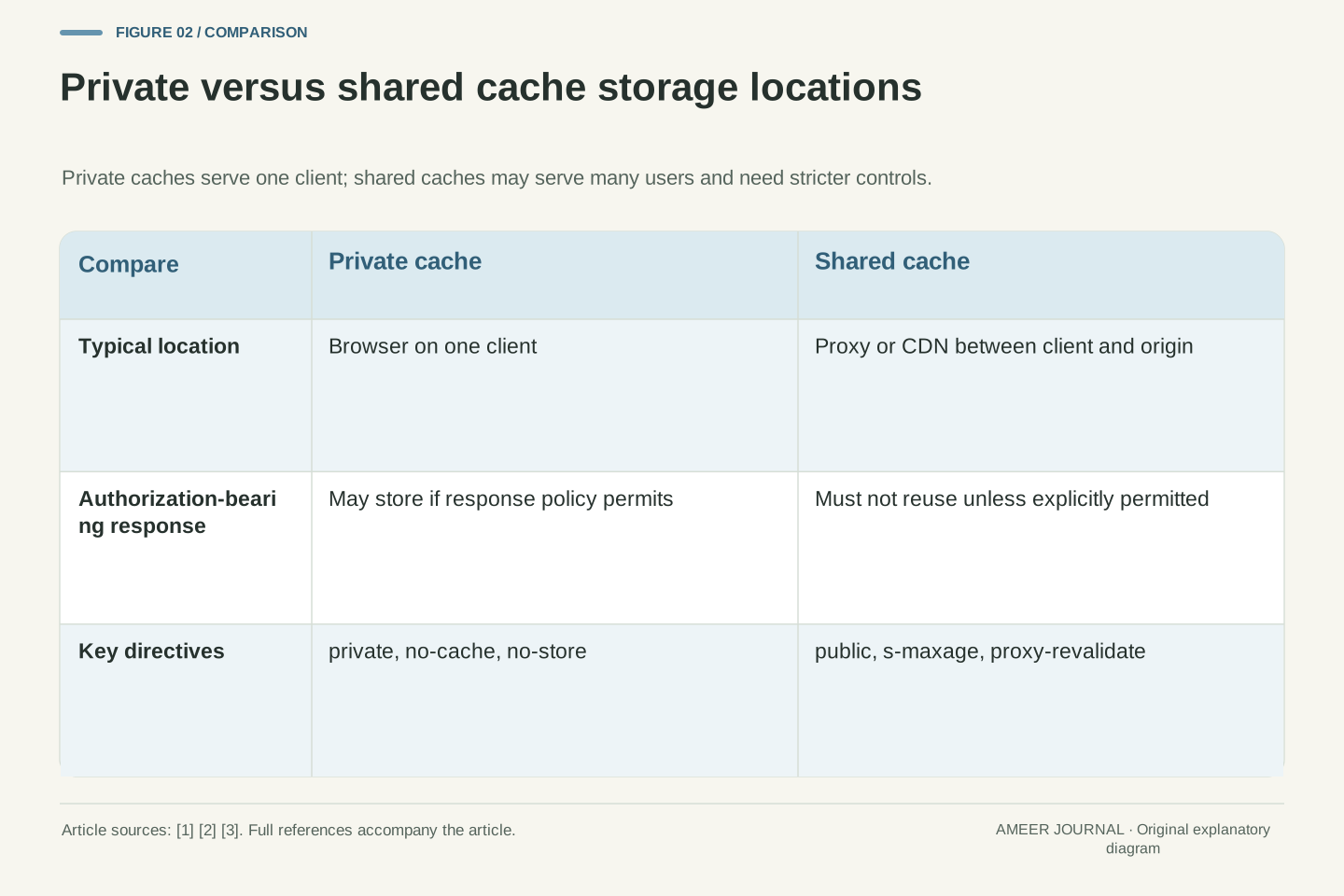
There are two main kinds of HTTP cache: private caches and shared caches [2]. A private cache is tied to one client, typically a browser cache [2]. Because its stored responses are not shared with other clients, a private cache can store a personalised response for that user [2]. A shared cache sits between client and server and can store responses that may be shared among users [2].
Shared caches include proxy caches and managed caches [2]. A proxy cache may be run for access control or to reduce traffic out of a network, and it is usually not managed by the site developer, so headers must control it [2]. Outdated proxy implementations that do not properly understand current caching rules have caused problems for developers in the past [2]. A managed cache, such as a CDN cache, is usually controlled through Cache-Control headers plus product configuration files or dashboards [2].
The practical question is not only whether something can be cached, but where. A response intended for one signed-in user should not be stored by a shared cache that could serve it to someone else [1][2]. The private directive indicates a response is intended for a single user, such as a browser cache, and must not be stored by a shared cache [3]. If you are worried about a shared cache in particular, adding private can help prevent unintended shared storage [2].
The specification distinguishes private caches, tied to a specific client, from shared caches located between client and server that may serve stored responses to multiple users [2]. Shared caches are further classified as proxy caches and managed caches [2]. Proxy caches may combine access control with caching to reduce outbound traffic, are typically outside the developer's administrative control, and must be governed by HTTP headers [2]. Managed caches vary by product, but are commonly controlled through Cache-Control and product-specific configuration or dashboards [2].
Storage rules for authenticated requests are stricter for shared caches. A shared cache must not use a cached response to a request containing an Authorization header to satisfy a subsequent request unless the response contains a Cache-Control directive that explicitly allows shared storage and the cache conforms to that directive's requirements [1]. The public directive indicates any cache may store a response even if it would normally be non-cacheable or cacheable only in a private cache [3]. The private directive indicates the response is intended for a single user and must not be stored by a shared cache such as a CDN or corporate proxy [3].
Set-Cookie does not by itself inhibit caching: a cacheable response carrying Set-Cookie can be used to satisfy subsequent requests, so servers that wish to control such responses are encouraged to emit appropriate Cache-Control fields [1]. Treat session handling and cache policy as separate checks: the presence of that header does not establish that shared reuse is forbidden [1]. Managed caches may also allow explicit deletion through dashboards or APIs, a capability the base HTTP specification does not define [2].
Freshness: max-age, Expires, Age, and heuristic guessing
Freshness answers a simple question: can this stored copy be used right now without asking the origin again? A response's freshness lifetime is the time between its generation by the origin and its expiration time [1]. An explicit expiration time is set by the origin, while a heuristic expiration time is assigned by the cache when no explicit time is available [1]. Freshness can permit direct reuse, provided the other applicable cache rules allow it; no-cache can still require validation [1][2].
The most common explicit control is Cache-Control: max-age, which gives a lifetime in seconds [2][3]. For example, max-age=604800 means the response is treated as fresh for that many seconds after it was served [2][3]. The Age header reports how old a stored response already is, so a cache can compare age against max-age [2][3]. Expires gives an absolute date instead of a duration, but max-age is preferred when both are present [2].
If no Cache-Control is given, HTTP may still store and reuse a response under heuristic caching when conditions are met [2]. That default is not the same as do not cache [2]. To avoid heuristic guessing, it is preferable to give every response an explicit Cache-Control header [2]. Heuristics must not be used when an explicit expiration time is present, and they are limited to certain heuristically cacheable status codes or responses explicitly marked cacheable [1].
Freshness is defined by the freshness lifetime, the interval between origin generation and expiration time [1]. Explicit expiration is origin-intended; heuristic expiration is cache-assigned in the absence of explicit freshness information [1]. Freshness governs cache reuse only and cannot force a user agent to refresh its display or reload a resource [1]. For a shared cache, the presence of s-maxage supplies the shared-cache freshness lifetime under the rule described in RFC 9111 [1]. Check the relevant directives together rather than deciding reuse from a single number.
max-age specifies an elapsed lifetime in seconds and is preferred over Expires when both are present [2]. The Age field conveys the time in seconds since the asset was served from the origin, allowing a cache to determine staleness by comparing age with the applicable lifetime [3]. Expires uses an absolute HTTP-date; parsing and clock-shift issues motivated the adoption of max-age for elapsed time in HTTP/1.1 [2]. When multiple values for a directive appear, a cache may use the first occurrence or treat the response as stale, and when directives conflict the most restrictive should be honoured [1]. Invalid freshness information, such as a non-integer max-age, should encourage treating the response as stale [1].
Heuristic freshness is a fallback for responses without explicit freshness whose status codes are defined as heuristically cacheable, or that are explicitly marked cacheable such as with public [1]. It must not override an explicit expiration time [1]. Because heuristic behaviour is implicit and implementation-dependent, explicit Cache-Control on all responses is the recommended operational posture [2].
A hypothetical cache-age timeline
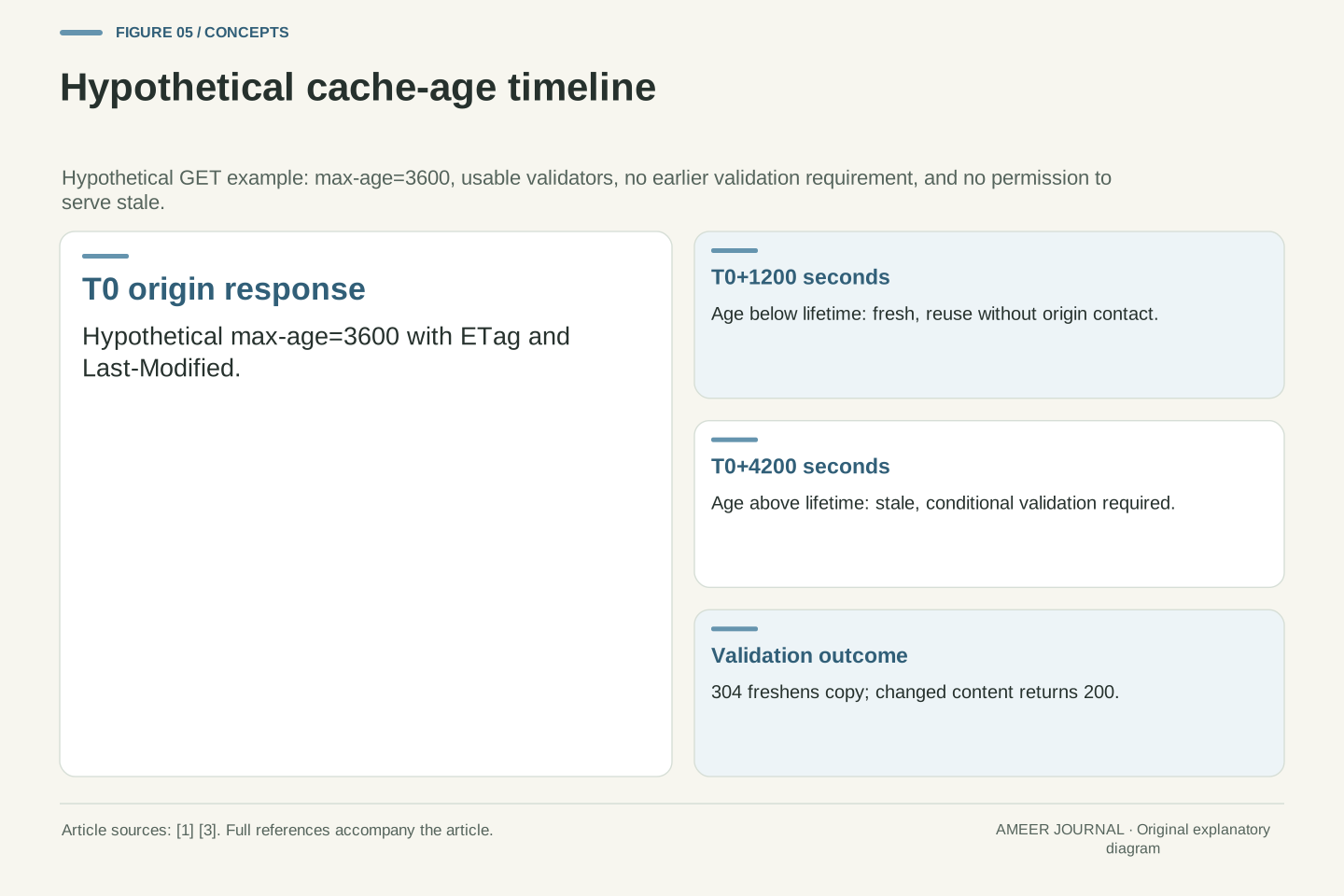
The following timeline is an original hypothetical example, created only to show the arithmetic; it is not a measurement from any real site. Assume, hypothetically, that an origin returns a page at 10:00 with Cache-Control: max-age=3600 and an ETag [2]. That means the stored copy is fresh for 3600 seconds, or one hour, after it was served [3]. At 10:20, a visitor requests the same URL. The cache age is about 1200 seconds, which is less than 3600, so the copy is still fresh and can be reused without contacting the origin [1][2].
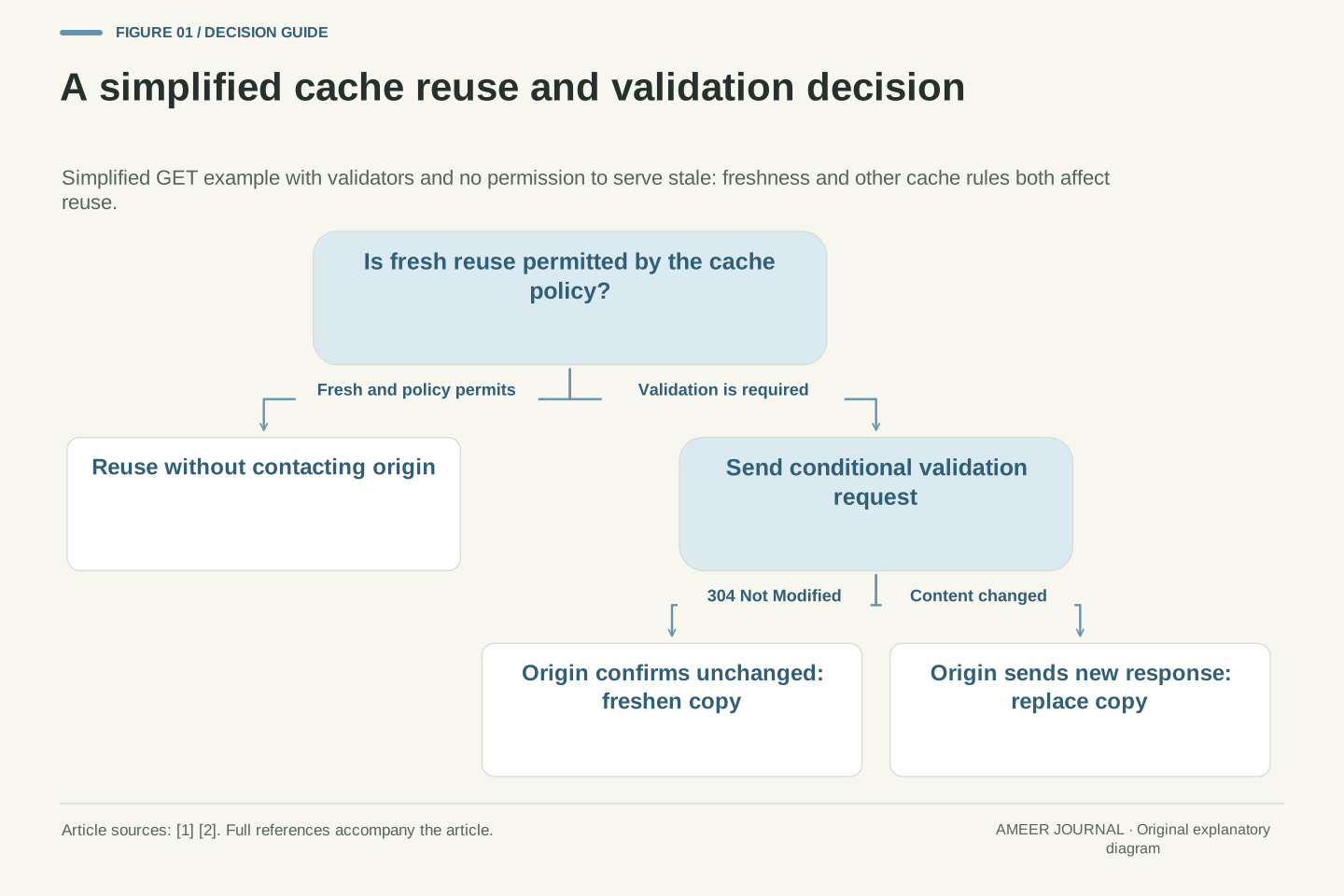
At 11:10, the age is about 4200 seconds, which is greater than 3600, so the copy is stale [3]. Stale does not mean deleted. The cache can ask the origin whether the stored copy is still valid, using validation [2]. If the origin says the content has not changed, the cache can freshen the stored copy and reuse it [1][2]. If the content has changed, the origin sends a new response and the cache replaces the old one [1].
This example shows why max-age and validation work together. Freshness avoids origin contact entirely, while validation avoids sending the full body again when nothing has changed [1][2]. It also shows the risk of a long max-age: during the fresh period, the cache will reuse the stored copy without checking the origin [1]. Choose the lifetime according to how quickly the content is allowed to become outdated, not according to the longest value that looks attractive [2].
Consider a purely hypothetical illustration, with all values assumed for exposition and not observed from any deployment. At time T0 the origin generates a response with max-age=3600, an ETag, and a Last-Modified timestamp [2]. Freshness lifetime is therefore 3600 seconds from generation [1]. At T0+1200 the current age is less than the freshness lifetime, so the stored response is fresh and may be reused without validation [1]. At T0+4200 the age exceeds max-age, so the response is stale by the definition that it is stale after its age exceeds the specified seconds [3].
Staleness does not entail eviction. RFC 9111 provides that a non-fresh stored response may still be reusable if validation freshens it, or in defined circumstances if the origin is unavailable [1]. Validation uses a conditional request to let the next inbound server select the stored response as valid, update stored metadata, or replace it with a new response [1]. A 304 response can freshen the stored copy without retransmitting the body, whereas a changed representation requires a full 200 response [2].
The operational trade-off is between origin load and staleness risk. A longer max-age suppresses validation traffic but extends the window in which changes are invisible to caches [1][2]. A shorter max-age increases origin contact but bounds the staleness window [2]. Neither choice is universally correct; the correct value depends on the resource's change frequency and the cost of serving an outdated copy [2].
Validation with ETag, Last-Modified, and conditional requests
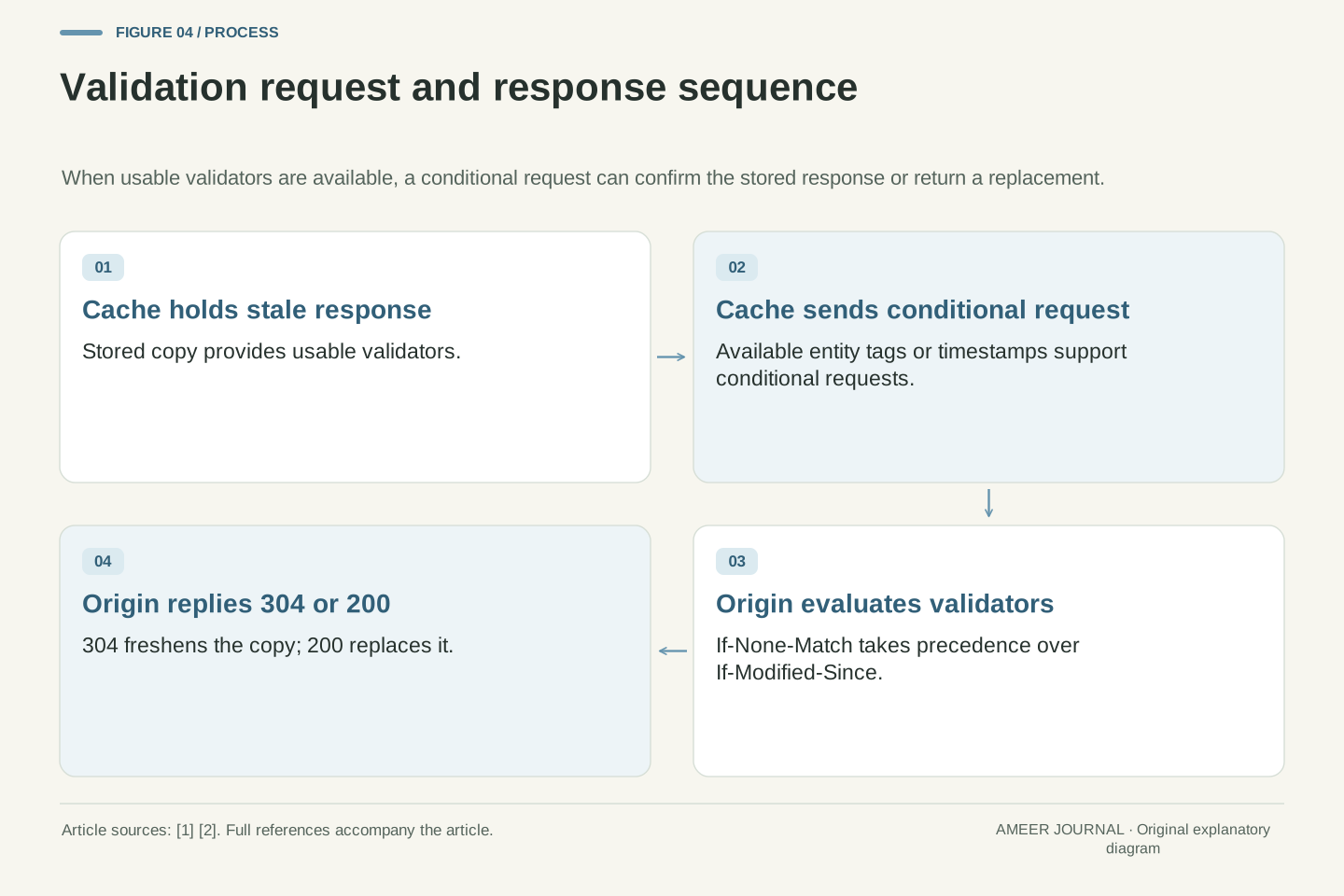
When a stored copy is stale, the cache does not have to throw it away. It can validate it by asking the origin whether the copy is still current [1][2]. Validation is done with a conditional request that includes If-Modified-Since or If-None-Match [2]. If the content has not changed, the origin can reply with 304 Not Modified, and the cache can reuse and freshen its stored copy instead of downloading the whole body again [2].
Two validators are commonly used. Last-Modified is a timestamp that can be sent back in If-Modified-Since [1]. An ETag is an entity tag that can be sent back in If-None-Match [1]. In many cases both validators are sent during validation, even when the ETag is stronger, so older intermediaries that do not understand entity tags can still respond appropriately [1]. If both If-Modified-Since and If-None-Match are present, If-None-Match takes precedence [1][2].
For site owners, the lesson is to send useful validators on cacheable responses. Providing both ETag and Last-Modified is generally better for the wider HTTP ecosystem, because Last-Modified is also used by content systems and crawlers for other purposes [2]. Without validators, validation may be impossible and the cache may have to download a fresh full response even when the content is unchanged [1][2].
Validation, or revalidation, transforms a stale response into a fresh one by consulting the origin through the conditional request mechanism [1][2]. The cache forwards a conditional request giving the next inbound server the opportunity to confirm the stored response, update stored metadata, or replace it [1]. Conditional validation uses If-Modified-Since with a Last-Modified timestamp, or If-None-Match with one or more entity tags from ETag [1][2].
Precondition precedence is normative: If-Match and If-Unmodified-Since are not applicable to a cache in this context, and If-None-Match takes precedence over If-Modified-Since [1]. In most cases both validators are generated in validation requests to interoperate with older intermediaries that do not understand entity-tag preconditions [1]. A request containing If-None-Match indicates the client wants to validate its stored responses against the response chosen by the cache [1].
Validators communicate information the cache can send in a conditional request. Last-Modified supplies a timestamp usable with If-Modified-Since, while ETag supplies an entity tag usable with If-None-Match [1]. Sending both is preferred where possible because Last-Modified also serves functions in content management and crawling [2]. Where the stored response provides no usable validator, a new full response may be needed rather than a validator-based confirmation [1][2].
no-cache means revalidate, not do not store
The most misunderstood directive is no-cache. Despite its name, no-cache does not prevent a response from being stored [2]. Instead, it prevents reuse of the stored response without revalidation [2]. In other words, the cache may keep a copy, but before using it for a later request it must check with the origin first [2][3].
That makes no-cache useful for main HTML pages that change often but are not sensitive [3]. The browser or shared cache can store the page, but each reuse requires a successful validation with the origin, so the content stays current [3]. If the origin confirms nothing changed, the cache can reuse the stored body after a lightweight 304 response [2]. If the origin is unreachable or validation fails, the stored copy must not simply be reused as if it were fresh [1][3].
A common pattern is Cache-Control: no-cache on the main document, combined with long max-age values on versioned static assets [2]. The HTML is checked every time, while the JavaScript and CSS files it references can be reused for a long time because their URLs change when their contents change [2]. This split gives freshness where it matters and speed where it is safe [2].
The no-cache response directive prohibits reuse of a stored response to satisfy a subsequent request without successful validation at the origin [3]. It does not prohibit storage [2]. This distinction is central to the directive's semantics: storage is permitted, but reuse is conditional on revalidation [2][3]. Cloudflare's documentation makes the same point for both browser and intermediate caches, noting that no-cache allows storage while requiring revalidation before use [3].
Operationally, no-cache is appropriate for frequently changing but non-sensitive resources where validation is cheaper than full retransmission [3]. It preserves the possibility of performance optimisations such as the Back-Forward Cache, because a stored copy exists to restore [3]. By contrast, a cache configured to serve stale responses must still not use a no-cache response without contacting the origin [3]. Conflicting directives should be resolved in favour of the most restrictive interpretation [1].
The canonical composition pairs no-cache on the main resource with long-lived, versioned subresources [2]. The main document is revalidated on each request, ensuring that references to new asset URLs are discovered promptly, while immutable assets are reused without repeated validation [2]. This pattern depends on validators being present so that revalidation can succeed with a 304 rather than a full transfer [1][2].
no-store, private, and public: controlling where copies live
Use no-store when you want to prohibit HTTP caches from storing the response [2][3]. This is a different request from allowing a stored copy but requiring a check before reuse. In this example, removing the option to reuse a stored response means the request needs another response. This is an explanatory consequence of the assumed scenario. Do not treat an HTTP cache setting as a complete privacy plan: separately review the application’s handling of sensitive information. The examples here make no universal claim about browser history restoration or application storage.
Private and public control which caches may store a response. Private means the response is intended for a single user, such as a browser cache, and must not be stored by a shared cache [3]. Public means any cache may store the response, even if it would normally be non-cacheable or only cacheable privately [3]. Public is mainly needed when a response must be stored despite an Authorization header, because otherwise a response with max-age will already be stored by a shared cache [2].
Sensitive responses need more than a vague intention not to cache. Set-Cookie alone does not stop caching, so servers should emit appropriate Cache-Control fields for responses they want to control [1]. For a signed-in page, a common combination is no-cache with private, so the browser may store it but a shared cache must not, and reuse still requires validation [2]. For sensitive responses that HTTP caches must not retain, no-store expresses that restriction [2][3].
The no-store directive prohibits storage by HTTP caches, including private and shared caches [2][3]. It addresses retention by those caches, whereas no-cache permits storage but requires validation before reuse [2][3]. Keep that protocol distinction separate from a complete data-retention design. Browser history restoration, application-managed storage, logs, and other information-handling mechanisms require their own assessment; this article does not infer their behaviour from a response header.
private restricts storage to a single-user cache and forbids shared storage [3]. public permits any cache to store the response, including cases that would otherwise be non-cacheable or private-only [3]. The public directive is principally required when storage must occur despite an Authorization header; for otherwise cacheable responses without that restriction, max-age can already provide explicit cacheability [2]. Other prohibitions still need to be respected. Shared caches must not reuse an Authorization-associated cached response unless a directive explicitly allows shared storage and its conditions are met [1].
Because Set-Cookie does not inhibit caching, control of session-bearing responses requires explicit Cache-Control [1]. The combination no-cache, private permits browser storage with mandatory revalidation while forbidding shared storage [2]. Where retention in any cache is unacceptable, no-store supersedes this pattern [2][3]. Directive selection should therefore be driven by two independent questions: where may a copy exist, and under what conditions may it be reused [1][3].
Shared-cache safety, Vary, and authenticated responses
Shared caches are powerful because one stored copy can serve many visitors, but that is also why they are risky for personalised content [2]. A shared cache must not use a cached response to an authenticated request for a later request unless the response explicitly allows shared storage [1]. If a page shows different content to different signed-in users, the default assumption should be that a shared cache must not store it [1][2].
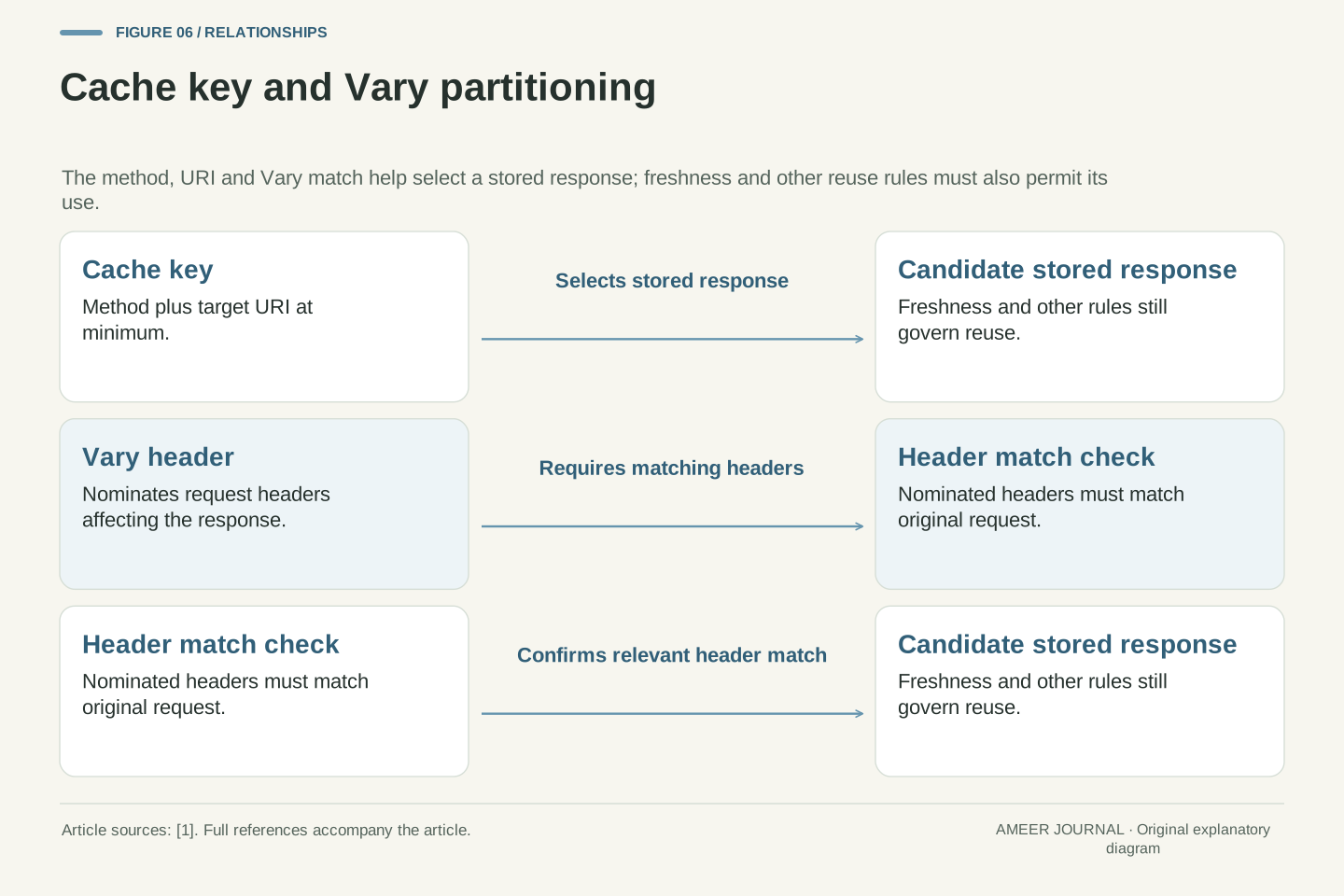
The Vary header adds another dimension. It lists request headers that affect which response is correct, such as language or encoding [1]. If a stored response contains Vary, the cache must not use it without revalidation unless the new request's nominated headers match the original request's headers [1]. Without Vary, a cache might serve a response generated for one kind of request to a different kind of request that happens to use the same URL [1].
Cloudflare adds a provider-specific caveat: by default, Cloudflare does not consider Vary values in caching decisions [3]. Vary is respected only when the Cache Rules Vary setting is configured, when Vary for images is configured, or when the header is Vary: Accept-Encoding [3]. That means a design that relies on Vary for correctness may behave differently on Cloudflare than the protocol alone would suggest [1][3]. Always check the actual CDN documentation for your configuration [3].
Shared-cache safety rests on the rule that a cached response to an Authorization-bearing request must not satisfy subsequent requests unless a response directive explicitly permits shared storage and the cache satisfies that directive [1]. This rule prevents credentialed representations from leaking across users through a shared intermediary [1]. The public directive is the mechanism that can explicitly authorise such storage [3]. Absent explicit authorisation, authenticated responses should be treated as non-shareable [1].
Vary extends the cache key beyond method and URI by nominating request header fields that must match between the original and subsequent requests before reuse without revalidation [1]. When Vary is present, reuse without revalidation is prohibited unless all nominated fields match those in the original request [1]. Vary therefore partitions the stored-response space by request characteristics, reducing the risk of serving a representation generated for a different request context [1].
Provider behaviour may diverge from the protocol default. Cloudflare states that by default it does not consider Vary values in caching decisions, respecting them only under specific Cache Rules, image, or Accept-Encoding configurations [3]. Consequently, correctness arguments that assume RFC 9111 Vary semantics must be rechecked against the deployed CDN's actual configuration [1][3]. Protocol compliance cannot be assumed from the standard alone [1].
Versioned assets, immutable, and cache busting
The resources that work best with long caching are static files whose contents never change [2]. For resources that do change, a common practice is to change the URL each time the content changes, so the new URL can be cached for a long period [2]. Because a cache distinguishes resources by URL, changing the URL means the old stored copy will not be reused for the new content [2]. This technique is called cache busting [2].
A typical setup gives a versioned file such as bundle.v123.js a long lifetime with Cache-Control: public, max-age=31536000, immutable [2]. The immutable directive tells clients the body does not change over time and that they should not send a conditional revalidation request even on an explicit refresh [3]. Cloudflare notes that immutable has no effect on public caches like Cloudflare, but does change browser behaviour [3].
Cache busting has a cost: every content change creates a new URL, so old copies remain in caches until they expire or are evicted [2]. That is usually acceptable for assets, but it means the main HTML page must not be cached for a long time, or visitors will keep requesting old asset URLs [2]. Pairing a revalidated HTML page with long-lived versioned assets is the standard compromise [2].
Cache busting exploits URL-based keying: since caches distinguish resources by URL, a changed URL prevents reuse of the prior stored response for the updated content [2]. This permits long max-age values on immutable, versioned assets without risking stale reuse after a content change [2]. The technique applies to all subresources, including images [2]. The main document, which references the versioned URLs, must remain short-lived or revalidated so that new references propagate [2].
The immutable directive signals that the response body does not change over time and that clients should not issue conditional revalidation requests such as If-None-Match or If-Modified-Since, even on explicit refresh [3]. Its effect is browser-facing; it does not alter public-cache behaviour such as Cloudflare's [3]. A representative header is public, max-age=31536000, immutable on a versioned asset [2]. The public component is required only when storage despite Authorization is needed; otherwise max-age alone enables shared storage [2].
Eviction limits the practical benefit of very long lifetimes, because caches remove old entries as new ones are saved, so survival of a stored response after a week is not guaranteed even with a one-week max-age [2]. Cache busting therefore trades storage churn for correctness, and should be applied where content identity is tied to URL identity [2].
Failure cases, edge cases, and a practical checklist
Several failure cases recur. Conflicting directives, such as max-age together with no-cache, should be resolved in favour of the most restrictive directive [1]. Invalid freshness information, such as a non-integer max-age, should encourage treating the response as stale [1]. Duplicate values for a directive may lead a cache to use the first occurrence or treat the response as stale [1]. These edge cases are reasons to keep headers simple and consistent [1].
Another failure case is relying on a CDN to follow the protocol without checking its settings. Cloudflare's Origin Cache Control feature, when enabled, makes Cloudflare strictly respect origin Cache-Control directives [3]. Free, Pro, and Business customers have it enabled by default, while Enterprise customers can enable or disable it [3]. When it is disabled, Cloudflare may not cache where the origin expected caching, or may ignore directives such as must-revalidate and serve stale content [3]. Cache Rules can also augment or override origin headers [3].
Use this checklist before shipping. Give every response an explicit Cache-Control header to avoid heuristic caching [2]. Decide for each resource whether it may be stored privately, shared, or nowhere [2][3]. Set max-age according to acceptable staleness, add validators for revalidation, and use no-cache for frequently changing main pages [2]. Version static assets and add immutable where appropriate [2][3]. Finally, test the actual CDN behaviour, including Vary handling and Origin Cache Control settings, rather than assuming the protocol alone describes it [3].
Edge cases arise from malformed or conflicting freshness information. Multiple values for a directive permit first-occurrence selection or stale treatment, conflicts require the most restrictive directive to be honoured, and invalid values such as non-integer max-age should encourage stale treatment [1]. Heuristic freshness must not be applied when explicit expiration is present [1]. These rules imply that header generation should avoid duplication and conflict, because cache behaviour under ambiguity is implementation-defined within the permitted options [1].
Provider divergence is a second failure class. Cloudflare's Origin Cache Control, when enabled, causes Cloudflare to strictly respect origin Cache-Control directives, with default enablement for Free, Pro, and Business plans and optional enablement for Enterprise [3]. When disabled, documented behaviours include not caching for max-age=0, no-cache, and s-maxage=0, and ignoring must-revalidate and proxy-revalidate so that stale content is served [3]. Edge Cache TTL Cache Rules override s-maxage and disable revalidation directives, while Browser Cache TTL rules override max-age downstream [3]. Cache Rules may augment or override origin headers generally [3].
A defensible deployment checklist follows. Emit explicit Cache-Control on all responses to suppress heuristic caching [2]. Classify each resource by permitted storage location using private, public, and no-store [3]. Set max-age or s-maxage according to the acceptable staleness window, noting that s-maxage overrides max-age and Expires in shared caches and implies proxy-revalidate semantics [3]. Ensure ETag and Last-Modified validators are present where revalidation is expected [1][2]. Apply no-cache to frequently changing main resources and long-lived immutable headers to versioned assets [2][3]. Verify Vary handling, Origin Cache Control state, and Cache Rules overrides in the deployed CDN configuration before relying on protocol semantics [3].
Sources & further reading
Explore the references behind this guide. External pages may change after our review.
- RFC 9111: HTTP CachingRFC Editor / IETF · Accessed 6 Nov 2026
- HTTP caching - HTTP | MDNMDN / Mozilla · Accessed 6 Nov 2026
- Origin Cache Control · Cloudflare Cache (CDN) docsCloudflare · Accessed 6 Nov 2026
Article updated 6 Nov 2026.
Found something we should revisit?
Good explanations get better with thoughtful feedback.