What you’ll take away
- A completed download confirms a transfer endpoint, not every installation or activation condition.
- Update eligibility, connectivity and installation prerequisites are separate questions with vehicle-specific answers.
- In a documented A/B design, prepared, selected for next boot, currently running and marked successful are distinct states.
- A component-version match count cannot replace the release’s actual completion and validation conditions.
- Keep update status, reported software version and any recall-completion record attached to their own scope.
One hundred percent of which part?
A car says its software download is complete. You might reasonably expect the new software to be running already. Yet downloading and installing are different operations. Tesla's Model 3 manual and Volvo's guidance for vehicles with Google built-in describe separate download and installation stages [1][2]. The completed download establishes that a transfer stage has finished according to the vehicle's system. It does not, by itself, establish that the relevant software has been installed, started and accepted as working.
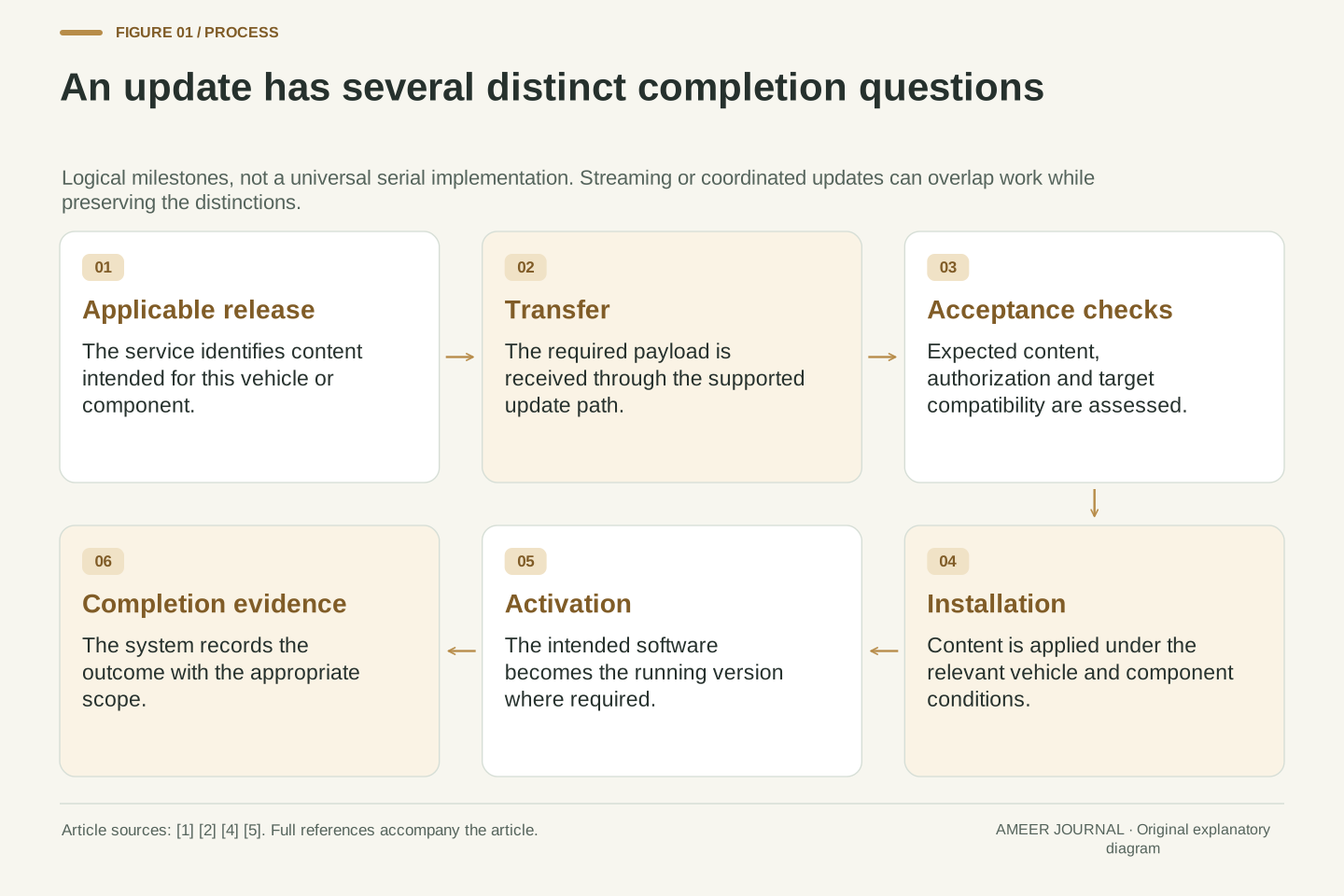
Think of the update as several questions rather than one long progress bar. Is this release intended for this vehicle? Have the required files arrived and passed the relevant checks? Can installation proceed under the vehicle's conditions? Which version is now running, and what completion evidence has been recorded? The exact implementation can overlap stages or combine their messages. This article explains those distinctions using published manufacturer guidance, a named software architecture and a pinned automotive update standard. Its file sizes, timings and version examples are invented. They are not instructions to interrupt an update or a prediction of any particular car's update duration. The point is to interpret the status accurately before deciding what it means.
An OTA update has multiple state transitions, even when the user interface represents it with one notification. Transfer completion, image acceptance, installation, activation and completion reporting are different assertions. The Model 3 manual and Volvo's Google built-in support guidance explicitly separate downloading from installation [1][2]. A download-stage completion message therefore cannot be treated as evidence that every target component is executing its new version.
The useful model is a set of logical conditions, not a universal serial protocol. Some implementations stream data into an inactive destination while receiving it; others store a package before later installation. Activation may require a restart, and reporting may occur after local work finishes. The analysis uses named source examples rather than assigning one architecture to every car. All numerical timelines and component-version records are constructed illustrations. The owner-facing task is to identify which condition a message actually confirms, which conditions remain outstanding, and where the applicable vehicle documentation explains them. No generic button sequence, firmware manipulation or forced recovery procedure follows from that model.
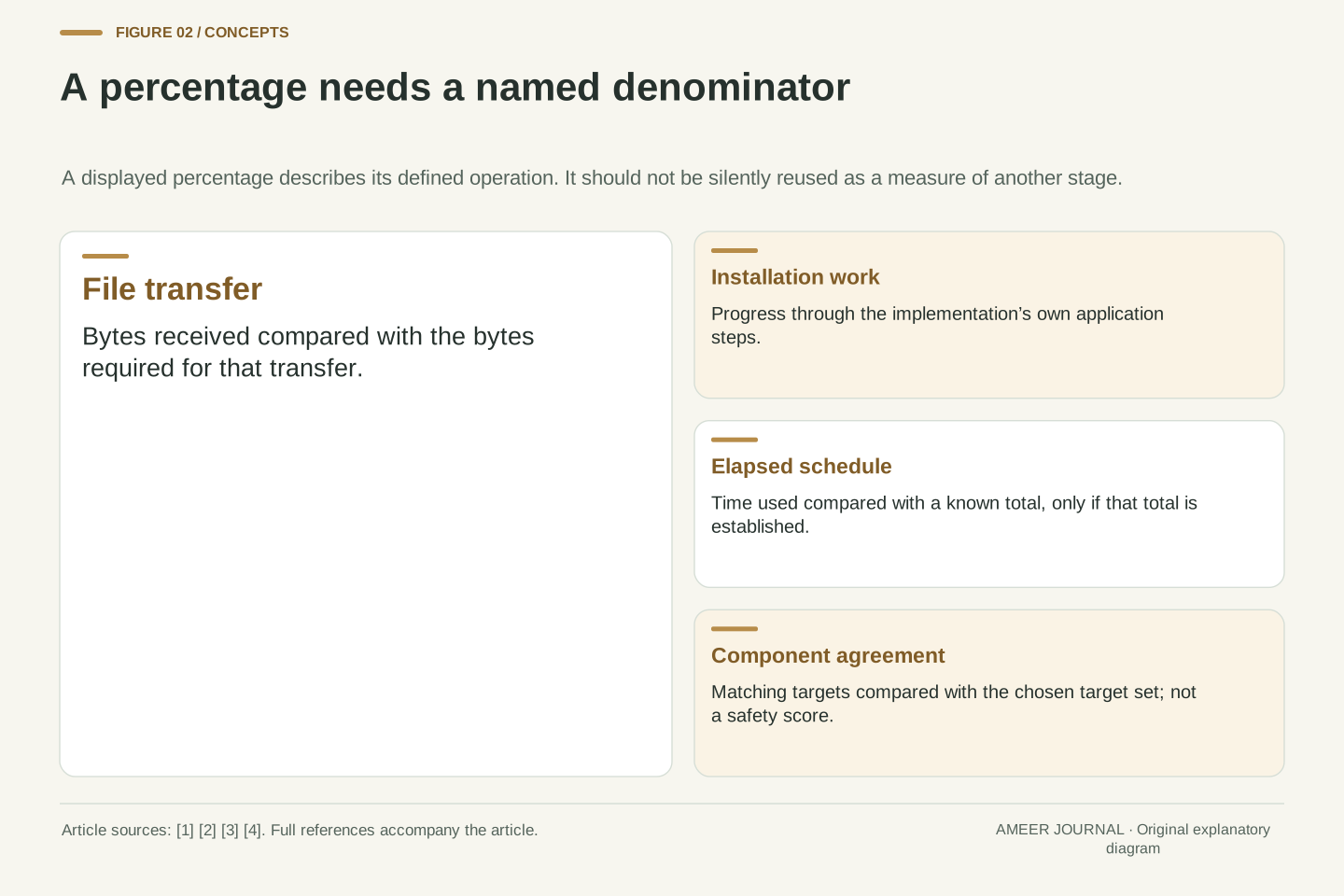
Available somewhere does not mean assigned to this vehicle
Before any file arrives, the update service has to decide which release applies. Vehicles can have different hardware, installed software and configurations. Volvo states that vehicles do not all receive the same software at the same time and that a download notification is shown when an update is applicable [2]. Tesla also describes release distribution as depending on factors specific to the release [1]. A version reported by another owner is therefore useful context, but it is not proof that your car should already have that same offer.
This distinction prevents two mistaken conclusions. No offer does not automatically mean the network has failed, because eligibility and scheduling can precede transfer. Conversely, an offer is not proof that installation has happened. The message may only establish that a suitable release is available to begin the next stage. Manufacturer guidance should be read for the relevant model, year and region; Volvo explicitly warns that the displayed instructions can vary across those boundaries [2]. A broad brand name is not enough to transfer every setting or prerequisite. For someone comparing status screens, the useful record is the vehicle configuration, offered release and current installed version, each kept as a separate item.
Eligibility is distinct from transport availability. A release can exist in the manufacturer's distribution system without being selected for a particular vehicle configuration or rollout cohort. Volvo's applicable-configuration statement and Tesla's release-specific distribution policy support that separation [1][2]. Observing different update offers across vehicles does not isolate a communications fault, nor does the existence of a public release announcement prove assignment to every compatible-looking vehicle.
In a system that targets individual controllers, compatibility may also be attached to hardware identifiers and image metadata. Uptane v1.2.0 describes vehicle/controller inventory information and hardware identifiers used to avoid directing incompatible firmware to an ECU [5]. That is a version-pinned design example, not a claim about universal adoption. It illustrates why a visible release name is only one part of selection. Hardware identity, installed state and intended target image can carry different meanings. For an owner-level comparison, retain the scope of the manufacturer page and distinguish offered from installed software. A mismatch between two people's screenshots is evidence of different displayed states; determining why requires the corresponding configuration and rollout information.
Received bytes still need the right identity and target
Downloading answers a transfer question. Acceptance adds questions about whether the received software is the expected file, comes through the authorized update process and is suitable for the target component. The Uptane automotive update design describes signed metadata, image hashes and hardware compatibility information as distinct parts of this work [5]. A hash is a calculated fingerprint of bytes. Comparing it with an expected value can reveal a mismatch, but the expected value must itself come from a trusted source.
These checks do not all establish the same thing. A matching file fingerprint does not by itself identify who authorized the file. A valid signature does not by itself prove that the image is intended for every hardware variant. Passing acceptance checks also does not prove that installation or later startup has succeeded. The safeguards answer narrower questions that fit together. In the pinned Uptane example, verification is separate from the installation attempt and the subsequent version report [5]. Owners normally rely on the vehicle's supported update system to perform these operations. The lesson is about what its status can mean, rather than a request to download firmware elsewhere or perform these checks manually.
Separate transfer integrity, authorization and compatibility. Uptane v1.2.0's signed Targets metadata associates images with hashes, file information and relevant custom metadata, including hardware identifiers [5]. Hash comparison binds downloaded bytes to an expected image representation. Authentication of the metadata establishes the authority for that expectation within the configured trust system. Hardware and target checks address a different failure mode: a correctly transferred, legitimately released image can still be unsuitable for a different component.
These properties are necessary inputs to an update decision, but none is a synonym for successful execution. The pinned standard describes metadata/image verification, installation and version reporting as separate functions [5]. Some implementations have constrained storage or streaming paths, so a simple illustration should not prescribe one universal buffering order. The important logical distinction is between acceptance of intended content and evidence about the state after applying it. Similarly, the presence of an expected hash is not a stand-alone trust proof if the expected metadata has not been authenticated. This article stays at that interpretation level; it supplies no signing-key procedure, unofficial firmware source or bypass of the manufacturer's acceptance process.
The network clock is only one part of the update clock
Use a fictional package of 240 MB, where MB means one million bytes. Assume the useful payload arrives continuously at 16 megabits per second. Eight bits make one byte, so 240 MB is 1,920 megabits. Dividing by 16 gives 120 seconds, or two minutes, for this assumed transfer. The rate is useful file data, so we have already excluded protocol overhead and interruptions from the calculation. Ford's guidance identifies file size, network conditions and vehicle state as factors in real download time [3].
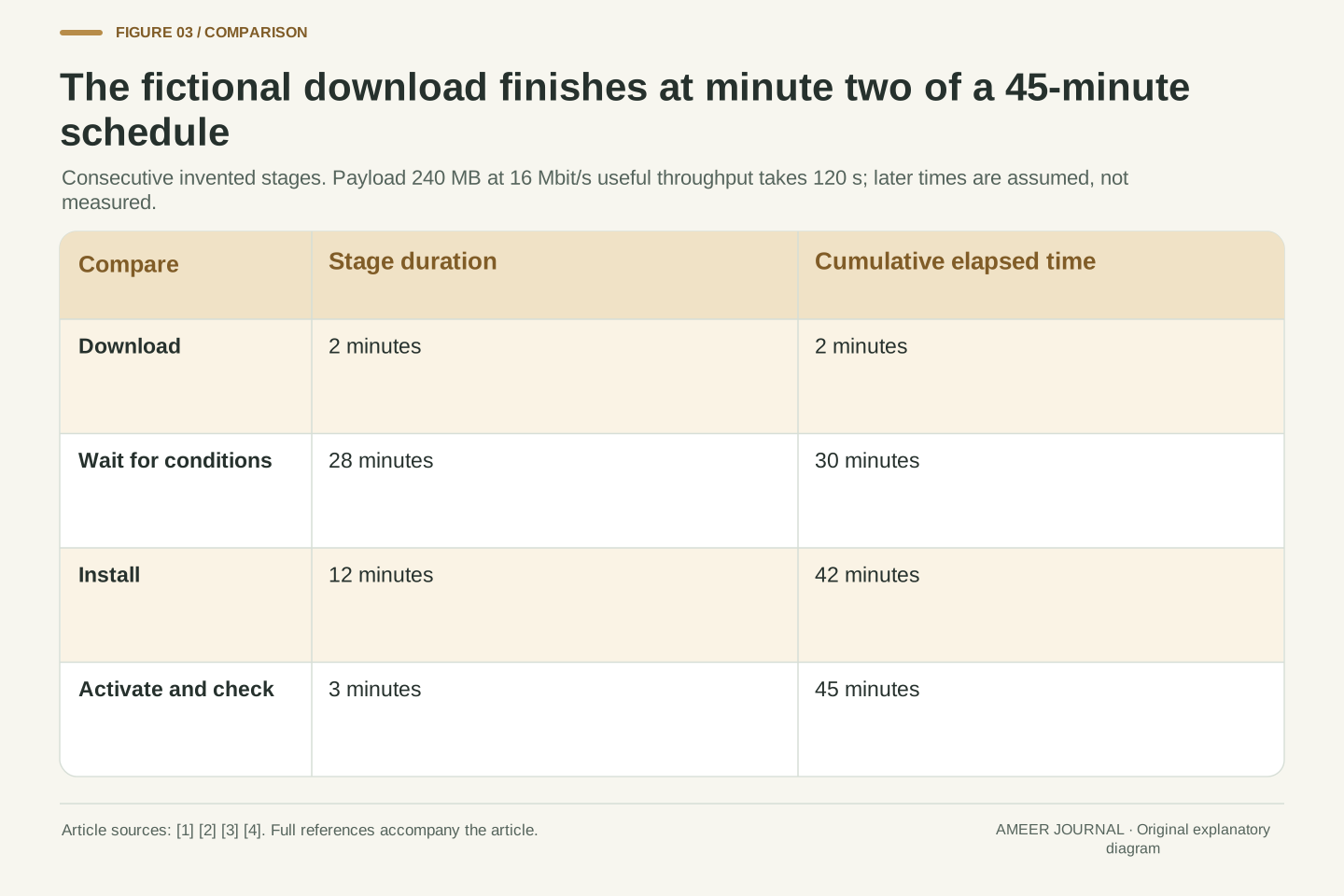
Now give the same invented update a fuller schedule. Downloading takes two minutes, waiting for installation conditions takes 28 minutes, installation takes 12 minutes, and activation plus checks takes three minutes. Total elapsed time is 45 minutes. A 100% download indication can appear at minute two while the rest remains ahead. It would be wrong to read that number as 100% of the complete schedule. It would also be wrong to promise that a faster connection removes the 28-minute wait or shortens a separate installation operation. The example's stages are deliberately consecutive to make the arithmetic visible; a real system may overlap work or display a different progress measure.
For an original transfer-only example, let package size S=240×10^6 bytes and useful payload throughput r=16×10^6 bit/s. With eight bits per byte, tdownload=8S/r=120 s. This is a constant-goodput calculation, not a lower-layer link-rate prediction. No binary MiB conversion is implied, and protocol overhead is not subtracted again because the assumed rate already refers to useful payload. Ford's scoped support page confirms that real transfer time depends on file size, network conditions and vehicle state [3].
Extend the constructed schedule with sequential durations of 2 minutes download, 28 minutes waiting, 12 minutes installation and 3 minutes activation/validation. Cumulative endpoints are minutes 2, 30, 42 and 45; total elapsed time is 45 minutes. At the download endpoint, transferred-byte completion is 100%, while elapsed time is only 2/45≈4.44% of this known hypothetical total. Those percentages have different denominators. A real interface may use neither calculation, so its percentage semantics require documentation. Improving transport affects its associated term, not every remaining operation. Streaming can overlap transfer and destination preparation [4], which is why the explicit sum is a chosen serial illustration rather than a universal timing formula.
Installation conditions are part of the operation
The vehicle may receive data while normal functions remain available, then require a different state before installation. Tesla's Model 3 manual says the car cannot be driven during installation and warns that some vehicle functions can be limited. Volvo's guidance for its covered Google built-in vehicles also restricts access and driving during installation [1][2]. These are examples of why a completed download can wait without the transfer itself being broken.
Do not assemble a universal checklist by borrowing one condition from each brand. Power requirements, charging restrictions, connectivity and access rules belong to the applicable vehicle and update. Volvo's cited page, for example, says an internet connection is required for downloading but not for its subsequent installation [2]. That illustrates a stage distinction; it is not a promise that every vehicle behaves the same way. The appropriate next reference is the instruction accompanying the actual update and the matching handbook. If a message names a condition that is unmet, preserve that message rather than treating every wait as a generic network problem. Planning around the stated unavailability is more reliable than inferring it from how quickly the files arrived.
Preconditions gate a state transition. A system can hold a completed, accepted package while waiting for conditions under which applying it is permitted. Manufacturer guidance provides concrete examples: Model 3 installation prevents driving and may limit other functions, while Volvo's covered Google built-in vehicles also have installation-specific access and operating restrictions [1][2]. Uptane's installation section separately recognizes conditions such as a suitable vehicle state and recovery preparation [5]. These are conditional examples, not a harmonized requirement list.
Connectivity belongs to a phase as well. Volvo explicitly distinguishes the connection used for download from the lack of an internet requirement for the installation described on that page [2]. Therefore an inferred connectivity failure is not a sufficient explanation for every deferred installation. Battery state, vehicle use and update policy can be independent gates. The owner's evidence should retain the phase and the condition reported by the supported system. The article does not prescribe how to override a gate or make a vehicle unavailable; those operating instructions remain with the applicable manufacturer documentation. A successful download and an unmet installation precondition are entirely compatible states.
Prepared software may still be waiting to become the running software
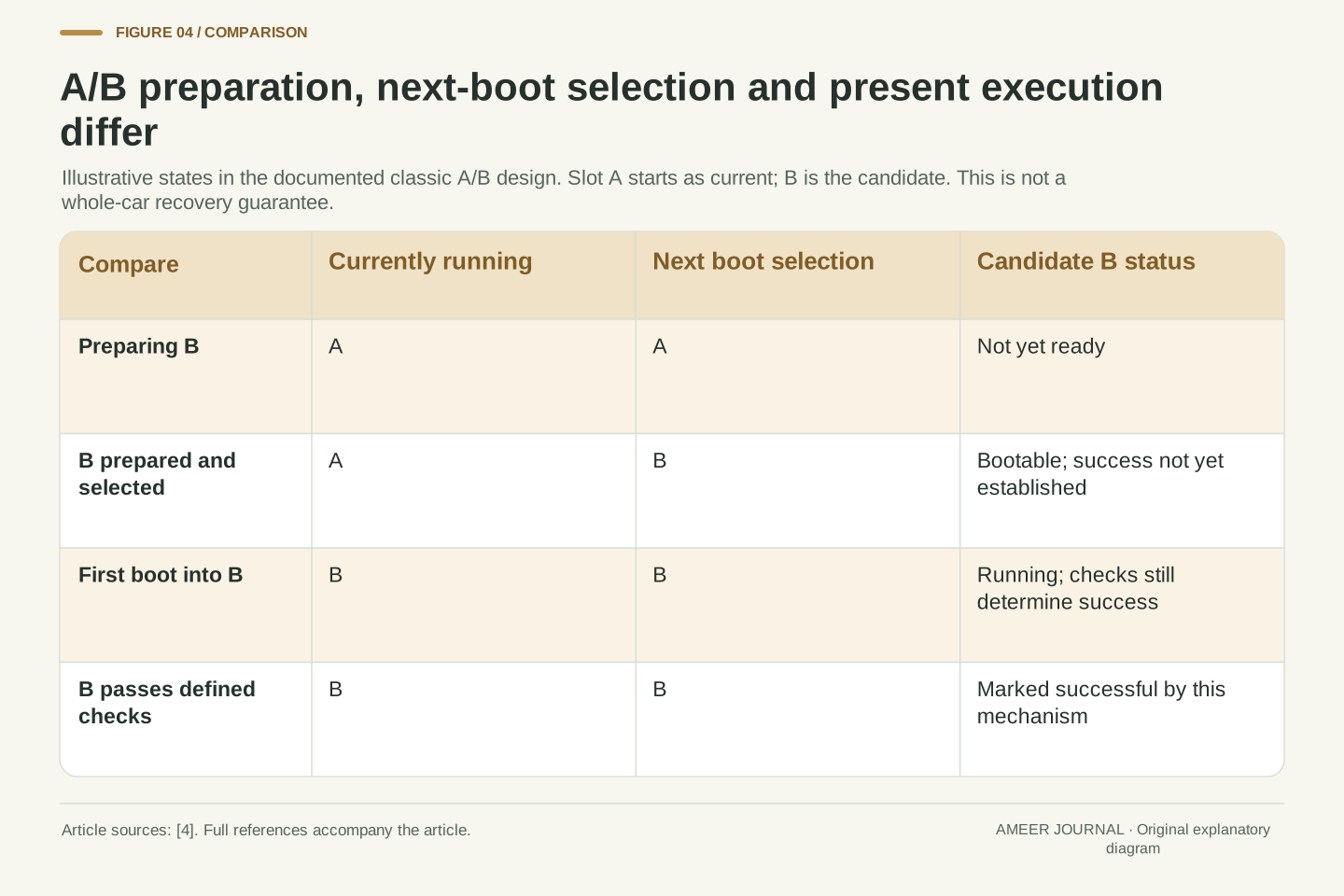
A software design can keep one system copy running while preparing another. Android's documentation describes a classic A/B arrangement with two sets of system partitions, called slots [4]. Imagine slot A running the old system while the update is written to slot B. B can contain the new files even though the current session is still using A. Selecting B for the next start is another distinct step. The labels A and B are just names, not a ranking of versions.
In this documented architecture, starting from the new slot and marking its boot successful are also separate events [4]. This makes it possible to distinguish 'prepared', 'selected for next boot', 'currently running' and 'accepted by the boot-success check'. Those states explain why copying all files does not necessarily change the software executing at that moment. The example is a software mechanism, not a statement that every controller in a car has two slots. It also does not turn a boot-success flag into proof that every vehicle feature has been tested. The flag belongs to its defined checks and component; broader completion evidence must keep the same scope.
AOSP's documented legacy A/B architecture uses two partition sets. The running system uses its current slot while update operations prepare the other set [4]. Let A be current and B be the destination. After preparation, B may be selected as the active or preferred slot for the next boot while A is still the currently executing system. In this terminology, active selection does not necessarily mean currently running. The source explicitly distinguishes current, bootable, active and successful attributes.
Following a boot into B, its successful attribute is established through the mechanism's defined checks rather than merely because its files exist [4]. A successful boot state is therefore stronger evidence than destination writing, but still narrower than an assertion about every feature or every controller. Streaming may write the destination during transfer, further separating logical milestones from a simple download-then-copy picture. This is a named operating-system design, not an architectural survey of production vehicles or a universal whole-car update guarantee. Its value is the precise state distinction: bytes present, next-boot selection, present execution and post-boot acceptance can refer to different versions at different times.
Automatic fallback is different from choosing any older version
The two-slot design can preserve a previously working system so it has somewhere to return if the new system fails its startup process [4]. That is a recovery mechanism built into a particular update design. It does not mean every vehicle can recover from every interrupted update, or that an owner can choose any old release whenever a feature changes. Ford's guidance acknowledges that an update failure can require technical support [3].
There is also a reason to distinguish a permitted fallback from accepting an arbitrary older image. Update systems can restrict which versions they accept to avoid installing software that the current policy no longer permits. Uptane v1.2.0 describes release-counter checks for this purpose [5]. Tesla's cited Model 3 manual states that reverting to a previous software version is not possible [1]. These examples concern different layers of control. A component's automatic recovery path is not a general owner-facing downgrade feature. When an update reports failure, the relevant evidence is its actual message and the manufacturer's supported response. Disconnecting power or trying an older file is not a conclusion that follows from learning how A/B slots work.
Fallback during a managed update attempt and unrestricted image rollback are different operations. In the documented A/B design, the boot mechanism can return to a previously bootable slot when the candidate fails to achieve its required success state [4]. That recovery depends on the architecture, preserved state and defined checks. It is not evidence that every ECU, shared data structure or full vehicle transaction can be reversed safely after every failure.
Image-admission policy introduces another boundary. Uptane v1.2.0 includes release-counter comparison to restrict acceptance of older image generations [5]. A manufacturer's owner interface may offer no downgrade operation at all, as the cited Model 3 manual states [1]. An automatic, permitted recovery to a known slot should therefore not be conflated with submitting an arbitrary historical image. Nor does the presence of recovery design eliminate failures that require service; Ford explicitly recognizes that possibility [3]. The correct interpretation preserves which component is recovering, what state was retained, and which policy authorized the transition. This explanation describes those distinctions without providing instructions to alter boot selection, image metadata or update controls.
One vehicle can contain several software identities
A car's visible software version can be a useful summary without being a complete inventory of every controller. Ford's scoped SYNC 4 and SYNC 4A guidance describes OTA delivery to certain vehicle, infotainment and modem modules [3]. That already raises a question: which component did a completion message describe? Updating the display software does not logically establish that a separate target controller has received its intended image.
Uptane makes this distinction concrete by describing reports for individual electronic control units, or ECUs, and a vehicle manifest that collects those reports [5]. A report can identify the component and its installed image rather than merely repeat the name of an offered release. That is a technical design example, not something every owner must retrieve from their car. It explains why a reliable completion record needs the scope of the work. Some releases may change one component; others may coordinate several. An unchanged component is not automatically a missed update, because its intended version may already be correct. Compare the reported state with the release's actual target, rather than expecting every version number to rise together.
Treat a vehicle software state as potentially component-indexed. A marketing release identifier or central display version is not necessarily a complete mapping from ECU identity to installed image. Ford's support page describes updates to specified vehicle modules, SYNC and modem modules within its covered connected-vehicle scope [3]. That supports the need to ask what a reported version represents rather than interpreting it as a universal firmware version for the entire vehicle.
Uptane v1.2.0 describes a vehicle version manifest containing ECU reports. Those reports associate an ECU identifier with installed-image information such as filename, length and hashes, together with freshness-related information [5]. This binds evidence to a component and an observation rather than just an intended release name. A target release can deliberately retain a component's existing image, so completion is comparison against the intended configuration, not the number of components whose labels changed. Likewise, a signed report supports its defined installed-state assertion; it is not automatically a comprehensive functional test. The owner-facing summary should preserve the distinction between the offered package, component state and the manufacturer's declared completion criteria.
A count of matching versions is not a completion rule
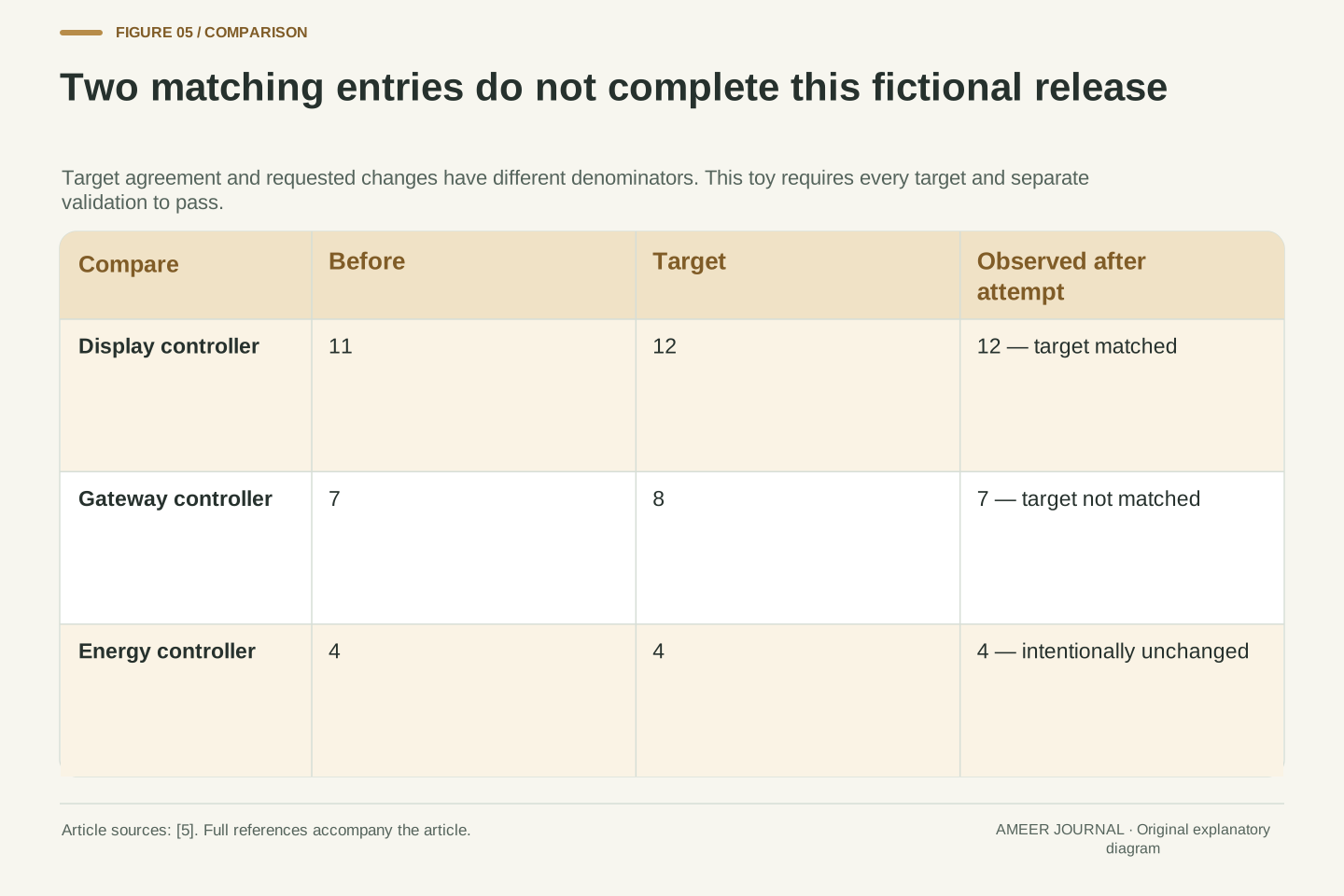
Use three fictional controllers: Display, Gateway and Energy. Before the update their versions are 11, 7 and 4. The intended release requires 12, 8 and 4. Only Display and Gateway need changes; Energy is already at the requested version. Now suppose a fresh record reports 12, 7 and 4. Display has reached its target, Gateway has not, and Energy still matches the intended unchanged state.
Two of three target entries match, so a simple match count would be about 66.7%. But only one of the two requested version changes has happened. Those are different counts with different denominators, and neither establishes successful completion. In this invented release, the completion rule requires all three target entries to match and the separate validation conditions to pass. A missing Gateway change cannot be averaged away by counting the already-correct Energy version. The example illustrates why per-component records matter in a design such as Uptane [5]. It does not classify a real car as safe or unsafe, rank the importance of its modules, or claim that a display normally exposes this table to an owner.
Let the original version vector be v0=(11,7,4) for fictional Display, Gateway and Energy controllers, and the target be vt=(12,8,4). Define the observed post-attempt vector as vo=(12,7,4). Position-wise comparison gives two target matches out of three. However, the set of requested changes has only two members: Display and Gateway. Exactly one of those requested transitions is reflected in vo, giving one out of two changed targets. The unchanged Energy image contributes to configuration agreement without representing a newly completed installation.
Neither 2/3 nor 1/2 is a sufficient completion predicate. For this constructed release, define completion as vo=vt together with the required validation results. That conjunction is false because the Gateway entry differs, irrespective of the aggregate percentages. Uptane's component-identified version reports provide a concrete basis for the kind of state evidence being illustrated [5]. The example supplies its own completion policy; it does not infer one from a particular manufacturer. Version labels here are simple ordered identifiers, not file hashes or measurements of safety. Real compatibility and release criteria can be richer than equality of three small numbers, which makes an unexplained average still less informative.
A notification, current version and recall record have different scopes
After local work finishes, a phone app may still be waiting for a fresh vehicle report. Volvo's cited guidance says its covered vehicles can appear offline in the app after a completed update [2]. That is a useful warning against treating every delayed connection as proof of failed installation. It does not make every offline status harmless. The completion indication, currently installed version, connectivity status and any reported fault are separate pieces of information to compare using the applicable instructions.
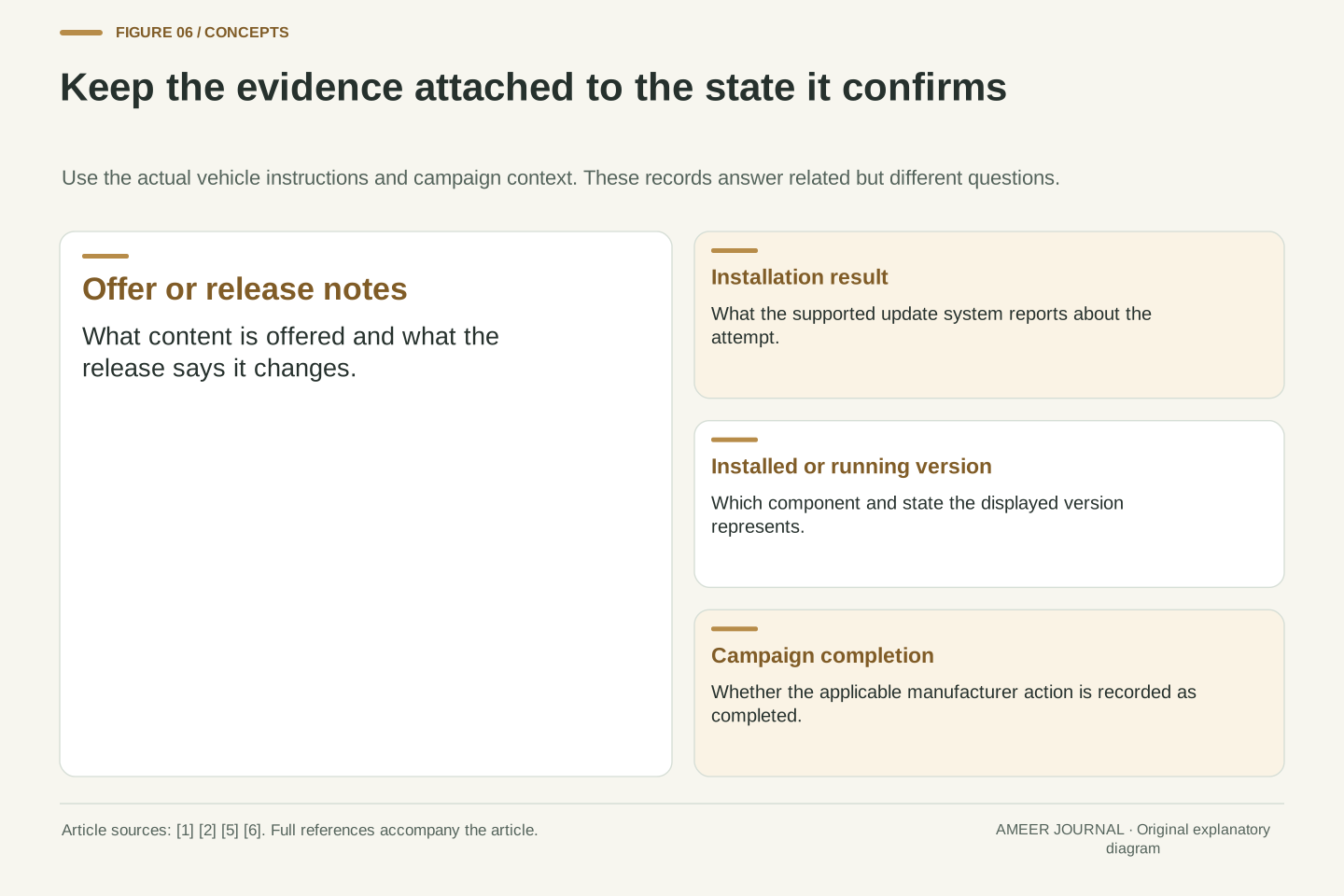
A safety-recall record is another separate record. A new software version alone does not identify which recall action, if any, it completes. In the United States, NHTSA's vehicle-specific search reports unrepaired recalls within its stated coverage, and it does not list already repaired recalls or necessarily include every vehicle in a very recent announcement [6]. A zero-result screen therefore is not a complete historical service record. If an update relates to a recall, keep the actual manufacturer campaign instructions and completion information with the update record. That connects the work to the relevant action without assuming that a general release note, a version increase or an app notification proves the same thing.
Separate local state, remote acknowledgement and service/campaign records. Volvo's scoped support page notes that an updated vehicle may appear offline in its mobile app [2]. Thus a completed local operation and temporarily stale remote connectivity can coexist. The absence of a fresh app state is not equivalent to evidence that all local work failed. Conversely, a reassuring message should be interpreted for the component, release and conditions it actually covers, together with any explicit failure indication.
Recall status has a different information model. NHTSA distinguishes a VIN-specific unrepaired-recall result from a general year/make/model search, and documents omissions including completed recalls and some recently announced vehicles [6]. A generic current-version string is not a campaign-completion record, and a zero unrepaired-recall result is not an exhaustive history of completed remedies. This is an evidence-scope distinction, not a legal conclusion about any vehicle. For a campaign-related update, retain the applicable manufacturer action and confirmation that the required work was completed. Do not infer campaign closure merely from bytes received, central-display version, or a remote notification without the corresponding campaign context.
Read the named state before deciding what to do next
Begin with the exact status: offered, downloading, ready to install, waiting for a condition, installing, completed or failed. Then read what the applicable vehicle guidance says that status covers. The worked timeline shows why a completed transfer can leave substantial work; the two-slot example shows why prepared files can differ from running software; the component table shows why a summary count can miss an unfinished target. These are different explanations, so they need different evidence.
For an actual update, keep the offered release, reported installed version, completion or error message and relevant release notes together. Tesla specifically recommends reading release notes because they can include operating and safety information [1]. Use the manufacturer’s supported guidance when installation fails or the resulting state is unclear; Volvo and Ford identify cases where support may be needed [2][3]. There is no need to invent a recovery procedure from the architecture diagrams. The most useful conclusion from 'download complete' is the narrow one: the transfer phase has reached its reported endpoint. Whether the vehicle is now using the intended release is a later question, answered by installation, activation and the appropriate completion evidence.
Interpret each update claim as a state assertion with a subject and scope. Offered describes availability for a target. Downloaded describes transfer. Verified describes defined acceptance checks. Installed describes applied content according to that implementation. Running describes current execution. Completed describes satisfaction of the manufacturer's stated completion conditions, which may include reporting. These concepts can be grouped or overlapped in a real implementation; their evidentiary meanings remain distinct [1][2][4][5].
The constructed calculations make the distinction operational without becoming service instructions. A 120-second file transfer does not establish a 120-second full update. A selected next-boot slot need not be the current slot. Two matching component targets out of three need not satisfy a release predicate. For an actual vehicle, retain the applicable scope, exact messages and release information, then use the supported documentation or service channel to resolve a failed or ambiguous state [1][2][3]. Avoid promoting one successful substep into proof of the entire transaction. This produces a clearer account of the update and a better basis for support than a single percentage detached from what it measures.
Sources & further reading
Explore the references behind this guide. External pages may change after our review.
- Software UpdatesTesla · Accessed 6 Nov 2026
- Updating your vehicle's software | Software Updates | Volvo Support EN-CAVolvo Cars · Accessed 6 Nov 2026
- What are Ford software updates?Ford Australia · Accessed 6 Nov 2026
- A/B (seamless) system updates | Android OS core topics | Android Open Source ProjectAndroid Open Source Project / Google · Accessed 6 Nov 2026
- Uptane Standard for Design and Implementation v1.2.0Uptane · Accessed 6 Nov 2026
- Check for Recalls: Vehicle, Car Seat, Tire, Equipment | NHTSAU.S. National Highway Traffic Safety Administration · Accessed 6 Nov 2026
Article updated 6 Nov 2026.
Found something we should revisit?
Good explanations get better with thoughtful feedback.