What you’ll take away
- A strong client connection does not identify the backhaul route or the time its forwarding requires.
- For the stated shared-resource model, 120 and 60 Mbit/s useful-service rates yield 40 Mbit/s of distinct delivery.
- Hop count needs the service costs and interference assumptions; repeated halving is not a universal formula.
- Independent stages can pipeline different blocks, while retries and competing flows consume additional resources.
- Compare the actual endpoints: a gateway internet test need not include the phone or laptop’s Wi-Fi path.
The nearby node is only the first connection
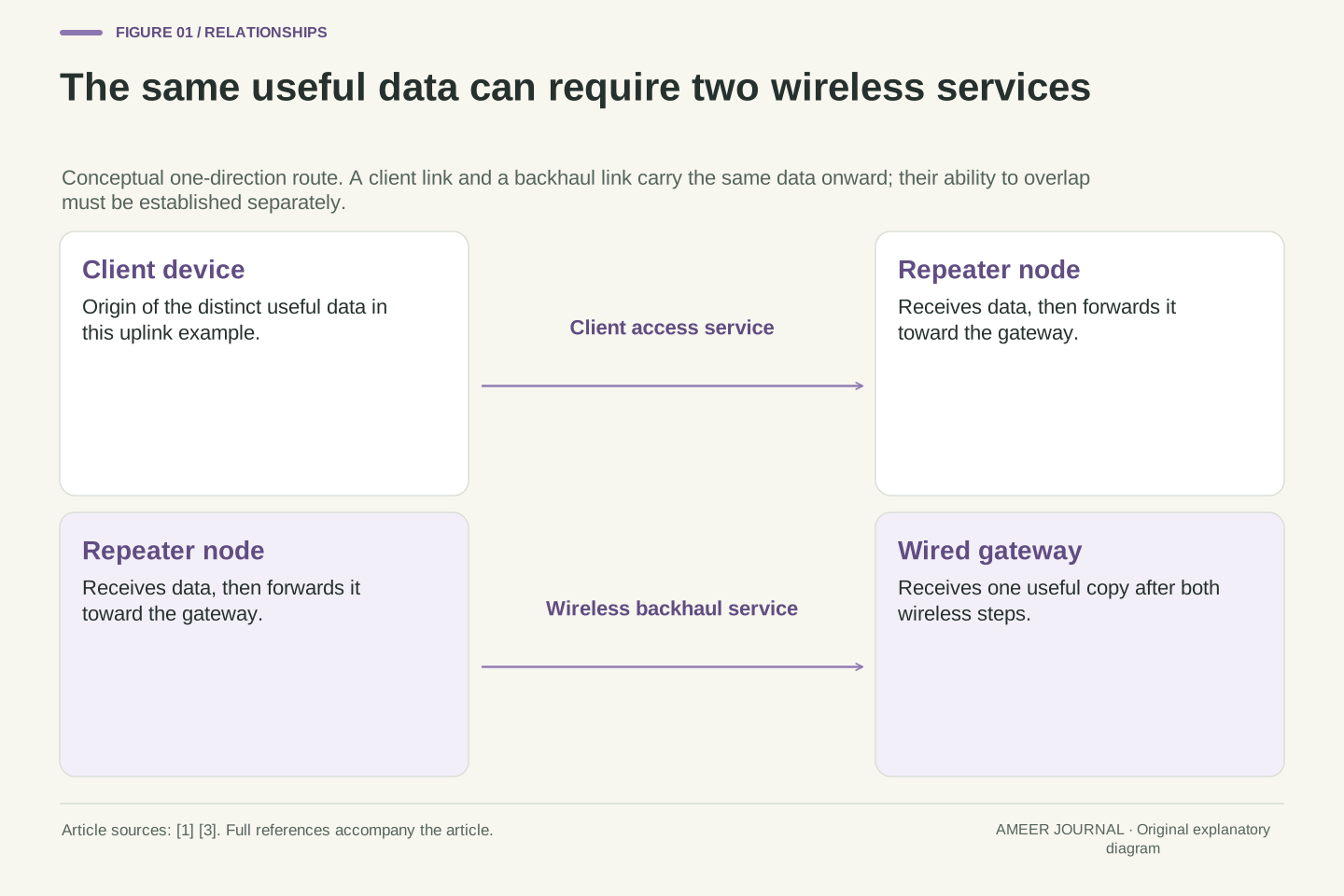
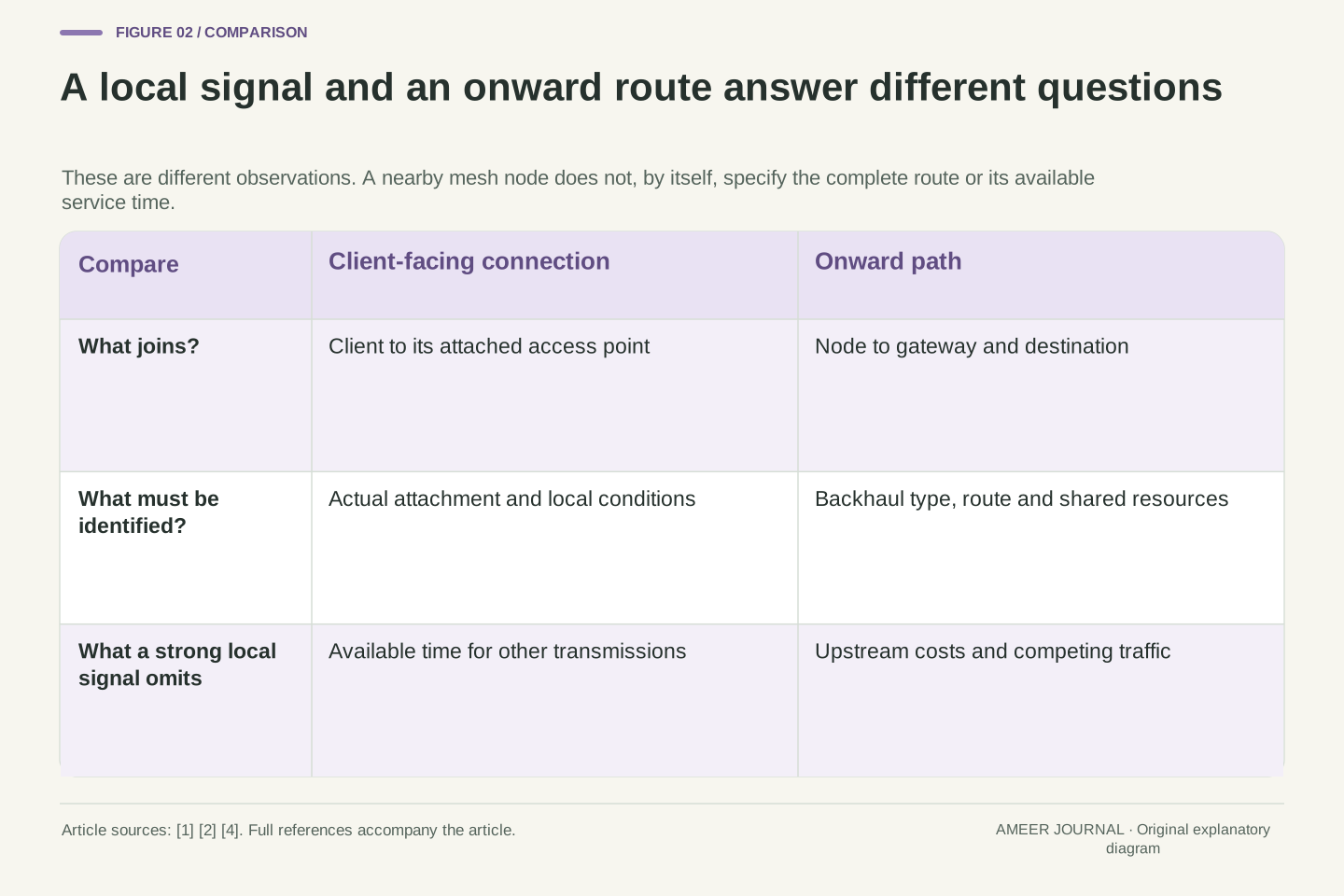
A laptop beside a mesh node has a short journey to that node. Its data may still have another wireless journey before reaching the main network. These are different connections: the client link joins the laptop to its access point, while the backhaul carries traffic onward. Cisco Meraki documents this distinction through repeaters that reach a wired gateway over wireless links. [1] Moving closer to the repeater can improve the first part without telling you what happens on the second.
That distinction changes the question to ask about a strong signal. Which node is the laptop actually using, how does that node reach the gateway, and do those transmissions share time on the same radio resource? A network can also mix wired and wireless connections between supported nodes, as eero documents. [4] The word mesh alone therefore does not specify the forwarding cost. We will follow one direction of useful data through deliberately invented routes, keeping a local connection indication separate from the time needed to deliver that data.
A client association and an access point's upstream route describe different edges of a network. Meraki's documented repeater has no direct wired uplink and forwards through mesh links toward a gateway. [1] A strong client-side received signal does not establish the capacity, loss behavior or resource-sharing relationship of that upstream path. It also does not identify every hop from the client to its destination. The object to examine is the actual forwarding route, rather than the physical distance to one nearby node.
Backhaul can be wireless or wired in a supported mixed deployment; eero explicitly documents both arrangements and model-specific port exceptions. [4] Consequently, node count alone is not a resource model. This article uses original analytical fixtures to distinguish repeated use of one exclusive radio-service budget from independently usable links. All numbers are stipulated, not measurements of a mesh product, and the examples examine one traffic direction. The useful result is an accounting method for a route, not a conversion from signal bars to a promised download rate.
Count the same data on each shared step
Send six megabits of distinct useful data through the invented route. The first step needs 6/120=0.05 seconds. The second needs 6/60=0.10 seconds. Because their service cannot overlap, they use 0.15 seconds together, giving 6/0.15=40 megabits per second delivered to the gateway. The second transmission carries the same useful data onward. It does not create six more megabits of new content for the receiver. Adding both transmitted copies in the final numerator would answer a different question.
For comparison, an invented direct connection delivering useful data at 50 megabits per second would finish the same amount in 0.12 seconds. The relay's first step is much faster than that direct connection, yet the complete shared-resource route is slower. Its delivery rate is 20% lower, while its completion time is 25% longer; those percentages use different denominators. This follows from counting the resource used by every step, the distinction emphasized in the routing research. [3] A strong first link does not erase a second time requirement.
For D distinct useful bits, the exclusive resource requires T=D/R1+D/R2. Thus Q=D/T=1/(1/R1+1/R2), under the declared fixed-cost assumptions. With D=6 Mbit, the two terms are 0.05 s and 0.10 s; T=0.15 s and Q=40 Mbit/s. This is a reciprocal sum, not the arithmetic mean of the rates and not their minimum. The same payload traverses both services, so unique delivered data remains D even though 2D payload-bit transmissions occur across the two hops.
A separate direct route with useful service rate 50 Mbit/s takes 0.12 s. The relay-to-direct rate ratio is 40/50=0.8, while the time ratio is 0.15/0.12=1.25. Neither result depends on an invented relationship between received signal and rate; every rate was supplied as a model input. The shared-resource reasoning is consistent with the research distinction between total transmission cost and channel diversity. [3] It does not justify applying a minimum-link-capacity pipeline formula to links that cannot perform their service concurrently.
Improve the step that consumes the time
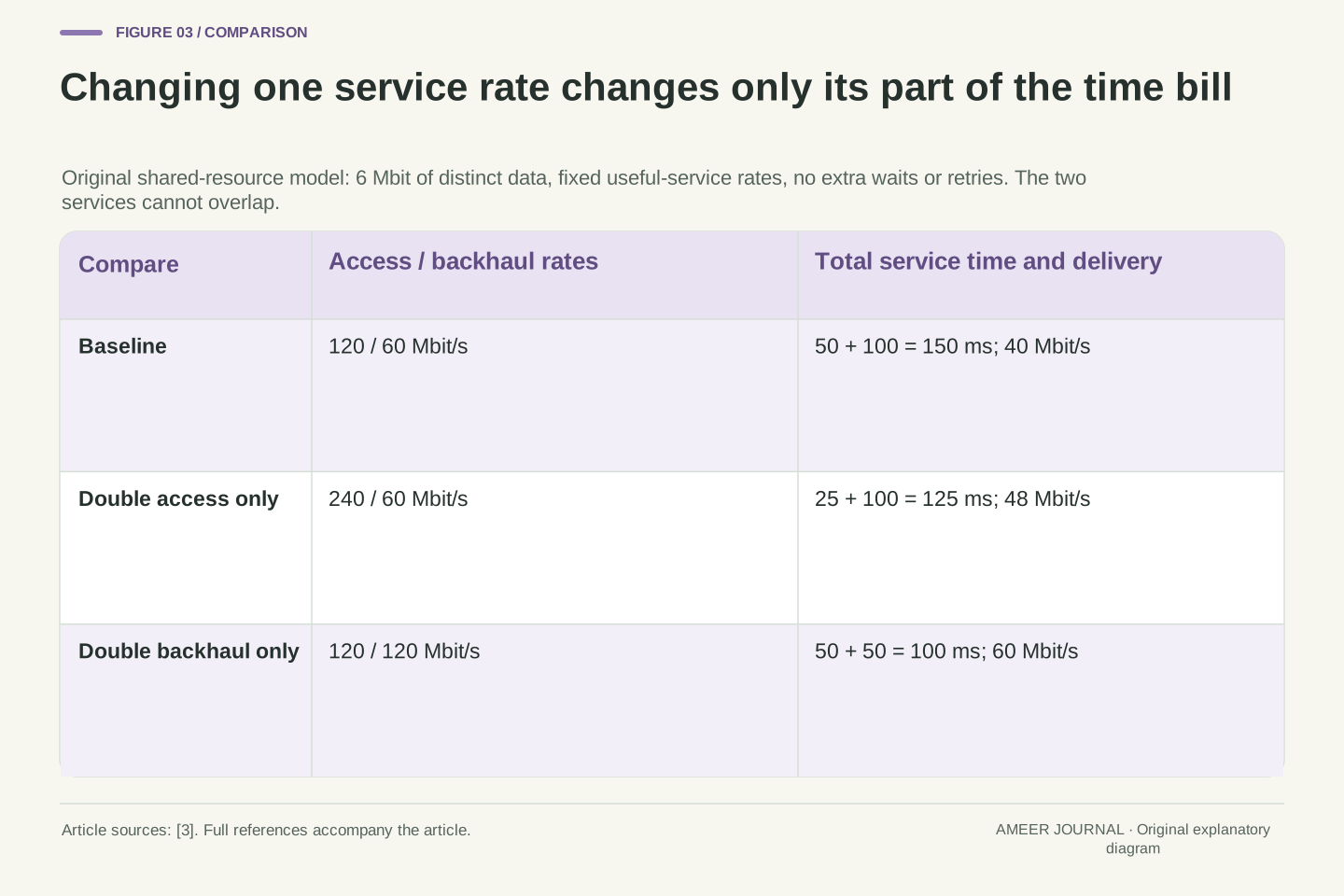
Now double only the laptop-to-repeater service rate, from 120 to 240 megabits per second. Its six-megabit contribution falls from 0.05 to 0.025 seconds, while backhaul still needs 0.10 seconds. The total becomes 0.125 seconds and delivery rises to 48 megabits per second. A doubling of one step produces a 20% improvement in the whole route, because that step originally used only a third of the combined service time. The rest of the bill did not change.
Instead, restore the first step to 120 and double backhaul from 60 to 120. The two contributions are now 0.05 seconds each, giving 60 megabits per second overall, a 50% increase over the original 40. These are alternatives, with unmentioned conditions held fixed. They illustrate why improving an already short part of a shared transmission path has a different effect from improving its longer part. The paper's transmission-time approach supplies the underlying resource perspective. [3] The calculated gains do not forecast a particular hardware upgrade.
At fixed D=6 Mbit, changing R1 from 120 to 240 Mbit/s reduces the first service demand to 0.025 s. Retaining R2=60 Mbit/s leaves the original 0.10-second backhaul contribution unchanged, giving T=0.125 s and Q=48 Mbit/s. Relative gain is 48/40−1=0.20. The first-hop term was one third of baseline T, so halving that term reduces total service time by one sixth. Inverting the new time gives the 20% rate increase; time savings and rate gains must not be interchanged.
For the alternative R1=120 and R2=120 Mbit/s, T=0.10 s and Q=60 Mbit/s. That is a 50% rate increase because the original two-thirds contribution was halved. This sensitivity calculation changes one stipulated service cost at a time. It is an original consequence of the additive airtime model, not a measured improvement reported by the cited research. [3] Real changes can also affect retries, interference or the selected route, so a before-and-after comparison must establish which terms actually changed before attributing the result to one leg.
A hop count needs its resource assumptions
If every step in a fully shared route had the same useful service rate of 120 megabits per second, one step would deliver at 120, two at 60 and three at 40. Each delivered bit needs one, two or three turns. The third result is not 30. Meraki offers an approximately half-per-repeater planning statement in its deployment discussion. [1] That statement should not become an unconditional sequence of halvings for every topology. Our count includes the client link as well as inter-node links, which some mesh-hop labels count separately.
A relay can still be useful. If the direct route in our earlier comparison were only 25 megabits per second, the invented 40-megabit relay route would be faster. More steps do not automatically mean worse service when the individual costs change. The 2004 paper develops routing measures that consider transmission cost and channel use, while Meraki documents link-quality and hop information in its own selection process. [1][3] Neither says that the nearest box or fewest drawn lines alone settles the performance of every available route.
With h equal-cost services sharing one exclusive resource, T=hD/R and Q=R/h. For R=120 Mbit/s and h=1,2,3, the resulting rates are 120,60,40 Mbit/s. The series is not R/2 raised to successive hop counts. Meraki's approximately 50% per-repeater guidance is contextual planning advice; our explicit fixture provides a different, checkable accounting statement. [1] Also distinguish total wireless services, including client access, from a vendor's count of access-point-to-access-point mesh hops before comparing numerical rules.
Hop count remains insufficient when costs differ. The original relay Q=40 Mbit/s exceeds a separately stipulated 25 Mbit/s direct route despite requiring two services. Draves, Padhye and Zill's 2004 ETT/WCETT work considers link transmission cost and channel diversity; Meraki documents a proprietary selection process using link quality and hops. [1][3] These support examining more than geometry or count. They do not establish that a current consumer mesh implements WCETT, that our reciprocal sum is its routing metric, or that a selected path is optimal under every traffic condition.
An extra attempt belongs to the step that repeats it
For a separate retry illustration, divide useful data into logical blocks of 0.12 megabits. These are accounting chunks, not a specified Wi-Fi frame size. At our two service rates, each block takes one millisecond on the first hop and two on the second. Suppose 100 distinct blocks reach the gateway, using 100 first-hop attempts but 120 second-hop attempts. Meraki identifies retry counts as relevant evidence, and the research includes repeated transmission cost. [2][3] Here we simply stipulate the counts and give failed and successful attempts the same service cost.
The first hop uses 100 milliseconds and the second 240, totaling 340 milliseconds for 12 megabits of useful delivery. That is about 35.29 megabits per second, compared with 40 without the extra attempts. Twenty additional second-hop attempts do not mean 20% less useful data, because every original block eventually arrives once. They also should not be called a 20% loss rate: 20 failed attempts out of 120 total attempts is a different fraction. Keep attempted work, failed work and distinct delivered content separate in the record.
Use logical payload chunks S=0.12 Mbit, giving per-attempt service costs S/R1=1 ms and S/R2=2 ms. These chunks need not correspond to individual 802.11 frames. In a separate constructed record, N=100 unique chunks require 100 first-hop attempts and 120 second-hop attempts; all unique chunks ultimately arrive. Assume equal fixed service duration for success and failure on each respective hop. Retry cost is motivated by the documented distinction between bitrate and retries and by the research's attempt-sensitive transmission cost. [2][3]
Total resource time is 100×1+120×2=340 ms, versus 300 ms without retries. Unique payload is 100×0.12=12 Mbit, hence Q=12/0.34=600/17≈35.294 Mbit/s, an 11.765% rate reduction. Twenty extra attempts are 20% of the 100 otherwise-required attempts, but only 1/6 of 120 total second-hop attempts if exactly 20 failed. This deterministic accounting does not infer independent loss probabilities, retry limits or a real acknowledgment-timeout distribution. It shows why applying a generic loss percentage to the final throughput can hide which resource paid the additional cost.
Independent links can overlap work on different blocks
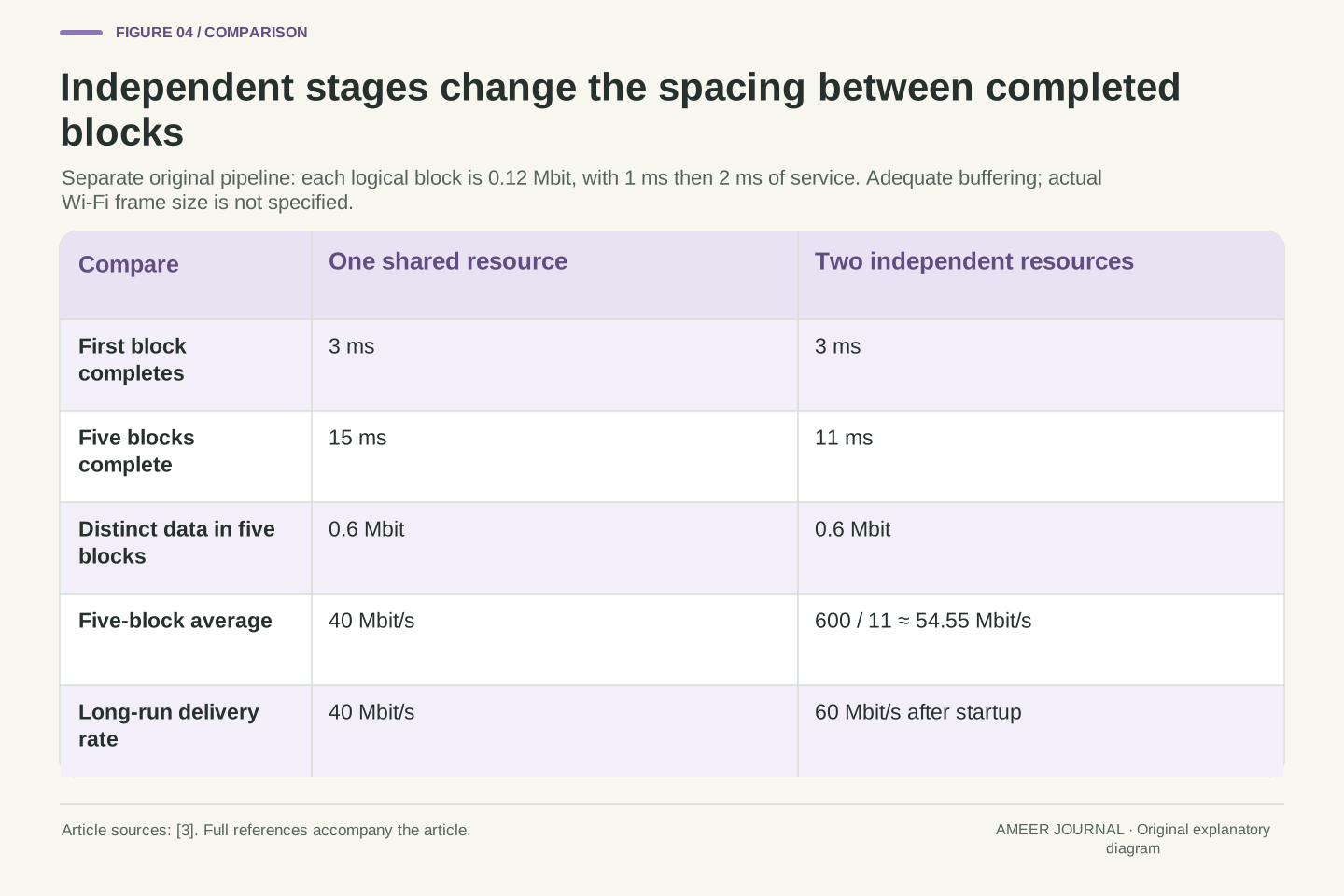
Change the resource arrangement while keeping the same block sizes and one- and two-millisecond service times. Suppose the two stages are genuinely independent and the repeater can receive one block while forwarding an earlier one. Provide enough space to hold waiting blocks. The first block still needs both steps and arrives after three milliseconds. Later blocks can follow after five, seven, nine and eleven milliseconds. Five blocks contain 0.6 megabits, so the complete five-block transfer averages about 54.55 megabits per second rather than the shared model's 40.
After startup, the second stage releases one block every two milliseconds, corresponding to 60 megabits per second. The first block's three-millisecond journey and the long stream's delivery spacing answer different questions. The research explicitly distinguishes interfering links from channel-diverse resources. [3] But a label such as dedicated backhaul does not by itself prove every independence assumption used here. Actual radios, interference and forwarding capabilities must support the overlap. This example demonstrates what changes when overlap is possible; it does not quietly grant that capability to the original shared route.
Define a separate two-server, store-and-forward pipeline with independent service resources, adequate buffering and the same S=0.12 Mbit, t1=1 ms and t2=2 ms. The first stage continuously supplies chunks. The second starts a chunk only after its first-stage completion and after the preceding second-stage service finishes. Its completion recurrence yields 3,5,7,9,11 ms for five chunks. Therefore finite-batch goodput is 0.6 Mbit/0.011 s=600/11≈54.545 Mbit/s. The exclusive-resource model instead requires five times 3 ms, totaling 15 ms.
For a long stream, the pipeline completion interval approaches max(t1,t2)=2 ms and useful rate approaches S/2 ms=60 Mbit/s. A single chunk still has 3 ms of service latency. The distinction depends on actual concurrency, not a renamed interface. The historical research explicitly assumes non-interfering channels for its channel-diverse reasoning. [3] Separate radio or band labels alone do not prove that a specific deployment meets our independent-server model. Nor does finite first-packet delay equal the reciprocal of long-run throughput when several chunks can be in flight.
A cable removes one radio task, not the whole path
A supported Ethernet backhaul can carry the inter-node traffic without using that wireless forwarding step. The laptop may still connect wirelessly to its nearby node. eero documents wired, wireless and mixed arrangements, while noting that its Beacon and eero 6 Extender models have no Ethernet ports for a wired backhaul. [4] Check the actual system's supported topology before interpreting the presence of a cable. A cable serving a local client and a cable providing the node's upstream connection are different roles.
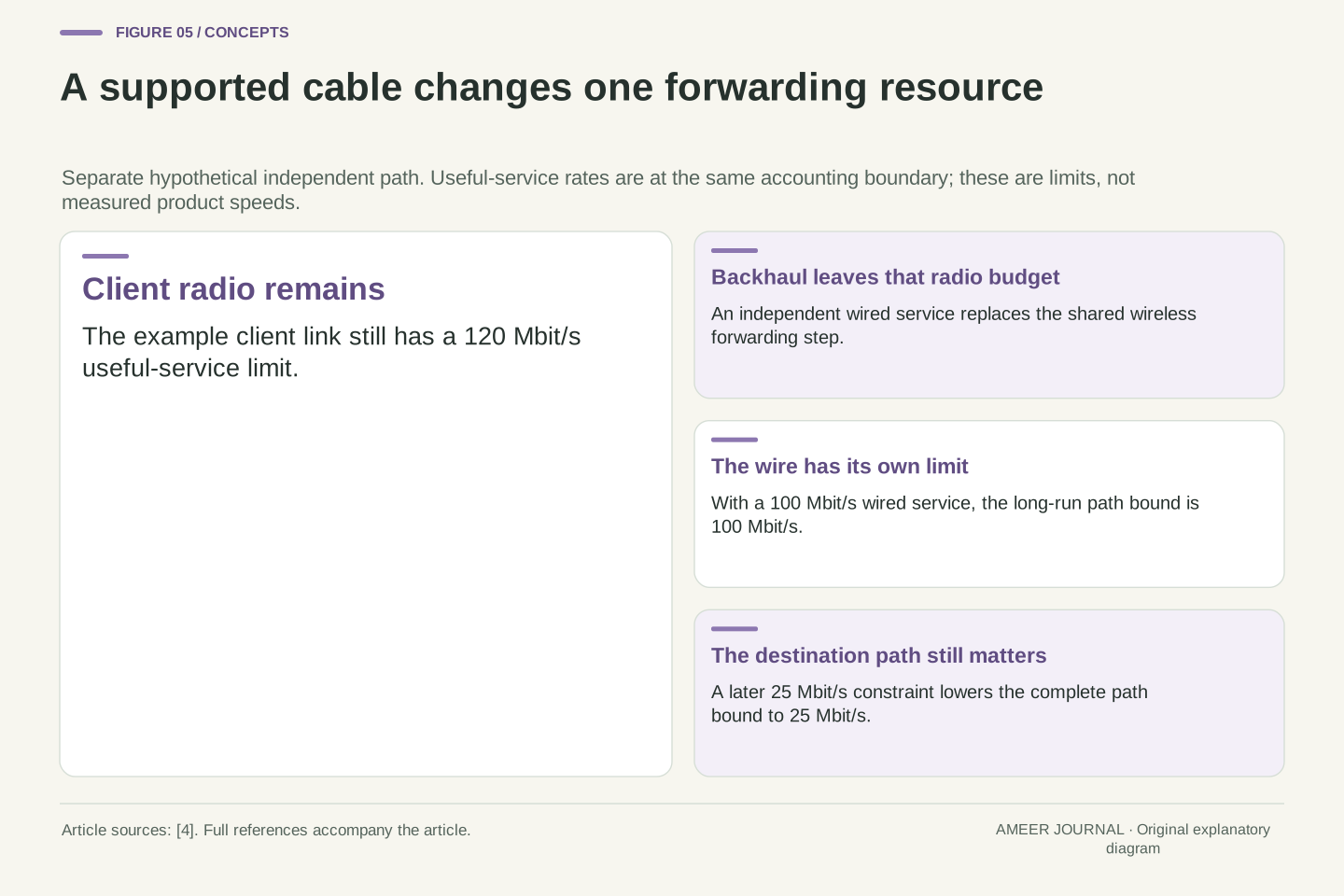
For a separate invented arrangement, give the wireless client service 120 megabits per second and the independent wired backhaul 100. A long transfer can deliver no more than 100 through both, assuming no other restriction. Removing the shared wireless hop does not make the cable unlimited, and adding 120 and 100 does not create a 220-megabit download. If a later internet segment allows only 25, that becomes a further ceiling. The useful question is which resource was removed from the busy budget and which limitations still remain.
Replacing a wireless backhaul service with a supported independent wired service changes the conflict graph: the client radio no longer pays for that inter-node transmission on its own resource. It does not eliminate client access or all downstream constraints. eero's documentation permits mixed wired/wireless deployments and identifies models that cannot be wired because they lack Ethernet ports. [4] That is product-scoped support evidence, not permission to assume every port or topology on another mesh system provides the same role.
In a separate long-run pipeline fixture, retain a 120 Mbit/s useful client service and introduce an independent 100 Mbit/s useful wired service at the same data-accounting boundary. The ideal path bound is min(120,100)=100 Mbit/s, not their sum and not the exclusive-resource reciprocal sum. Adding a stipulated external 25 Mbit/s constraint lowers the bound to 25. This changes the resource model deliberately. It neither predicts a finite transfer's startup time nor infers that replacing backhaul must improve an application already limited elsewhere.
Place the relay for both sides of its job
A relay needs an onward connection as well as a convenient position near the client. Moving it toward a difficult room can improve one side while weakening the other; the net outcome depends on both. Meraki's documentation treats mesh link quality, route choice and hop information as separate observations, and its throughput guidance includes obstructions and interference among relevant factors. [1][2] There is no universal distance in metres that balances those conditions in every building, device combination and radio arrangement.
For an existing network, draw the client, its actual node, that node's upstream path and the destination. Mark which links are wired and which radio services may contend. If available, keep route and retry observations from the time of the complaint, rather than assuming the diagram stayed unchanged. Meraki describes routes changing with conditions in its own implementation. [1] A strong signal beside one box should lead to a narrower question about the rest of that path, not an automatic instruction to add another box or change a channel.
Placement changes several possible service costs rather than a single distance variable. A client-facing improvement can coexist with a more expensive upstream leg, and obstructions, interference and device capabilities matter alongside separation. Meraki's retained guidance supplies those factors and exposes distinct route and neighbor information. [1][2] The appropriate inference is to inspect both access and backhaul for the actual route. A floor-plan midpoint is not derived as optimal from our model, because no propagation law or building-specific measurements were supplied.
Record the observed association and upstream route when available. Meraki's proprietary implementation can change routes as conditions change; that documented behavior should not be expanded into a universal roaming algorithm. [1] A before-and-after result may therefore include a topology change as well as a local signal change. Keep timestamps and the relevant resource-sharing assumption with each result. This preserves the distinction between the route the observer drew, the route the network actually used and the conflict relationships required by a particular airtime calculation.
The phone displaying a test may not be its starting point
A router app can show a fast internet test while a laptop through a remote mesh node reports a slower result. The two numbers may cover different paths. eero explains that its app test measures the provider connection at the gateway, rather than Wi-Fi between an eero and the client device. [5] Starting that test from a phone in another room does not make the tested transfer cross the phone's local Wi-Fi path. The place where you press the button is not necessarily an endpoint of the timed data.
Imagine a gateway result of 90 megabits per second and a laptop-to-server result of 30. These invented observations could both be accurate. They do not prove that backhaul alone caused the difference: the client link, device, competing traffic and destination conditions also need accounting. Separate the useful questions. A gateway test examines the upstream service it includes; a client test includes the client's forwarding path; a local transfer can omit the internet. Match endpoints, direction and timing before treating different numbers as contradictory evidence.
The control interface and measurement endpoints are distinct. eero's documented app test measures the ISP connection at its gateway, excluding the Wi-Fi leg between an eero and the client. [5] Thus moving the phone that initiates that operation need not alter the timed path. Conversely, a transfer generated by the client can include its access hop, backhaul and upstream service. A generic speed-test label without endpoints cannot distinguish these measurements, even when the results use identical units and appear on the same screen.
Consider stipulated gateway and client results of 90 and 30 Mbit/s. Their difference does not identify a unique bottleneck. The client path adds resources and endpoint conditions, while the observations may also differ in destination or competing load. Preserve the test's start and finish, direction, unique-data definition, time window and concurrent conditions. A local destination removes the external internet path but still requires adequate endpoints. This is an interpretation framework for existing evidence, not a claim that tests were executed or that one maximum result diagnoses the mesh.
Keep a route record that explains the result
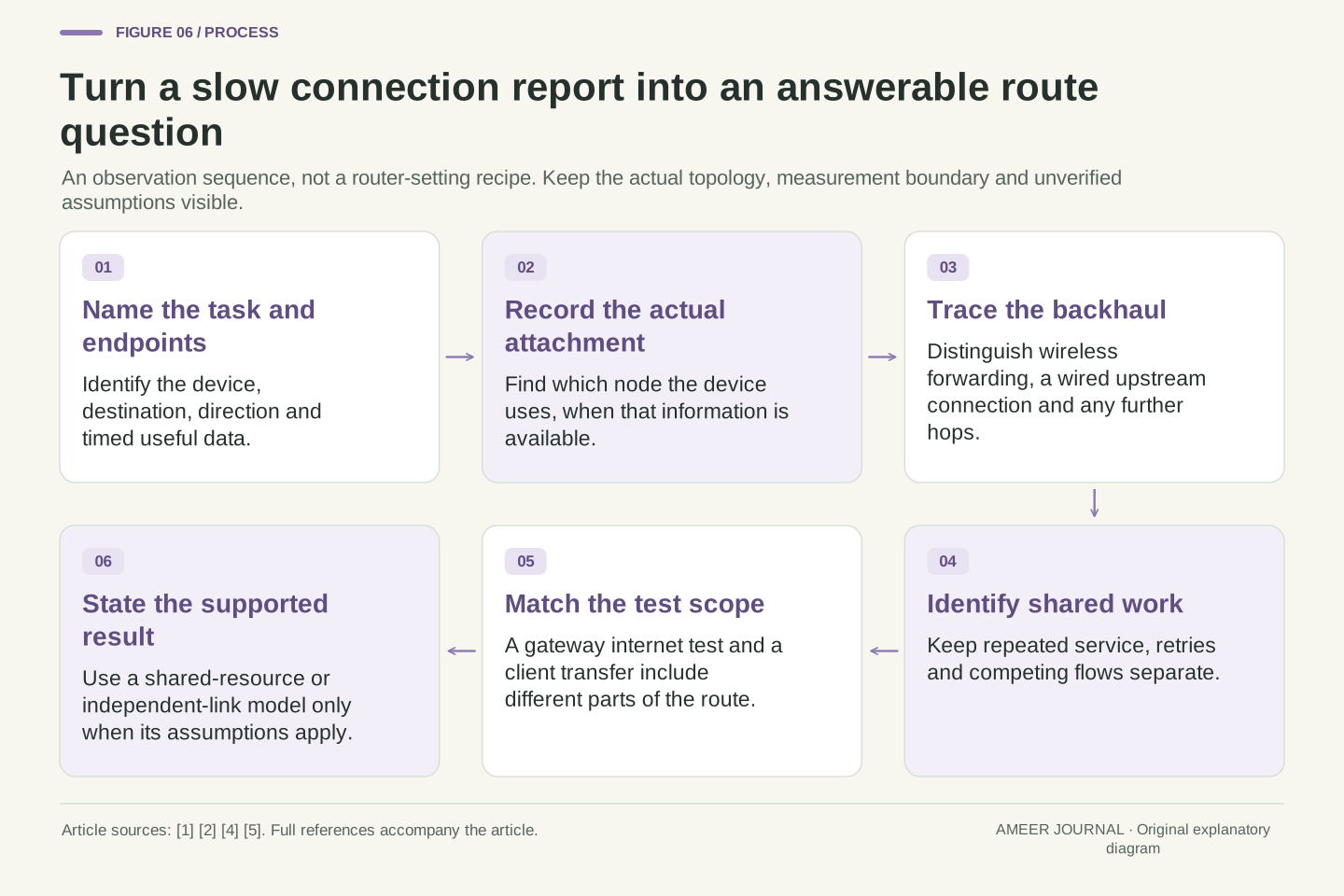
A useful record begins with the task that feels slow, the client and the destination. Add the actual attached node and backhaul route if the system exposes them. Name the link rates according to what they measure, then note shared resources, competing traffic and retries separately. Meraki's route and neighbor information illustrates why these fields can answer different questions. [1][2] An unknown backhaul mode should remain unknown in the record instead of being filled in from the number of boxes or the strength of a nearby signal.
Then choose the calculation that matches the arrangement. Shared serial service requires adding each forwarding cost. Independent links can pipeline different blocks. Retries add work at the step that repeats it; other flows consume part of the available budget. A wire can change that budget, while an internet ceiling can still limit the final result. The examples make these distinctions visible without promising a particular speed. Before keeping a change, compare the same task and endpoints under representative conditions, with the actual supported topology and ordinary system protections intact.
Bind each observation to a client, destination, direction, actual association and upstream route. Preserve the rate's layer and time definition, the assumed resource-conflict relationship, competing load and available retry evidence. Meraki's separate route/neighbor reporting and eero's distinction between gateway and client tests provide concrete reasons for retaining that context. [1][2][5] This is enough structure to identify missing information without asserting that a signal reading, advertised aggregate rate or node count alone supplies a complete network model.
Apply only the matching result: a sum of service costs for mutually exclusive forwarding, a pipeline calculation for independently usable stages, or a multi-flow resource constraint when traffic shares the budget. Our numerical fixtures deliberately change those assumptions one at a time. They show why a better local link can produce a modest gain, why extra attempts consume useful opportunity and why a cable does not erase every later limit. A defensible conclusion names the supported cause or remaining uncertainty, and compares the intended application under consistent conditions rather than selecting whichever display shows the largest number.
Sources & further reading
Explore the references behind this guide. External pages may change after our review.
- Wireless Mesh Networking - Cisco Meraki DocumentationCisco Meraki · Accessed 7 Nov 2026
- Wireless Throughput Calculations and Limitations - Cisco Meraki DocumentationCisco Meraki · Accessed 7 Nov 2026
- Routing in Multi-Radio, Multi-Hop Wireless Mesh NetworksMicrosoft Research · Accessed 7 Nov 2026
- Can I connect my eeros with Ethernet? – eero Help Centereero · Accessed 7 Nov 2026
- Why are my eero App speed test results different from the ones on my device? – eero Help Centereero · Accessed 7 Nov 2026
Article updated 7 Nov 2026.
Found something we should revisit?
Good explanations get better with thoughtful feedback.