What you’ll take away
- A refresh opportunity can show an earlier frame; hertz does not count distinct source images.
- Exact 24 fps content fits an ideal 120 Hz schedule evenly through five repeats per frame.
- Equal average frame rates can hide different presentation intervals.
- VRR coordination, operating-system refresh policy, and pixel response time describe separate mechanisms.
- Record the selected display mode and the running content before interpreting a counter.
One screen, two different clocks
A display setting says 120 Hz. A film file says 24 fps. Both numbers can be correct while you watch that film. The first describes how often the display refreshes; the second describes how many frames the source supplies per second. If each film frame is repeated across five refreshes, the screen still runs at 120 Hz while the film still supplies 24 source frames per second. Android’s documentation uses this relationship to explain why a device may choose a 120 Hz display mode for 24 fps video. A refresh is an opportunity to present an image, not a promise that its content has changed. [1][3]
For a game, the content has to be produced while you play. The processor and graphics hardware do work before a frame can be presented, and the display pipeline then decides when that ready frame reaches the screen. A faster display setting does not complete unfinished game work. Conversely, a repeated picture does not prove that the display has stopped refreshing. Keep those two clocks separate when reading a specification: one belongs to the production of images, the other to their presentation. This article follows those clocks using deliberately simplified examples, not measurements of a particular laptop, phone, monitor, or game. [1][2]
Refresh rate and content frame rate describe different events. A display operating at a fixed 120 Hz has nominal refresh intervals of 1/120 second; a 24 fps source supplies nominal content intervals of 1/24 second. With exact rates, correct scheduling, and no interpolation, five display refreshes can present the same source frame. Android explicitly documents selecting 120 Hz for a 24 Hz video surface. Counting refreshes therefore cannot establish the number of distinct source images, even when every scheduled display update occurs successfully. The content-production boundary and the display-presentation boundary must be named before comparing their rates. [1][3]
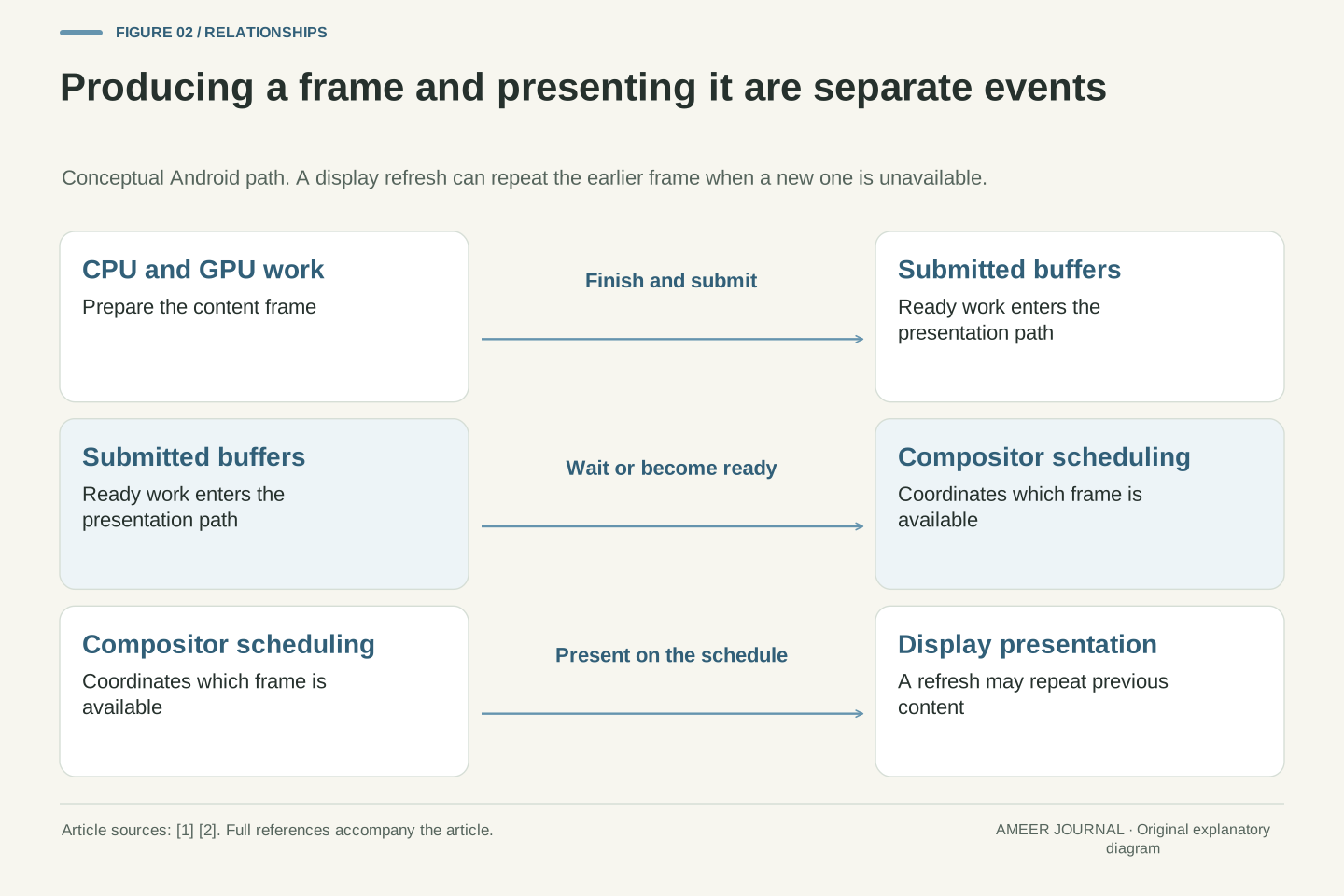
A rendered application adds intermediate stages. CPU work, GPU work, buffer submission, composition, and presentation are related but do not represent one instantaneous operation. Android’s Frame Pacing documentation explains how SurfaceFlinger makes submitted frames available to display hardware, including repetition of an earlier frame when a new one is late. The conceptual pipeline here is sufficient to distinguish the measurements; it is not a universal description of every operating system’s exact buffering implementation. Nothing in a panel’s maximum refresh specification independently establishes an application’s sustained rendering rate or its completed input-to-display latency. Those require evidence from the relevant workload and measurement boundary. [1][2]
Turn hertz into time before comparing numbers
The useful conversion is simple: divide 1,000 by the refresh rate to obtain the nominal interval in milliseconds. At 60 Hz, refresh opportunities are about 16.67 milliseconds apart. At 120 Hz they are about 8.33 milliseconds apart, and at 240 Hz about 4.17 milliseconds apart. These are calculated intervals for fixed rates, not stopwatch results. They show why doubling the rate halves the spacing between opportunities. They also show why the change from 60 to 120 Hz removes about 8.33 milliseconds of spacing, while the change from 120 to 240 Hz removes about 4.17 milliseconds. [1][5]
That calculation does not tell you that a button press will appear 8.33 milliseconds sooner. The button must be read, the application must respond, a frame must be prepared, and the display must present it. Some of those stages can overlap; others can wait. Nor does an 8.33 millisecond refresh interval guarantee that every pixel has finished changing color within that time. Use the conversion to understand one part of the schedule. If a review claims a shorter response delay, look for the actual measurement and its starting and ending points instead of deriving the whole delay from the hertz label. [2][5]
For a fixed nominal refresh frequency H, the interval T in milliseconds is T = 1000/H. Thus 60, 120, and 240 Hz correspond to 16.6667, 8.3333, and 4.1667 ms respectively. These are reciprocal conversions, rounded here for readability. The absolute interval reductions are not identical when the frequency doubles: 60 to 120 Hz saves 8.3333 ms of interval, whereas 120 to 240 Hz saves 4.1667 ms. Neither value is an observed reduction in input latency. Intel’s monitor guide separately identifies refresh timing and pixel response timing, including the 240 Hz interval calculation. [1][5]
Treat T as a presentation-schedule quantity, not a complete per-frame execution budget that every subsystem must consume serially. Rendering and display work may be pipelined, queued frames may wait, and the timing of input sampling affects when a change becomes visible. Android’s documentation describes latency arising from queue stuffing and illustrates that pipeline choices affect input-to-screen timing. Therefore halving T does not mathematically imply halving end-to-end latency. A meaningful latency comparison must hold its event definition, workload, display configuration, and measurement method clear. The calculations in this section isolate refresh spacing and make no claim about those unmeasured components. [2][5]
Why 24 fps fits 120 Hz more evenly than 60 Hz
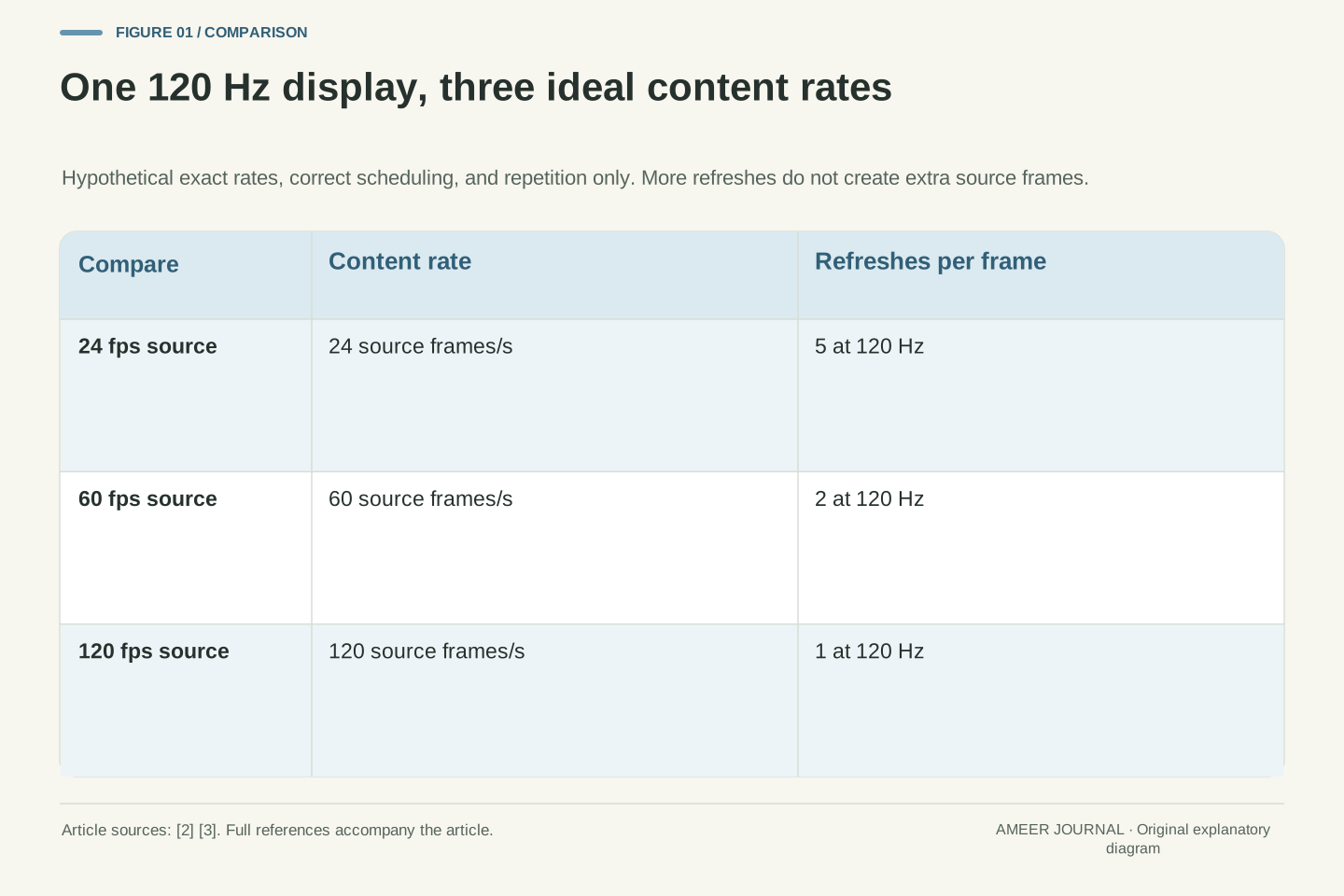
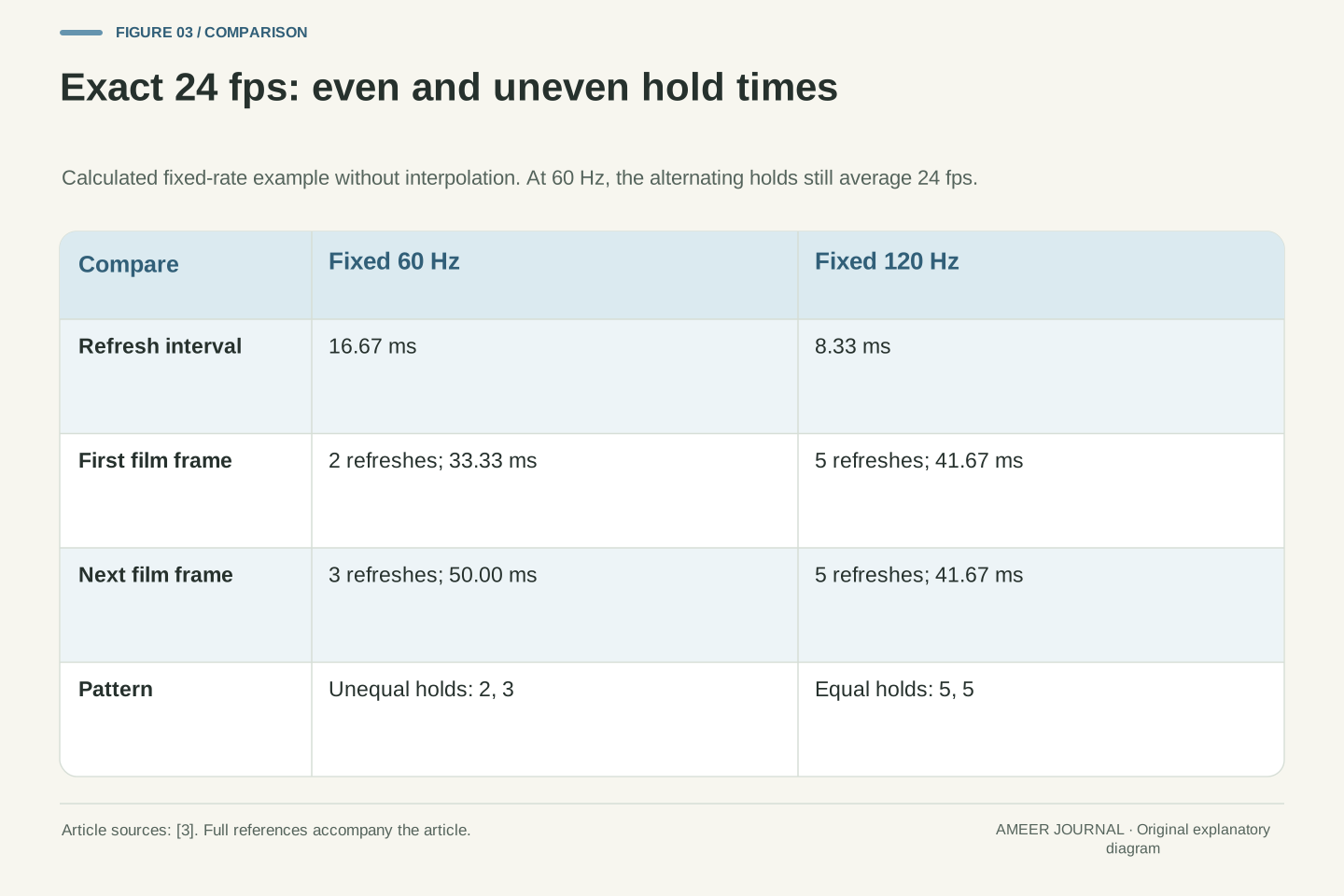
Imagine a film containing exactly 24 frames each second and a display running at exactly 120 Hz. We assume ordinary repetition of film frames, with no invented intermediate pictures. Dividing 120 by 24 gives five refreshes for each film frame. Five intervals of about 8.33 milliseconds make about 41.67 milliseconds, which is also one twenty-fourth of a second. The first film frame can stay for five refreshes, the next for five, and so on. The repetition keeps the timing even; it does not turn the film into footage captured at 120 fps. Android documents this reason for choosing a compatible higher display rate. [3]
At exactly 60 Hz, the same division gives 2.5 refreshes per film frame, and a display cannot allocate half a fixed refresh interval in this simplified schedule. An alternating pattern of two refreshes and three refreshes produces holds of about 33.33 and 50 milliseconds. Together those two film frames occupy about 83.33 milliseconds, so the average rate remains 24 fps, but their individual hold times differ. This is the timing issue behind the 3:2 pulldown example in Android’s guidance. Real media may use rates such as 23.976 rather than exactly 24, so check the actual source and display mode before applying these particular numbers. [3]
Consider exact 24 fps content presented in a fixed 120 Hz mode, with correct timestamps, no dropped frames, and no motion interpolation. The integer ratio 120/24 = 5 permits every content frame to occupy five nominal display intervals. Its presentation duration is 5 × 1000/120 = 41.6667 ms, matching the source period. This is a cadence relationship rather than additional temporal information: repeating a source sample does not produce another independently captured or rendered sample. Android’s frame-rate API documentation uses 24 Hz video and a 120 Hz display to illustrate a mode selection that avoids 3:2 pulldown. [3]
Under the same assumptions at 60 Hz, 60/24 = 2.5 requires unequal integer interval allocations. Alternating two and three refreshes yields 33.3333 and 50 ms presentation durations; their average is 41.6667 ms. Across the pair, five refresh intervals accommodate two source frames without changing the source’s average rate. The unequal individual durations explain the cadence difference that an average FPS value hides. These exact-rate calculations deliberately exclude fractional-rate formats, playback-speed changes, interpolation, variable-refresh scheduling, and implementation-specific timestamp errors. The relevant question is whether the actual source period is represented consistently by the selected presentation schedule, not whether the display’s advertised maximum is numerically largest. [3]
The same average can hide an uneven rhythm
Here is a second hypothetical example, separate from the film. Suppose a display has fixed refresh opportunities every 10 milliseconds, corresponding to 100 Hz. One application presents a new picture every 20 milliseconds. Another repeats a pattern in which one picture lasts 10 milliseconds and the next lasts 30 milliseconds. Both patterns supply two new pictures over each repeating 40 millisecond period, so both average 50 updates per second. Yet the first pattern is even, while the second alternates a short hold and a long hold. Every number in this example was chosen for the explanation; it is not a result from a product test.
This is why a lone average FPS counter leaves an important question unanswered. It tells you how many counted events occurred over an interval, but not how they were spaced. Android’s frame-pacing guide describes short and long frame timing that can produce stutter even when a simple rate does not reveal the whole problem. A useful investigation records frame intervals or presentation timing alongside the average. It should also say what was counted: frames prepared by the application and pictures actually presented are different stages. Do not claim that a particular person will notice a specific timing pattern from these arithmetic examples alone. [2]
Define a hypothetical fixed 100 Hz presentation schedule with 10 ms opportunities. Pattern A presents successive distinct images at intervals of 20, 20, 20, 20 ms. Pattern B repeats intervals of 10, 30, 10, 30 ms. Over each complete repeating 40 ms cycle, both have two update intervals and a mean update frequency of 2/0.040 = 50 per second. Pattern A uses two refresh intervals per image; Pattern B alternates one and three. This construction avoids treating arbitrary sub-refresh presentation times as possible on the assumed fixed schedule. It is an analytical counterexample, not captured telemetry or a perceptual threshold experiment.
The mean rate therefore does not uniquely identify the presentation-time distribution. Nor should a render-completion counter automatically be substituted for a presentation counter. Android’s Frame Pacing documentation distinguishes queued frames, requested presentation times, actual presentation times, and intervals between consecutive frames in its profiling statistics. Those boundaries answer different questions about delay and pacing. For a reproducible investigation, specify the event stream, sampling duration, workload, and any aggregation before interpreting a reported average. The purpose is to preserve the behavior that averaging can remove; no particular percentile target or acceptable stutter threshold is inferred from the hypothetical 50-update patterns. [2]
What a late frame changes—and what a queue can hide
A screen still needs something to show when the next picture is not ready. In the fixed-rate Android display example, the hardware shows the previous frame again. The screen has refreshed, but the moving object has not reached a new position in a new picture. That distinction explains why a display can report a high rate while a game briefly appears to pause. Android describes frame pacing as coordination between the game and the display system; matching a headline average is only part of that job. The correct timing of ready pictures matters as well as the amount of rendering work completed. [2]
There can also be too much work waiting ahead. Imagine an application preparing pictures containing older input while those pictures sit in a queue. Rendering more of them does not automatically make the next visible response more recent. Android calls one form of this problem queue stuffing and explains that it can increase latency when input is sampled before the frame. Its Frame Pacing library uses timing information and synchronization to manage presentation. That is an Android-specific implementation example, not a claim that every game has the same queue length or needs the same setting. A reported frame rate alone cannot tell you how old the visible response is. [2]
For the fixed-rate path described in Android’s guide, a display tick without a newly available frame repeats the prior frame. Thus refresh frequency can remain unchanged while the frequency of distinct presented content falls. The library documentation connects this behavior to uneven short and long game frames and describes presentation timestamps that prevent premature presentation. A frame being available earlier does not always mean it should be presented immediately; consistency with the intended timeline also matters. This is a scheduling statement about the documented Android path, not a universal prescription for every compositor, swapchain, or latency-sensitive application. [2]
Queue depth introduces a separate dimension. The Android guide describes back-pressure when a producer fills the presentation queue and notes increased input latency when input was sampled before the queued frame. A throughput-oriented counter may therefore look satisfactory while queued work contains older input. The guide’s example queue size is not generalized here to all devices. Likewise, the existence of a fence or a timestamp is not itself a performance result: it is a mechanism whose behavior depends on implementation and workload. To diagnose the effect, distinguish render completion, queue residence, scheduled presentation, actual presentation, and the age of the input represented by the frame. [2]
Variable refresh changes coordination, not the source material
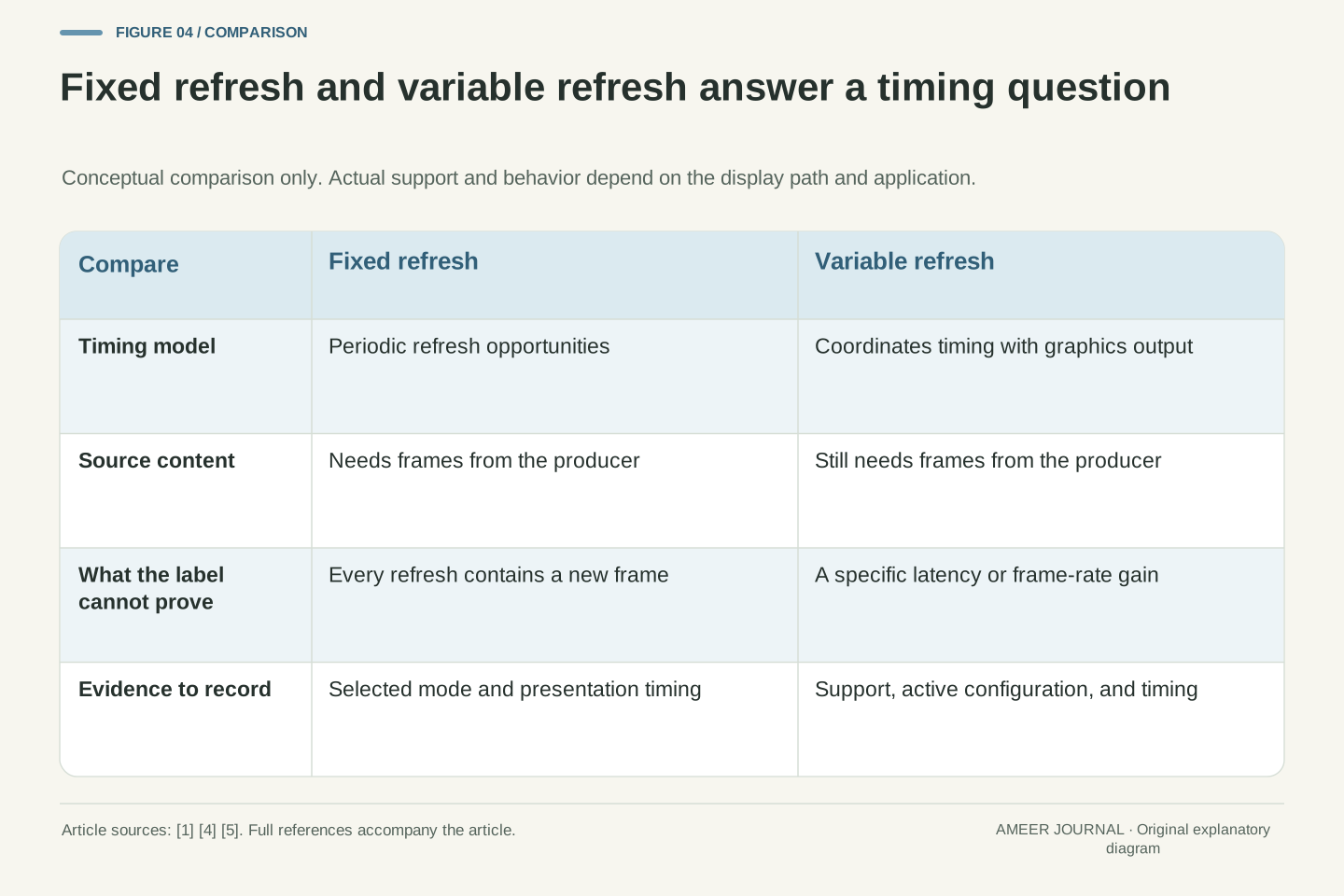
With a fixed refresh rate, display opportunities follow a regular schedule. Variable refresh rate, or VRR, describes coordination in which display timing can follow the graphics output instead. Intel’s explanations describe adaptive synchronization as matching display refresh with produced frames. That addresses a different problem from making the processor or graphics hardware finish work sooner. If a game has not produced a new picture, synchronization does not invent its missing content. Similarly, switching on a compatible feature does not turn 24 recorded film frames into 120 separately recorded moments. Keep the timing mechanism separate from the amount of information the source contains. [1][5]
The practical question is whether the actual display path supports and uses the relevant feature. Microsoft’s Advanced display information can report VRR support for the selected display, but that capability label should not be treated as a record of every application’s current behavior. A monitor specification, an operating-system option, and an application’s presentation settings are different pieces of evidence. Record them together before attributing a change to VRR. This article does not provide a universal operating range, a minimum-frame-rate rule, or a comparison between branded implementations. Those details need the documentation for the exact hardware and software combination being investigated. [4][5]
Fixed-rate presentation offers periodic refresh opportunities; VRR is a general category of synchronization between display timing and graphics output. Intel distinguishes that category from Adaptive Sync, a particular protocol family, while its refresh-rate guide describes synchronizing display refresh as frames are produced. That distinction supports a coordination model, not a claim that every implementation has identical behavior. A variable presentation schedule cannot independently reduce the application’s computational work or create absent source samples. Any assertion about the number of distinct images still depends on the content-production and presentation events actually observed. [1][5]
Capability, configuration, and operation should be evaluated separately. Microsoft documents a VRR-support field in Advanced display, which establishes a reported capability for the selected display rather than a complete per-frame execution trace. Hardware compatibility, selected mode, application behavior, and the active display path remain part of the investigation. No operating-range numbers, low-frame-rate compensation algorithm, certification equivalence, or brand ranking is inferred from these general sources. Keeping that boundary explicit prevents a nominal VRR label from being used as proof of a particular latency, cadence, or image-quality outcome that has not been measured on the configuration in question. [4][5]
A system can choose a different rate for a reason
Windows 11 also uses the name Dynamic Refresh Rate, or DRR, for a feature that changes refresh rate according to activity. That is an operating-system policy, rather than simply another name for every use of VRR. Microsoft says DRR requires supporting hardware, including VRR and a display rate of at least 120 Hz; Windows 10 does not support DRR. The same guidance says DRR can limit the maximum refresh rate of some games. These are documented Windows conditions, not rules for Android phones or every other desktop system. The shared word “dynamic” is not enough to establish that two features behave identically. [4]
Android provides another useful example of policy. An app targeting Android 11 or later can tell the platform its intended frame rate through the frame-rate API. The system may choose a suitable mode, but the request is not a guarantee: another higher-priority surface or battery saver can affect the result. The app might also get a multiple of its requested rate. Android documents a 120 Hz display accommodating one 60 Hz surface and another 24 Hz surface. If a device chooses 120 rather than 60 in that situation, the setting alone does not prove that either app is producing 120 different pictures each second. [3]
Windows 11 DRR is a policy that adjusts refresh according to activity. Microsoft lists VRR support and a display rate of at least 120 Hz among its requirements, and states that the feature is unavailable on Windows 10. Its guidance also identifies cases in which DRR can restrict the maximum refresh rate of games not designed for VRR. These statements should retain their platform and hardware qualifiers. They do not establish a cross-platform equivalence between activity-based mode selection and frame-by-frame synchronization, nor do they quantify the power or latency effects of either mechanism. [4]
Android’s frame-rate API, available to apps targeting Android 11/API 30 or later, supplies a desired content rate to the platform rather than commanding an unconditional mode switch. The documented selection can be overridden by another surface’s priority or battery-saving policy. It can also choose a compatible multiple: Android describes 120 Hz accommodating simultaneous 60 Hz and 24 Hz surfaces. In the ideal integer-rate schedule those surfaces use two and five display intervals per content frame respectively. An investigation must therefore distinguish the requested source rate, selected display mode, and effective presentation behavior instead of treating a different selected number as automatic evidence that the request failed. [3]
A 1 ms response label answers a different question
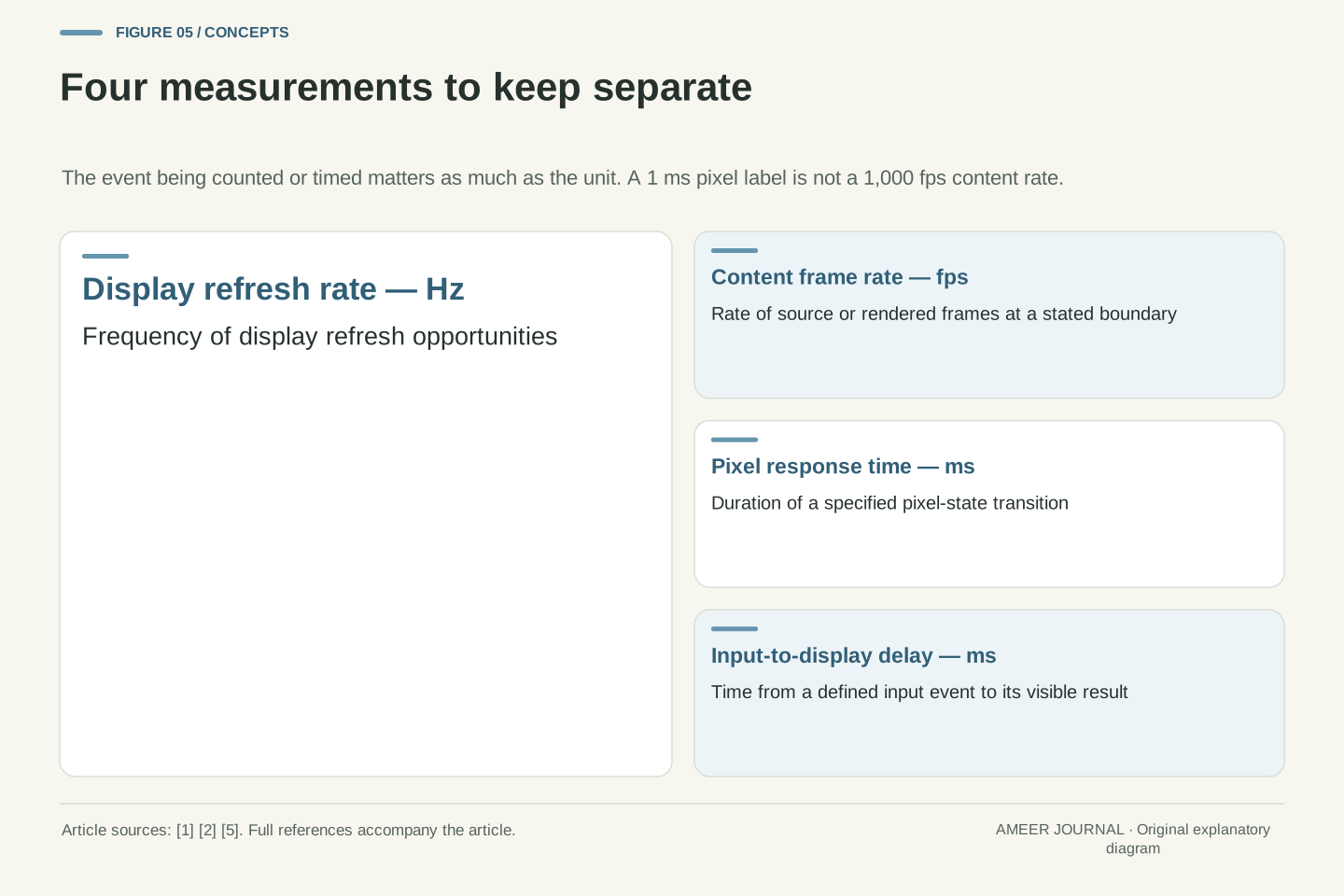
Refresh rate is not the same measurement as pixel response time. Intel’s monitor guide describes response time as the time a pixel takes to change color, often advertised for a gray-to-gray transition. A quoted number can represent a favorable transition rather than an average across every change. A “1 ms” label therefore does not mean a display produces 1,000 different frames per second, and it does not establish that all of its transitions finish in one millisecond. The unit is time, but the event being timed matters. Read the measurement conditions before comparing that label with a refresh-rate setting. [5]
Input-to-screen delay asks a broader question: how long after an action does its visible result arrive? The application work and queue behavior discussed earlier can contribute, as can the display side of the path. A smaller pixel-transition number cannot describe all of those stages. Imagine two otherwise unspecified systems that advertise the same refresh rate and the same response-time figure. Those two labels alone leave their game workload, queue timing, and input sampling unknown, so they cannot prove equal responsiveness. Treat refresh spacing, pixel transition, and response to an input as separate rows in your notes instead of combining them into one score. [2][5]
Pixel response time concerns a transition between pixel states; refresh interval concerns the timing of display updates. Intel notes that a gray-to-gray specification can be a best-case result among tested transitions. It is therefore invalid to invert a nominal 1 ms pixel-transition specification into a claim of 1,000 unique content frames per second, or to treat it as a worst-case bound for every transition. Both quantities involve time, but their event definitions differ. A defensible comparison records the response-time test conditions separately from the selected refresh mode and separately again from the content’s production rate. [5]
End-to-end input-to-display latency includes a longer causal path than a pixel transition alone. Android’s examples demonstrate contributions from input sampling, queued rendering, and presentation scheduling; Intel separately distinguishes response time from input lag. The exact included stages depend on a measurement’s endpoints, so no universal sum is assigned here. Equal advertised refresh and gray-to-gray numbers leave other latency components unconstrained. The practical consequence is methodological: compare like-defined measurements, identify whether values are specified or measured, and do not subtract a calculated refresh-interval change from an unknown total latency as though the rest of the pipeline had been observed to remain constant. [2][5]
Read the selected display and the running content separately
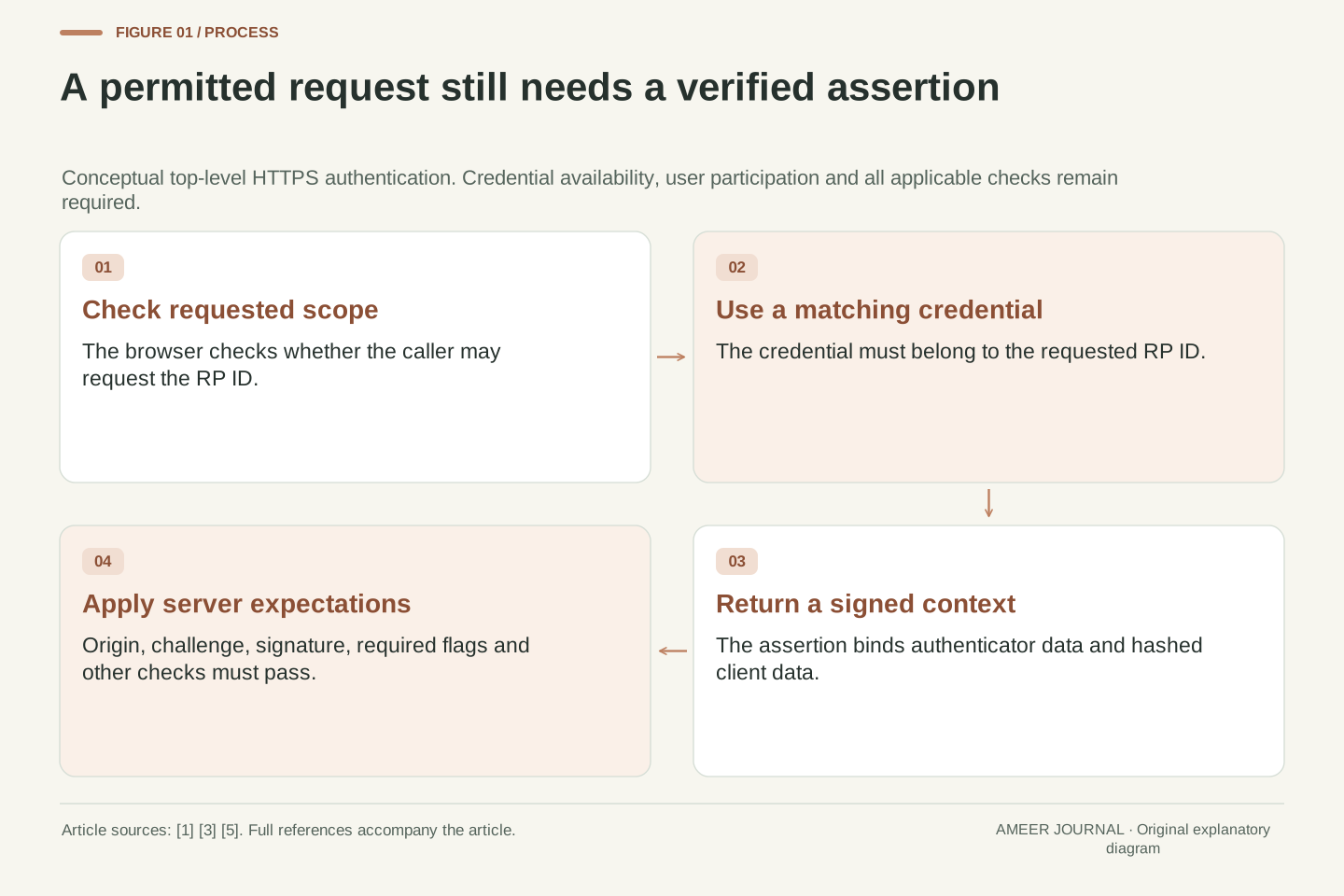
On Windows, Microsoft directs users to Settings, System, Display, then Advanced display to inspect the selected display’s resolution and refresh rate. If several displays are connected, make sure the information belongs to the one you mean. Available rates depend on the display, and Microsoft explains that an asterisk beside a rate can mean selecting it will also change the resolution. That makes the resolution part of the record, not a detail to ignore. A comparison made at one resolution and repeated at another has changed more than the refresh setting, so its result needs that qualification. [4]
Then record the running content. Is it a fixed-rate video, a game with a target rate, or several surfaces sharing the screen? An in-app counter and an operating-system display setting are not expected to show identical numbers in every valid configuration. For example, the documented 60 and 24 Hz surface case can coexist with a 120 Hz display. If an average FPS value is available, keep it alongside evidence of pacing rather than replacing the whole record with it. The goal is to identify what each reading represents, not to force all counters to agree by changing unrelated settings until their numbers happen to match. [2][3]
Microsoft’s Advanced display panel exposes selected-display information including current resolution and refresh rate. Its rate selector can mark modes requiring a resolution change with an asterisk. Therefore a controlled comparison must retain both parameters and identify the relevant display; changing a mode while silently changing resolution creates a confounded comparison. The settings panel is evidence about configuration, not by itself an instrument for measuring application render completion or per-frame presentation. Preserve the distinction between a supported mode, a selected mode, and a measured event stream. The documented UI details are Windows-specific and may differ on other systems. [4]
Next identify the producer and its timebase. A fixed-rate video, a game adapting to workload, and multiple composited surfaces impose different scheduling requirements. Android’s example of 60 Hz and 24 Hz surfaces sharing a 120 Hz display is a concrete reason that reported rates need not be equal. For a performance investigation, retain interval or timing information as well as average counts and state which pipeline boundary each counter observes. This makes disagreement informative: a changed display mode, repeated source content, and delayed presentation are distinct hypotheses. The counters should be interpreted against those hypotheses, not treated as interchangeable measurements of one undefined “speed.” [2][3]
Make one useful record before changing another setting
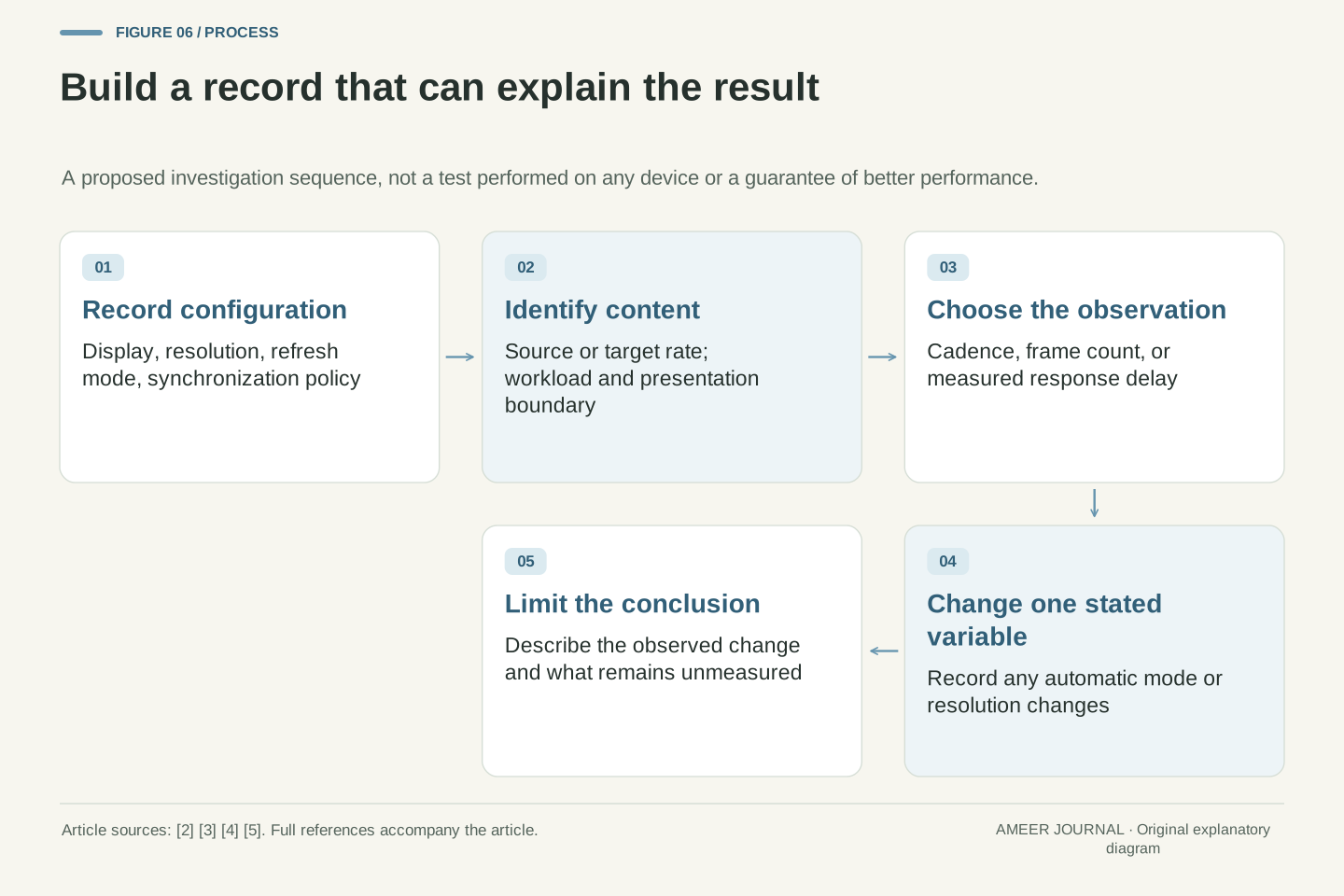
Start with a small record containing the selected display, resolution, refresh mode, content type, and any active variable or dynamic refresh option. Add the app’s target or source frame rate if you know it, then describe the actual problem: uneven motion, a delayed response, or simply a number that differs from the display label. Those descriptions lead to different evidence. Uneven frame spacing calls for timing information; a claim about response delay needs an input-to-visible-result measurement; a film cadence question starts with the source rate and display mode. This is a proposed investigation method, not a report that we tested your equipment. [2][3][4][5]
If you compare two configurations, change one stated variable, keep the workload comparable, and write down any automatic resolution or mode change. Do not promise yourself that the highest available hertz number must solve every symptom. A compatible rate can present a fixed-rate source more evenly, while a high maximum rate says little about unfinished rendering or old frames in a queue. After the comparison, keep the conclusion as narrow as the evidence: a setting changed, a measured interval changed, or the problem remained. That leaves you with a repeatable explanation instead of a specification number carrying more meaning than it actually has. [1][2][3][4]
A useful evaluation record separates configuration, workload, and observations. Configuration includes display identity, resolution, selected refresh mode, and relevant synchronization policy. Workload includes source or target frame rate and the reproducible activity. Observations identify their endpoints: rendering rate, presentation intervals, or an independently measured input-to-display delay. This framework is an original synthesis of the documented distinctions, not a benchmark protocol validated here. It deliberately avoids predicting outcomes from a single panel specification and avoids presenting subjective smoothness as though it were an instrument reading. A fixed-rate video and an interactive game should not inherit the same success criterion without justification. [2][3][4][5]
For any comparison, state the changed variable and preserve the others where possible; explicitly record mode-dependent resolution changes or system policy that prevents that control. Then phrase the result at the observed boundary. A compatible integer cadence can explain repeated film-frame timing, but cannot establish lower game input latency. A higher refresh mode can shorten nominal display intervals, but cannot establish an increased rate of distinct rendered frames. A pacing trace can reveal uneven intervals, but cannot by itself identify the hardware stage responsible. These limits make the final diagnosis more useful: each conclusion points to the evidence that supports it and leaves the unmeasured parts open. [1][2][3][4]
Sources & further reading
Explore the references behind this guide. External pages may change after our review.
- What Is Refresh Rate and Why Is It Important? - IntelIntel · Accessed 6 Nov 2026
- Frame Pacing library | Android game development | Android DevelopersAndroid Developers · Accessed 6 Nov 2026
- Frame rate | Android media | Android DevelopersAndroid Developers · Accessed 6 Nov 2026
- Change the refresh rate on your monitor in Windows | Microsoft SupportMicrosoft · Accessed 6 Nov 2026
- Gaming Monitor Buying Guide - IntelIntel · Accessed 6 Nov 2026
Article updated 6 Nov 2026.
Found something we should revisit?
Good explanations get better with thoughtful feedback.