What you’ll take away
- A microphone request can change the active audio profile, even while the same headset remains selected.
- An A2DP codec must be supported by both ends and does not determine the separate microphone path.
- Windows version, application stream category and actual input selection matter when explaining a transition.
- LE Audio can support different concurrent capture and playback options, but hardware, software and accessory requirements must all match.
- Sample rate and raw PCM bitrate are different from encoded Bluetooth bitrate; compare the same quantities and boundaries.
The microphone changes the job
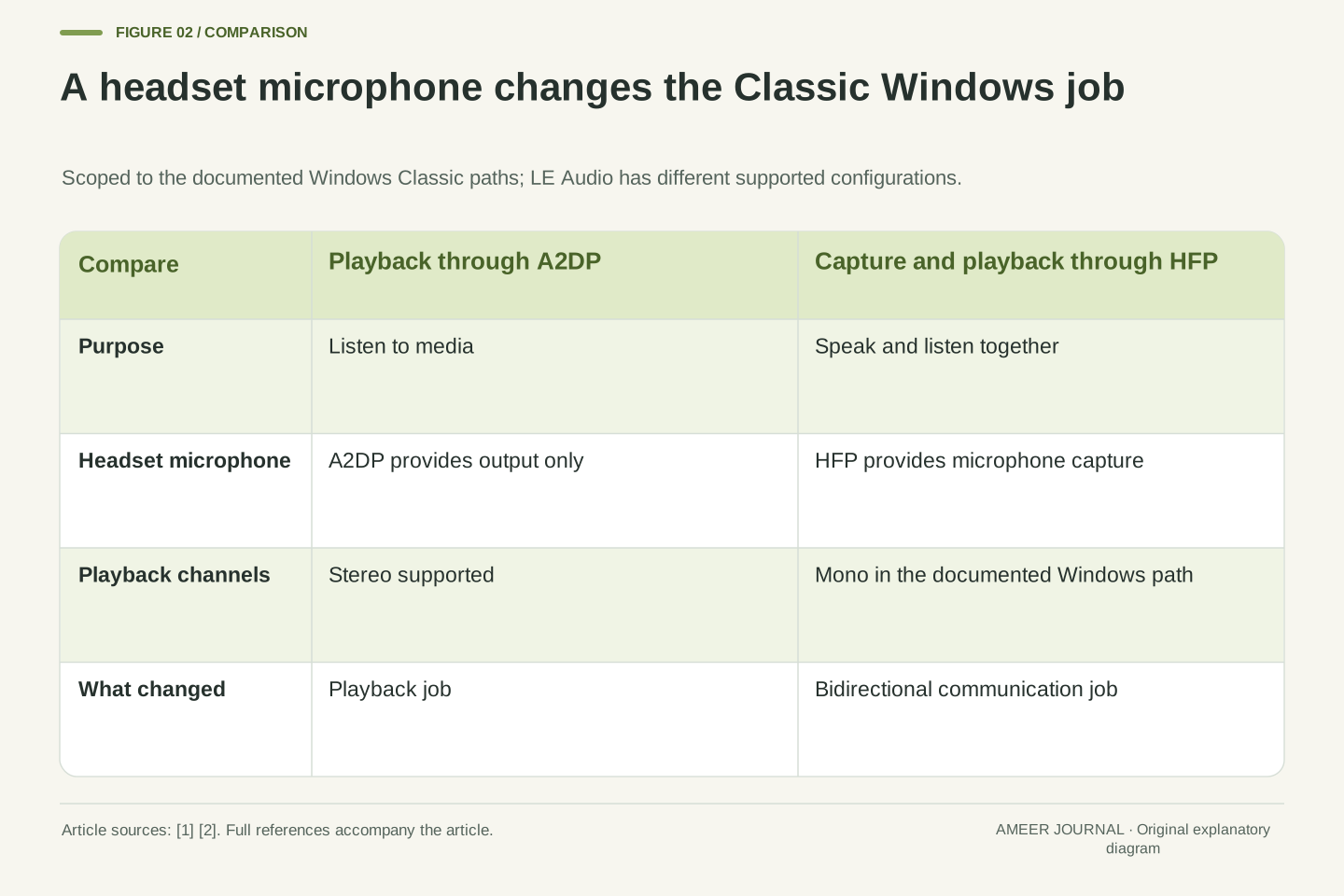
Music sounds spacious through your Bluetooth headphones. Then you join a meeting, and the same music suddenly sounds thinner. Before blaming the recording or replacing the headphones, check what changed: the computer may now be using the headset microphone. Microsoft's description of Bluetooth Classic audio distinguishes a stereo listening path, A2DP, from a path that carries microphone and playback audio together, HFP. The documented HFP path uses mono sound. [1] The speakers have not physically changed. The computer has asked the wireless connection to do a different job, with a different set of audio capabilities.
Apple documents a similar listening change on a Mac when an app uses the headphones' built-in microphone, including reduced quality or volume. [2] That makes microphone use a useful clue, not proof of the cause of every audio problem. Newer LE Audio arrangements can behave differently, and the computer, headphones and software all matter. [4][6] This article follows one clearly defined Classic example, then shows where the explanation stops applying. The aim is to identify the active connection before judging a codec name, an audio setting or a new purchase.
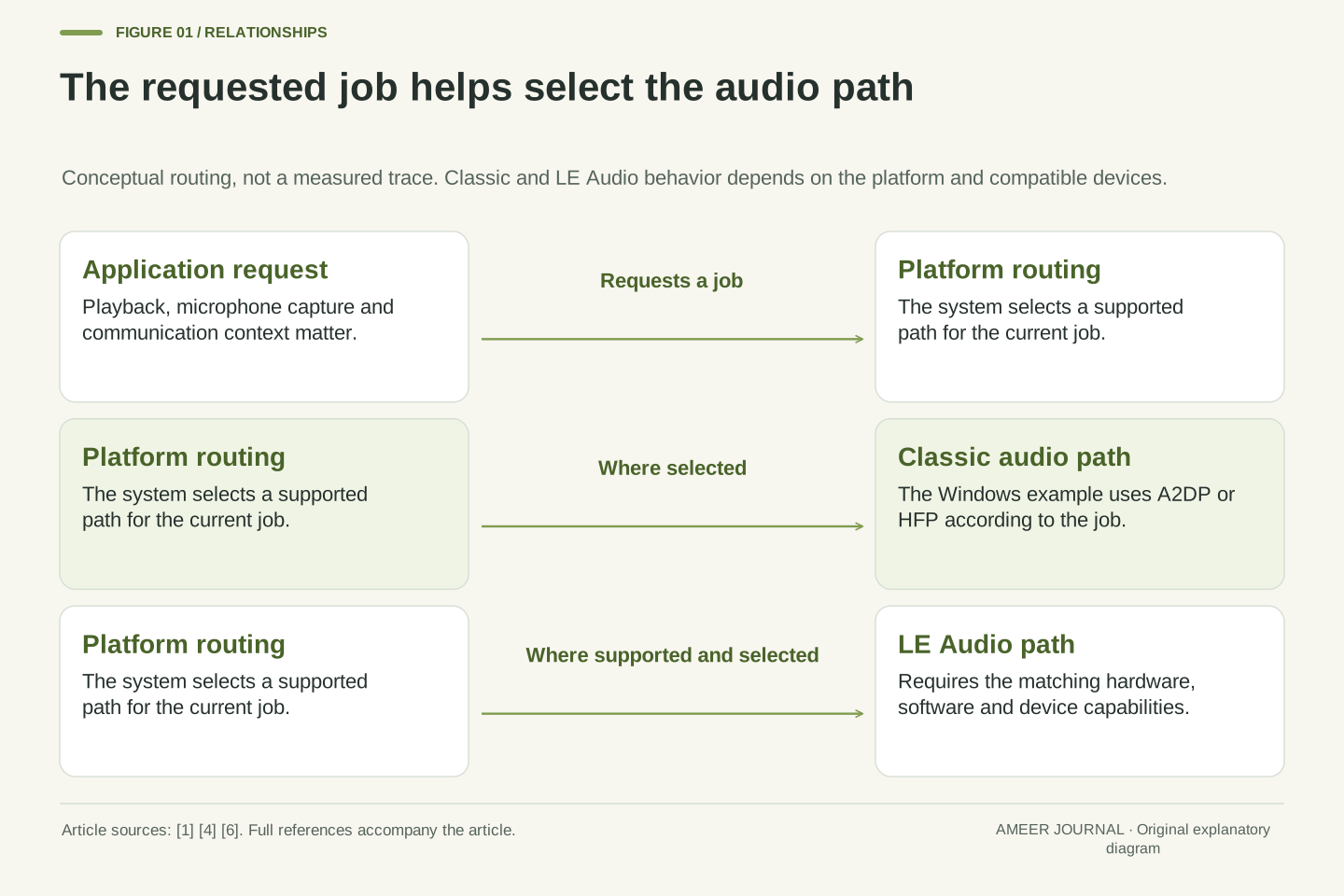
A change in Bluetooth playback during microphone capture can be a profile transition rather than a change in the media file. Microsoft's Windows Classic-audio implementation uses A2DP for stereo rendering and HFP for simultaneous monaural rendering and capture. [1] Opening the remote device's capture endpoint can therefore change the transport configuration used by audio already playing. A statement that a headset supports a particular A2DP codec describes a capability of one path; it does not establish that this path remains active throughout a communications session. The session's functional requirements belong in the explanation.
Apple's Mac support guidance corroborates the user-visible symptom when the headset microphone is used, but does not turn it into a universal diagnostic rule. [2] LE Audio introduces another family of configurations, with platform-specific support for higher-quality concurrent capture and playback. [4][6] The analysis below keeps Windows Classic behavior, the Mac support procedure and current LE Audio requirements separate. It is a documentation-based explanation with hypothetical examples, not a listening test, a codec-quality ranking or a claim that every Bluetooth implementation makes the same transition.
Separate the profile, the codec and the active route
Three questions help untangle the labels. What kind of connection is carrying audio? What job does its profile support? Which codec is encoding the sound for that job? In the Windows Classic example, A2DP serves ordinary playback, while HFP supports speaking and listening together. A codec is the method used to encode and decode the audio carried within the chosen arrangement. [1] Reading a list of codecs without identifying the profile is like checking which files a printer accepts before checking whether the device is currently being used as a scanner.
The active route is another practical question: is the app actually using the headset microphone, the laptop microphone or a separate input? Those choices can affect which capabilities are needed. Android's documentation also distinguishes hardware support for LE Audio from the route selected for a particular stream; a device may fall back to A2DP or HFP. [4] A product's feature list is therefore only the starting point. Keep a small record of the computer, headset, chosen input, chosen output and running app. That describes the setup much more clearly than writing only 'Bluetooth sounds bad.'
Distinguish the radio/audio architecture, service profile, codec and application route. In Microsoft's Classic stack, A2DP exposes rendering, whereas HFP provides a bidirectional audio service with capture and rendering. The codec encodes the audio representation appropriate to the negotiated profile. [1] These are related layers, not interchangeable product specifications. An optional A2DP codec cannot by its mere presence provide the microphone service absent from A2DP. Conversely, opening a capture endpoint can make a different service appropriate even when the source and sink both support a preferred media codec.
Routing adds state to this capability description. The application may request a particular communications device, while the platform selects a compatible path through its audio subsystem. Android documents device-support queries, communication-device selection and possible fallback from LE Audio to A2DP or HFP. [4] Thus support and use must be evaluated separately. A useful observation names the selected render and capture devices, application context and platform version. That information identifies the configuration under discussion without assuming that a Bluetooth version badge, a paired-device name or an enabled setting proves the actual streaming path.
The codec must exist at both ends
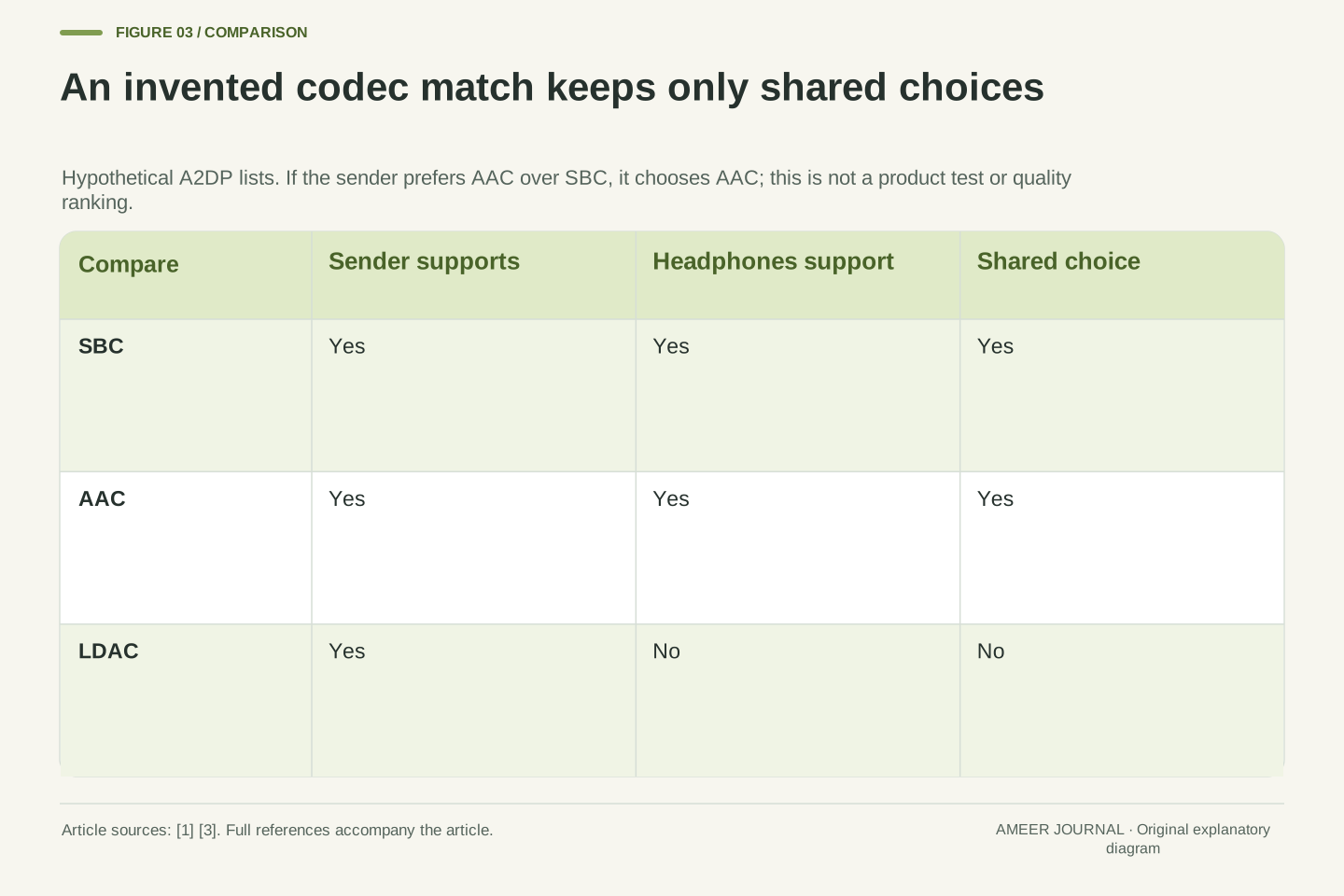
Imagine an invented music setup. Its sending device supports SBC, AAC and LDAC, while its headphones support SBC and AAC. The two shared choices are SBC and AAC. LDAC appearing on the sender's list does not make it available at the receiving end. If our imaginary sender is configured to prefer AAC among the shared choices, it selects AAC. This is a set-matching example, not a report about a real product. AOSP describes codec negotiation between sender and audio sink, and allows device makers to set codec priorities. [3] A longer list alone cannot identify the result.
There is also a baseline to understand: A2DP requires SBC support, while other codecs depend on the equipment and implementation. [1] AOSP's discussion of additional codecs is explicitly framed around Android 8.0 and includes manufacturer implementation and licensing considerations. [3] It should not be copied into a promise about every Android phone sold today. Most importantly, our imaginary AAC selection describes music playback through A2DP. It says nothing about the path used once a microphone is opened. A shared codec answers one compatibility question within a particular use case; it does not answer all of them.
Consider a hypothetical capability intersection: source set S = {SBC, AAC, LDAC} and sink set H = {SBC, AAC}. Their intersection is {SBC, AAC}. A source policy that prefers AAC over SBC would select AAC from that intersection; the unavailable LDAC option cannot win. This simplifies negotiation to codec families and does not claim to model every configuration parameter. AOSP documents A2DP codec negotiation and manufacturer-configurable ordering, including disabled priorities. [3] The worked set establishes compatibility and policy dependence, not an objective ordering of perceptual quality or a measured result for a named implementation.
SBC is the required A2DP baseline in Microsoft's explanation, while optional codec availability depends on host and remote-device support. [1] AOSP's additional-codec discussion belongs to its Android 8.0 implementation context; proprietary components and manufacturer choices qualify any attempt to generalize its list. [3] An agreed A2DP codec also does not determine the HFP configuration. Negotiation occurs within the service being established. A meaningful compatibility statement therefore names the profile, source and sink capabilities, and selection policy where known. Merely presenting two product lists side by side leaves the active service and its actual configuration unresolved.
Follow one hypothetical Classic call
Suppose a Windows 11 computer and a Bluetooth Classic headset are playing music through A2DP. Our invented meeting app then opens that headset's microphone. Following Microsoft's documented behavior, the system switches to HFP. Assume this particular combination uses its supported 16 kHz wideband mode. The headset now sends microphone sound and receives mono playback through that call path. [1] We have deliberately specified Classic audio, Windows behavior and a supported mode. Changing any of those conditions could change the result; the example is not a prediction for an unnamed pair of earbuds.
Now suppose a second app supplies music at 48 kHz while the call continues. Microsoft explains that Windows resamples such audio to match the selected HFP endpoint. [1] Selecting a high source format does not preserve an A2DP route that is no longer active. When microphone capture ends, media playback can return to A2DP, provided another condition is not keeping HFP selected. That explains why the change may closely follow joining and leaving a call. It also shows why repeatedly changing a music app's quality setting may leave the underlying cause untouched.
Take a hypothetical Windows 11 Classic headset session with A2DP initially active. When the meeting application opens the headset capture endpoint, the documented stack selects HFP. Assume mutually supported wideband operation at a 16 kHz sampling rate. Microsoft's HFP description specifies simultaneous mono capture and mono rendering for this path. [1] The assumption avoids claiming that wideband always negotiates: the same documentation describes hardware combinations that fall back to narrowband. This example follows a platform rule under stated conditions rather than reconstructing an observed trace or assigning behavior to all HFP versions and implementations.
If another application supplies a 48 kHz render stream during that session, Windows resamples it to the active HFP endpoint format. [1] The application's format and the remote transport configuration therefore need not match. Increasing the former does not remove the latter's constraints. Closing capture permits a return to A2DP when no other HFP-triggering condition remains. The causal sequence is application demand, profile selection and format adaptation. It should not be inverted into a claim that an expensive media codec has malfunctioned simply because it is absent from the communications path.
One device name can hide different Windows profiles
An old troubleshooting guide may tell you to choose a device labelled Stereo instead of Hands-Free. Its advice may refer to Windows 10's separate audio endpoints. Microsoft's documentation describes different endpoint handling on Windows 11: when the device supports HFP, the system exposes one output and one input, with A2DP and HFP unified behind that interface. [1] A familiar headset name staying on screen does not prove that the same profile stayed active. Equally, the absence of two old-style names does not prove that the hands-free capability has disappeared.
Microphone use is not the only relevant Windows 11 trigger. Microsoft also documents HFP selection when an application creates an output stream in the Communications category. [1] This is why choosing a laptop or USB microphone is not a guaranteed recipe for keeping every meeting app on A2DP. It changes one input condition, but the app's playback request can still matter. Read instructions for the operating system and application you actually use. A setup explanation that includes those details is more useful than a universal promise that one dropdown will restore stereo in every call.
Windows endpoint presentation is version-dependent. The documented Windows 10 arrangement can create separate A2DP and hands-free endpoints. Windows 11 unifies the A2DP and HFP presentation, exposing one render endpoint and, when HFP is supported, one capture endpoint for the device. [1] User-visible endpoint identity is consequently insufficient to infer the active profile. This distinction matters when interpreting screenshots, older support instructions or application device menus. A stable display name may cover a profile transition; comparing names alone misses the change in the underlying audio configuration.
The Windows 11 selection rule also includes an output stream categorized as Communications. [1] Therefore, replacing headset capture with an unrelated microphone is not logically sufficient to prove that HFP will be avoided. Capture state and render-stream category are separate conditions in the documented rule. The practical consequence is to inspect the application's actual routing behavior rather than promising a universal workaround. This article does not prescribe changing an application's internal category, disabling supported device services or applying an old registry modification. It explains why a configuration change can have different outcomes in different applications.
Check the trigger with one change at a time
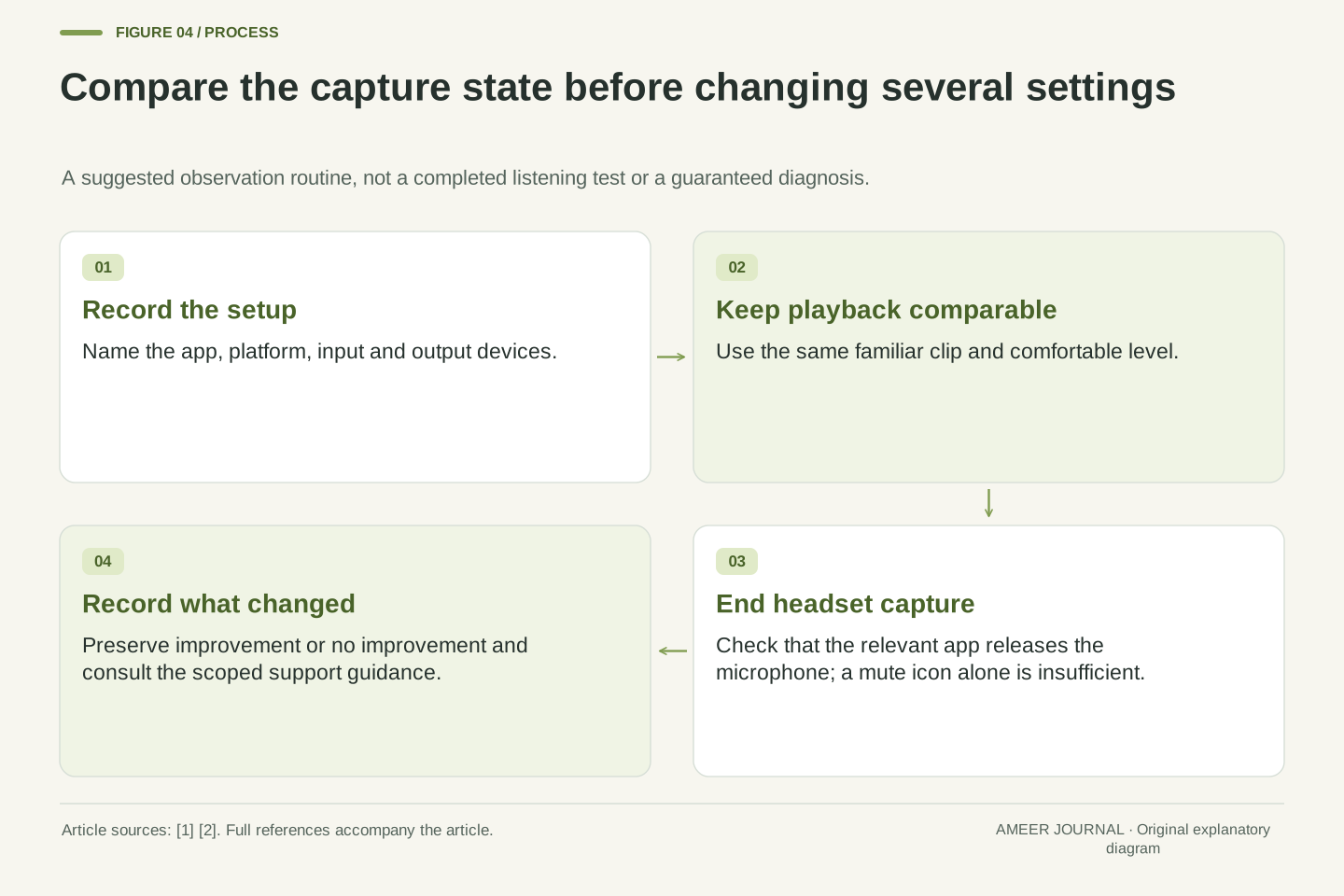
For an ordinary listening check, choose a familiar clip and keep its volume comfortable and consistent. Note the current input and output device, then compare playback before the communication app uses the headset microphone and after the app has completely stopped using it. This is a proposed observation method, not a test performed for this article. Record what actually happens instead of assuming that clicking a mute icon closes microphone capture. The important question is whether the app still holds the capture path open, because Microsoft's transition rule concerns microphone use. [1] A visible mute state alone does not establish that condition.
On a Mac, Apple specifically advises quitting apps that use the Bluetooth headset microphone and making sure the Sound settings pane is not open; its support page also describes reselecting the headphones if necessary. [2] Follow the instructions appropriate to that platform. If playback changes with the microphone session, that supports investigating the route. If it remains poor after the session ends, the observation has not explained the problem. Preserve that result and use the device maker's support path. Changing several settings at once makes it harder to learn which condition mattered, even if the sound happens to improve.
A useful controlled comparison holds the source material, output device and listening level as stable as practical while changing the capture session. Record platform version, application, render endpoint, capture endpoint and whether the application has actually released capture. The observation is a suggested diagnostic record, not a benchmark or proof of codec identity. A mute indicator does not itself document endpoint lifetime; the Windows selection behavior is tied to the state and category of audio streams. [1] Closing the relevant application provides a clearer change in conditions than inferring transport state from a crossed-out microphone icon.
For macOS, Apple's documented procedure includes quitting applications using the headset microphone and closing the Sound settings view, followed by device reselection if the reduction persists. [2] Keep this as scoped platform guidance rather than importing it into Windows endpoint terminology. A reversible comparison may identify a repeatable association, but cannot establish a full fault diagnosis from sound alone. If the symptom persists independently of capture, preserve that negative result. Avoid attributing every click, level change or interruption to the same profile transition; the evidence gathered in this comparison is narrower than that conclusion.
LE Audio changes the available options
LE Audio uses the Bluetooth Low Energy radio and includes LC3 as its mandatory codec. Bluetooth SIG explains that its required isochronous transport feature was introduced in Bluetooth Core 5.2. [5] That history does not mean every device displaying a later Bluetooth number implements every LE Audio feature. Check explicit LE Audio support at both ends. The SIG also explains that products can support both Classic and LE Audio, and that a source and receiver must use a compatible approach. A pair of headphones can therefore work through Classic audio without proving that an LE Audio path is active.
Android documents built-in LE Audio support beginning with Android 13, alongside a separate check for hardware support. It also describes higher-quality concurrent microphone and playback use and possible fallback to Classic profiles. [4] The useful question is the complete combination: phone or computer, operating system, drivers where applicable, headphones and app route. LC3 is part of that arrangement, not a button that turns a Classic-only headset into an LE Audio device. Nor does its presence supply a measured delay or sound-quality score for your setup. Those results would need evidence from that actual configuration.
LE Audio is an architecture operating over the LE radio, with LC3 mandatory in LE Audio products and a dependency on LE Isochronous Channels introduced by Bluetooth Core 5.2. [5] A core-version label is not a complete profile and feature declaration. Compatibility requires the source and sink to support the relevant audio architecture; dual-mode products can retain Classic operation. The distinction matters because successful pairing or playback may be evidence only for the fallback path, rather than for the desired LE Audio session or a specific concurrent capture/render capability.
Android's overview identifies Android 13, API level 33, as the platform introduction and separately exposes a hardware-support query. It describes concurrent microphone/playback improvements and warns that a central device can still route through A2DP or HFP. [4] Accordingly, platform support, hardware support and actual route selection are independent checks. LC3 compatibility should not be used as a proxy for end-to-end latency, microphone processing quality or all possible audio configurations. No comparative listening or timing measurement is reported here; the supported inference is about available mechanisms and their documented prerequisites.
Read a stereo-with-microphone claim with its conditions
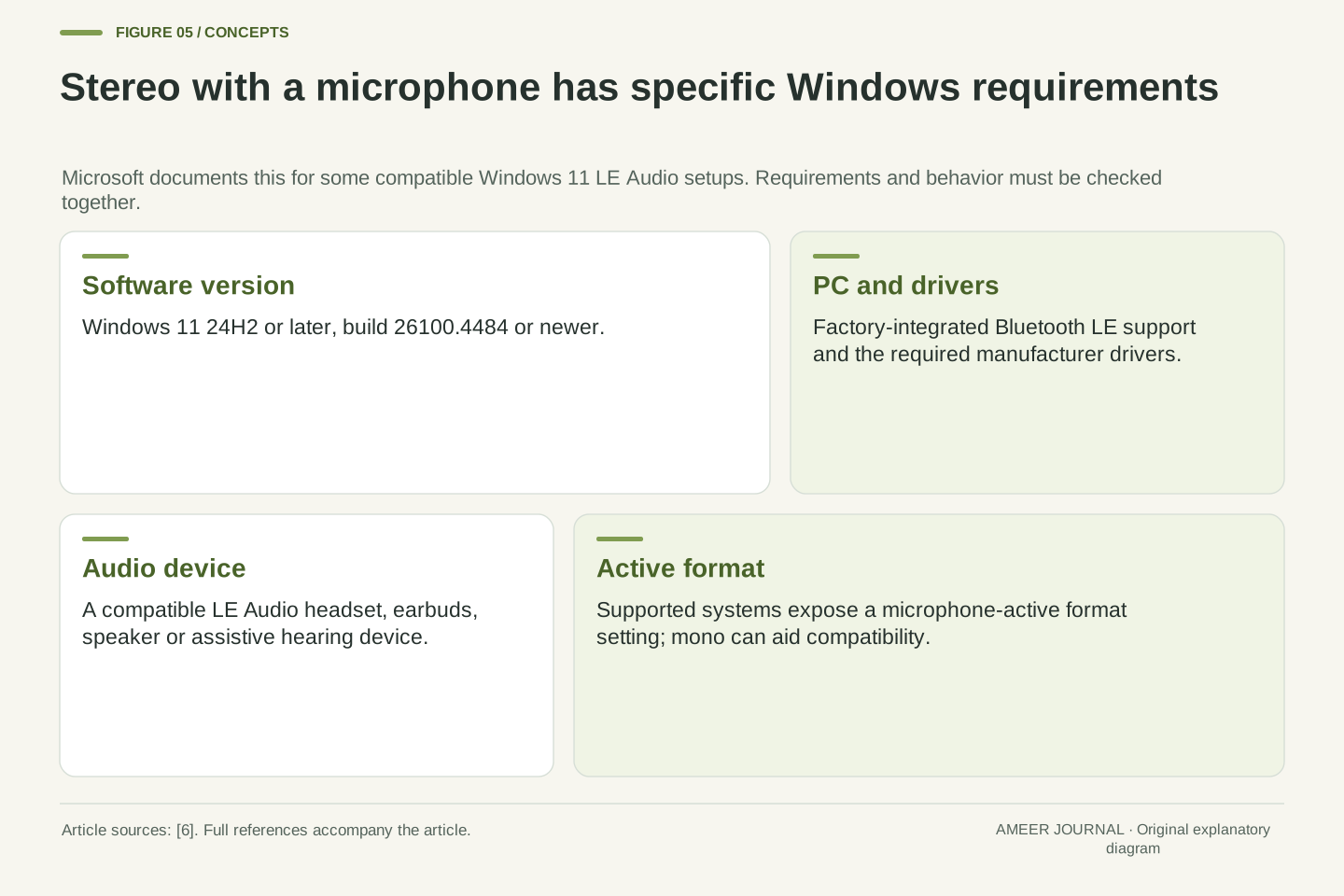
Microsoft now documents stereo playback while the microphone is used on some Windows 11 LE Audio setups. Its support page specifies build 26100.4484 or newer, Windows 11 version 24H2 or newer, appropriate manufacturer drivers, factory-integrated Bluetooth LE support and an LE Audio peripheral. [6] These are conditions to check together. A headset's stereo playback during music listening does not establish stereo playback during microphone use. A general Windows 11 label does not establish the required update, driver or hardware combination either. Keep the support page linked with any compatibility claim.
On supported equipment, Microsoft's Sound settings include a Format when microphone is active control. The page explains that some accessories may have compatibility problems in stereo and that mono can be selected if audio is lost or disrupted. It also notes the separate system-wide mono accessibility setting. [6] Those details prevent two mistaken conclusions: mono during a call is not always evidence of broken headphones, and stereo support is not a guarantee of trouble-free operation in every combination. Read the feature as a documented option for qualified systems, then check the behavior of the setup you have.
The current Windows support document describes stereo rendering during microphone use as a capability of some LE Audio systems. It gives a build threshold of 26100.4484, specifies Windows 11 24H2 or later, and requires factory-integrated Bluetooth LE support, appropriate vendor drivers and a compatible LE Audio peripheral. [6] These conditions are cumulative, not alternative ways of qualifying. The claim is more specific than generic stereo rendering or generic LE radio support. An accurate compatibility record preserves all of them rather than extending the capability to every Windows 11 PC or any accessory with a recent core-version number.
For a supported combination, the documented interface exposes Format when microphone is active and permits mono or stereo selection. Microsoft describes mono as a compatibility option when particular accessories exhibit lost audio or disruptive glitches, and separately identifies interaction with the system-wide mono accessibility setting. [6] This is an implementation capability with configurable behavior, not a universal property of Bluetooth communications. Documentation can establish that the configuration is supported under stated conditions; it cannot establish that a reader's unexamined device pair is currently using it or predict its subjective quality.
Sample rate is not the Bluetooth transmission bitrate
A sampling rate describes how many audio samples are represented each second. It is not the same number as the bits sent over Bluetooth. To see the difference, invent two uncompressed audio formats with 16 bits per sample. A stereo stream at 48,000 samples per second per channel contains 48,000 × 16 × 2 = 1,536,000 bits each second. A mono stream at 16,000 samples per second contains 16,000 × 16 × 1 = 256,000 bits each second. These are calculated raw sample-data rates. They exclude packaging and compression and are not measurements from headphones.
The first invented raw rate is six times the second, but that does not mean one Bluetooth connection needs six times the transmitted bitrate or sounds six times better. Encoding changes the representation, and our calculation did not specify the codec output. Microsoft's resampling example shows why the app's supplied format can also differ from the active endpoint format. [1] Keep the labels attached: sample rate, channel count, sample depth and encoded bitrate answer different questions. A number copied from a music file cannot, by itself, identify the wireless session that eventually carries the sound.
Sampling frequency, PCM sample depth, channel count and encoded bitrate are separate quantities. For a hypothetical uncompressed PCM representation, raw payload rate is sampling frequency multiplied by bits per sample and channel count. At 48,000 samples/s/channel, 16 bits/sample and two channels, this is 1,536,000 bit/s, or 1.536 Mbit/s using decimal units. At 16,000 samples/s/channel, the same sample depth and one channel, it is 256,000 bit/s. These are dimensionally defined sample-data calculations, excluding framing and other overhead, and they are not claims about negotiated Bluetooth transport rates.
The six-to-one raw ratio follows from three times the sampling frequency and twice the channel count. It does not establish a six-to-one encoded bitrate ratio, quality ratio or latency ratio. Codec configuration and the rest of the path are absent from this model. Microsoft's Windows example explicitly resamples a 48 kHz application stream to an HFP endpoint operating at 8 or 16 kHz. [1] Thus even a correct application-format report is not necessarily a report of the endpoint or over-the-air format. Numerical comparisons need a shared measurement boundary before their ratios acquire practical meaning.
Write down the setup that matters
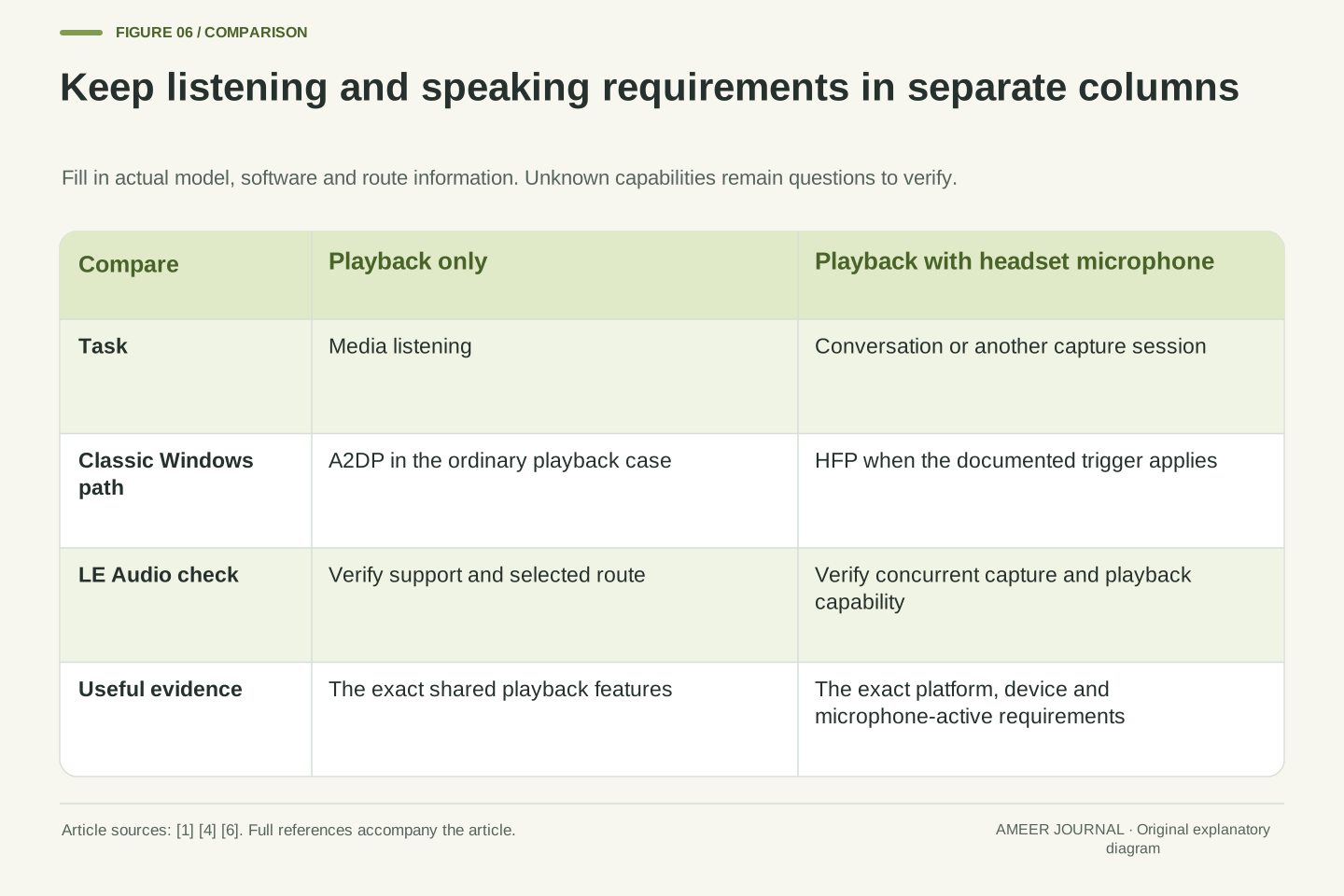
Before choosing headphones or asking for help, describe two separate jobs: listening without the headset microphone and listening while speaking through it. For each, record the source device, operating-system version, headset model, selected input and expected audio path. Add codec support only where it belongs. The Classic documentation establishes different services for playback and calls; the LE Audio documents establish additional possibilities with their own requirements. [1][4][6] This short record makes a useful purchasing question: does this exact combination support the experience I need during a call, as well as when I listen alone?
For an existing setup, keep the same record with the observed result and the support page that describes it. If switching apps or inputs changes the sound, that difference is evidence to preserve. If a requested feature depends on a driver or operating-system update, verify that requirement rather than inferring it from a familiar product name. Avoid treating an optional codec list as a complete account of a wireless headset. Once the active job, route and shared capabilities are clear, the sudden change when a microphone opens becomes a specific compatibility question that can be investigated.
A compact compatibility record should separate playback-only and bidirectional use cases. For each, identify the host and OS build, remote device, render/capture selection, audio architecture, relevant profile and supported codec/configuration information. Link the actual manufacturer or platform document and mark unknown fields as unknown. Windows Classic service behavior and Android or Windows LE Audio prerequisites provide the appropriate scope for those fields. [1][4][6] This approach avoids inferring a full configuration from a single successful connection or using codec branding as a substitute for service compatibility.
Then attach observations to that defined configuration: which application opened capture, whether another communications stream remained, and what changed when the session ended. Distinguish a documented possibility from an observed negotiated state. A compatibility page can justify a feature requirement; a reproducible local observation can describe a symptom; neither is automatically a laboratory performance measurement. That separation gives both buyers and support teams a better question to answer. The microphone can alter the audio service because it changes the requested job. Establishing that service, and the conditions under which alternatives work, is the useful starting point.
Sources & further reading
Explore the references behind this guide. External pages may change after our review.
- Bluetooth Classic Audio - Windows drivers | Microsoft LearnMicrosoft · Accessed 6 Nov 2026
- If sound quality is reduced when using Bluetooth headphones with your Mac - Apple SupportApple · Accessed 6 Nov 2026
- Bluetooth services | Android OS core topics | Android Open Source ProjectAndroid Open Source Project · Accessed 6 Nov 2026
- Bluetooth Low Energy Audio | Connectivity | Android DevelopersAndroid Developers · Accessed 6 Nov 2026
- Bluetooth LE Audio FAQs | Bluetooth® Technology WebsiteBluetooth SIG · Accessed 6 Nov 2026
- Configuring Bluetooth LE Audio quality settings on Windows 11 | Microsoft SupportMicrosoft · Accessed 6 Nov 2026
Article updated 6 Nov 2026.
Found something we should revisit?
Good explanations get better with thoughtful feedback.