What you’ll take away
- A saved preview, a new rendering and an exported image are different objects.
- RAW does not universally mean an uncompressed, untouched mosaic of sensor values.
- Different gains or tone curves can produce different results from the same retained sample array.
- Rendering clipping and values already capped before storage leave different information available.
- Preserving RAW samples does not automatically preserve every byte, setting or preview in a container.
- Record the input, recipe, renderer and output before interpreting an appearance change.
The picture you see is a particular interpretation
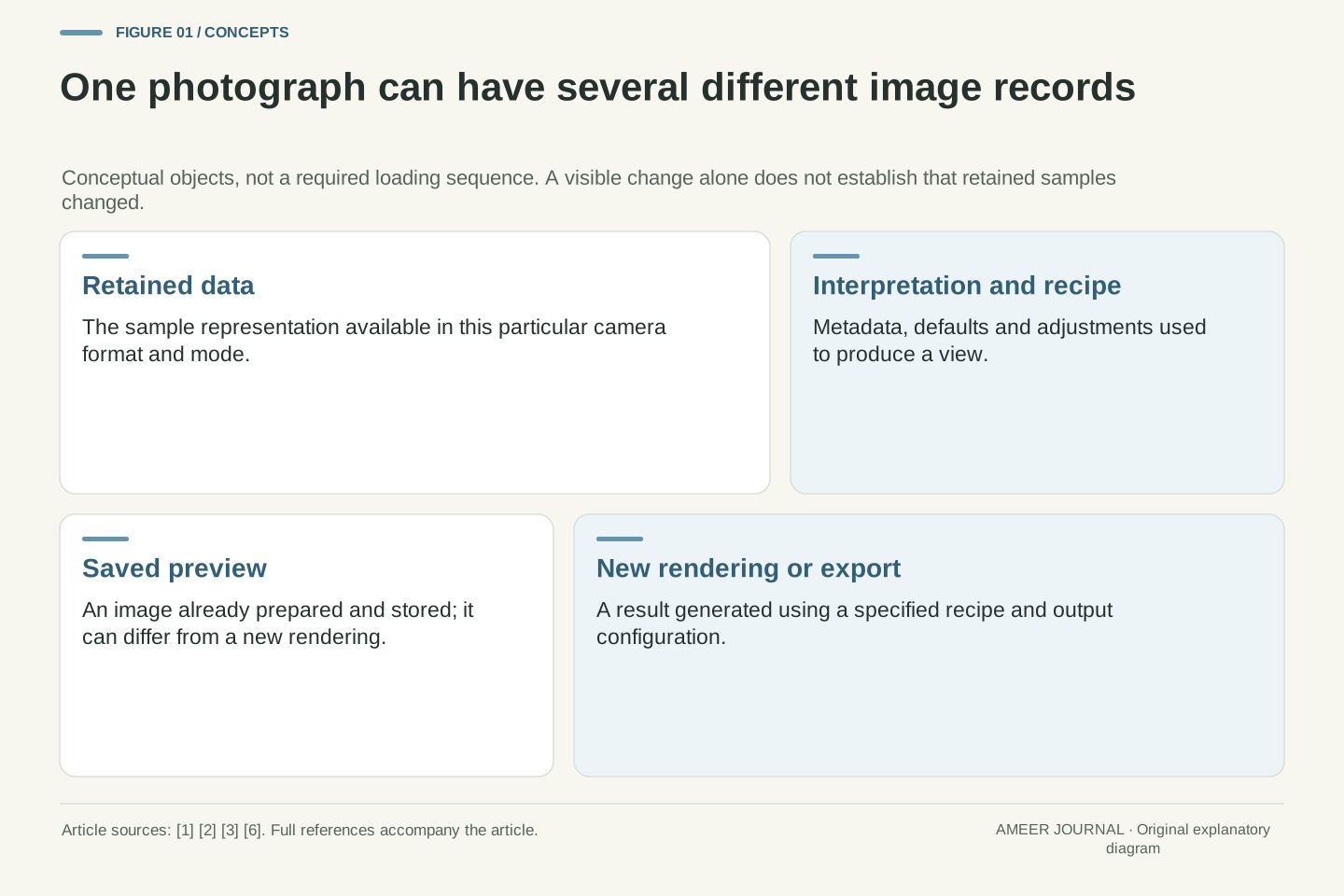
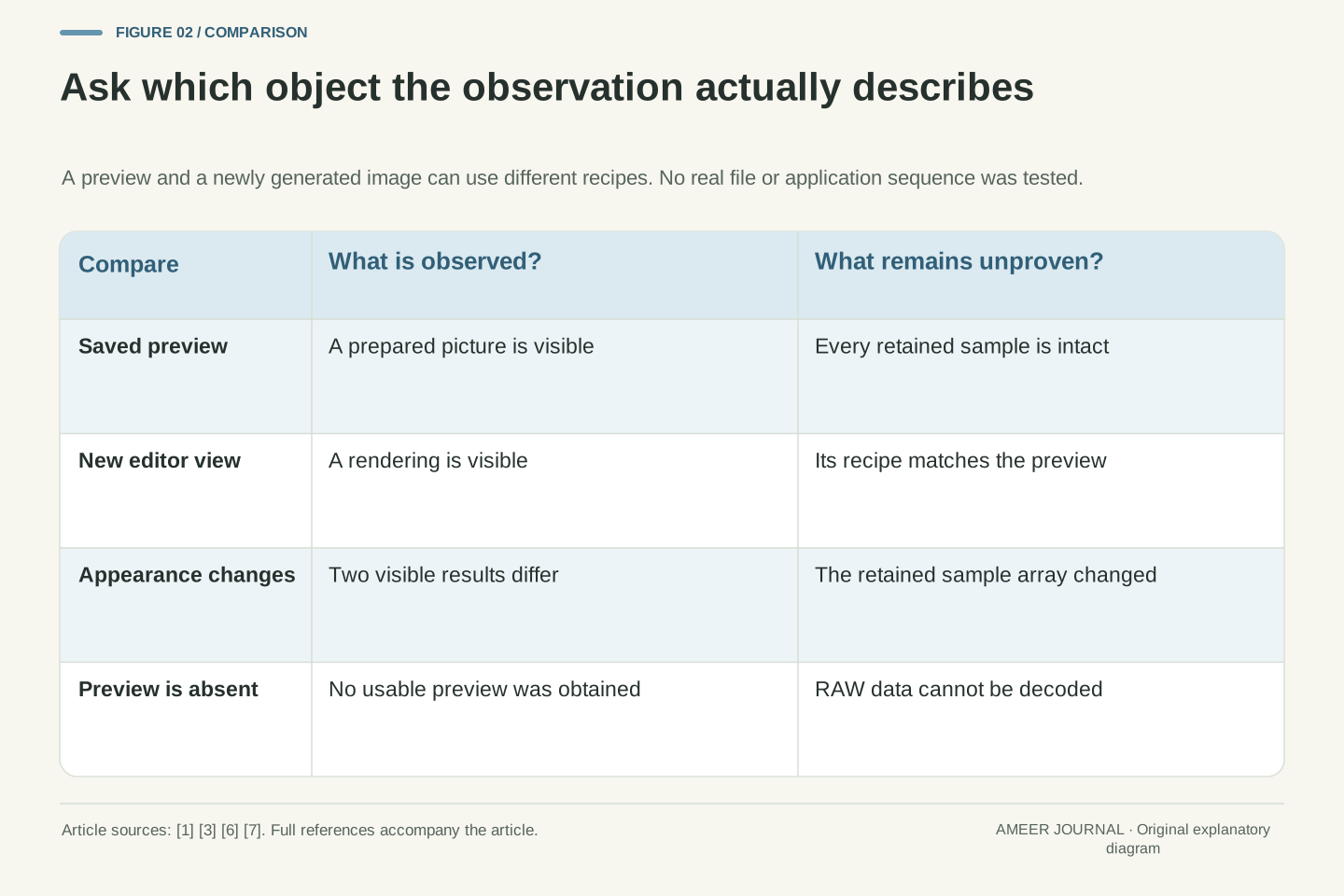
A photograph looks bright in a thumbnail, then becomes flatter when an editor opens it. That can happen when one prepared image is replaced by a different rendering of the retained RAW data. A saved preview and a newly generated preview are separate objects: Apple’s dated ProRAW description includes a prepared preview, while Adobe describes Bridge previews generated from current Camera Raw settings. [1][3] The visible change does not, by itself, tell you that the captured samples were rewritten. It tells you that the displayed result changed.
Keep three questions apart: which data were retained, which instructions produced the picture, and which picture is currently visible? A file may contain a preview; an editor can generate another; an export can preserve a chosen result. LibRaw explicitly distinguishes preview information from RAW data and processed-image information. [6] This article follows those boundaries through original numerical examples, without claiming to reproduce a camera or editor. A preview handover is one possible explanation for a change, not a diagnosis that every program follows the same loading sequence.
A displayed RAW photograph is an interpreted image, not a direct visual inspection of the stored sample array. Distinguish an embedded preview J, a rendering generated from retained data S under a recipe R, and an exported derivative. Apple’s WWDC2021 account describes prerendered ProRAW previews; Adobe describes Bridge previews generated using current Camera Raw settings. [1][3] Thus a transition between visible images can occur without establishing a transition in S. Appearance is evidence about a rendering, not a sufficient integrity test for the underlying capture.
Use Y=F(S,M,R) as an abstract rendering relation, where M denotes the interpretation metadata. The function includes whichever processing stages the format and application require; it is not an asserted implementation order. LibRaw’s distinct rawdata, thumbnail and processed-image structures provide a concrete software example of these separate objects. [6] Our numerical fixtures isolate a few operations so that their consequences can be checked. They are not camera measurements, a full RAW decoder or proof that a particular application displayed an embedded preview before rendering.
RAW does not name one untouched storage format
RAW is not a promise that every file contains an uncompressed, untouched mosaic of sensor values. Sony’s ILCE-7CM2 guide offers different RAW compression choices. Apple’s WWDC2021 ProRAW presentation describes data that have already been demosaiced and can combine exposures. [3][5] Demosaicing means reconstructing colour information from a patterned set of samples. Those examples are enough to reject the universal claim, without deciding that every RAW file uses either approach.
This matters when someone describes an edit as going back to what the sensor saw. The retained material depends on the camera, mode and format. A processed RAW representation may still support valuable later choices, but it is not necessarily the camera’s earliest available representation. LibRaw likewise documents both single-component mosaic buffers and full-colour buffers. [6][7] A decoder’s in-memory storage width also does not establish the precision originally captured. Before comparing two views, identify the actual file and capture mode instead of asking the letters RAW to settle its processing history.
Treat RAW as a family of capture-oriented representations, not an invariant processing stage. The named Sony guide distinguishes uncompressed, lossless-compressed and compressed choices. Apple’s dated ProRAW presentation describes a linearizable, already demosaiced representation that may incorporate exposure fusion. [3][5] These are scoped counterexamples to the proposition that all RAW files are uncompressed Bayer mosaics. They do not establish the properties of every later ProRAW mode or the equivalence of all Sony resolution options.
LibRaw’s documentation exposes one-component, three-component, four-component and floating-point raw buffers, reflecting this variety. [6][7] Buffer element type, original encoding precision and retained scene information are different quantities. A 16-bit unpacked container does not prove 16 bits of independently captured information. The practical consequence is that S in our rendering relation must be defined for the actual format. Preserving S may preserve a processed representation, not necessarily untouched sensor readout. This article therefore uses an explicit small sample fixture rather than treating one camera’s data model as the definition of RAW.
A sample value needs a scale and a role
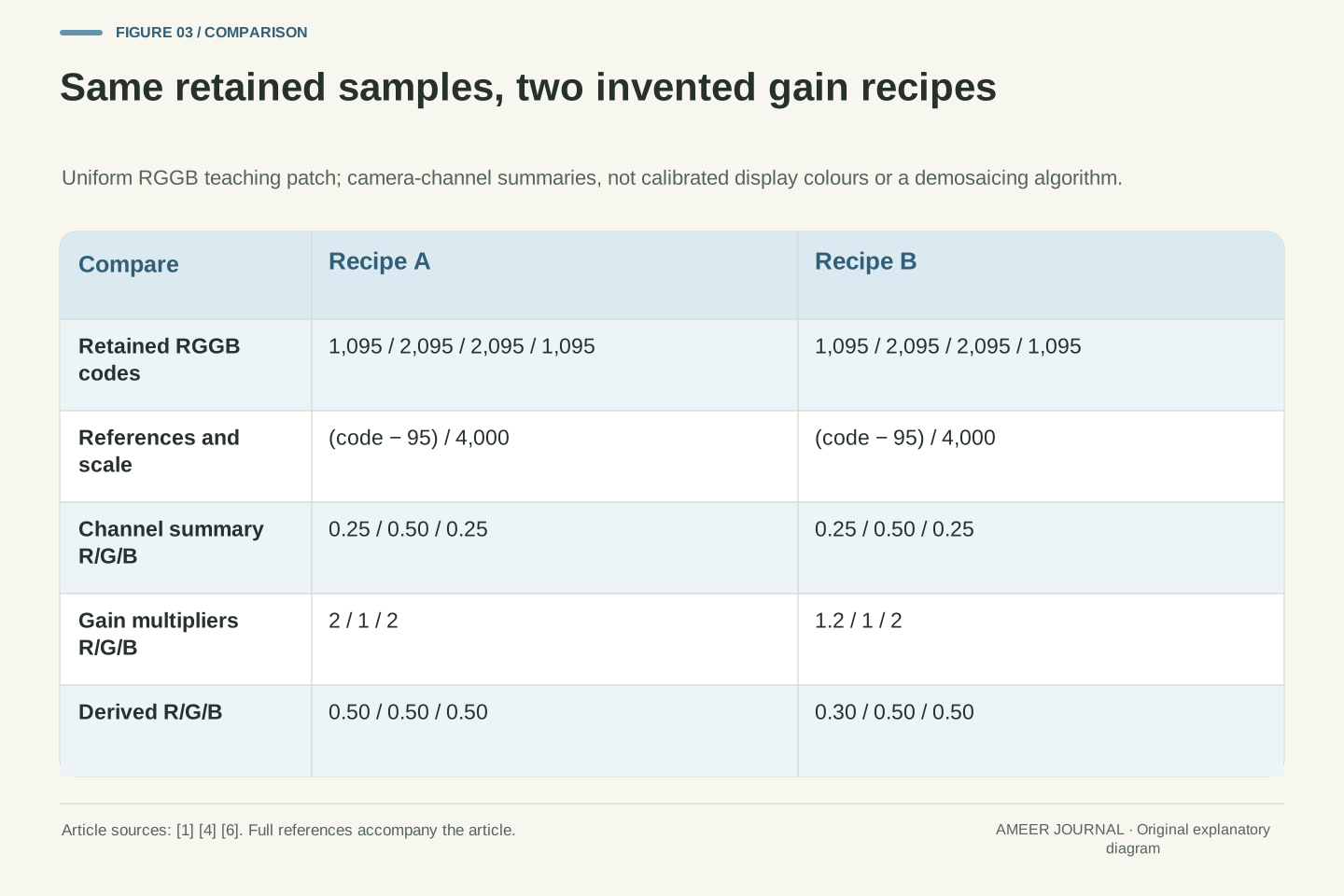
A number such as 1,095 is not a finished red pixel on a screen. Its meaning depends on the sample layout and the way the camera’s values are interpreted. LibRaw documents camera-dependent black levels, maximum values and white-balance information rather than one universal scale. [6] To make that idea concrete, invent a uniform patch sampled in a two-by-two red, green, green, blue pattern. Its four stored codes are 1,095, 2,095, 2,095 and 1,095. Each position supplies one component in this deliberately simplified example.
Choose a black reference of 95 and an upper reference of 4,095. Subtract 95, then divide by the remaining span of 4,000. The red and blue values become 0.25; both green values become 0.50. We can summarize this uniform patch as red 0.25, green 0.50, blue 0.25. We have not created four complete colour pixels or implemented demosaicing. The calculation simply shows why the stored integers need context before a rendering can use them. A different reference scale would be a different interpretation.
LibRaw distinguishes mosaic layout, camera-dependent black information, maxima and colour coefficients. [6] Those fields illustrate why an unlabelled integer array is not yet a display image. Define an original uniform RGGB patch with S=(1095,2095,2095,1095), black reference b=95 and upper reference w=4095. For this fixture only, let x=(S−b)/(w−b). Since w−b=4000, the normalized values are (0.25,0.50,0.50,0.25). The references are stipulated constants, not metadata extracted from a real file.
Summarize the uniform patch by camera-channel values c=(0.25,0.50,0.25), with the two equal green samples represented once. This is a channel summary under the uniformity assumption, not four RGB pixels or an interpolation algorithm. Real black correction and scaling can depend on camera and channel; LibRaw’s documented fields expressly allow that variation. [6] Our denominator is neither the observed maximum in a particular photograph nor an assertion about every 12-bit encoding. Keeping these definitions explicit prevents a simple arithmetic illustration from becoming an inaccurate universal decoding recipe.
Two recipes can use exactly the same stored numbers
Now apply one set of multipliers to the patch: double red, leave green alone, and double blue. The channel summary becomes 0.50, 0.50, 0.50. Apply a second recipe instead: multiply red by 1.2, leave green alone, and double blue. The result is 0.30, 0.50, 0.50. In both cases the four retained codes are still 1,095, 2,095, 2,095 and 1,095. Only the instructions used to derive the next values changed.
This is a small model of how a processing choice can alter an image without replacing the source samples. Camera Raw describes preserving RAW data while changing adjustments, and LibRaw documents white-balance multipliers. [1][6] Our invented multipliers are not the settings of a real camera. Even the equal first triplet is only balanced inside this model; calling it a neutral displayed colour would require the missing colour interpretation. The important result is the unchanged starting record. Different derived values do not logically require different captured values.
Apply diagonal gain operators to the camera-channel summary c. With G_A=diag(2,1,2), G_Ac=(0.50,0.50,0.50). With G_B=diag(1.2,1,2), G_Bc=(0.30,0.50,0.50). Both calculations read the same S and the same normalization references. No assignment is made back into the retained sample array. The difference lies in the transformation parameter, not in a second capture or a modified original. This is a direct counterexample to the inference that unequal rendered values necessarily imply unequal source samples.
Adobe describes adjustment workflows that preserve RAW data, while LibRaw exposes camera and user white-balance coefficients. [1][6] Those sources support the separation of data and processing choice, not the claim that these invented gains reproduce either implementation. The triplets remain camera-channel quantities. We omit a camera-to-output colour transform, so numerical equality is not a calibrated neutrality claim. This boundary also separates the example from assigning or converting an ICC profile on an existing rendered photograph: here we are following an earlier sample-to-render interpretation choice.
Changing the tone curve changes another part of the result
Colour multipliers do not specify the whole look. A tone curve can map the same intermediate value to a different output value. Adobe describes curves in terms of input and output tones; Apple’s ProRAW presentation also separates a default tone curve from other rendering information. [3][4] A file can therefore have the same retained data and the same colour multipliers while still receiving a different tonal treatment.
Consider two invented curves for values between zero and one. Curve A leaves each value alone. Curve B takes its square root. At an input of 0.25, the outputs are 0.25 and 0.50. At 0.64, they are 0.64 and 0.80. Both curves keep zero at zero and one at one, yet they differ between those endpoints. These are teaching curves, not the hidden defaults of an editor or a measurement of perceived brightness. They show why matching a few settings or the endpoints does not establish that two complete renderings must match.
Let t_A(x)=x and t_B(x)=sqrt(x), for 0≤x≤1. The mappings agree at the endpoints but differ internally: t_A(0.25)=0.25 versus t_B(0.25)=0.50, and t_A(0.64)=0.64 versus t_B(0.64)=0.80. This original scalar exercise isolates tone mapping from sample acquisition and channel scaling. It makes no claim about a standard display transfer function, actual gamma setting or a vendor’s internal pipeline.
Adobe’s curve documentation explicitly relates input to output tones, while Apple’s WWDC2021 description includes a tone-curve tag among default-rendering information. [3][4] Therefore an apparent match in white balance does not constrain every later transformation. Conversely, a flatter result need not mean the editor discarded capture data; it may represent a different mapping of the retained values. To compare two results meaningfully, identify the recipe and relevant processing state. A statement that both pictures came from the same file supplies only part of the information required to explain their appearance.
An untouched control panel still has a recipe
Opening a file without moving a slider does not mean that no decisions have been made. Adobe documents defaults associated with camera model and, depending on preferences, serial number or ISO. Its As Shot white-balance setting uses camera information when available. [1][2][4] A default is a starting interpretation, not the absence of one. It is possible to leave every visible control alone and still compare two different starting recipes.
Imagine two people opening the same retained sample array. One begins from recipe A in our gain example; the other begins from recipe B. Neither has edited a slider during that session, but their derived values differ immediately. That is not evidence that one secretly changed the capture. Apple’s dated ProRAW account provides another useful example: default-rendering information includes several distinct adjustments, not only white balance. [3] When describing a disagreement, name the application, version and selected defaults. The phrase no edits is too incomplete to establish that the processing instructions were identical.
A zero-interaction session is not a zero-transform pipeline. Adobe allows defaults associated with model, serial number or ISO, and documents As Shot as a white-balance interpretation using camera information when available. [1][2][4] Neither the default label nor the absence of a manual adjustment uniquely specifies F. Some metadata can be unavailable or interpreted through a fallback, so the displayed control state must be read in its documented context rather than promoted into a universal capture property.
In the fixture, two sessions can initialize R_A and R_B while S remains identical. Their difference precedes any action by the viewer. Apple’s 2021 ProRAW presentation lists multiple default-rendering components, illustrating why one white-balance choice cannot represent the whole recipe. [3] A comparison record should therefore distinguish user actions from initialized settings and software interpretation. This does not predict that every application will disagree. It identifies the missing variables before treating a difference as evidence of data loss, corruption or a camera setting that has been permanently baked into every RAW representation.
A white preview does not identify where values were lost
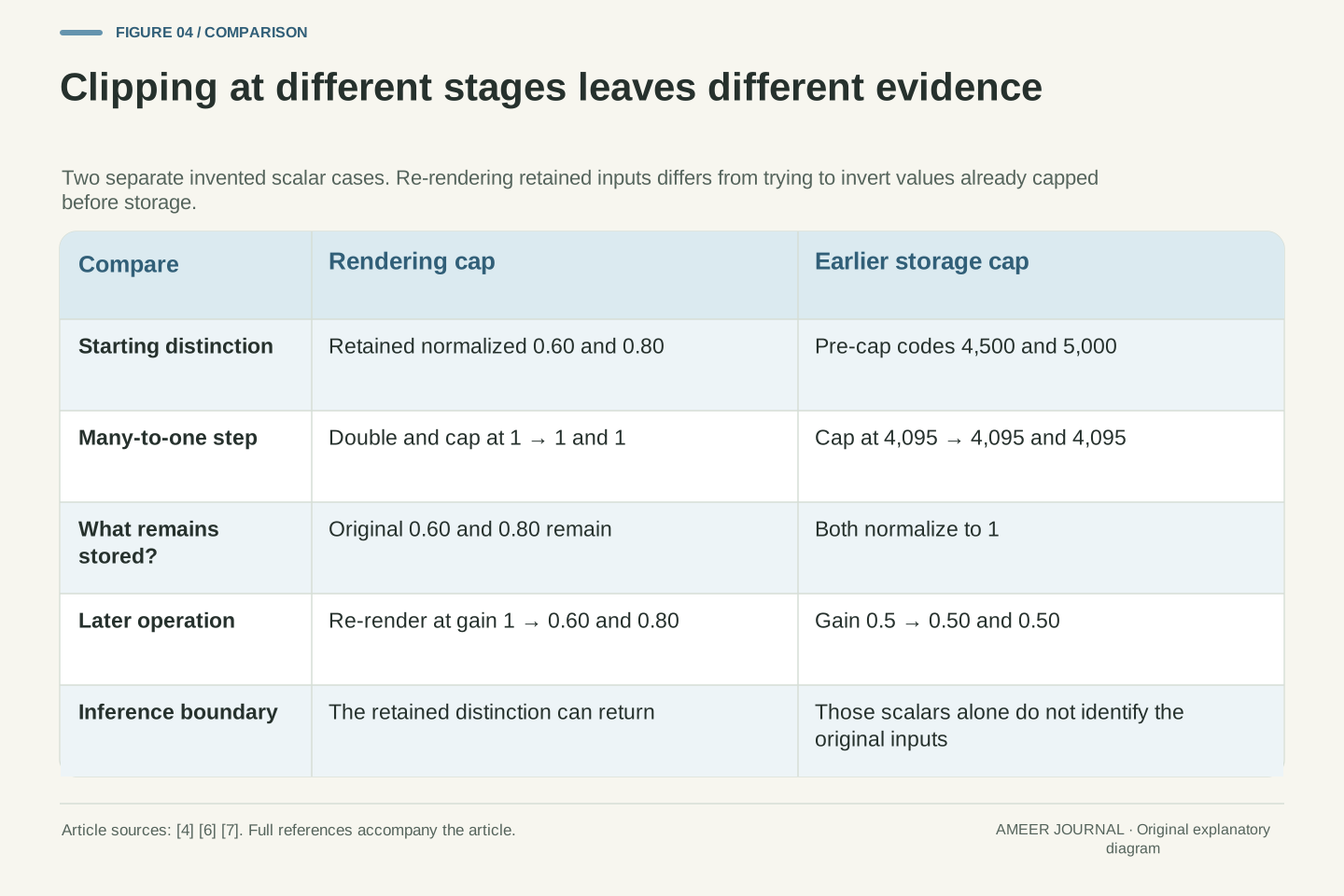
Take two retained normalized values, 0.60 and 0.80. In an invented rendering, double each and cap the output at 1. The displayed values are now 1 and 1, so their difference has disappeared from that output. Return to the retained values and render with a multiplier of 1: 0.60 and 0.80 reappear. This is different from darkening the already capped output, which would still start from two equal numbers. Adobe’s clipping indicators and tone controls describe the processing result being viewed. [4]
Now change the starting assumption. Suppose two hypothetical values, 4,500 and 5,000, were both capped at 4,095 before storage. Both normalize to 1 using our earlier references. Multiplying those stored results by 0.5 produces 0.5 and 0.5; it cannot tell us which uncapped value occurred. Other channels or scene information can support reconstruction methods, but that is additional evidence, not information recovered from these equal numbers alone. [4] The useful question is where the distinction was lost, not simply whether an area currently looks white.
Define a rendering operator h_g(x)=min(gx,1). For retained x_1=0.6 and x_2=0.8, h_2 gives (1,1), whereas h_1 gives (0.6,0.8). Re-evaluating from retained x preserves a distinction that the first rendering discarded. Applying a later multiplier to the capped output cannot perform the same operation. Adobe documents output clipping and adjustable highlight behaviour; neither a preview warning nor a histogram should be treated as a direct examination of every original channel value. [4]
Separately define a toy storage cap q(u)=min(u,4095). Inputs u=4500 and u=5000 both yield q=4095; normalization by (q−95)/4000 gives 1 in both cases. A later gain of 0.5 cannot uniquely invert that many-to-one mapping. This is an identifiability result for the stated scalar model, not a denial of reconstruction using other channels or contextual information. Adobe’s documented recovery descriptions include information from other channels. [4] Distinguishing retained-data clipping from rendering clipping avoids both extremes: assuming every white preview is irrecoverable, or assuming every bright area contains uniquely recoverable original detail.
A brighter rendering is not a second exposure
A post-capture brightness control acts on information already available to the editor. It does not go back in time and collect another exposure. Adobe describes an Exposure adjustment in terms of brightness changes comparable to photographic stops, while preserving RAW data in its adjustment workflow. [1][4] That description does not make moving a slider the same physical event as changing the camera’s exposure before the photograph was taken.
Our patch makes the distinction visible. The numbers 1,095 and 2,095 remain the starting record whether we display a lighter curve or a darker one. A chosen rendering may make some retained differences easier to see, and a poor choice may hide them. Neither result establishes that new capture information was obtained. Keep the report precise: the rendering changed, a visible distinction returned, or a new derivative was exported. Claims about the original exposure require evidence about that capture. This distinction prevents an attractive edited result from being mistaken for proof that every earlier recording limit has been undone.
The capture operation and a later transformation operate at different times and on different inputs. Adobe’s Exposure control describes brightness adjustment using photographic-stop language, but its RAW workflow preserves the retained data while changing processing settings. [1][4] A numerical resemblance between a control scale and an exposure ratio does not establish physical equivalence between obtaining a new measurement and remapping an existing one. Our model concerns the latter operation.
In particular, the tuple S does not gain additional observations when the tone curve or gain changes. A transformation can reveal a distinction that survived in S but was suppressed by an earlier output mapping. It cannot uniquely invert the storage-cap counterexample without additional information. This argument is narrower than a theory of sensor noise, exposure latitude or computational reconstruction; those require their own models. The useful reporting boundary is whether a claim concerns retained samples, a derived representation or a visible result. Adobe also separates output bit-depth and other workflow choices from RAW data itself. [2]
The edit instructions may live beside the file
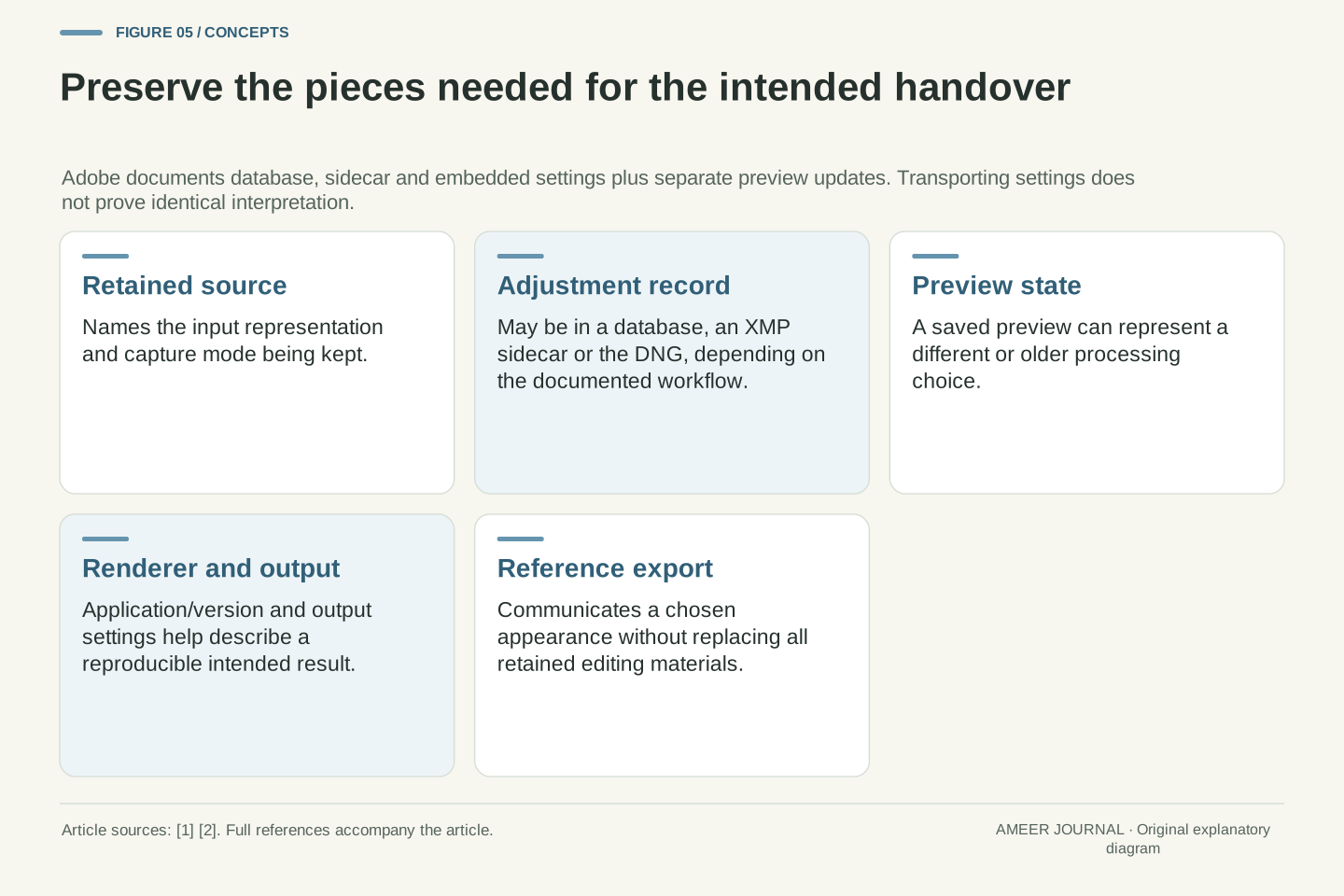
The source image is not always the only item needed to reproduce an edit. Camera Raw can keep settings in a database, a sidecar XMP file or within a DNG, according to its documented workflow. It can also update a DNG’s embedded preview separately. [1][2] A colleague can therefore receive the image file without necessarily receiving the same adjustment record or the same preview state.
Think of three handovers in our example. The first includes only the retained capture file, so the receiving editor must establish its own starting recipe. The second also includes the intended adjustment record. The third supplies a rendered export showing the chosen result. These handovers answer different needs. Even when settings accompany the file, another application still needs to understand them; transport alone does not prove identical interpretation. Adobe specifically documents exporting database settings to sidecars for transfer. [2] Preserve the relevant pieces deliberately, and describe whether the goal is continued editing or delivery of a particular visible result.
Recipe persistence is separate from sample persistence. Camera Raw documents database storage, XMP sidecars and embedded DNG settings, together with distinct operations for exporting settings and updating DNG previews. [2] Its database association can also be local to the editing environment. Consequently, copying a RAW filename is not a complete specification of the processing state available at the destination. The receiving application may have S without the intended R, or a saved J that represents an older R.
An explicit handover record can name the source, relevant sidecar or embedded settings, renderer context and intended derivative. These are dependencies, not interchangeable copies of one object. A sidecar arriving successfully establishes its availability, not semantic compatibility with every editor. Adobe’s export-settings workflow addresses carrying settings out of the database; it does not promise universal cross-application equivalence. [2] In our abstract relation, transporting S and R still leaves the implementation of F and interpretation metadata M relevant. This is why a reference export can be useful for communicating intended appearance while retaining the separate editing materials.
Preserved samples do not mean an unchanged container
Suppose a container holds three things: samples, metadata and a preview. Updating the preview changes something in the container even if the samples remain exactly the same. Adobe’s separate DNG settings and preview-update operations make this distinction practical. [2] A statement that an edit preserves RAW data should therefore not automatically become a promise that every byte of the whole file remains unchanged.
The extension alone is also an incomplete description. Adobe documents a Render to DNG operation that creates a non-RAW DNG with edits locked into the result. Apple’s dated ProRAW description uses DNG for already demosaiced data. [1][3] Those examples do not make ordinary RAW preservation meaningless; they show why the operation and representation must be named. Ask whether someone updated settings, refreshed a preview, retained the sample representation or created a rendered derivative. Each can leave a file with a familiar extension, while supporting a different claim about what remains editable and what was preserved.
Let the conceptual container be C=(S,M,J). A transition from C_1=(S,M_1,J_1) to C_2=(S,M_2,J_2) can preserve S while changing other content. Thus equality of the retained sample representation is a narrower invariant than equality of the complete container. Adobe’s documented ability to embed settings and update DNG previews supplies a real workflow in which that distinction matters. [2] This is a logical container model, not a claim that we edited or compared an actual photograph byte by byte.
DNG also does not uniquely identify an unrendered mosaic. Apple’s WWDC2021 presentation describes its already demosaiced ProRAW representation in DNG, while Adobe’s current documentation explicitly describes Render to DNG as producing a non-RAW derivative with edits locked in. [1][3] These are different operations and should not be conflated with preserving an original camera RAW. A precise preservation statement names the object and transformation: source samples, interpretation metadata, adjustment record, preview or final rendering. That vocabulary is more informative than asserting that a file was unchanged merely because its extension remained the same.
An export commits a particular output choice
When the goal is to share the chosen appearance, an exported rendering answers a different question from the retained RAW file. It represents a selected processing result and output configuration. Adobe separates workflow choices such as output colour space and bit depth from RAW data, and notes that some output attributes are not stored with the adjustment settings. [2] An edit recipe alone is therefore not a complete delivery specification.
For example, saying use recipe A does not say which output dimensions or encoding were selected. Nor does choosing a 16-bit output recapture the scene with greater original precision. It describes the output representation. Keep the capture and its editing materials if the intention is to revisit the interpretation, and identify the export when the intention is to discuss a delivered picture. Our separate colour-profile guide explains assigning and converting profiles on rendered photographs. Here the earlier distinction is enough: retained input, processing choices and delivered output are separate records, even when all three relate to the same photograph.
An export evaluates a chosen rendering and encodes a result under output parameters. Adobe’s workflow documentation separates output colour space, bit depth and size from the RAW data, and identifies output attributes that are not part of the saved adjustment settings. [2] Reproduction therefore requires more than the informal statement that the same preset was used. The export configuration and software interpretation must also be part of the comparison boundary.
Output bit depth is not a retrospective acquisition parameter. Selecting 8 or 16 bits per component changes the representation of the produced image; it does not establish the precision of the original measurement. [2] Similarly, exporting one rendering does not make its clipped intermediate values equivalent to the retained RAW inputs in our earlier model. When continued interpretation is required, preserve the input representation and relevant recipe separately from the delivered derivative. Colour-space conversion of that derivative is an additional topic addressed by the existing profile article, not a substitute for identifying which stage of RAW processing produced it.
Describe the change before deciding what went wrong
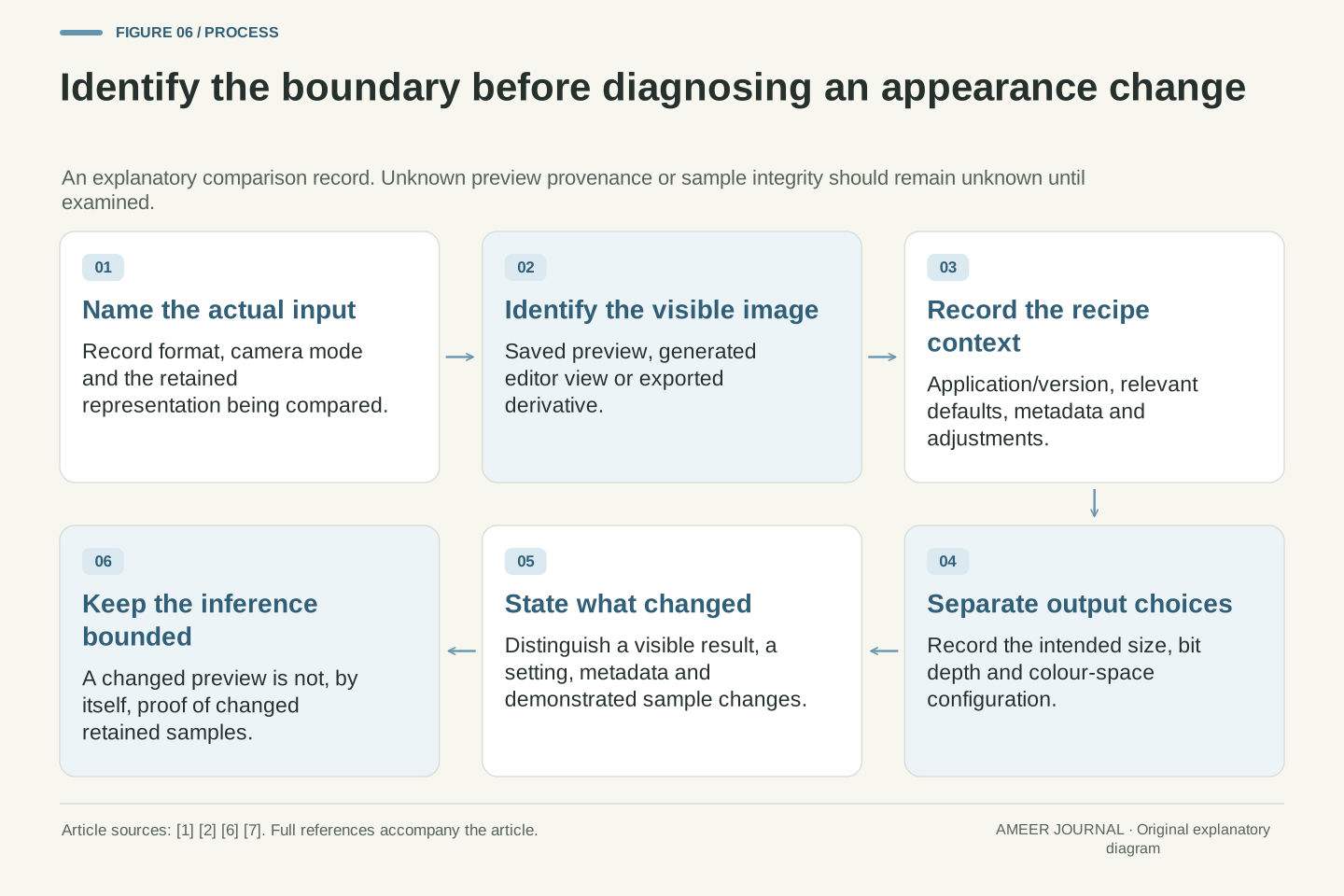
A useful report might say: the file browser showed a saved preview; the editor then generated a view using its default recipe; choosing another recipe changed the view again; the retained samples have not yet been compared. That report distinguishes observation from assumption. It is more answerable than saying the RAW changed colour, because it identifies the displayed object and the processing event that needs investigation.
Record the actual file and mode, application and version, relevant settings, preview source where known, and which exported result is being compared. Leave unknowns visible. LibRaw documents cases where a missing preview does not prevent RAW unpacking, so the absence of a thumbnail is not itself proof that the capture cannot be read. [7] The reverse inference is also too strong: seeing a preview does not establish that every retained sample is intact. Follow the boundary the evidence actually reaches. The purpose is to find which interpretation changed, without turning a visual difference into an unsupported claim about the original capture.
A comparison should identify the source representation, metadata and recipe state, renderer/version, preview provenance where known, and output configuration. Then name the observed transition: J_1→J_2, R_1→R_2 or a demonstrated change in S. If S has not been examined, that last field remains unknown. Our gain and tone examples show why the visible transition alone cannot identify it. This is an observation framework, not a claim that all rendering differences are harmless or that corruption is impossible.
LibRaw explicitly treats an absent preview as a non-fatal condition that need not prevent later RAW unpacking. [7] That supports separating thumbnail availability from sample decoding. Conversely, a readable preview establishes something about that preview, not complete integrity of every other object in the container. The practical question is therefore precise: which retained object, instruction or output changed, and what evidence establishes that change? Answering it separates ordinary differences in interpretation from cases that require deeper examination, while preserving the original capture as the reference for subsequent rendering choices.
Sources & further reading
Explore the references behind this guide. External pages may change after our review.
- Introduction to Camera Raw files for Photoshop CC | Camera RawAdobe · Accessed 7 Nov 2026
- Manage Adobe Camera Raw settings | Camera RawAdobe · Accessed 7 Nov 2026
- Capture and process ProRAW images - WWDC21 - Videos - Apple DeveloperApple Developer · Accessed 7 Nov 2026
- Make color and tonal adjustments in Adobe Camera Raw | Camera RawAdobe · Accessed 7 Nov 2026
- ILCE-7CM2 | Help Guide | RAW File TypeSony · Accessed 7 Nov 2026
- Data Structures and Constants | LibRawLibRaw · Accessed 7 Nov 2026
- General Notes on API | LibRawLibRaw · Accessed 7 Nov 2026
Article updated 7 Nov 2026.
Found something we should revisit?
Good explanations get better with thoughtful feedback.