What you’ll take away
- Count files, items, image items and intended standalone pictures separately; the totals need not match.
- The primary image selects a default representation, while a derived grid identifies how one image is reconstructed.
- Thumbnail, derivation and metadata references have different directions and meanings.
- Tile positions outside the output are a geometric boundary, not a measure of compressed size or a reason to omit required inputs.
- Verify the actual export objective: one visible result does not establish preservation of the original collection and relationships.
One file can have several equally correct image counts
You open one HEIF file and see one photograph. An inspection tool then lists several image objects. That does not immediately mean the viewer lost photographs or that the tool found duplicates. HEIF can store individual pictures, inputs used to assemble a picture, smaller previews, auxiliary images and metadata. It can also carry image sequences. [1][3] The useful question is what each object does. Counting every object as another photograph mixes the materials used to produce a picture with the pictures someone intended you to browse.
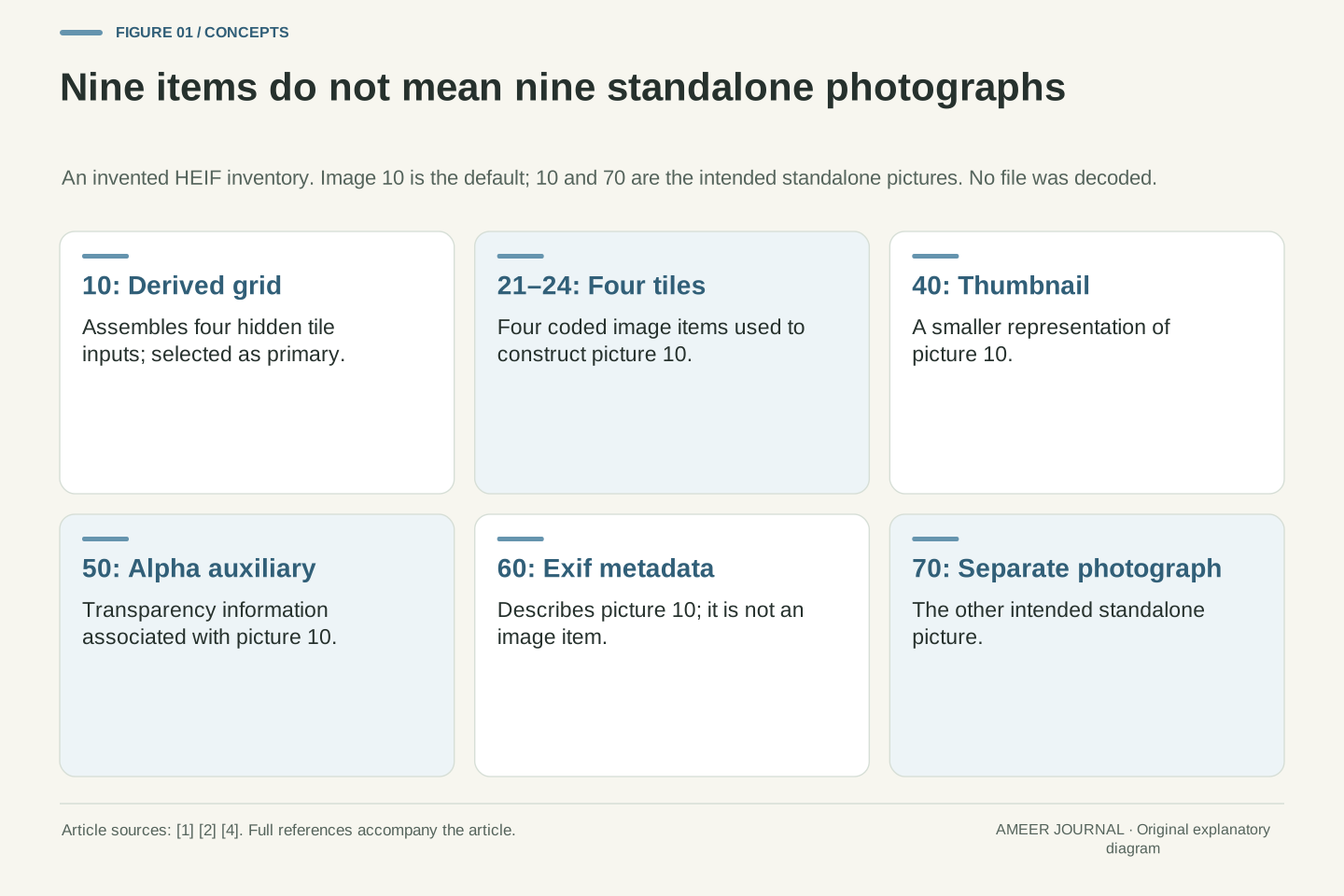
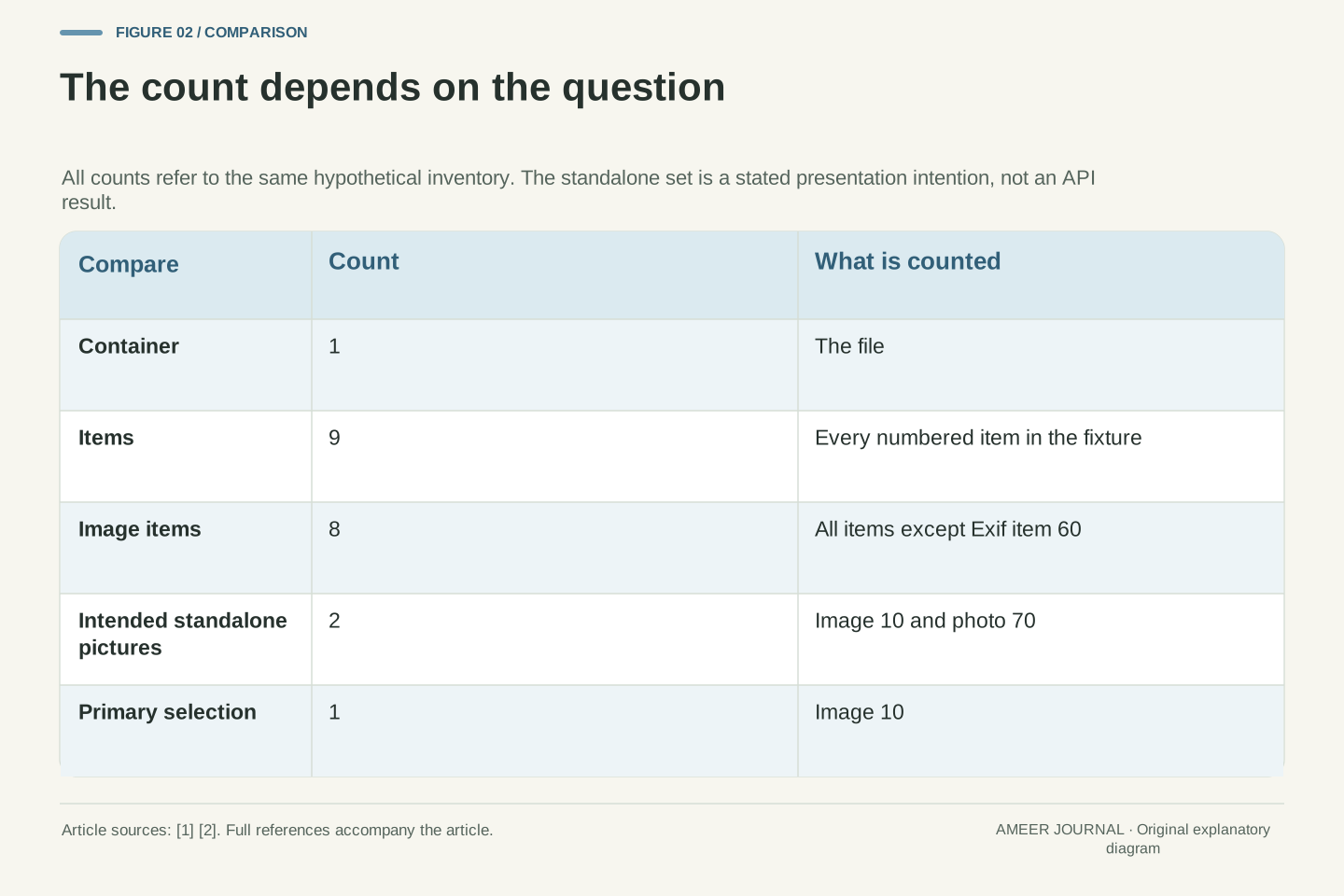
We will follow an invented file containing nine items. Item 10 assembles four hidden tile images, numbered 21 to 24. Item 40 is its thumbnail, item 50 supplies transparency information, and item 60 contains Exif metadata. Item 70 is a separate photograph. Eight items are image items; the metadata item is not. We intend two standalone photographs, 10 and 70, and select 10 as the default. These are original bookkeeping and geometry examples, not a decoded test file. Their purpose is to show why one file, nine items, eight image items and two intended photographs can all describe the same arrangement.
Distinguish a container, an item, an image item and an intended standalone presentation. HEIF's structural model accommodates still-image items and timed tracks, while individual images can have overlapping roles such as cover, derived, thumbnail or hidden input. [1] Consequently, item cardinality is not a reliable count of album photographs. A viewer displaying the primary image has made a presentation selection; it has not necessarily enumerated every object or demonstrated that the container holds only that image.
Our hypothetical inventory is I = {10, 21, 22, 23, 24, 40, 50, 60, 70}. Item 10 is a derived grid using hidden coded inputs 21–24; 40 is its thumbnail; 50 is an alpha auxiliary; 60 is associated Exif metadata; 70 is an independent coded photograph. The image-item set excludes 60 and has eight members. The intended standalone choices are {10, 70}, with 10 primary. Assume valid relationships and usable encodings. This is a conceptual fixture, not a generated conforming bitstream, decoder execution or claim about a camera's customary file layout.
The primary image is a selection, not a file-order rule
HEIF has a cover or primary image to represent the file when no other display preference is available. Nokia's reader examples ask for that primary item explicitly; a separate example asks for the collection's master images. [1][2] Those are different questions. A program looking for a default picture need not present a contact sheet of everything inside. Conversely, an inspection tool can expose useful internal objects that an ordinary photo viewer has no reason to show as separate photographs.
In our file, the primary choice points to item 10. Imagine changing only that choice to item 70 while keeping all nine items and their image contents. The preferred opening picture changes, but the inventory does not. Item 70's larger number does not make it less eligible merely because it comes after 10 numerically. Nor does being primary mean that an image contains the most detail, is the newest photograph or occupies the most bytes. Those are separate properties. When two programs show different pictures, first identify their selected item before concluding that either has damaged the file.
The primary-item selection and collection enumeration serve distinct purposes. Nokia's API examples retrieve the former through getPrimaryItem, rather than infer it from the first result of a master-image query. Its format overview describes the cover as the default representation when no other preference is available. [1][2] This does not establish that every application implements an identical gallery policy. It establishes why a primary-image path cannot be treated as a complete inventory of displayable content.
In the original fixture, changing the primary reference from 10 to 70 preserves the item set and all stipulated image payloads while changing the preferred representative. That counterexample separates selection from both cardinality and identifier ordering. It also separates selection from size, recency and fidelity: none of those properties is encoded by our bare statement that item 10 is primary. A comparison between applications should record the chosen item or representation before evaluating decoding differences. Otherwise two correct renderings of different selected images can be mistaken for inconsistent rendering of one image.
Four tile images can be the ingredients of one picture
A derived image is described through an operation and its input images. A grid is one example: it assembles equally sized image tiles into a larger picture. The libheif documentation explains that each grid tile is stored as a separate image. [1][4] Separate storage does not make each tile a separate scene. The division can simply be how one intended photograph is represented. That is why an object listing may be much longer than the collection a reader expects to browse.
Our item 10 is the assembly instruction for four 512-by-512-pixel inputs. Tiles 21 and 22 form the top row; 23 and 24 form the bottom row. They are marked hidden in this fixture because they are ingredients rather than standalone presentation choices. HEIF's hidden role prevents such an input from being displayed as an independent output. [1] Item 10 still counts as an image item even though its picture is obtained from those inputs. Counting only compressed tile payloads misses the assembled object; counting every tile as an album photograph invents browsing choices we did not specify.
Derived images represent an operation applied to referenced input images. The HEIF grid derivation reconstructs an arrangement of inputs with equal width and height; libheif documents a separate stored image for each grid tile. [1][4] Thus a grid image and its coded inputs occupy different levels of the representation. Item enumeration can expose both levels without implying a collection of unrelated photographs. In particular, derived does not mean that a second full coded copy of the assembled output must be present.
Assign four 512 × 512 coded inputs to item 10's 2 × 2 grid in row-major positions: 21 and 22 above 23 and 24. Our fixture marks all four inputs hidden. The overview distinguishes reconstruction from display and permits a reconstructed output to serve as another image's input, while hidden images are not displayed independently. [1] The graph therefore contains five image items for this picture's grid representation: four inputs plus one derived output. That count describes representation structure, not five intended photographs or five independently chosen exposures.
A reference tells you which relationship to follow
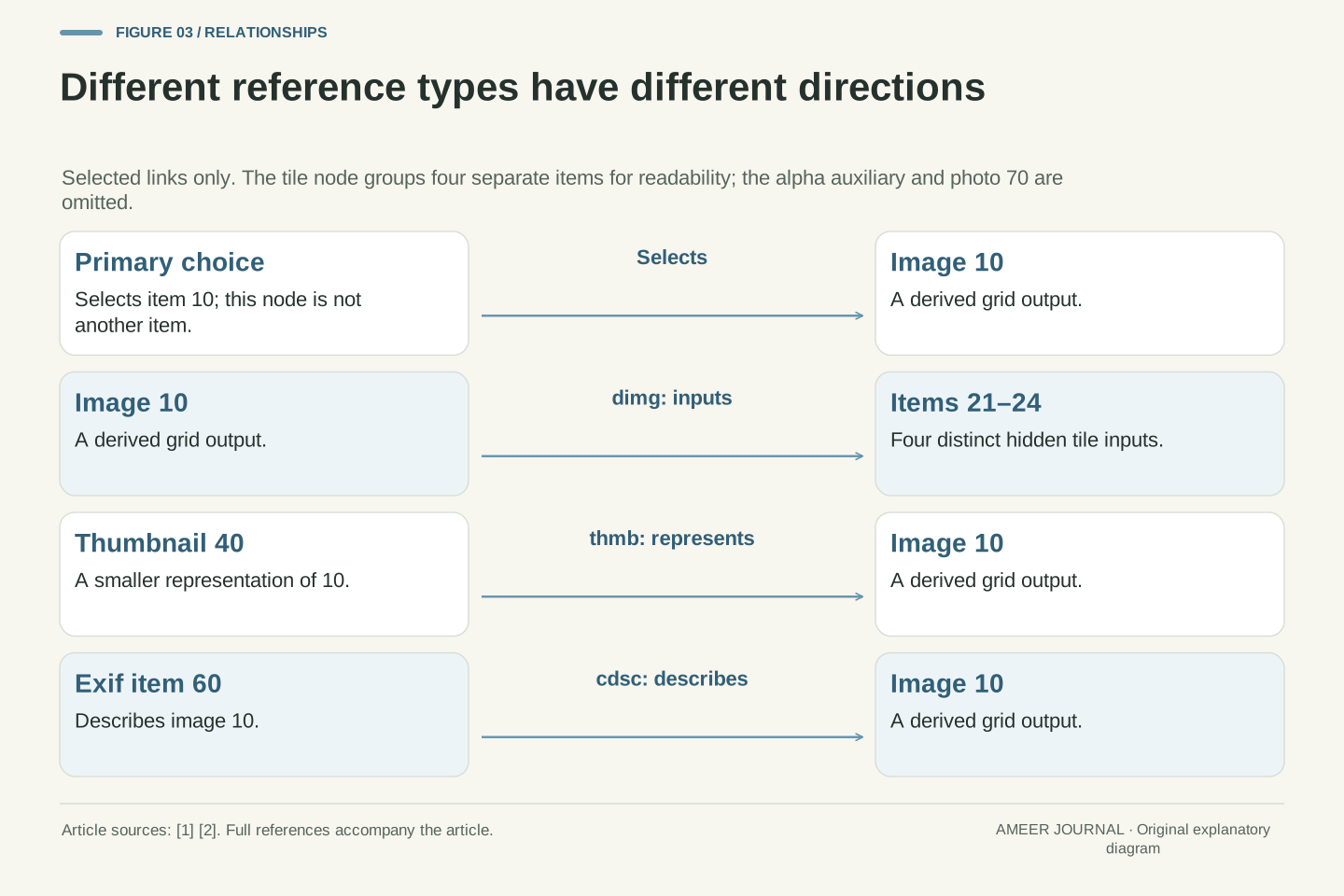
A link between two objects needs a meaning and a direction. In Nokia's documented examples, a thumbnail's thmb reference points from the thumbnail to its master image. A dimg reference runs from a derived image to its inputs. Exif metadata describes an image through a cdsc reference directed toward that image. [1][2] These links answer different questions: which picture does this preview represent, what inputs produce this result, and which picture does this information describe?
For our invented file, the selected relationships include 40 to 10 for the thumbnail, 10 to each of 21–24 for the grid inputs, and 60 to 10 for the metadata. If you start at image 10 and want its thumbnail, you search for the thumbnail reference arriving at 10. You do not reinterpret the thumbnail as an input tile. Likewise, finding metadata about 10 does not add another image to the grid. Direction and relationship type prevent that confusion. The diagram groups the four tiles for readability; it does not introduce a new group item into the nine-item inventory.
Reference traversal must preserve both edge type and direction. Nokia's reader examples explicitly place thmb from thumbnail to master and dimg from derived item to derivation inputs. Its Exif example queries metadata items referencing the selected image through cdsc. [2] The format overview independently describes metadata-to-image cdsc references and dimg input relationships. [1] A generic undirected association would lose the distinction between reconstruction dependency, alternative-size preview and descriptive metadata.
Our selected edges are 40 → 10 labelled thmb, 10 → {21, 22, 23, 24} labelled dimg, and 60 → 10 labelled cdsc. Retrieving a thumbnail for 10 therefore uses an inverse traversal of the thmb relation; retrieving its grid inputs follows outgoing dimg references. The primary choice is a separate selection of 10, not an assertion that all arriving links are its reconstruction inputs. Our schematic collapses four tile nodes into one labelled visual group, but the underlying fixture retains four distinct items. No auxiliary-reference encoding is inferred from that simplified diagram.
An extra image can describe transparency rather than another scene
An auxiliary image helps interpret or display another image. Nokia's HEIF overview gives an alpha plane and a depth map as examples. A thumbnail has a different role: it represents a picture at smaller resolution. [1] These categories explain why an image inspector can find additional images without finding additional photographs to browse. The word image describes a kind of stored representation; its role tells you whether someone should treat it as another view of the scene, a preview or supporting information.
In our file, item 50 is an 800-by-700 alpha auxiliary associated with image 10. Its role is transparency information for that picture, not a third standalone photograph. Item 40 is a 160-by-140 thumbnail of 10. Item 60 is Exif metadata, so it is not included in our image-item count at all. These distinctions also change what an export question means. Asking whether the picture survived is different from asking whether its transparency information, thumbnail relationship and metadata association survived. None of those questions can be answered by counting the destination files alone.
An auxiliary image and a thumbnail are image items with different semantics. The former complements a master image, with alpha and depth among the documented examples; the latter is a smaller-resolution representation. Exif can instead occupy a metadata item associated with an image. [1][2] Treating all three as interchangeable additional photographs discards both item type and role. Conversely, omitting an auxiliary from an album view does not establish that the viewer failed to use it in producing the displayed result.
The fixture assigns 800 × 700 dimensions to alpha item 50 and 160 × 140 to thumbnail 40, both associated with item 10. Exif item 60 contributes to the nine-item inventory but not the eight-member image set. The thumbnail and main output share the stipulated 8:7 aspect ratio, while the alpha has matching output dimensions. These assignments are examples, not assertions about a captured file. A preservation claim should name the intended invariant: visible result, auxiliary content, metadata, or the relationships joining them. Equal destination file counts establish none of those invariants by themselves.
Do not add role counts as though every role had its own object
HEIF roles can overlap. The overview explicitly allows an image to have more than one role. [1] Our item 10 is both the chosen cover and the derived grid image. Those labels describe the same item from two viewpoints: why it is selected and how it is constructed. Adding one cover to one derived image and assuming two different objects would count item 10 twice. A file report can therefore list several role totals without those totals forming a valid item total.
Write the identifiers beside the labels when a report seems contradictory. In this fixture, the primary set is {10} and the derived set is also {10}; their combined membership still contains one item. The hidden-input set is {21, 22, 23, 24}. Our two intended standalone choices remain {10, 70}, although a viewer opening only the primary image shows one. The report is useful when it tells you which set it counted. Phrases such as 'eight images found' become misleading only when someone silently translates them into 'eight independent photographs should appear in the gallery.'
Role labels need not partition the image-item set. Nokia's overview expressly permits multiple roles on one image. [1] Let C = {10} be our cover set and D = {10} the derived-image set. Their separate cardinalities are each one, but the union has cardinality one because the intersection contains 10. Summing role counts without accounting for overlap therefore produces a false inventory even before thumbnails and auxiliary representations are considered.
Keep the fixture's different sets explicit: image items number eight, hidden inputs number four, and the intended standalone selection set {10, 70} numbers two. Primary-only display yields one chosen output under our stated policy. These statements concern distinct predicates over the same structure, rather than competing measurements of a single quantity. A diagnostic report should identify whether it enumerates items, selected roles, coded payloads or presentation candidates. We do not assume that a particular library's master-image enumeration returns exactly our two intended choices; that would require examining its API semantics and actual file.
A grid can extend beyond the final picture
Our four 512-by-512 tiles form a 1,024-by-1,024 rectangle, but suppose the grid's declared output is 800 pixels wide and 700 high. The libheif grid documentation allows output dimensions that are not whole multiples of the tile dimensions, with excess at the right and bottom excluded from the result. [4] The final picture therefore need not display every position in the full tile rectangles. This is a geometric boundary, not evidence that a thumbnail was enlarged or that part of an unrelated photograph went missing.
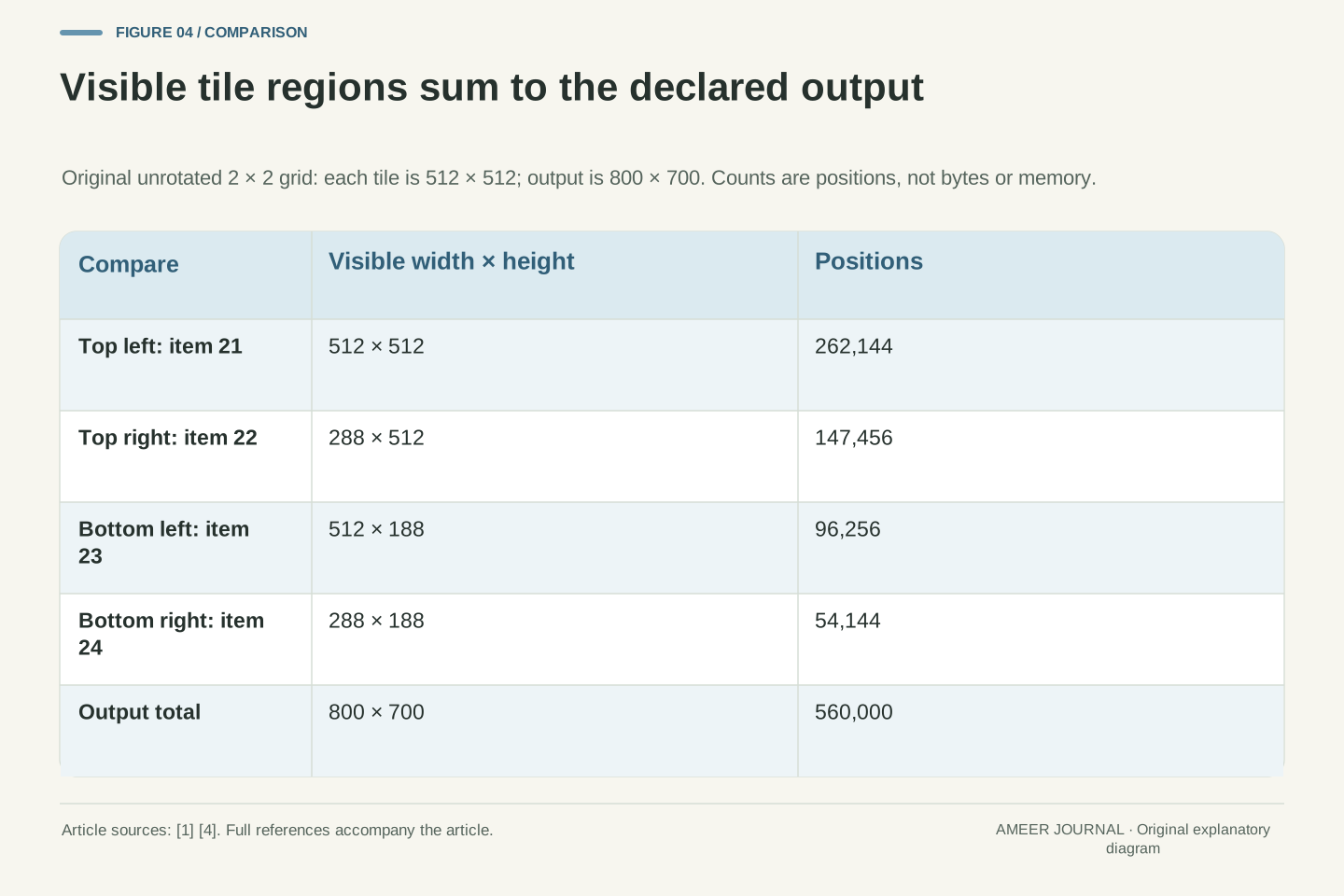
The top-left tile contributes 512 × 512 = 262,144 positions. The top-right contributes 288 × 512 = 147,456. Below them, the visible heights are 188 pixels, giving 96,256 positions on the left and 54,144 on the right. Together they make 560,000, exactly 800 × 700. The full four rectangles contain 1,048,576 positions, so 488,576 lie outside this output. Those are image-position counts. They do not measure compressed bytes, allocated memory, decoder workload or image quality. All four tiles still contribute a visible region to this particular picture.
For the unrotated original grid, let each tile be 512 × 512, with two rows and columns, and let the output extent be 800 × 700. libheif's grid documentation permits a declared output smaller than the tiled extent and excludes excess right and bottom regions. [4] Here the tiled rectangle is 1,024 × 1,024; output coverage is determined by intersecting each positioned tile rectangle with the 800 × 700 output rectangle. No scaling operation is required by this fixture.
The retained tile extents are 512 × 512, 288 × 512, 512 × 188 and 288 × 188. Their areas are 262,144; 147,456; 96,256; and 54,144, summing to 560,000. The full extent has 1,048,576 positions, leaving 488,576 outside the output. This calculation concerns geometric positions, not component samples or storage bytes. It cannot establish compression efficiency or memory savings, because encoding, channel representation and implementation allocation are unspecified. Every tile intersects the output positively, so border exclusion does not make any of these four input tiles optional.
A working thumbnail does not prove the full picture is reconstructable
The documented libheif grid-writing path requires every grid tile to be supplied; skipped tiles are not allowed for that grid representation. [4] This is different from excluding the outside border of a supplied tile from the final picture. In our example, the lower-right tile contributes 54,144 visible positions. If its data were unavailable, the missing object would matter even though much of its full rectangle lies outside the output. Unused border area does not turn the rest of that tile into optional material.
Now imagine a program successfully reading thumbnail 40 while being unable to obtain one required grid input. The small preview could be available without establishing that image 10 can be reconstructed completely. This is a logical example, not a report that a tested application behaves that way. Nokia's examples retrieve thumbnails and derived inputs through separate operations. [2] A useful problem report would identify which representation opened, its dimensions, and whether the full requested image completed. 'I can see a preview' is valuable evidence, but it answers a narrower question than 'all the picture's required inputs are usable.'
The documented libheif grid API requires all grid tiles to be populated. [4] Do not confuse that structural requirement with clipping a valid positioned tile at the output boundary. In our fixture, input 24 retains a 288 × 188 intersection, so its required contribution is nonempty despite the excluded remainder of its rectangle. A hypothetical unavailable input prevents us from asserting complete reconstruction of the stipulated grid; the arithmetic supplies no permission to omit it.
Thumbnail retrieval and derived-image dependency retrieval are separate paths in Nokia's examples. [2] Consider a diagnostic state in which item 40 is usable but one required dimg input of 10 is unavailable. Successful preview display then establishes a fact about 40, not full reconstructability of 10. This counterexample requires neither an invented decoder fallback nor a claim that every application loads previews first. Record the selected representation and the operation that succeeded. That evidence can distinguish an accessible preview from a successful full-image reconstruction without assigning an unsupported cause to the failed input.
A sequence has timing that a still-image count cannot supply
A HEIF file can contain still items and image-sequence tracks together. A sequence track carries samples and timing; it is not just a longer list of still-image items. [1][5] This distinction matters when a file opens as one picture in one context and offers motion in another. The presence of several stored objects alone does not tell you whether motion was intended, how long it lasts, or which samples belong to the sequence. Those questions require the track information.
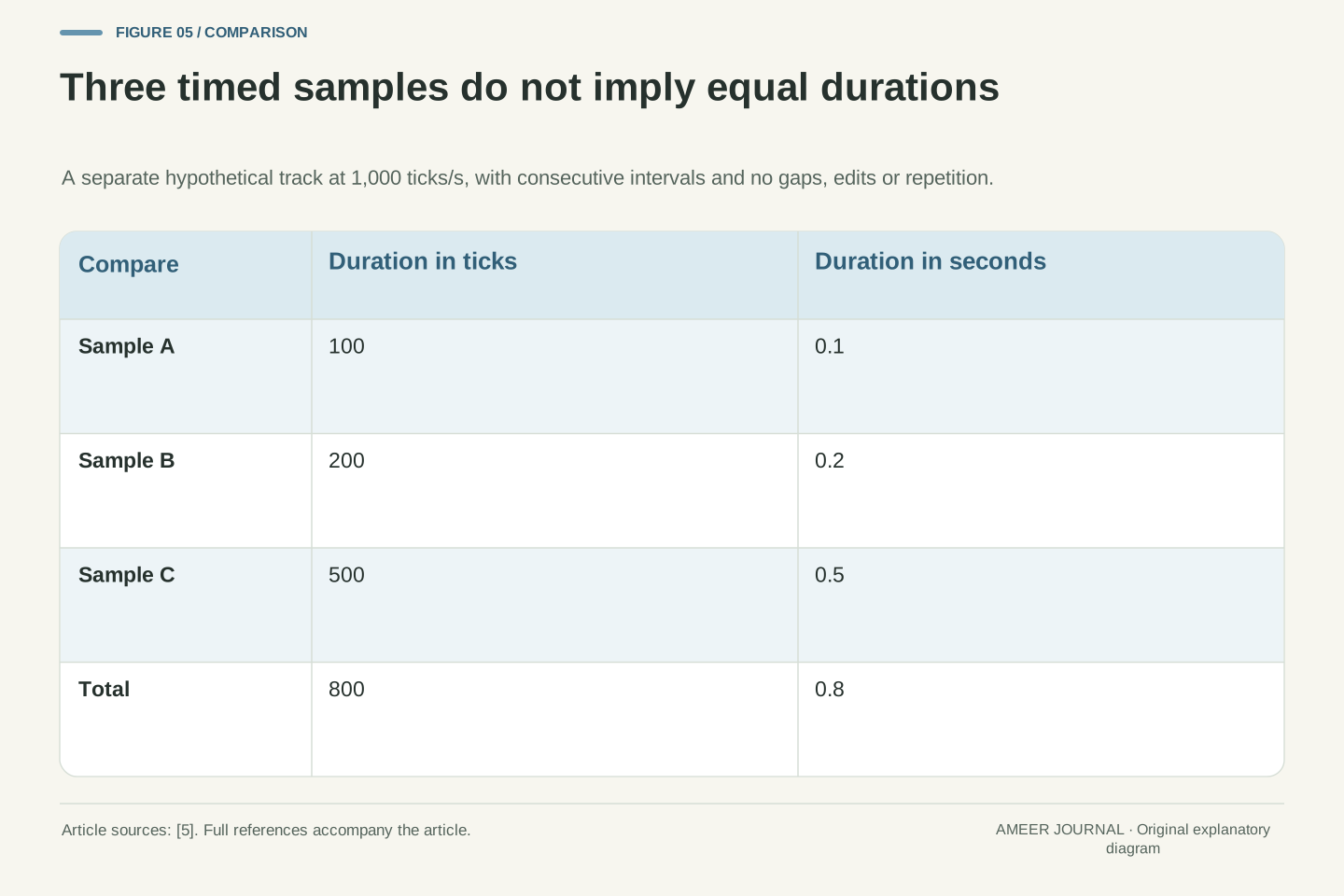
For a separate invented track, use a clock of 1,000 ticks per second and three consecutive display durations of 100, 200 and 500 ticks, with no gaps or repetition. They last 0.1, 0.2 and 0.5 seconds, making 0.8 seconds in total. The libheif sequence documentation explains converting sample duration through the track's timescale. [5] Three samples do not imply three seconds or three equal durations. This track example is separate from the nine-item inventory; adding its samples to that item count would mix two different kinds of record.
Static image items and timed track samples are distinct structural entities, and a file can carry both. [1][5] A timed sequence therefore needs more than a count of image objects. Interpretation depends on its time base and sample durations, along with any relevant presentation controls. Our example isolates a single track with consecutive display intervals, without edit-list changes, gaps or looping, so that its duration follows directly from the stated values rather than an assumed frame rate.
Set the timescale to 1,000 ticks/s and successive sample durations to 100, 200 and 500 ticks. The corresponding intervals are 0.1, 0.2 and 0.5 s, with boundaries at 0, 0.1, 0.3 and 0.8 s. The total is 800/1,000 = 0.8 s. libheif's sequence documentation defines the timescale as ticks per second and relates sample duration to that scale. [5] These three timed samples are not additional members of the earlier item set I. Neither a primary-image selection nor a static item count substitutes for inspecting this separate timing structure.
Reading the container and decoding its pictures are different capabilities
HEIF supplies the structure around the image data, while decoding also depends on how those images are encoded. The libheif project documents support for multiple coding formats and the option to build with only a subset of codec backends. [3] This gives a concrete reason why a general format-support label is incomplete. A program may recognize a container and its primary selection without necessarily providing every decoder or every presentation feature needed by a particular file.
For our invented file, first discovering that item 10 is primary is not the same operation as decoding its four inputs and assembling the output. A separate program might correctly inspect the inventory without promising to display it. The libheif README likewise shows primary-image retrieval separately from decoding. [3] When checking a compatibility problem, record the application and version, the selected representation and the operation requested. An extension or one successful thumbnail is too little information to conclude that the complete grid, its auxiliary image and a separate sequence are all supported by that installation.
Container parsing, codec availability and presentation support are separate implementation boundaries. libheif's retrieved README describes codec backends that can be included selectively or supplied as plugins; its primary-image example obtains an image handle before decoding. [3] Therefore, the statement that a program recognizes HEIF does not identify its complete decoder configuration or supported structural features. The README is the mutable project snapshot retrieved on 7 November 2026, not evidence about every installed libheif release.
In the original fixture, locating primary item 10 establishes selection metadata. Reconstructing it additionally requires the relevant coded inputs and grid processing; handling auxiliary information or a separate timed track raises further questions. These are distinct capability predicates, not a prescribed sequence of user-interface screens. A useful compatibility record names the installed implementation, selected item or track, required coding format and failing operation. Do not infer complete file support from a successful metadata query, a recognized extension, or the fact that a different representation such as thumbnail 40 decoded successfully.
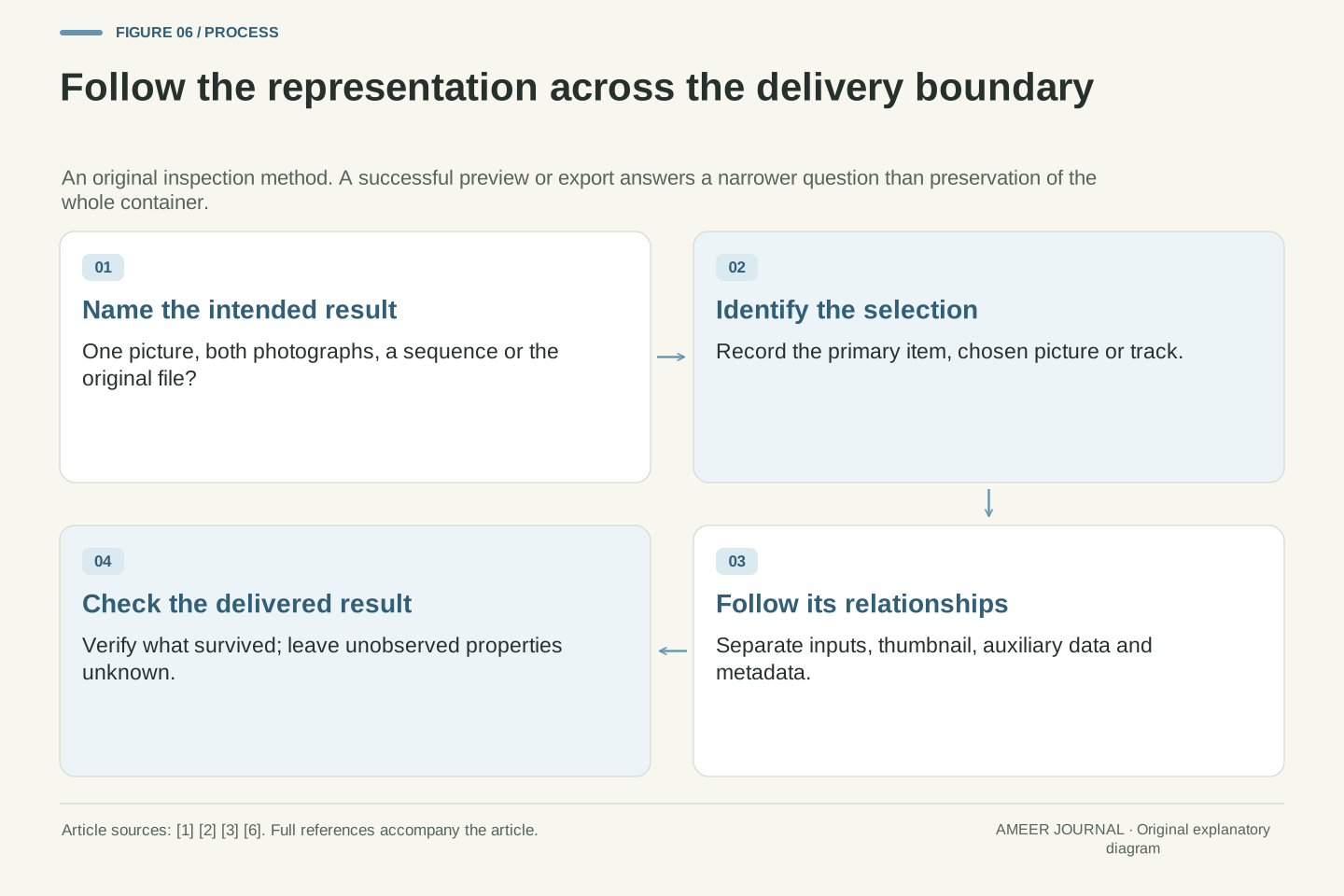
Check the object you meant to keep
Start an investigation by naming the intended result: one visible picture, both standalone photographs, the original container, or a timed sequence. Then record the selected image and the available inventory. If tools expose them, distinguish thumbnails, auxiliary images, hidden inputs and metadata. libheif documents an inspection utility that can report file information and its box structure, but its existence does not guarantee that every photo application exposes those details. [3] Missing interface detail should remain unknown rather than become evidence that an object is absent.
For our fixture, a sensible report could say: primary 10 opened at 800 by 700; photo 70 was also enumerated; the export contained only the selected still picture. Each clause answers a specific question. A different report might say that only thumbnail 40 was available, leaving full-grid reconstruction unresolved. Those descriptions are more useful than a single image count. Follow selection, input relationships and the delivered result, and compare them with the purpose you started with. You can then identify what was preserved or left unverified without treating every supporting image object as another missing photograph.
Define the preservation predicate before collecting counts. For this fixture it might be successful reconstruction of 10, retention of both intended standalone images, preservation of the complete item graph, or retention of the separate track's timing. These predicates are not equivalent. libheif's documented inspection utility can expose overview information and box structure, while actual decoding remains a distinct operation. [3] Use the available inspection evidence to describe structure; do not silently promote an inventory into a rendering or integrity test.
A concise record can bind the container, chosen item or track, typed dependencies, output dimensions, successful operation and exported result. For example, enumerating 70 plus reconstructing 10 proves different things from rendering only thumbnail 40. Likewise, finding three track samples requires their time base before making a duration claim. Our original set and geometry examples make those boundaries explicit. The practical outcome is a precise statement of which representation survived and which remains unverified, with the default picture kept separate from the larger structure that may have produced or accompanied it.
Sources & further reading
Explore the references behind this guide. External pages may change after our review.
- HEIF Technical Information - High Efficiency Image File FormatNokia Technologies · Accessed 7 Nov 2026
- III. HEIF Reader API and Usage Examples · nokiatech/heif Wiki · GitHubNokia Technologies · Accessed 7 Nov 2026
- libheif/README.md at master · strukturag/libheif · GitHubStruktur AG / libheif project · Accessed 7 Nov 2026
- Reading and Writing Tiled Images · strukturag/libheif Wiki · GitHubStruktur AG / libheif project · Accessed 7 Nov 2026
- Reading and Writing Sequences · strukturag/libheif Wiki · GitHubStruktur AG / libheif project · Accessed 7 Nov 2026
- Using HEIF or HEVC media on Apple devices - Apple SupportApple · Accessed 7 Nov 2026
Article updated 7 Nov 2026.
Found something we should revisit?
Good explanations get better with thoughtful feedback.