What you’ll take away
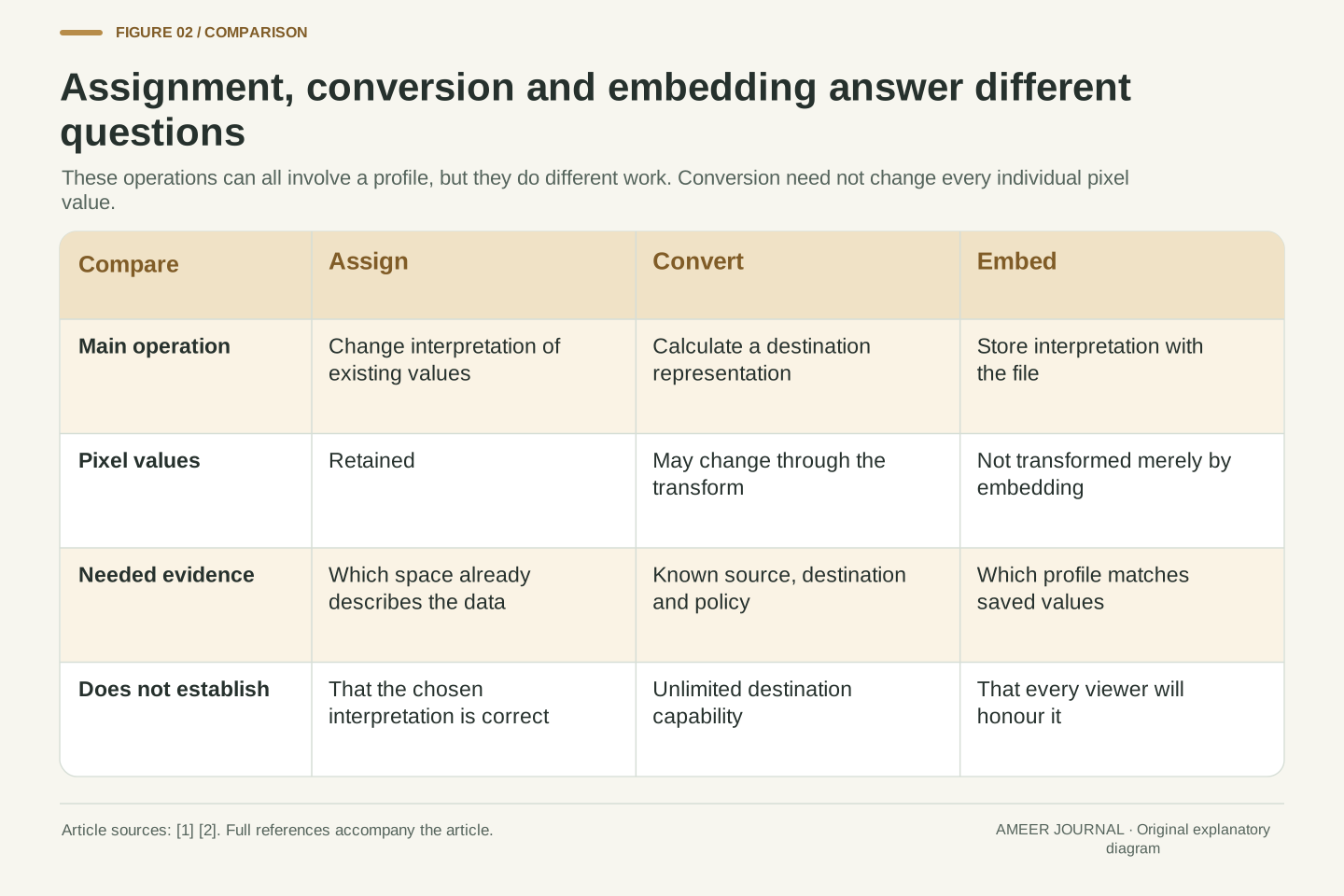
- Assigning a profile changes how existing values are interpreted; conversion calculates a destination representation.
- Equal RGB numbers can describe different colours in different spaces, while different numbers can preserve the same reference colour.
- A correct source interpretation is needed before conversion; an untagged file does not prove that an application’s default is right.
- A destination cannot exactly reproduce every colour outside its range; mapping policy and output conditions remain relevant.
- Embed the interpretation that matches the exported values, and distinguish document profiles from display and printing conditions.
A different profile can change the meaning before changing any pixels
You choose a different colour profile and the photograph changes appearance. The pixel numbers may still be exactly the same. Adobe distinguishes assigning a profile, which changes how existing values are interpreted, from converting to a profile, which calculates values for another colour space. These operations answer different questions, even though both involve choosing a profile name. Treating them as interchangeable can turn an attempt to preserve colour into a reinterpretation of the picture. [1]
Imagine a file whose RGB values were created in sRGB. Relabelling those values as Display P3 does not reconstruct the same colours in a larger space. It tells the application to read the old numbers under a different definition. A proper conversion starts with their known sRGB meaning and calculates destination coordinates. Some values can remain unchanged, but preserving the original numbers is not its governing objective. [1][4]
The examples below use explicitly constructed RGB coordinates and published conversion mathematics. They are not measurements of a camera, monitor or printer. The diagrams show relationships and numbers rather than pretending to display an accurate colour proof on every screen. That distinction lets us examine what assignment, conversion and output limitations actually establish before changing an image. [2][3][4]
Profile assignment changes the interpretation attached to existing component values. Profile conversion uses an established source interpretation to calculate a destination representation. Adobe explicitly separates these behaviours in its Photoshop documentation: assignment retains the colour numbers, while conversion transforms them with the aim of maintaining appearance in the destination space. Neither operation should be inferred solely from a change in the displayed profile name. [1]
For example, attaching a Display P3 interpretation to an sRGB triplet is not equivalent to transforming that sRGB colour into Display P3. The first operation changes the mapping from numbers to colour; the second changes coordinates while seeking to preserve the relevant colour relationship. Conversion does not require every individual component to change: coincident values are possible. Its meaning comes from the transform and destination, not from counting edited numbers. [1][4]
This article uses original calculations for two defined SDR RGB spaces, alongside scoped ICC and Photoshop documentation. The examples omit quantisation and device-specific measurement errors so that the interpretation boundary remains clear. They do not claim that a mathematical colour match proves identical appearance on uncontrolled displays, or that a diagram viewed in an unknown pipeline can serve as a physical proof. [2][3]
RGB names the components; the colour space defines their meaning
An RGB triplet gives red, green and blue amounts, but those labels alone do not fully identify the colour. The colour space defines which primaries the amounts refer to and how the stored values relate to light. W3C defines sRGB and Display P3 separately. In the cited definitions they share a D65 white point and the same transfer curve, but their primaries differ. Equal triplets can therefore identify different colours. [4]
A profile supplies information that colour-management software can use to interpret and transform image data. The ICC describes profiles for input, display and output roles, plus a common connection between the relevant transforms. A standard working-space profile and a profile describing one measured display are useful for different purposes. The mere fact that both are called profiles does not make them interchangeable labels for a photograph. [2][3]
For a concrete question, consider green values of zero red, full green and zero blue. Those coordinates identify the chosen space’s green primary. The sRGB primary and Display P3 primary are different reference colours. Keeping the three values unchanged while changing their space therefore changes what the file asks to reproduce. No saturation slider needs to move for that reinterpretation to occur. [4]
RGB is a component model, while a defined RGB colour space supplies additional colourimetric and encoding information. In the pinned CSS Color 4 definitions, sRGB and Display P3 use D65 and the same nonlinear transfer curve, but different primary chromaticities. The conversion matrices consequently differ. Three normalized encoded values cannot be interpreted as a unique colour without identifying which mapping applies. [4]
ICC profiles communicate information used by a colour-management module, or CMM, to transform between encodings and device conditions. The conventional ICC model links source and destination transforms through a profile connection space. That role is distinct from a calibrated device state or a user’s preferred saturation. A source working-space profile describes the meaning of image data; a display profile describes the relevant display response used for presentation. [2][3]
The vector (0,1,0) exposes the distinction without requiring a complex image. At these endpoint values the encoded and linear versions coincide, but the selected green primary still depends on the RGB space. The same component vector in sRGB and Display P3 has different XYZ coordinates. A profile-name change that preserves the vector can thus change its colourimetric meaning, independently of later display rendering. [4]
Assignment needs evidence about the numbers you already have
Assignment can be appropriate when the values already have a known meaning but their label is missing or wrong. Suppose an export record establishes that a file contains sRGB values, yet the corresponding profile was omitted. Providing that correct interpretation addresses missing information. Choosing a profile because it makes the preview more vivid answers a different question and may attach the wrong meaning to the data. Adobe describes assignment as reinterpretation without changing the numbers. [1]
An untagged file does not reveal its original colour space just by existing. ICC notes that many applications assume sRGB for unprofiled RGB data. That is an application fallback, not proof of how the file was created. The same visible triplet can belong to several spaces, as the green example shows. A pleasing preview alone cannot uniquely identify the intended source encoding. [4][6]
Look for the originating application’s export settings, the original tagged file or documentation from the person supplying it. Preserve the original while resolving the ambiguity. Once the source interpretation is established, a conversion can target another destination. Otherwise, conversion merely carries the chosen assumption forward; it cannot recover a missing fact by adding another calculation. This is a consequence of needing a source meaning before translating its numbers. [1][2]
Assignment is a metadata/interpretation operation with an evidentiary prerequisite: the selected source definition must correspond to the existing values. In the constructed missing-profile case, external export records establish sRGB encoding, so restoring that interpretation can be justified. The operation itself does not validate those records. Reassigning an arbitrary profile changes the input to subsequent colour transforms without recovering an independently known original colour. [1][2]
ICC’s finding-profiles guidance notes that many applications assume sRGB for unprofiled RGB data. Such a default is a policy, not provenance. Component values are compatible with multiple coordinate systems, and neither the file’s RGB model nor an attractive rendering uniquely determines the intended one. The ambiguity is especially clear for normalized primary vectors whose numerical labels coincide across spaces while their colourimetry differs. [4][6]
Retain the known source state and the reason for any assignment. Export settings, an embedded original profile or a documented upstream process can supply that reason. A later conversion is conditional on the interpretation supplied to it; a technically correct transform from the wrong source can faithfully preserve the wrong meaning. This makes resolving source identity a separate task from choosing a destination profile or rendering intent. [1][2]
A conversion has a source, a destination and a policy
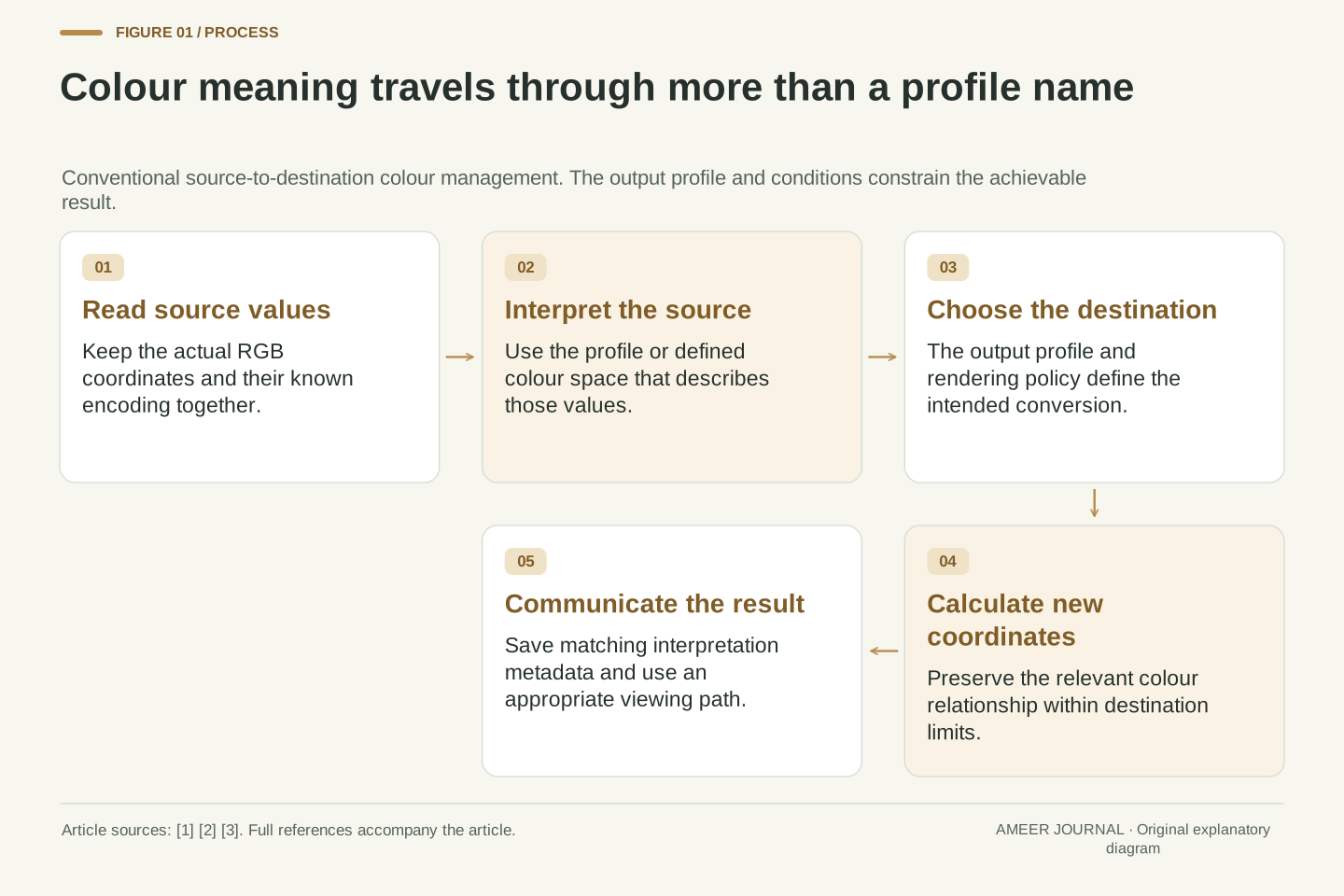
Conversion starts by reading values according to their source definition. It then calculates a destination representation, using the selected colour-management method and output policy. ICC’s conventional framework connects the source and destination through a shared reference space. This allows profiles made for different devices or roles to work together without making every device understand every other device directly. The profiles are part of a translation process, not decorative labels. [2]
The destination matters because it may not reproduce every source colour. A monitor space, a print condition and another editing space can have different limits. Adobe’s conversion controls include both a destination profile and rendering options. Preserving appearance is the purpose, but it is constrained by those limits and the chosen mapping. It is more precise to ask which colour relationship is being preserved than to promise that every output will look identical. [1][2]
For the next example, both RGB spaces share D65, so we can demonstrate their relationship using a common D65 XYZ calculation. That is an educational coordinate conversion, not a complete imitation of an ICC processing engine. Keeping the method explicit prevents a numerical example from silently claiming to include every profile table, viewing adjustment or output setting used by a real application. [2][4]
A conventional ICC transform combines source and destination profile information through a PCS, with the CMM and selected rendering intent determining the applicable path. The reference decouples the two profile transforms. It does not eliminate assumptions about device condition, media or viewing context, and specialized profile classes need not follow the same simple two-profile illustration. Adobe explicitly exposes destination, engine and rendering options in its conversion interface. [1][2]
The common D50-based PCS described in the conventional ICC material must not be confused with every intermediate XYZ coordinate system. Our numerical examples instead use the W3C matrices for sRGB and Display P3 in XYZ relative to D65. Both spaces have that white point, so their direct coordinate conversion needs no change of reference white. It is not presented as a complete ICC v4 pipeline. [2][3][4]
Within that stated model, preservation means retaining the same XYZ colourimetry while expressing it in destination coordinates. Outside the destination’s realizable range, an additional mapping decision is needed. Rounding, bit depth, profile quality and actual output response introduce further considerations in production. Naming these boundaries keeps an algebraically correct conversion from being mistaken for a guarantee about the final physical image. [2][4]
Different RGB numbers can describe the same intended colour
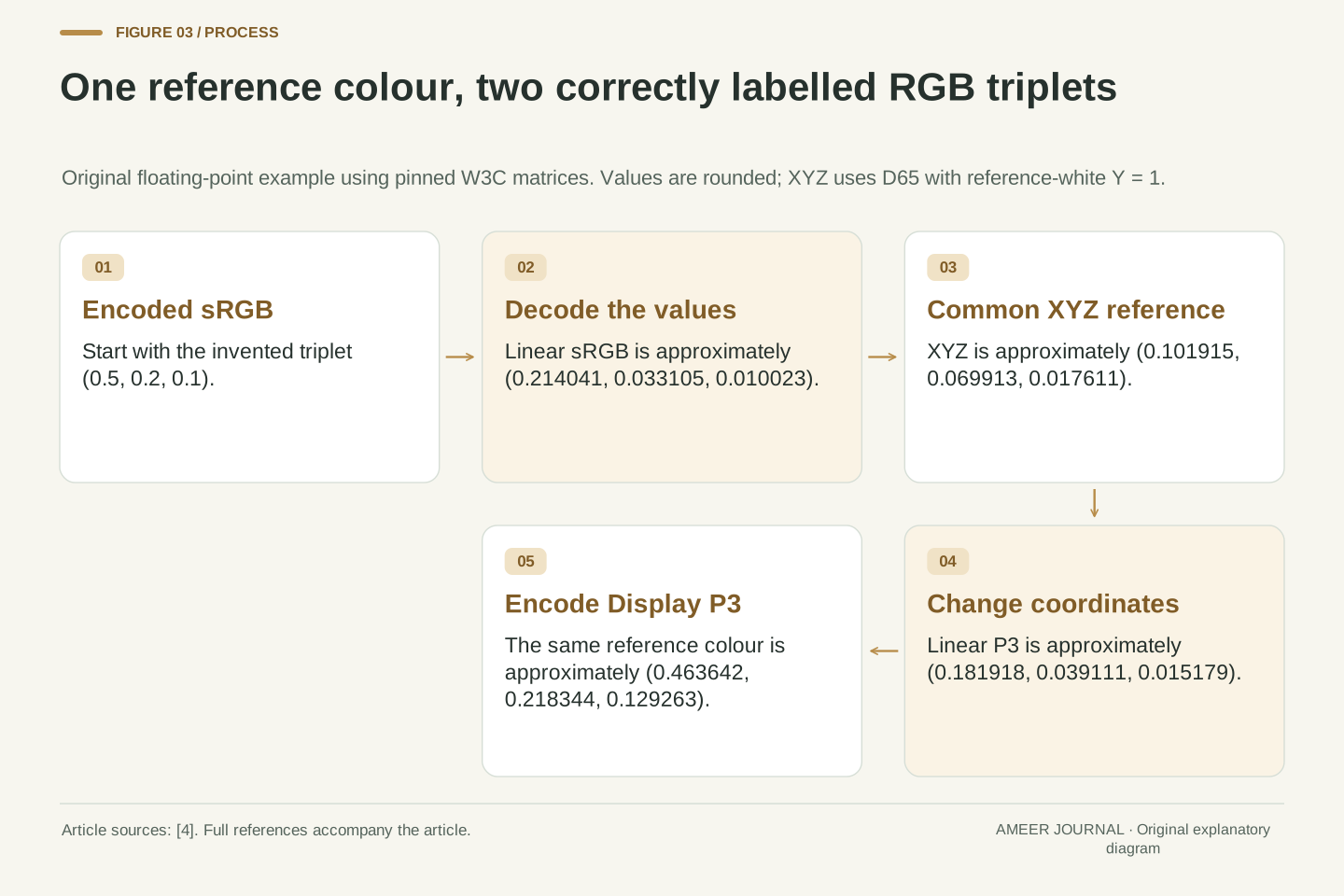
Take the invented sRGB triplet (0.5, 0.2, 0.1), with each encoded component normalized between zero and one. Using the published transfer curve and matrices, its corresponding Display P3 triplet is approximately (0.46364, 0.21834, 0.12926). The numbers differ because they are coordinates in different spaces. Under the stated calculation, they represent the same reference colour rather than a deliberately altered photograph. [4]
The calculation first removes the nonlinear encoding, then translates through a common XYZ description, and finally applies the destination encoding. The shared XYZ values are about (0.101915, 0.069913, 0.017611), using D65 and a reference white with Y equal to one. You do not need to memorize the values. Their role is to show that one reference colour can have two different, correctly labelled RGB descriptions. [4]
Now keep the original (0.5, 0.2, 0.1) numbers and simply call them Display P3. That produces a different XYZ result, about (0.114928, 0.072704, 0.011957). This is the distinction between conversion and assignment made concrete. The example uses floating-point arithmetic before file quantisation, and the displayed values are rounded; it is not a measured claim about a particular screen’s accuracy. [1][4]
For the constructed encoded sRGB vector c=(0.5,0.2,0.1), applying the specified decoding curve gives linear-light values approximately (0.214041,0.033105,0.010023). Multiplying by the pinned sRGB-to-XYZ matrix gives XYZ_D65=(0.101915,0.069913,0.017611), rounded to six decimals. Here the reference-white Y is normalized to one. The calculation uses documented mathematical definitions rather than sampled device data. [4]
Applying the inverse Display P3 matrix produces linear P3 values approximately (0.181918,0.039111,0.015179). Encoding these with the shared transfer curve gives (0.463642,0.218344,0.129263). All destination components lie within zero to one. Converting the unrounded destination back reproduces the initial XYZ to floating-point precision; this is an internal arithmetic check, not a display-performance result. [4]
By contrast, decoding the original triplet and using the P3 matrix directly gives approximately (0.114928,0.072704,0.011957) in the same XYZ_D65 reference. The coordinate label changed without the preserving transform. This makes assignment’s effect observable in the mathematics even when an uncontrolled viewer obscures the visual difference. Quantisation and rendering are deliberately excluded from this example, so rounded printed coordinates should not be treated as a lossless file interchange specification. [1][4]
A larger source range cannot fit unchanged inside every destination
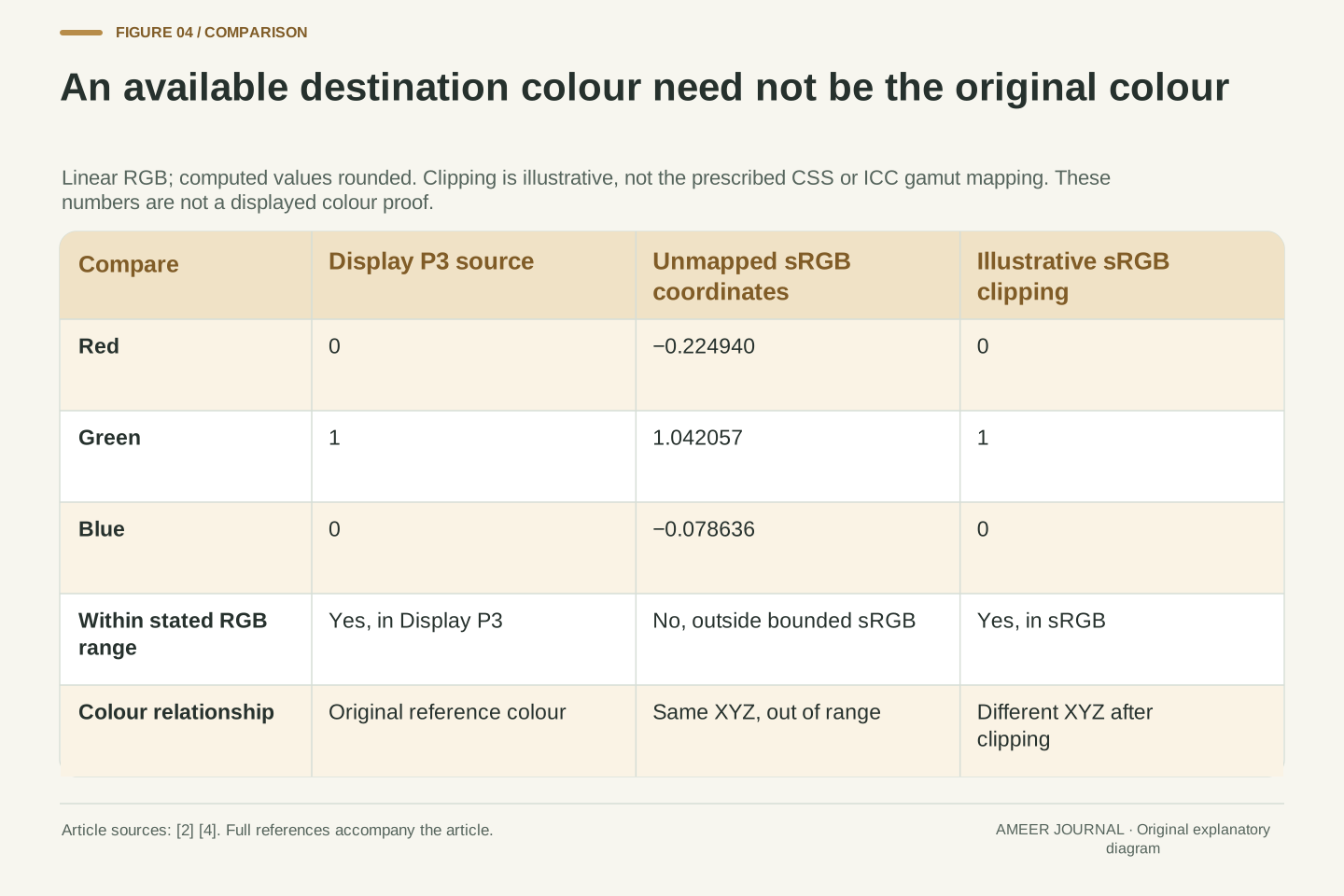
Consider the Display P3 green primary, (0,1,0). Its exact colour cannot be represented by an ordinary in-range sRGB triplet. Applying the same published conversion mathematics produces linear sRGB coordinates of roughly (-0.22494, 1.04206, -0.07864). Two components are negative and the green component exceeds one. Those values describe an out-of-range result; they are not proof that the original Display P3 colour is invalid. [4]
To see why a compromise changes something, imagine a deliberately simple clipping rule: replace values below zero with zero and values above one with one. The result becomes sRGB (0,1,0). But that is the sRGB green primary, whose reference colour differs from the Display P3 green primary. The rule has produced an available destination colour rather than preserving the original exactly. [4]
This clipping rule is only an illustration, not the prescribed CSS gamut-mapping algorithm or a recommendation for a particular ICC engine. Real mapping policies can make different compromises. The useful conclusion is narrower: a destination limit cannot be removed merely by embedding a profile or asking for a more faithful conversion. When the original lies outside that limit, preserving every colour relationship unchanged is not an available outcome. [2][4]
Starting with linear Display P3 green (0,1,0), the P3 matrix gives XYZ_D65 approximately (0.265668,0.691739,0.045113). Applying the inverse sRGB matrix yields (-0.224940,1.042057,-0.078636) in linear sRGB. This is outside the conventional bounded sRGB cube. The pinned W3C material distinguishes such intermediate out-of-gamut coordinates from invalid colour syntax; their existence does not corrupt the source colour. [4]
For an intentionally elementary mapping demonstration, clamp each component to [0,1]. The result is linear sRGB (0,1,0), with XYZ_D65 approximately (0.357584,0.715169,0.119195). Comparing these XYZ vectors shows that clipping changed the colourimetry. The destination result is representable, but representability and preservation are different predicates. No claim about perceptual error magnitude or the best mapping follows from these numbers alone. [4]
The clipping operation is our explicit hypothetical rule, not a reimplementation of the CSS gamut-mapping requirement or a statement that all ICC engines clip this way. Actual rendering intents and profile transforms can differ. The worked boundary case establishes only that the exact source primary is unavailable inside this destination range, so a feasible output requires a changed result or a different output capability. [2][4]
A rendering intent chooses a compromise within the workflow
When a destination cannot reproduce the complete source range, the conversion has to decide what relationships to preserve. ICC describes several rendering intents that make different compromises. Colourimetric approaches focus on matching colours that the destination can represent, with distinctions concerning the medium’s white. Other approaches can change colour relationships to account for the destination and viewing conditions. A label such as “perceptual” does not make missing colours physically available. [2]
This is why there is no universal best option independent of the task. A proof of a particular print condition asks a different question from a pleasing reproduction within another device’s range. The result also depends on the actual profiles and conversion software. ICC notes that out-of-gamut mapping is not fully specified by simply naming a colourimetric intent. Record the chosen intent alongside the profiles rather than expecting the name to describe every calculation. [1][2]
For a supplied photograph, first establish whether the recipient requests a particular output profile or printing condition. Then evaluate the supported preview and conversion within that workflow. Repeatedly assigning unrelated profiles to chase a preferred appearance bypasses the original question: how should the known source colours be represented at the intended destination? Creative editing can still be deliberate, but it should remain distinguishable from correcting colour interpretation. [1][2][5]
Rendering intent selects a colour-reproduction objective within the profile/CMM path. The ICC introduction distinguishes media-relative and ICC-absolute colourimetric behaviour, as well as intents that modify colourimetry for gamut and viewing-condition differences. These objectives do not imply that every source colour has an exact destination equivalent. Nor should a rendering-intent name be treated as a complete numerical specification of every profile’s transform. [2]
In particular, the cited ICC description states that the mapping of out-of-gamut colours is not specified solely by the colourimetric intent. The actual profile data and implementation matter. A proofing objective may preserve a medium-related reference that another reproduction objective adjusts. The relevant comparison therefore includes source profile, destination profile, intent and CMM options; isolating one dropdown label leaves the transform underdescribed. [1][2]
For a production handoff, preserve the requested output condition and distinguish reproduction policy from image editing. A saturation adjustment changes the chosen content; assigning a profile changes its interpretation; a profile conversion expresses the interpreted content according to a destination policy. Those operations may all alter a preview, but the reason and retained evidence differ. A controlled workflow makes the intended operation explicit before judging the result. [1][2][5]
The display profile describes a device state, not the document’s origin
Calibration and profiling work together but are not identical. Calibration adjusts a display toward a chosen behaviour. Profiling describes how it behaves so colour-management software can account for that response. ICC explains that a display can also be profiled without changing its calibration state. The profile is therefore information about a condition, not a promise that the hardware has been transformed into every possible output device. [3]
If the display’s settings or operating conditions change, the old description may no longer fit as well. ICC discusses keeping adjusted controls stable, checking performance over time and accounting for the viewing environment. Brightness, surrounding light and the display’s available range affect interpretation. Attaching the display’s own profile to a photograph is not a general repair for these issues; it can reinterpret the document’s source values instead. [1][3]
Keep two questions separate: what colours does the image data specify, and how does this display reproduce them now? The source profile answers the first within its definition. The calibrated display condition and suitable display profile help answer the second. A mismatch can arise at either boundary, so changing the image until one uncontrolled screen looks pleasing does not identify where the original problem occurred. [2][3]
Calibration changes a device response toward a selected target, whereas characterization/profile information describes a response for colour management. The ICC calibration guidance explicitly allows profiling a display without modifying its calibration state. A particular profiling procedure may perform both operations, but their logical functions remain distinct. A profile associated with the display is not automatically the source encoding of every document shown on it. [3]
The association is conditional on the relevant device state. Changes to controls, display drift and the viewing environment can undermine a previously useful description; ICC discusses all three. The source and output mappings must therefore remain separate. Assigning a measured monitor profile to ordinary sRGB document values changes the source interpretation unless those values were actually defined in that monitor space. It does not retroactively calibrate the screen. [1][2][3]
A useful diagnostic record identifies the document profile, current display profile, display settings and relevant viewing conditions. These records answer different questions and should not be collapsed into a single “colour profile is installed” assertion. Even consistent numerical conversion cannot guarantee identical perception across uncontrolled environments or individual observers. That practical limit motivates a controlled comparison, rather than an automatic correction to the source image whenever two previews differ. [3]
Save the profile that describes the exported values
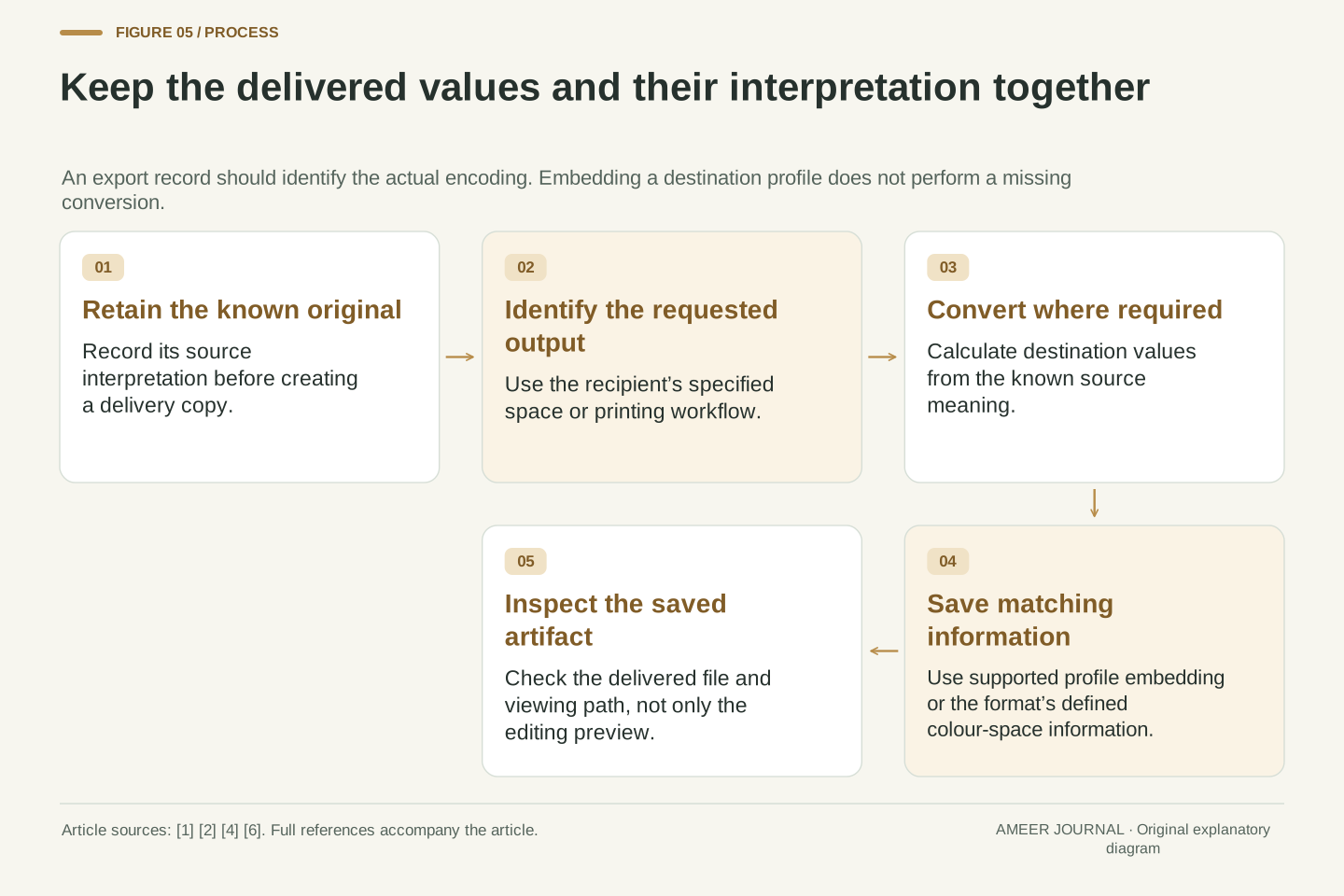
After a conversion, the exported values belong to the destination space. Their accompanying profile must describe that result. Adobe’s workflow tags the converted document with the destination profile and provides an embedding option when saving to supported formats. Embedding preserves the interpretation alongside the data; it does not itself perform an omitted conversion. A file can contain a profile and still contain the wrong pairing of numbers and meaning. [1][2]
This matters when an editing file and a delivery copy use different spaces. Retain the original, convert a copy as required by the destination, and check that the saved copy carries the intended interpretation. The receiving application also has to use that information appropriately. An embedded profile provides the needed description; it cannot force every viewer, export service or display to follow the same processing path. [1][2][3]
Camera output introduces another boundary. ICC distinguishes a rendered JPEG or TIFF with an embedded working-space profile from camera raw data that is rendered later by conversion software. A camera’s rendered-output colour-space choice should not be treated as a complete description of every stage inside a raw workflow. Identify the actual delivered file and rendering step before deciding which profile its pixel values require. [6]
The exported encoding and associated metadata must agree. Adobe states that conversion changes the values and tags the result with the destination profile; embedding then preserves that interpretation in supported file formats. These are separate operations. Merely attaching a destination profile to unchanged source coordinates is assignment, even if the saved file now contains perfectly valid ICC metadata. Syntactic metadata validity does not establish semantic correctness. [1][2]
For a delivery derivative, retain the known source, intended destination and conversion settings, then inspect the saved artifact’s interpretation. The receiver still needs a colour-managed path compatible with that information. Standard colour-space identifiers, such as those explicitly supported by CSS, can likewise define values in their applicable format; an ICC payload is not the only possible way to specify a colour space. The requirement is unambiguous meaning within the actual interchange format. [1][2][4]
The ICC camera guidance separates rendered JPEG/TIFF output from raw capture subsequently rendered by software. It describes the former as output in a defined standard space with a matching embedded profile. The latter’s rendering stage determines the delivered image encoding. Therefore document-level assignment or conversion should not be generalized into a complete raw-development model, and a camera menu label alone does not settle every downstream profile choice. [6]
A print profile belongs to a printing condition
A printer profile is tied to more than the word “printer”. Adobe describes profiles for the output device, ink and paper combination. Its Photoshop-managed workflow asks for a profile matching the printer and paper, while a printer-managed workflow delegates conversion to the driver. These are different responsibilities. Knowing which stage performs the conversion helps prevent two independently configured colour-management paths from conflicting. [5]
The same guidance offers a preview, gamut warning and paper-white simulation. Such a preview answers a conditional question about the chosen output description. Its usefulness depends on the profile matching the real printing conditions and on a suitable display and viewing setup. ICC’s display guidance treats soft proofing as a specific calibration purpose, so a preview should not be interpreted as physical evidence that an unmeasured print already matches. [3][5]
For a print handoff, keep the requested profile, actual medium and responsibility for conversion together. A lab may specify the encoding it wants rather than ask you to apply the printer’s profile yourself. Follow that stated workflow instead of inferring it from a profile filename. The aim is a reconstructable transformation from known source data to a known output condition, with the preview used to evaluate that intended path. [2][5]
Output profiling describes a defined reproduction condition. Adobe’s printing documentation identifies printer, ink and paper combinations, and separates application-managed from driver-managed colour conversion. In its application-managed path, the driver’s competing colour management is disabled; the driver-managed path assigns that responsibility differently. These are scoped workflow descriptions, not instructions to disable every transformation in every printing system. [5]
A soft-proof or print-preview configuration is another transform context. The chosen output profile, intent and paper/black simulations determine what is being approximated, while the display’s state and environment constrain the preview. ICC treats soft-proof calibration separately from other display purposes. The preview is therefore evidence about a configured simulation, not a replacement for verifying that the actual output condition matches its profile. [3][5]
Preserve who owns the final conversion in the handoff. Applying a printer transform in advance when the receiver expects working-space data can produce a different processing chain from the agreed one. Conversely, assuming the receiver will interpret an untagged derivative correctly leaves a missing source definition. The practical record should join the delivered encoding, requested profile/medium and responsible conversion stage, rather than relying on an isolated statement that the file is “colour managed”. [1][2][5]
Find which relationship changed before correcting the image
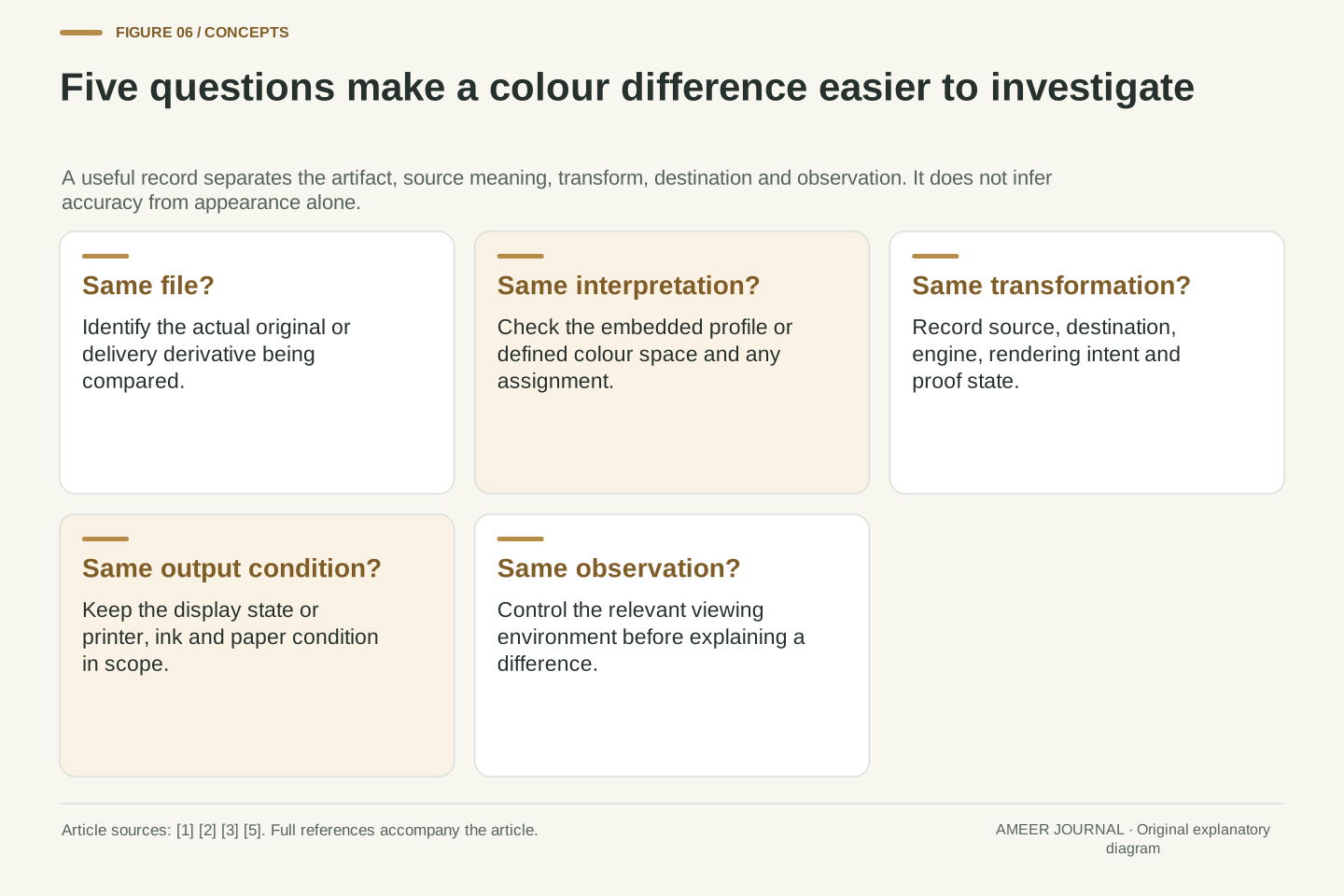
When two views disagree, start with the same saved file and identify its actual profile. Ask whether the operation assigned a meaning, converted coordinates, embedded information, or changed the viewing condition. Then check the destination, conversion settings and any proof preview. These questions narrow the comparison more usefully than assuming that every visible shift requires a saturation adjustment. Each operation affects a different part of the interpretation chain. [1][2][3][5]
Our first example preserved a reference colour by changing the RGB numbers. Our second showed why a Display P3 green cannot be reproduced exactly inside the bounded sRGB range. Together they explain why unchanged numbers do not prove unchanged colour, and why changed numbers do not prove that a conversion damaged the picture. The relevant evidence is the source meaning, destination capability and transform used. [4]
Keep a known original and an understandable delivery copy. Record enough context that another person can determine what the numbers mean and how the output was produced. A profile then becomes useful communication rather than a mysterious enhancement switch. It helps the next stage interpret the picture while leaving the physical limits and viewing conditions visible. [1][2][3]
A reconstructable comparison retains the same artifact, its source interpretation, the operation performed, destination profile, intent/CMM options, proof state and output condition. Distinguish data changes from metadata changes and from changes to the renderer or display. This is an evidence strategy, not a claim that one software setting explains every visible difference. The documentation establishes multiple independent boundaries where the interpretation can change. [1][2][3][5]
The worked calculations supply two checks on that strategy. The in-gamut conversion changes coordinates while preserving XYZ under the stated model. The out-of-gamut primary cannot retain its exact XYZ inside the chosen destination cube, and the explicitly illustrated clipping rule changes it. Neither the count of modified values nor the presence of an embedded profile is sufficient to classify those outcomes correctly. [4]
Treat assignment as a statement about existing data, conversion as a defined translation, and embedding as communication of the resulting interpretation. Couple these with a suitable output profile and controlled evaluation where accuracy matters. That sequence makes disagreements investigable: the next person can identify the assumed source, reconstruct the intended transformation and assess the real destination rather than guessing from an attractive preview. [1][2][3][5]
Sources & further reading
Explore the references behind this guide. External pages may change after our review.
- Change color profiles in Photoshop on desktop | PhotoshopAdobe · Accessed 6 Nov 2026
- Introduction to the ICC profile format — International Color ConsortiumInternational Color Consortium · Accessed 6 Nov 2026
- Display calibration — International Color ConsortiumInternational Color Consortium · Accessed 6 Nov 2026
- CSS Color Module Level 4World Wide Web Consortium · Accessed 6 Nov 2026
- Print with color management in Photoshop | PhotoshopAdobe · Accessed 6 Nov 2026
- Finding profiles — International Color ConsortiumInternational Color Consortium · Accessed 6 Nov 2026
Article updated 6 Nov 2026.
Found something we should revisit?
Good explanations get better with thoughtful feedback.